Insurance Eligibility Verification Software: Clearinghouses, Services and Portal Automation Compared

HIPAA was passed in 1996, beginning the move toward national standards for electronic healthcare transactions, including X12 270/271 eligibility inquiries and responses.
The standard is more than twenty years old now, but an electronic check can still come back without what the front desk needs for the visit, like the copay or a visit limit. Someone has to go and get it.
That's the buying decision I want to help you make with insurance eligibility verification software: who completes the check and gets the answer into the appointment record?
At Skyvern, our position is to keep electronic checks that return what you need and automate the browser work that remains.
In this piece, I'm comparing clearinghouses, managed verification services and payer-portal automation, so you can choose a combination with clear responsibility for unfinished checks.
What is insurance eligibility verification?
Insurance eligibility verification is the check a provider makes before a visit to confirm that a patient's coverage is active and what the plan will pay toward that visit, such as the copay, the deductible and any visit limits.
What platforms are used for insurance eligibility verification?
There are three kinds of platforms for verifying insurance eligibility:
- Clearinghouse or API: gives you an electronic answer.
- Managed verification service: hands the check to a team that finishes it.
- Payer-portal automation: logs into the payer's portal and pulls the answer for you.
To pick between them, you need to ask what the front desk needs in hand before this patient walks in.
| Approach | Best fit | What you should get back | What to ask |
|---|---|---|---|
| Clearinghouse or API (270/271) | The electronic response already has what the visit needs | Coverage dates, copay and deductible, with gaps flagged | Who can see the results? What do transactions, integration and follow-up cost? |
| Managed verification service | Electronic checks leave gaps that need a portal visit or a phone call | A finished benefits record, or an open item with a reason | Who enters the result and who follows up? What access does the service get, and what do extra charges cover? |
| Payer-portal automation | The same portal checks repeat and you're authorized to use the portal | The portal fields you asked for, or the reason they couldn't be pulled | Does the payer allow this use? Who fixes the workflow when the portal changes? |
Best insurance eligibility verification software
These five tools cover the three approaches above: one pick for each, plus two more for different setups. Skyvern is first because this piece is about finishing the checks that electronic tools leave open, and that's the work we do.
1. Skyvern: payer-portal automation
Best for: checks where the electronic response leaves fields open and an authorized portal has them.
Skyvern signs into the payer portal, pulls the fields you listed and hands them to your integration. It doesn't replace 270/271, and staff may still need to call when a portal comes up empty.
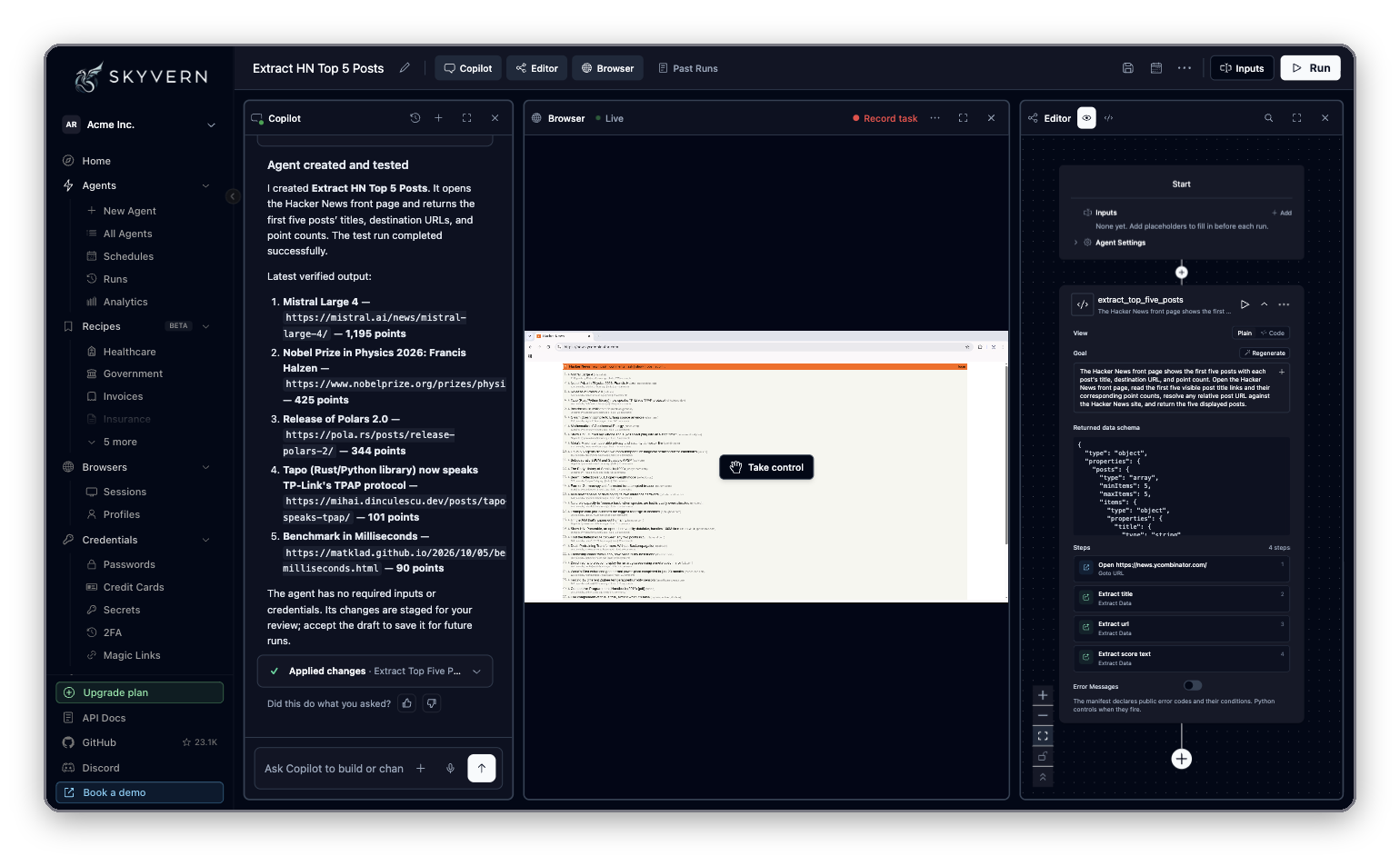
Skyvern Studio, from Skyvern's documentation. The demo agent here extracts posts from a news site, not eligibility data.
Features:
- Fills multi-page payer portal forms and retrieves coverage details
- Runs real-time eligibility checks across payer portals
- Handles stored credentials and two-factor prompts
- Run view with a live browser, recordings, screenshots and manual takeover
Pricing: Hobby is $29/month and Pro is $149/month, each with monthly credits. Enterprise is custom. A run is billed as one workflow execution.
2. pVerify: clearinghouse or API
Best for: EHR and practice management vendors that want eligibility inside their own software.
pVerify says its 50+ API endpoints give EHR and practice management vendors automated eligibility verification.
Features:
- Real-time eligibility checks across 1,500+ medical, dental and vision payers
- Business rules engine for rule-based verification workflows
- Access through a portal, EHR integration or a high-volume API
- 50+ API endpoints, including ANSI X12 270/271
Pricing: pVerify's pricing page lists Advanced Eligibility Standard from $125/month for up to 500 transactions, and Enterprise from $395/month for up to 1,500, both on one-year terms.
3. 314e Veritable: managed verification service
Best for: teams that would rather hand off the chasing than staff it.
The team at 314e Veritable picks up what the EDI transaction lacks, through payer portal logins and direct phone calls.
Features:
- Batch eligibility verification from a CSV upload
- Real-time eligibility checks with deductible and copay detail
- Insurance Discovery for self-pay patients
- Claim status checks
Pricing: Usage-based, starting at $50/month, with no per-seat fees and no lock-in contract.
4. Inovalon: eligibility verification software
Best for: teams that want one vendor's software with real-time API integrations.
Inovalon sells eligibility verification software for providers and lists real-time API integrations.
Features:
- Automatically completes missing information in eligibility transactions
- Real-time API integrations that show results in one place
- Checks any time, including nights and weekends
- Saves every verification, with historical 271 data for appeals
Pricing: not published. The page offers a demo.
5. eClaimStatus: web-based eligibility
Best for: practices that want one login across Medicare, Medicaid and commercial payers.
eClaimStatus says you can verify eligibility and benefits for Medicare, Medicaid and 900+ commercial insurances under one login, with results in 3-5 seconds.
Features:
- One login for Medicare, Medicaid and 900+ commercial insurances
- Real-time, color-coded results in 3-5 seconds
- Batch processing of over 1,000 records in 1-2 minutes
- Reports you can download in Excel
Pricing: not published. The site describes monthly subscription plans with no lock-in and offers a 15-day free trial.
Whichever you shortlist, the evaluation checks further down apply to all five.
When are clearinghouse and API 270/271 checks enough?
A clearinghouse or payer API is enough when the response gives your team every benefit the visit needs and your system records it where staff will see it.
Understanding API 270 and 271
A 270 is the eligibility question and a 271 is the answer.
The CMS HETS companion guide lays out these transactions for Medicare. It treats a patient who doesn't match as an error, separate from a coverage result. It also says a 271 isn't a promise of payment. So when the patient doesn't match, you'd leave the check open and follow up.
How to test a response
To begin with, write down the fields you require and compare real responses against that list.
Say a patient is booked for physical therapy. The 271 says active coverage but never mentions the visit limit. The check succeeded, and the front desk still can't answer the patient's question.
Speed doesn't settle it either. CAQH CORE's current eligibility rule, vEB.2.0, says a real-time 271 must come back within 20 seconds of the 270. A fast response can still leave out the benefit you need.
Who sells electronic checks
Among the insurance verification software above, pVerify, Inovalon and eClaimStatus sell electronic checks, and each one connects to payers in its own way.
A portal isn't always the better source. UnitedHealthcare documents portal, API and EDI options for eligibility and benefits. Before you add browser automation, it's worth finding out which channel works for your task.
When does a managed verification service fit?
A managed service fits when electronic checks leave gaps and you'd rather hand off the chasing than staff it. Its team picks up what the EDI transaction lacks, through payer portal logins and direct phone calls.
Buying access to a transaction and buying a finished verification are two different deals. So you'll want the finished check in the contract, and four things settled before you sign:
- Completion: Which benefits must the service get, and how does it mark what it couldn't find?
- Turnaround: How long before the appointment must the record be ready?
- Escalation: Who handles an ambiguous match, conflicting benefits, or a payer that wants another call?
- Delivery: Who enters the result in your system, and how does staff see that follow-up is still open?
What matters most is how a service handles a failed check, not its payer list, so ask to see both a finished record and an unresolved one. Our healthcare BPO and automation guide covers how to split repeated browser work from human follow-up.
When should payer-portal automation complement eligibility software?
Portal automation makes sense when the electronic check leaves fields open and a portal you're authorized to use has them. That's the browser work Skyvern handles, and we don't try to replace 270/271.
It usually comes up in two situations:
- The response is incomplete. The 271 comes back, but a benefit you need isn't in it.
- There's no usable electronic response. The payer has none for what you need, so an authorized portal may be your only digital route.
Staff may still have to call when the portal comes up empty too.
With Skyvern, a workflow can:
- Sign into a payer portal.
- Enter the member's details.
- Go to the benefits page.
- Pull the fields you asked for.
Your integration supplies the appointment details and receives the result. You configure the workflow and test it one payer at a time.
Scripted bots break when a portal changes its pages. Our post on agentic automation versus RPA explains why, and our operations guide to agentic automation covers how AI handles browser tasks more generally.
For eligibility, the test is simple: can the workflow pull your required fields from a portal you're allowed to use?
Logins, two-factor prompts and page changes show up in every browser workflow.
Our credential documentation is where to start when you plan access. Being able to log in doesn't mean the payer lets you use that account this way, so it's worth reading the payer's terms.
How do you verify insurance eligibility?
You verify eligibility in five steps, whether you use an electronic connection, a managed service or a portal workflow. It helps to write them down before you compare product demos.
If you already have them as a procedure, our launch-week post shows how to turn an SOP into a workflow:
- Collect the inputs. Patient and subscriber, payer, member ID, rendering provider, planned service and date of service. Decide which benefit fields this appointment needs.
- Run the electronic check first. Use portal or phone follow-up only for what's still missing.
- Check the answer. Is it the right patient and the right visit? Compare the benefits to your required fields. If the patient didn't match, keep the record open and investigate rather than marking coverage inactive.
- Record the result. Save the source, the time of the check, the service date and the benefits on the appointment or registration record. Mark missing fields as missing.
- Hand off what's left. Give every open item an owner and a deadline. Keep prior authorization follow-up separate from the eligibility result.
A blank result shouldn't overwrite an earlier good one, so you'll want to ask each vendor what happens when a run returns nothing.
Our revenue cycle management automation guide shows where eligibility sits in the rest of the revenue cycle.
How do you use Availity for eligibility verification?
Someone on your team with access runs the check inside Availity Essentials, a multi-payer portal with real-time eligibility and benefits checks. Availity also lists additional benefit information and patient cost estimates among its eligibility features. It's a portal, so it falls in the portal row of the table and doesn't make a fourth option.
Before you build on it, you'll want to confirm which payers your organization can reach in Availity and what each request needs. Then save the result and its source on the appointment record, so staff can see what's confirmed and what's still open.
How to evaluate insurance eligibility verification software: security, write-back, cost and exceptions
Once you know which approach fits, the next step is comparing the vendors inside it.
They differ most in five places:
- payer coverage
- write-back
- failure handling
- patient information
- cost
The checks below go through each one.
1. Payer coverage and benefit detail
You'll want to ask which payer and plan combinations the vendor supports, and for sample responses for your services.
Then sort the fields into three piles: what comes back electronically, what needs the portal and what needs a call.
You also need to know how the team handles real-time checks, advance batch checks and a response that's still incomplete close to the visit. A long payer list tells you little.
2. Write-back and integration ownership
Next, watch the result land on the right patient and appointment. Which fields get written? How do partial results show up, and how is existing information protected? Who investigates when a handoff fails?
Our integrations page shows what we connect to. Whether your EHR can take eligibility results back is something to scope with us. If your team plans a custom connection, start with our developer resources and product documentation.
3. When a check fails
Then have the vendor run three failures: an access failure, an unresolved patient match and a response missing a required field.
Each should show a status and who picks it up next. You also need to settle ahead of time who fixes portal changes, and who makes the calls and tells staff a check is unfinished.
For browser automation, ask what logs or screenshots you get when a run fails, who can see them and how long you keep them.
4. Patient information and access controls
To begin with, ask each vendor for its signed business-associate agreement, because HHS explains that HIPAA generally requires business-associate contracts to safeguard protected health information. You need to know which agreements apply to the service you're considering, and you should read them before any patient data goes over.
The HHS Security Rule summary describes role-appropriate access, authentication and audit controls for electronic protected health information. Screenshots, logs and benefit outputs can contain patient information, so they deserve the same review as credentials.
We had an independent SOC 2 audit, and Skyvern and SOC 2 describes it.
5. Total cost
You'll want a quote that breaks out per-check fees, setup, integration, portal maintenance and human review, and a price for a finished check, including the work your staff still does.
We publish our pricing at skyvern.com/pricing, and I'd still ask any vendor, us included, for a quote on your own payer mix.
The page price isn't your total cost, because setup and review work add to it. Try asking, "If a check needs a second attempt and a phone call, what do I pay?" A vendor who can't answer in one sentence hasn't priced it.
Choose the approach that completes your eligibility workflow
Whichever mix you land on, Skyvern covers the part electronic checks leave behind: the portal work.
- Portal checks, finished. A workflow signs into the payer portal, pulls the fields you listed and hands them to your integration.
- Failures you can see. Every run keeps its recording, screenshots and error details, so whoever picks up a failed check can see what happened.
- Your electronic checks stay. We don't try to replace 270/271. We work on what it leaves open.
Want to see it on your own payers? List the three where your 271 most often comes back incomplete, and the fields you're missing from each. Book a demo and bring the list.
Keep reading
CVO Credentialing vs an In-House Team: When to Outsource and When to Automate
A credentials verification organization (CVO) checks a healthcare provider’s credentials with the original sources and reports the results to your organization. Outsourcing that work can make sense when you need outside expertise or extra capacity. If you already have a credentialing team, automating repeated online checks with Skyvern gives you a way to handle that work in-house instead of outsourcing it. We build Skyvern, an AI browser agent that automates license lookups, exclusion searches
OIG Exclusion List (LEIE): How to Run the Monthly Check for Your Whole Roster
The OIG exclusion list, officially the List of Excluded Individuals/Entities (LEIE), is the HHS Office of Inspector General's list of people and organizations barred from Medicare, Medicaid and all other federal health care programs (OIG). If your organization bills those programs, you need to know that nobody you employ or contract with is on it, when you hire them and every month after. OIG publishes the list in two forms: a free CSV file you can download, and an online search that takes up t
Healthcare BPO vs Automation for Prior Authorization: Growing Volume Without Growing the Team
Healthcare BPO, or business process outsourcing, means hiring another company to handle administrative work such as billing, insurance checks and prior authorization. It helps your practice growing without recruiting an internal team for every task. Much of that work still involves time-consuming, manual data entry and document retrieval. Someone copies patient details between systems, finds supporting records, uploads files and checks payer portals for updates. This is the type of work we bui
Put the browser to work
Use Skyvern for the work that lives in a browser.
Turn repetitive browser tasks into reliable workflows with Skyvern.