Revenue Cycle Management Automation: What to Automate and How to Measure Results
 Suchintan Singh10 min read
In an earlier article on prior authorization automation, I wrote about how a small change to a payer portal can break a browser script.
But even when the script works perfectly, the claim can still be stuck. A payer denies a claim, and the denial letter gets downloaded without reaching the person who can respond.
Meanwhile, the appeal filing deadline is getting closer.
This is one of the challenges with revenue cycle management automation: software can complete a task without completing the process it belongs to.
So how do you decide which parts of RCM to automate, and how do you know whether the automation is helping?
What is revenue cycle management automation?
Revenue cycle management (RCM) automation is the use of software to complete repetitive administrative tasks involved in healthcare billing and payment collection. It reduces the work staff have to do manually, from checking insurance coverage and submitting claims to tracking denials and posting payments.
For healthcare organizations, RCM automation can support different stages of the revenue cycle, from patient registration to collections. The tasks vary by stage:
| RCM stage | Examples of automated tasks |
|---|---|
| Patient scheduling and registration | Routing appointment requests, verifying registration details, and reducing manual data entry for new patients |
| Insurance verification | Checking insurance eligibility, recording benefits information, and flagging coverage exceptions |
| Claims processing | Checking for missing information, routing medical coding exceptions for review, and handling electronic claims submission |
| Denial management and payment processing | Routing claim denials, processing EOBs, posting electronic remittances, and tracking accounts receivable |
Insurance verification is one RCM automation use case many healthcare providers start with. When the eligibility result reaches the registration record before a visit, staff can investigate unclear coverage before claims processing begins.
Related work may involve extracting billing data from EHR systems or reconciling patient payments with patient accounts. These revenue cycle management activities depend on accurate data moving between electronic health records and practice management systems.
What RCM automation improves
The benefits of RCM automation depend on what you're automating, and they're easier to see in staff workflows than in a broad revenue claim.
For example:
- Billing: Fewer missing fields to correct before claims go out.
- Payment posting: Less data entry for adjustments already supplied in electronic remittances.
- Accounts receivable: Earlier visibility into overdue requests instead of waiting for the next manual review.
Across the revenue cycle, accurate registration and billing information can mean fewer avoidable corrections for patients and clearer balances. That may help patient satisfaction, although patient care depends on much more than billing software.
For healthcare organizations, these improvements can reduce administrative burden, billing errors, and operational costs across revenue cycle management.
They may help cash flow by getting information to the right staff sooner, but they don't guarantee payer approval or faster reimbursement. To measure the operational improvement, track handling time, accuracy, repeat work, and how quickly exceptions reach their owners.
Which RCM tasks can existing APIs and EDI integrations automate?
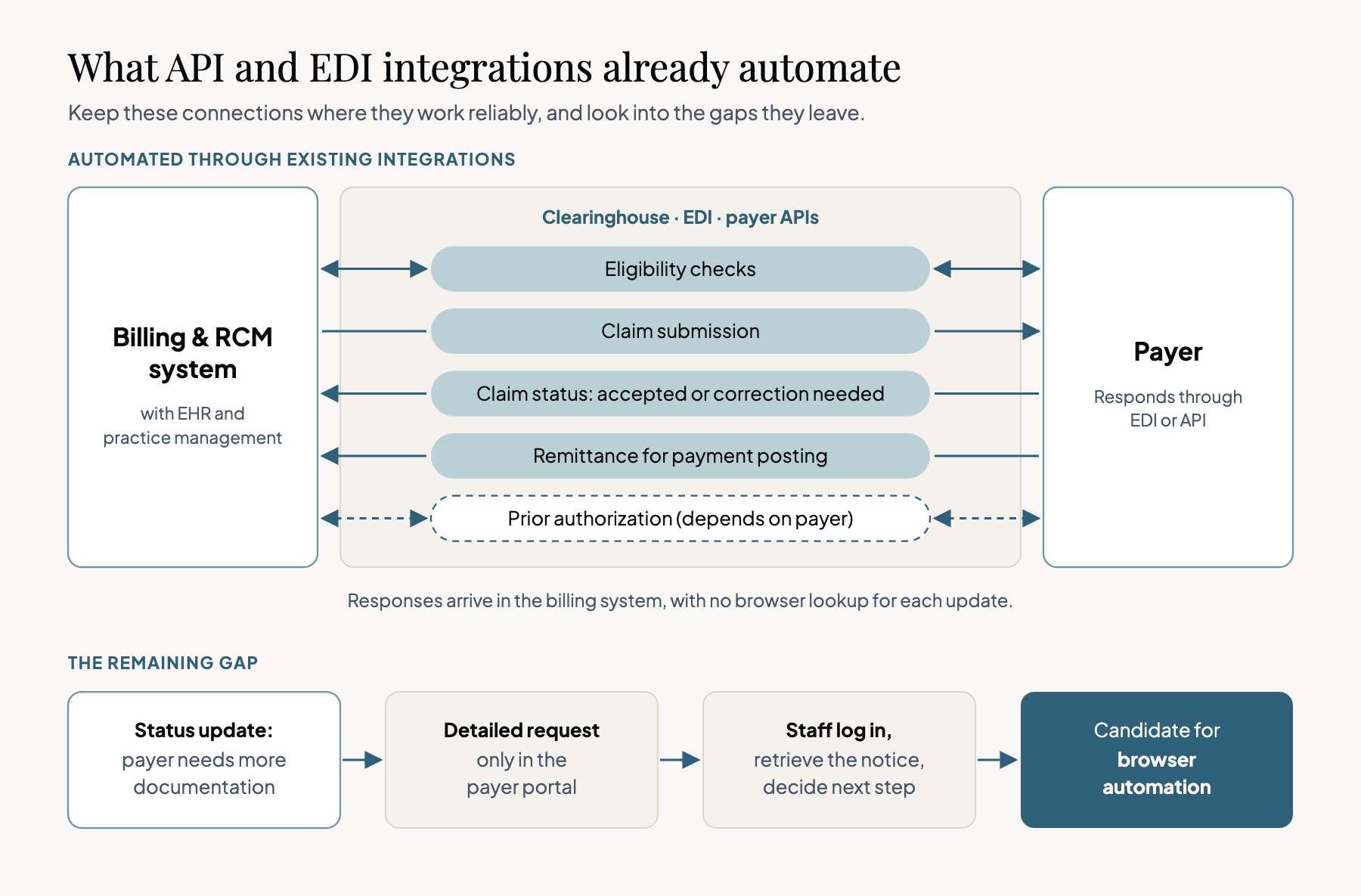
APIs and electronic data interchange (EDI) integrations already automate routine revenue cycle management processes.
Depending on the payer and the systems involved, they may also support prior authorization requests and responses. Common examples include:
- Insurance verification: Send an eligibility inquiry and return the response to the registration record.
- Claims processing: Submit a claim through a clearinghouse and receive acceptance, rejection, or claim-status updates.
- Payment posting: Receive electronic remittances and apply payments and adjustments to patient accounts.
Keep these revenue cycle integrations wherever they're working reliably.
Many healthcare organizations have already invested in connecting clearinghouses, electronic health records, and practice management systems, so any additional RCM automation layer should have a specific job.
Where payer portals still require manual work
A claim-status update may say that a payer needs more documentation without including the full request.
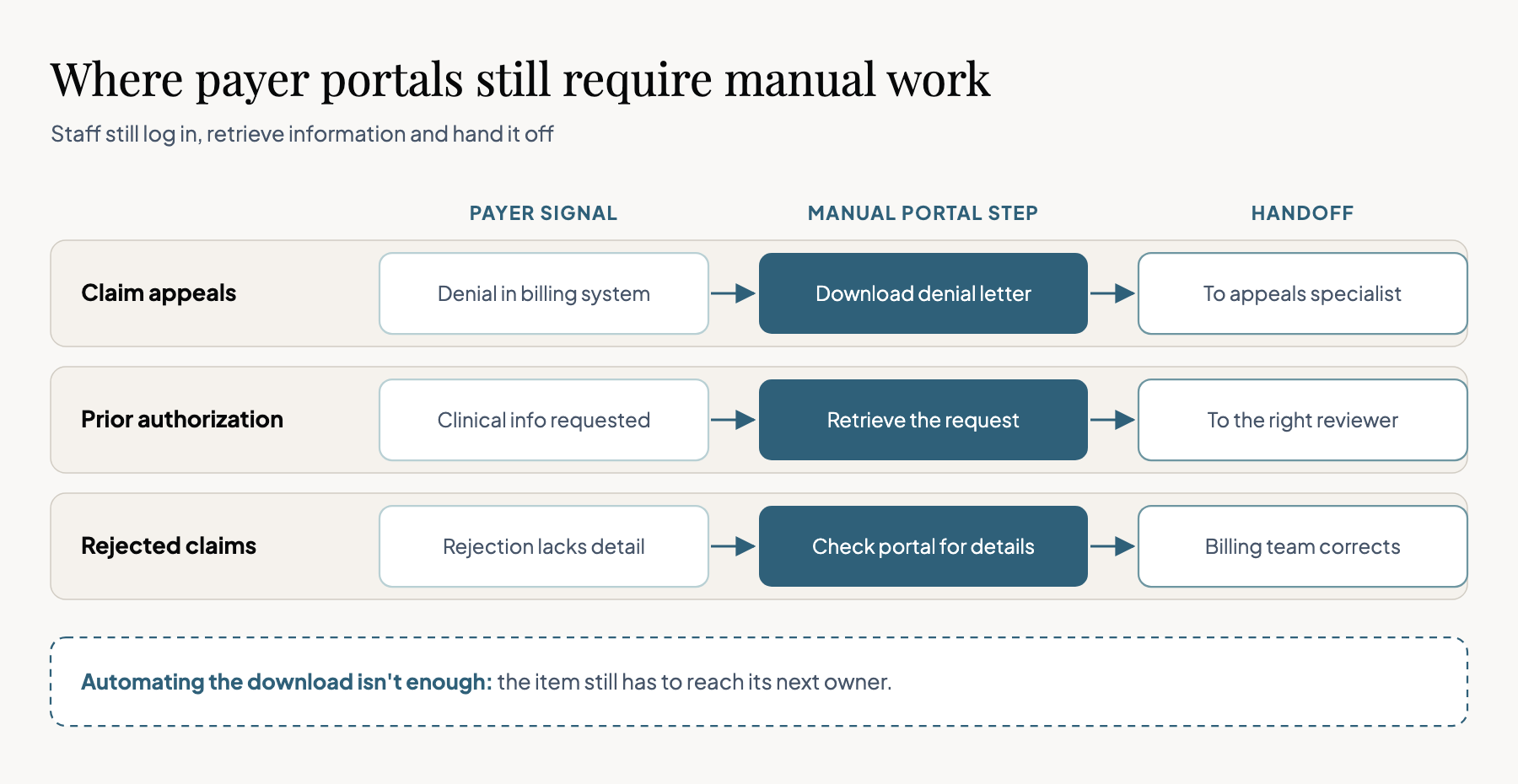
If that notice is only available in a portal, staff still have to retrieve it and work out what to do next. That's the kind of gap worth investigating for RCM automation through a browser.
Your billing system might tell you that a claim has been denied, but the full denial letter is only available through the payer's website. Someone from your team still has to log in, download the letter, and get it to the appeals specialist.
These portal gaps aren't limited to denial letters:
- Claim appeals: Retrieve denial letters and appeal instructions, then upload supporting documents once the appeal is approved.
- Prior authorization follow-ups: Retrieve a request for additional clinical information and route it to the appropriate reviewer before submitting the approved response.
- Rejected-claim follow-ups: Look up details missing from an electronic rejection so the billing team can verify and correct the issue.
Where manual payer follow-up adds up
In the 2026 Guidehouse/HFMA Revenue Cycle Management Trends report, 88% of surveyed provider executives ranked payer challenges among their top three concerns.
These included increased denials, prior authorization delays, and excessive information requests.
Repeated claim denials can send a case back and forth between payers and healthcare providers.
That adds work for revenue cycle staff in denial management and accounts receivable, while the team still needs to identify the next action. In the manual queue, look for:
- Documents downloaded from portals but entered into claim records by hand.
- Approved appeals or records that staff must upload through a website.
- Requests that get reopened because the information never reached the next owner.
For healthcare providers, one payer may support an electronic exchange while another requires a portal upload.
Check which specific tasks repeatedly send staff back to the website, rather than assume every payer needs browser automation. A faster download does little for cash flow if the document still gets stranded in a folder.
How to decide whether a payer workflow is worth automating
Start with a sample of recent payer requests to see what staff repeat, how often they do it, and what happens after the portal visit. That gives an RCM automation pilot a real workload rather than an easy demo.
Before choosing a browser workflow, check four things. Each one affects whether staff can use the result:
- Is there already an electronic way to do it? Check the payer's supported integrations and your existing RCM systems first.
- Is the task administrative and repeatable? Retrieving a denial letter is easier to define than deciding whether an appeal is clinically appropriate.
- Can you verify the result? A downloaded document should match the claim, and a submission should have evidence of acceptance when available.
- Where does the information go next? The result should reach the correct record or owner without another round of manual data entry.
Where robotic process automation and AI fit
Robotic process automation (RPA) can automate tasks by following fixed steps in older applications. It works well when the screens and rules stay consistent, but a changing payer website can break the script.
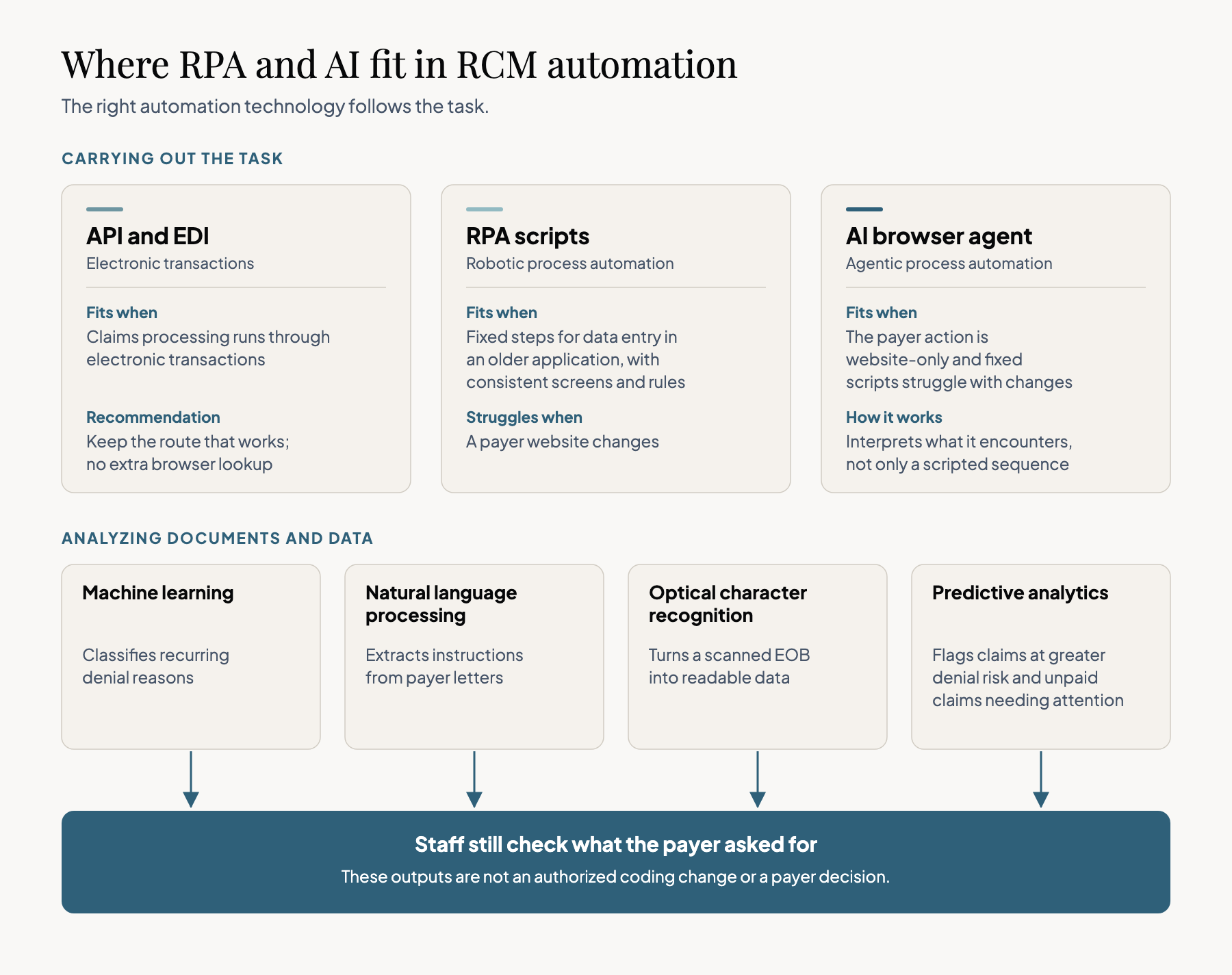
Other revenue cycle automation tools solve different problems. The main uses are:
| Technology | Where it can help |
|---|---|
| Machine learning and predictive analytics | Analyze historical data to flag likely claim denials or prioritize unpaid claims for review |
| Natural language processing and optical character recognition | Extract stated requests from payer letters and readable data from scanned EOBs |
| AI browser automation | Navigate a website, retrieve documents, and enter previously approved information when no suitable integration exists |
Artificial intelligence can help prioritize work without taking over approvals. Machine learning may flag a claim for review, but that output is not an authorized coding change or a payer decision.
Choose RCM automation technology based on the task, and keep people responsible for judgment and approvals.
How to design a reliable RCM automation workflow
1. Check ownership and exceptions
A missing medical record has a different owner from a registration error, and revenue cycle management processes often cross departments.
A clear revenue cycle management workflow gives every exception a person who can resolve it. The workflow also needs a stopping rule. It should stop or request review when it encounters:
- An ambiguous claim match or incomplete patient data.
- An unexpected approval or clinical judgment request.
- A login failure, timeout, or changed portal requirement.
For those browser failures and page changes, return the source information to staff rather than hide the error behind a successful run.
You can read our agentic automation operations guide where we talked about the wider handoff and exception problem.
2. Define when the RCM task is complete
Define the output of a revenue cycle management task before building the automation.
For a denial letter, the denial management team needs the original document attached to the right claim, any stated filing deadline, and an assigned appeals specialist. Downloading the PDF is only part of that result.
If two claims look alike or patient financial data conflicts, the system should flag the case rather than guess.
The same matching check applies whether a person, a browser agent, or another automated system updates the record. Healthcare providers need that check regardless of the tool.
3. Verify submissions before closing the task
When a workflow uploads an approved appeal packet, clicking Submit doesn't establish that the payer accepted it.
Capture an acknowledgment or confirmation number when the portal provides one. If the session times out, the workflow should verify what happened before retrying.
| Outcome | What the RCM team can confirm |
|---|---|
| Information retrieved | The notice or document was obtained and matched to the request |
| Administrative action accepted | The portal acknowledged the approved submission, when acknowledgment is available |
| Work item resolved | The case reached its defined status, and any next owner or payer follow-up is recorded |
An accepted appeal packet may still be awaiting a payer decision.
The claim should remain open for that follow-up instead of being marked resolved because the browser run finished. That distinction helps reduce errors and keeps outstanding work visible.
4. Establish staff review and patient-data controls
Revenue cycle management automation can retrieve instructions and transfer approved information, but some decisions need human expertise.
Healthcare providers should keep clinical interpretation, medical coding changes, appeal arguments, and financial approvals with authorized staff.
| Action | Who should make the decision? |
|---|---|
| Retrieve a payer request | An authorized automation may retrieve and route it |
| Choose clinical records or change coding | An authorized clinician or coding specialist |
| Approve an appeal or financial action | The staff member with the required approval authority |
Patient data may appear in screenshots, logs, and downloads as well as submitted records. Before processing real records, healthcare organizations should review:
- Account permissions and applicable business associate agreements.
- Screenshot, recording, and file retention settings.
- Connected services, model providers, and access to execution artifacts.
HHS guidance on HIPAA and cloud computing explains the obligations that may apply when a cloud service handles protected health information.
How Skyvern can handle the payer-portal step
We talked about workflows and automation, but let's talk about solving the problems that I mentioned earlier. I wouldn't recommend replacing a working API AI connection right away.
But for RCM automation tasks your existing integrations don't cover, I'd recommend the Skyvern's browser automation for the portal interaction and return the result to the RCM system.
Skyvern uses artificial intelligence and visual page information instead of relying entirely on fixed selectors, which can help with rearranged forms and moved buttons. Your automations keep working and achieving the assigned goal even when the portal changes, unlike traditional scripted automation.
Skyvern can cover different parts of the browser tasks like:
| Capability | How a team could use it |
|---|---|
| Form filling | Enter information that staff have already verified and approved |
| Skyvern Studio and workflow blocks | Configure browser actions, extraction, and checks |
| APIs and SDKs and the developer quickstart | Trigger the workflow from an existing claims processing or work-queue system |
A denial-letter workflow in practice
For a denial letter, I'd set up the following sequence. The RCM system still owns the claim record and the staff work queue.
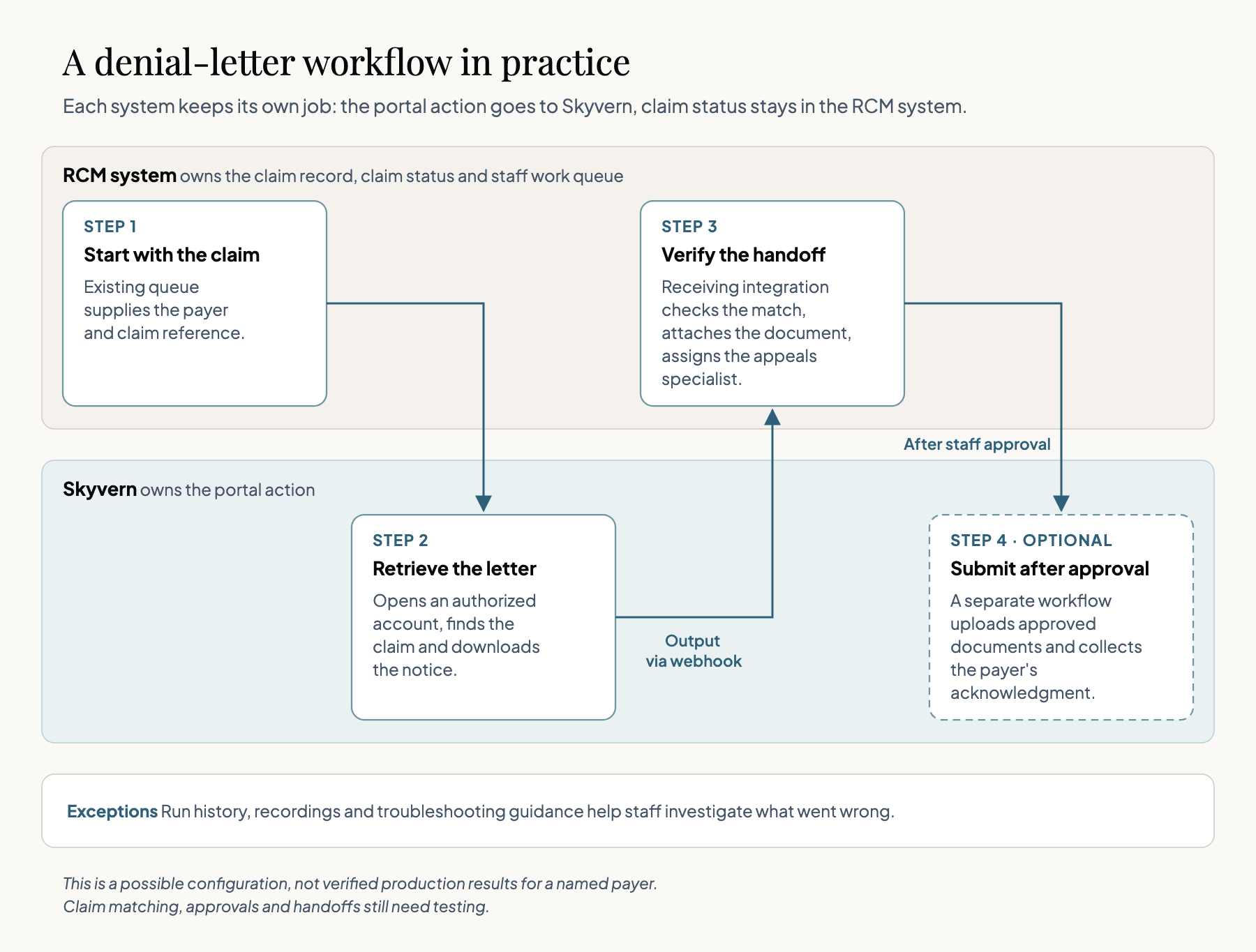
- Start with the claim: The existing queue supplies the payer and claim reference.
- Retrieve the letter: Skyvern opens an authorized account, finds the claim, and downloads the notice.
- Verify the handoff: The receiving integration checks the match, attaches the document, and assigns the appeals specialist.
- Submit after approval: A separate workflow may upload approved documents and collect the payer's acknowledgment.
This is a possible configuration, not verified production results for a named payer. Teams can use SOP upload to start from a written procedure, but the claim matching, approvals, and handoffs still need testing.
The integration can receive outputs through webhooks, while run history and recordings and troubleshooting guidance help investigate exceptions. I'd keep Skyvern responsible for the portal action and the existing RCM system responsible for claim status.
Skyvern supports stored credentials and two-factor authentication, but masking secrets doesn't protect every place patient information could travel. Skyvern's Trust Center offers information for vendor review, and a self-hosted deployment may offer more infrastructure control. Neither replaces a deployment-specific security, privacy, and contractual assessment.
How to measure an RCM automation pilot
Let's take the one payer and one repeatable task, such as retrieving denial letters. Before implementing RCM automation, measure staff time, matching accuracy, exceptions, and repeat portal visits for comparable requests.
Then measure the same things during the pilot, including time spent reviewing and correcting results. Here's a hypothetical scorecard, not Skyvern customer data:
| Measure | Manual process | Automation pilot |
|---|---|---|
| Requests evaluated | 100 | 100 |
| Browser runs completed | N/A | 96 |
| Accurate handoffs to claim records | 95 | 87 |
| Requests requiring rework | 5 | 13 |
| Total staff time, including corrections | 600 min | 270 min |
What the pilot results show
The RCM automation pilot cuts staff time, but accurate handoffs drop and more requests require correction. I wouldn't expand it yet. I'd first find out why those results got worse.
Check the failures before adding another payer. For the revenue cycle team, the review should answer:
- Matching: Were correct notices attached to the wrong claims?
- Extraction: Did the workflow miss a deadline or another required detail?
- Handoff: Did staff still have to re-enter information or reopen the payer portal?
And importantly, monitor the claim denials, accounts receivable aging, patient payments, cost to collect, and cash flow separately from browser performance.
Those financial measures matter to revenue cycle operations, but the pilot alone can't prove that automation caused a change in collections.
Automating your healthcare workflows?
Use the RCM automation pilot to decide which dependency to fix next. There are three possible decisions:
- Keep: A working API or EDI route that already brings the right result into the record.
- Fix: A browser workflow that retrieves the right document but loses it during matching or handoff.
- Expand: A task that repeatedly reaches the right record with less staff correction and visible exceptions.
For healthcare providers, we built Skyvern for healthcare that carefully processes the required workflows and self-correcting any failures or changes on pages to achieve the end result.
The Skyvern quickstart is a place to begin testing with approved data, before deciding whether the workflow belongs in live revenue cycle operations.
Keep reading
Healthcare BPO vs Automation for Prior Authorization: Growing Volume Without Growing the Team
Healthcare BPO, or business process outsourcing, means hiring another company to handle administrative work such as billing, insurance checks and prior authorization. It helps your practice growing without recruiting an internal team for every task. Much of that work still involves time-consuming, manual data entry and document retrieval. Someone copies patient details between systems, finds supporting records, uploads files and checks payer portals for updates. This is the type of work we bui
Automation Anywhere Alternatives: 6 Options and What AA Really Costs
If you’re looking for an Automation Anywhere alternative, you’re probably unhappy with something: the price, a workflow builder that feels clunky, or the effort it takes to keep your automations running. Those frustrations show up in Automation Anywhere’s reviews. Some reviewers describe expensive licensing, costs that become harder to predict as AI usage grows, and a steep learning curve for complex workflows. Others point to difficult debugging and resource-heavy deployments. A lot of the pe
How to Automate KYB Verification Across Business Registries
KYB, or Know Your Business, is the process of checking who you’re doing business with. Before you onboard a business customer, supplier, or partner, you confirm its registration details, understand who owns or controls it, and check for risks such as sanctions exposure. These checks take time: search a registry, find the right entity, download its filings, and copy the details into your review sheet. Open the next portal and do it again. Every new business adds another round of searches, downlo
Put the browser to work
Use Skyvern for the work that lives in a browser.
Turn repetitive browser tasks into reliable workflows with Skyvern.