Healthcare BPO vs Automation for Prior Authorization: Growing Volume Without Growing the Team
 Suchintan Singh6 min read
Healthcare BPO, or business process outsourcing, means hiring another company to handle administrative work such as billing, insurance checks and prior authorization. It helps your practice growing without recruiting an internal team for every task.
Much of that work still involves time-consuming, manual data entry and document retrieval. Someone copies patient details between systems, finds supporting records, uploads files and checks payer portals for updates.
This is the type of work we built Skyvern for. Our healthcare workflows automate those browser tasks using the information and instructions you provide. Skyvern enters data, retrieves documents and collects status updates, while your team or your BPO partner handles payer conversations and clinical questions.
In this article, I’ll explain which prior-authorization tasks to automate, where a BPO team remains useful, and how to compare the costs of combining both as your practice grows.
What a healthcare BPO team does
Healthcare BPO teams handle the administrative work around patient care. They answer patient calls, schedule appointments, check insurance coverage and prepare billing paperwork. Billing teams also submit insurance claims and follow up on payments.
For prior authorization, the team gathers the required records, enters patient and procedure details into the insurer’s portal, and submits the request. They check its progress, follow up with the insurer and ask your practice for missing information. They then record the decision and update your staff. Your clinicians provide the medical explanations and answer questions about treatment.
Why practices outsource prior authorization
In the American Medical Association’s 2025 survey, 1,000 physicians reported an average of 40 prior authorizations per physician each week. Completing those requests took 13 hours of combined physician and staff time every week.
BPO handles part of that workload without increasing your practice’s headcount. An outside team takes responsibility for submissions, document collection and follow-up, while your clinicians provide the medical information and explanations. This adds administrative capacity without making your practice responsible for recruiting and managing additional employees.
Where automation comes in
Like outsourcing, automation takes on administrative work without adding people to your practice. It focuses on the repetitive browser tasks that consume staff time: entering patient details, retrieving documents, uploading files and checking payer portals for updates.
This is the work we built Skyvern to automate. A configured workflow repeats those steps across requests, so practitioners and administrative staff spend less time moving information between systems.
I see the clearest opportunity to reduce costs in that repeated manual handling. Automating portal visits reduces the staff time needed for each request. The cost comparison includes the software, maintenance and human review alongside the hours saved. For a fixed BPO contract, reducing the invoice also requires adjusting the service agreement.
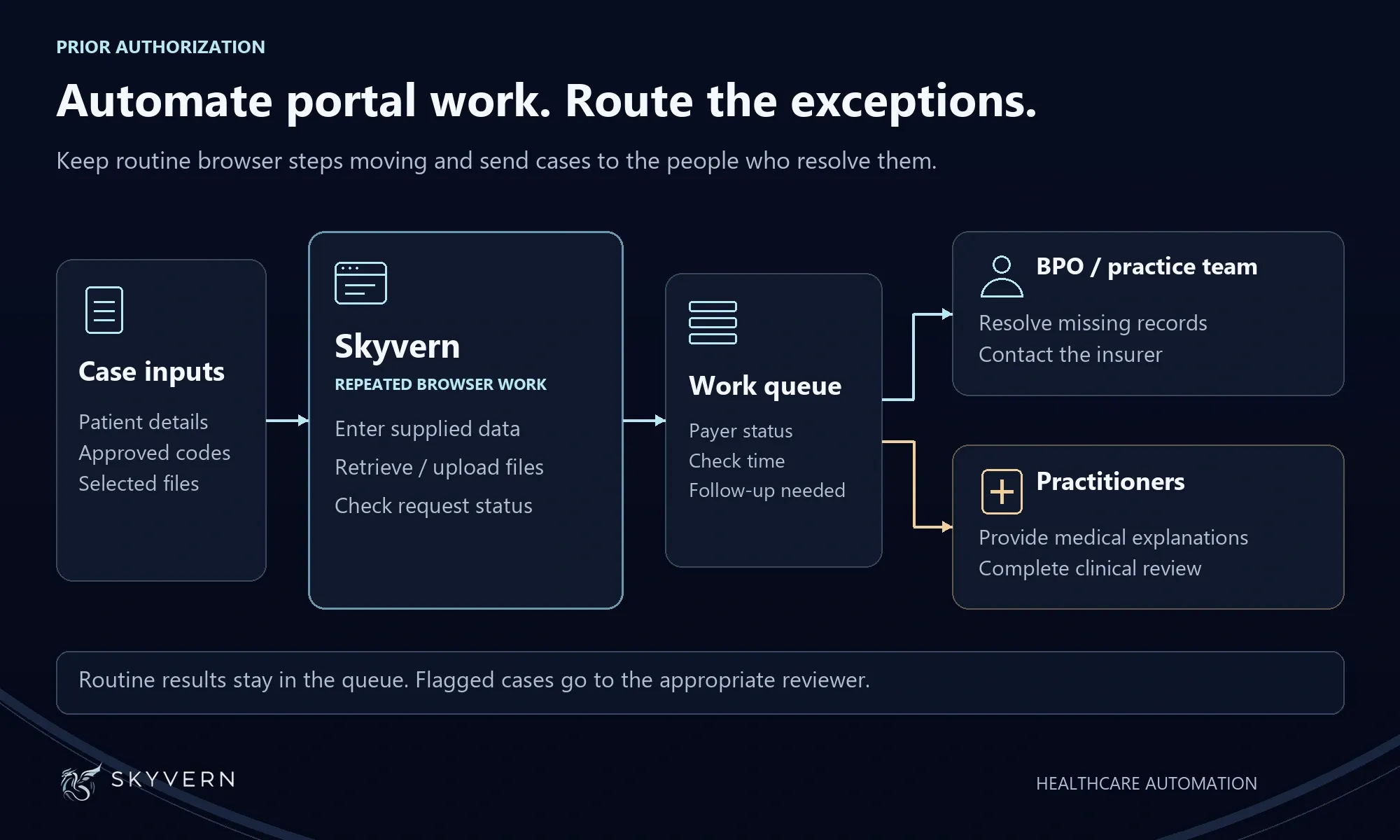
I recommend using automation alongside your BPO partner or internal team. People still resolve conflicting information, contact insurers about stalled requests and review denials. Clinicians provide medical explanations and participate in peer-to-peer reviews. Automation handles the repeated browser steps, while the team handles the conversations and decisions needed to finish the case.
Which prior-authorization tasks to automate
Skyvern’s healthcare customers automate the prior-authorization tasks below. The table shows which browser steps automation handles and which decisions and follow-up remain with their teams.
| Task | Automation to configure | Human responsibility |
|---|---|---|
| Check whether authorization is required | Look up the supplied service and save the payer's response | Resolve unclear or conflicting requirements |
| Prepare the request | Enter supplied patient, provider and service details | Check the clinical information and codes |
| Submit the request | Upload selected documents and save the submission receipt | Supply missing records and answer clinical questions |
| Check progress | Retrieve the status and requests for more information | Respond to the payer or assign the case for follow-up |
| Record the decision | Save the payer's response and reference number | Review the decision and arrange further action |
These are just a few examples of what Skyvern automates. Skyvern is built to automate work performed in a browser, from filling out forms and retrieving documents to moving information between websites. The same approach extends beyond prior authorization to other administrative workflows your team handles online.
How to compare the cost of prior authorization
When you compare BPO costs, include the work your staff still do. Reviewing submissions, finding missing documents, correcting errors and following up with insurers all take time. Add those costs to the BPO fee to understand what each request costs your practice.
For one of our customers, automation cut the cost per prior-authorization request by more than half compared to their BPO service.
Automation also expands over time. Start with repeated tasks such as data entry and status checks, then add document retrieval and other portal steps after testing them. As more steps are automated, less of each request requires manual handling. Keep software costs, maintenance and human review in the calculation to measure the savings.
How to combine outsourcing and automation
I recommend keeping your BPO team alongside automation to handle exceptions. Skyvern completes the routine portal work, while the team reviews flagged cases, follows up on missing documents and calls insurers to resolve stalled requests.
Start with one payer and one request type. Keep your BPO partner involved in follow-up while you test the portal work in Skyvern. That gives the team a defined set of results to review before expanding.
An illustrative workflow: automating status checks
Here is an illustrative workflow for a practice that assigns daily authorization checks to a BPO partner. The manual process involves opening the payer portal, finding each pending request and copying its status into a shared work queue. A pending status goes back on the list for another check. A request for more information goes to the person responsible for the response.
To automate those lookups, configure Skyvern to return the current status, the time checked and any request for more information. Connect the results to the team's work queue and set up scheduled runs for repeat checks. Unattended runs require portal access and authentication that support the schedule; test both before enabling it.
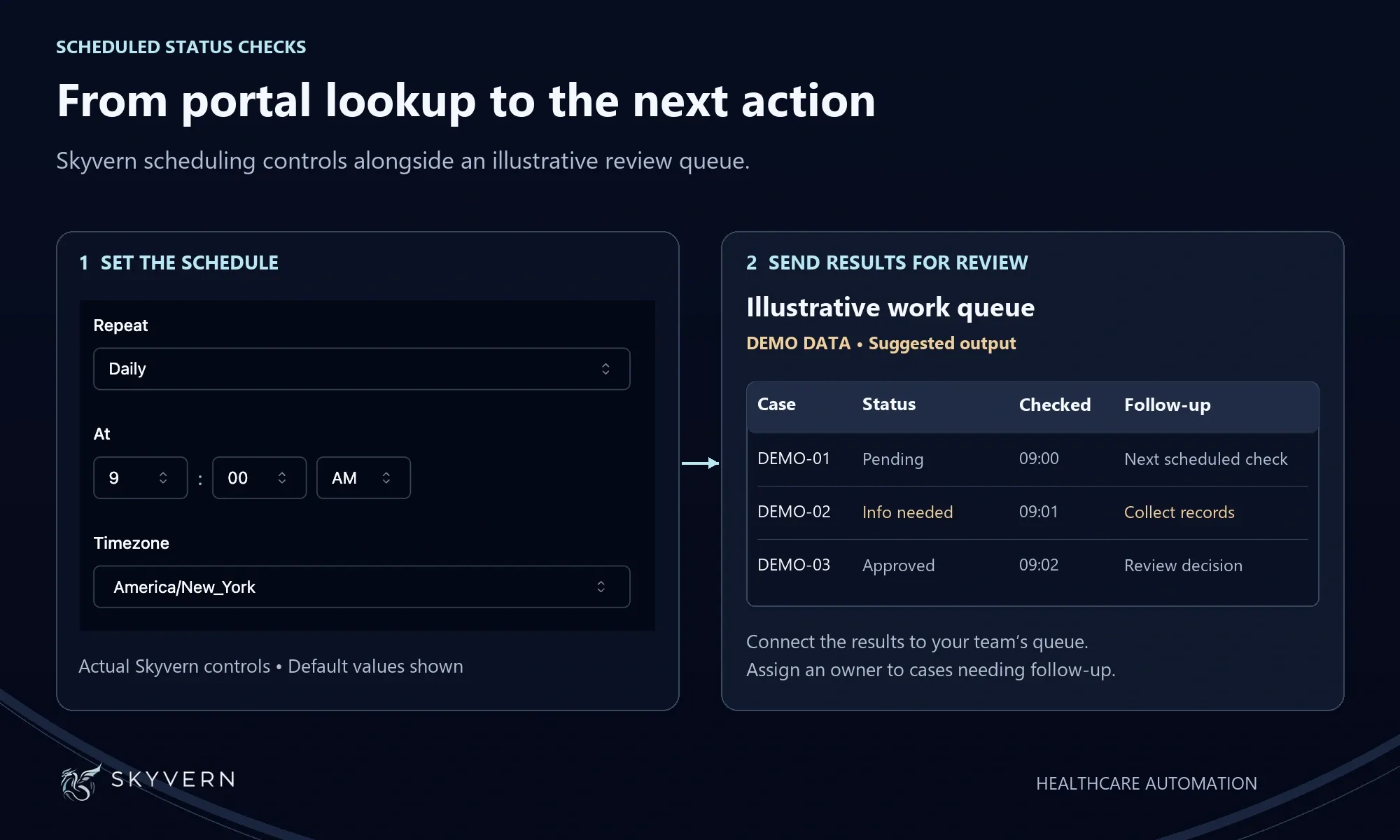
Assign payer calls and missing-document follow-up to the BPO team. Keep clinical explanations with the practice's clinicians. This divides the work explicitly: Skyvern retrieves the portal information, and the team acts on the cases that need attention.
Use the pilot to measure the staff time spent per request and the number of requests the team completes. Those results establish how much capacity the arrangement adds.
Make failed checks visible
For a failed lookup, retain the previous status with its last successful check time and mark the latest attempt as failed. This tells staff which information needs refreshing.
Assign someone to investigate failed runs. Give requests for clinical records a separate owner. A broken portal login and a missing medical document need different responses.
Expand only after the results match the portal and the team keeps up with follow-up. Review unresolved cases as part of that decision. A growing backlog is a sign to fix the process before adding volume.
Keep clinical review in place for automated submissions. Our prior-authorization automation guide explains how to prepare case information, configure portal access and save confirmation.
What to agree before renewing a BPO contract
Automation changes the work assigned to the provider. The contract needs to reflect that division and the price of the remaining service. I recommend settling these points before renewal:
- Work included in the fee. Specify coverage for submissions, repeated follow-up, corrections and appeal support.
- Pricing as volume changes. Record the rates for additional requests and the effect of moving tasks into automation.
- Response times. Define the service-level agreement (SLA), including deadlines for submitting ready requests and responding to new information. Keep those commitments separate from the payer's decision time.
- Problems and maintenance. Name the person responsible for fixing the workflow after a portal change and the team handling affected cases in the meantime.
- Records and access. Establish access to submission receipts, status history and records of actions taken. Agree how open cases and records return to your practice at the end of the service.
- Patient information. Review the business associate agreement (BAA), subcontractors, access permissions and retention periods.
My recommendation is to preserve the support that resolves difficult cases and test automation against the repeated portal work. Use the pilot to establish the team's capacity, then negotiate a contract that reflects the work you still need from the provider.
Bring your BPO costs down with Skyvern
Get started with Skyvern and automate the browser work behind prior authorization. For a quick start, choose one repeated task, such as checking authorization status, and describe it in plain language. Review and test the workflow, then expand it to more requests and portal tasks.
Keep reading

EMR & EHR Data Extraction: How to Automate It Without an API
Choose an EMR/EHR extraction method, collect provider productivity and billing data, and build a recurring report export in Skyvern without writing code.

AI Automation for EOB Processing: Tools & Workflows (2026)
If you're looking into EOB processing, there's probably someone on your team spending hours downloading insurance payment documents and copying the numbers into billing software. They log in to one insurer's website, find the right document, save it, and move on to the next. We've built Skyvern for this kind of healthcare admin work. It's an AI browser agent that can log into these websites, find the documents, and download them for you. You can build the rest of the workflow in Skyvern too, fr
How to Automate Insurance Eligibility Verification with Skyvern
A step-by-step guide to using Skyvern for insurance eligibility checks, from entering patient details in payer portals to returning coverage and benefits to your appointment system.
Put the browser to work
Use Skyvern for the work that lives in a browser.
Turn repetitive browser tasks into reliable workflows with Skyvern.