Prior Authorization Automation: What It Is and How to Do It

Prior authorization automation uses software to prepare, submit, and track requests for approval from health insurers. Before AI browser agents, teams automated this work through predefined rules, electronic connections between healthcare systems, and bots programmed to follow specific steps through payer portals.
Those approaches reduced manual entry, but portal scripts often needed repairs when forms or page layouts changed and that's exactly what Skyvern is fixing (I am Skyvern's CEO).
We built Skyvern to use AI to interpret the page in front of it and determine how to complete a task. It can adapt when fields move or forms are rearranged, helping workflows continue through changes that would break fixed scripts.
If you'd rather skip the explanations and see what a good healthcare automation platform with AI at its core can do for your specific use-case, get in touch with us.
What is prior authorization automation?
Prior authorization is the process of obtaining a health plan's approval before certain services or medications are provided. For a healthcare practice, the administrative work can include checking requirements, gathering patient and provider information, attaching clinical records, submitting a request, and following up on the decision.
Automation reduces the repeated work within that process by using software that can reuse information from existing records, check whether required fields are present, enter data into a portal, and return status updates to the team managing the case.
In the AMA's 2025 survey, physicians reported an average of 40 prior authorization requests per week, consuming 13 hours of physician and staff time.
How prior authorization automation worked before AI
Prior authorization automation existed long before browser agents. Electronic transactions already allowed providers and health plans to exchange authorization requests and responses. CMS documents the adoption of the X12 278 standard in 2009, for example.
In practice, teams have used several approaches, often together:
| Approach | What it does | Where additional work remains |
|---|---|---|
| Rules-based workflows | Check required information, route requests, and trigger reminders | Exceptions and new requirements need rules or staff review |
| Electronic system connections | Exchange structured requests and responses through supported EHR and payer connections | Unsupported payers, transactions, or missing integrations leave gaps |
| Scripted browser automation | Follow programmed steps to enter data and navigate portals | Changes to targeted elements or the expected process can require repairs |
These methods still have useful roles. A reliable electronic connection can avoid repeated portal entry entirely. Rules can catch missing information before a request reaches the payer.
Scripted portal automation has a different dependency: the interface it was built to operate. If a script targets a particular field identifier and the payer changes that identifier, then you need to update the script. An unexpected question or login screen can also interrupt a predefined sequence.
Across several portals, teams have to maintain those variations alongside changes to documentation and authentication requirements. AI browser automation addresses that by adapting to the changes autonomously.
How AI browser automation handles changing payer portals
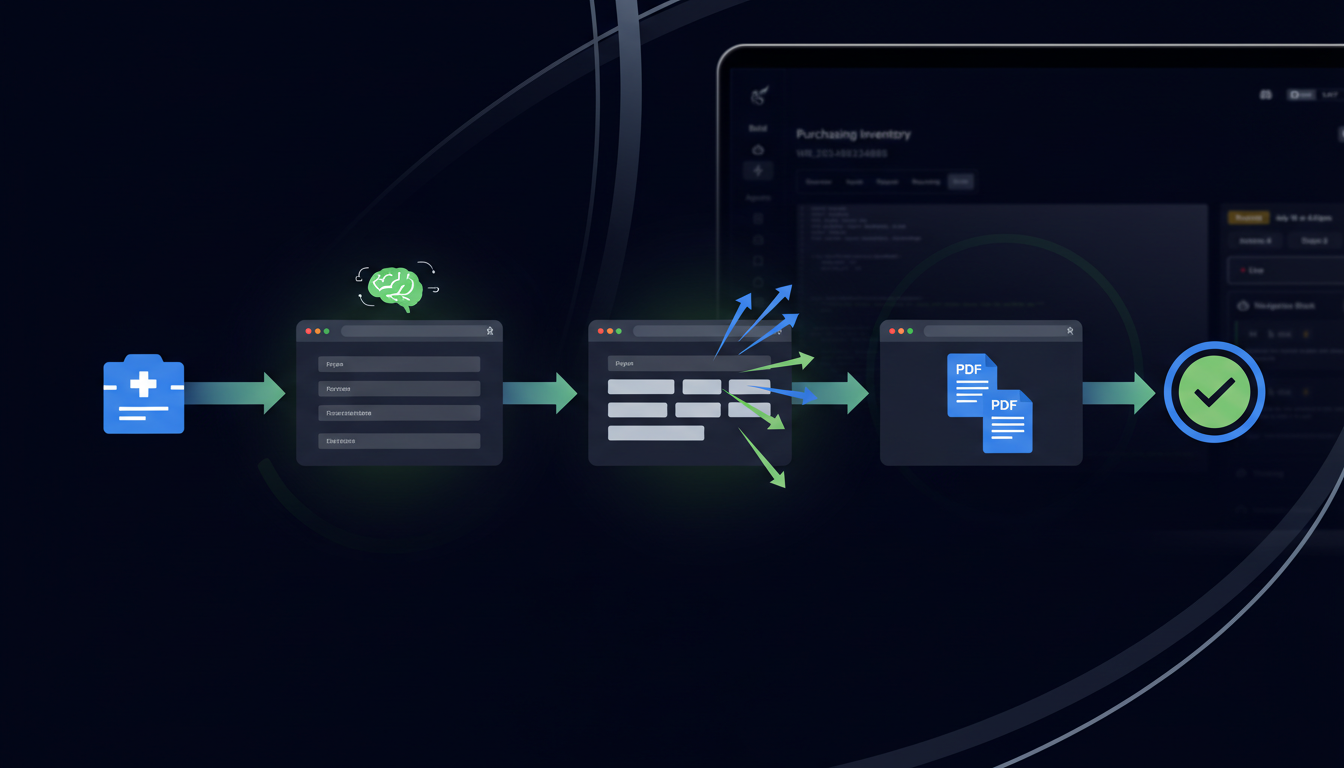
Skyvern's browser agent combines screenshots, the page's underlying structure, and language models to identify controls and choose actions. You describe the task and supply the data. The agent examines what is on screen as it works through the process.
Now imagine a payer that moves the member ID field into a new section and rearranges the document upload page. A script tied to the previous elements will stop working. Skyvern, on the other hand, will identify the field from its label and context, then locate the upload controls on the updated page.
That makes it a more flexible alternative for portal work that would otherwise depend on maintaining fixed selectors. Instructions can describe the intended result while the AI determines the browser actions needed to reach it.
How to automate prior authorization with Skyvern

Start with a workflow your team already understands. The first implementation should make one recurring process dependable before you extend it to more request types and payers.
1. Choose a request type and map the process
Pick one payer portal and one common authorization workflow. Record how staff move from a ready case to a submitted request, including the documents, review steps, and confirmation they expect.
Check whether an existing electronic connection already handles the process. Where portal work remains, identify which actions Skyvern should perform and when staff should take over.
Define success precisely. For a submission workflow, success means the portal confirms receipt and the reference is captured. A separate follow-up process tracks the payer's decision.
2. Prepare the case data and supporting documents
Build a consistent input record using data from your EHR or case management system. Depending on the request, it may include patient identifiers, insurance details, provider information, procedure or medication details, diagnosis codes, dates, and supporting records.
Validate required values before opening the portal. Associate every attachment with the correct case and use codes and clinical information approved by your team.
Keep an internal case ID throughout the workflow. It connects the source information to the portal receipt, later status checks, and any work assigned to staff.
3. Configure portal access and patient data handling
Set up the portal credentials and verify the actual login process, including its MFA requirements. Use Skyvern's credential management rather than placing passwords in task instructions.
Before processing patient information, confirm the deployment, connected services, and contracts meet your organization's requirements. HHS guidance addresses applicable business associate agreements, risk analysis, and safeguards for cloud processing of protected health information.
Include screenshots, recordings, and downloaded files in that review. Decide who can access them and how long they should be retained.
4. Build the preparation workflow
Give Skyvern the portal URL, validated case information, and approved supporting documents. Define the navigation, form completion, and upload tasks, together with a clear stopping point.
For example, a preparation instruction could read:
Open the prior authorization form for the supplied case. Fill the fields using the provided data and attach the supplied documents. Stop at the review page without submitting. Return any required information that is missing or inconsistent. Do not invent clinical answers.
Use workflow parameters for values that change between cases. Describe fields by their purpose and labels so the instructions can accommodate layout differences. Test with synthetic data in an appropriate test environment before processing live cases.
5. Review the request, then submit
Have an authorized staff member verify the prepared request against the source records. The review should cover patient identity, the requested service or medication, clinical responses, and the attached documents.
Make that approval a condition for starting the submission stage. For example, record approval in your case management system and trigger a separate submission workflow only after that state is set.
If the portal session expires during review, reopen the request and verify its contents before submitting. A saved browser session should not be treated as a guarantee that the payer's login remains valid.
6. Capture confirmation and handle uncertain results
After submission, extract the reference number and the status the portal displays. Skyvern supports structured extraction so you can define the fields your case system expects.
An illustrative record for a fictional case might look like this:
{
  "case_id": "DEMO-104",
  "submission_reference": "EXAMPLE-12345",
  "submission_status": "received",
  "payer_decision": "pending"
}
If the browser times out after the submit action, check the portal's request history before trying again. Route an uncertain result to staff when you cannot establish whether the request was received. This helps prevent duplicate submissions.
7. Monitor the decision and return updates
Schedule follow-up checks for requests that remain pending. Match each check to the existing case and submission reference, then return the observed status to your case management system.
Route requests for additional information, denials, and cases needing clinical discussion to the appropriate staff member. An approval response should be recorded with the details the payer provides.
Expand to additional payers after testing their authentication, form requirements, and exception paths. Reuse the workflow design while validating how it behaves on each portal.
How to measure whether the automation is working
Compare the automated process with a baseline from similar cases. Measure staff time across preparation, review, submission, and follow-up, including the time spent resolving failures.
Track successful submissions with confirmed receipts, requests needing intervention, errors caused by missing documents, duplicate requests, and maintenance hours. These measures show whether the workflow is reducing work overall.
Keep payer decision time separate from submission time. Faster data entry can reduce the delay before a request reaches the payer, but the authorization may still require review.
Inspect recurring exceptions before expanding volume. If the same attachment is missing repeatedly, improve the input process. If a portal frequently interrupts login, address that authentication flow before adding more concurrent runs.
Frequently asked questions
Can prior authorization automation work with an existing EHR?
Yes, where your system provides an approved way to supply case data and receive results. An API or controlled export can provide inputs, while an integration returns submission references and status updates. The connection and data mapping need to be configured for your environment.
What happens when a payer changes its portal?
Skyvern can interpret the updated page and adapt to changes such as moved fields or rearranged controls. Changes to clinical requirements, authentication, or the underlying process may need staff input or workflow updates.
Which steps should clinical staff review?
Clinical staff should retain responsibility for clinical answers, supporting evidence, and decisions that require judgment. In the workflow above, an authorized reviewer checks the prepared request before submission, and later requests for clinical information return to the team.
Does automated submission guarantee approval?
No. Automation helps prepare and transmit a request. The payer determines whether to authorize it. Track the submission receipt and payer decision separately so a successful browser run does not get recorded as an approved authorization.
Will the 2027 API requirements eliminate portal work?
The CMS final rule requires affected payers to implement prior authorization APIs on compliance dates generally beginning in 2027. Those APIs support identifying documentation requirements and exchanging requests and responses. Their availability can reduce portal work where the necessary connections are implemented.
Assess each workflow against the connections available to your organization. Browser automation can cover remaining portal steps. The 2024 rule's prior authorization provisions exclude drugs, while CMS proposed additional drug requirements in April 2026. As of October 2026, those drug extensions remain proposed.
Choose one recurring portal workflow and build it with Skyvern. Start with validated inputs and staff review, then measure how much submission and follow-up work your team can hand over.
Keep reading

Automated Credentialing: How AI changes everything
If you are researching automated credentialing, your team is probably entering the same provider data into several systems, chasing missing documents, and checking portals for updates. I know that administrative burden all too well. Healthcare and provider credentialing work still happens in websites that do not have a suitable API and forces manual credentialing processes with time consuming manual data entry. Someone still has to copy/paste data into a state board portal, CAQH, NPPES, or a
Medicaid enrollment automation for hospitals: a state-by-state guide
Compare nine state Medicaid application workflows, see what hospitals can automate, and learn how to measure ROI while keeping human review.
How to automate Indiana Medicaid application prep after hospital PE
A step-by-step tutorial showing how Skyvern prepares a full Indiana Medicaid application after a hospital PE handoff and stops for human review.
Put the browser to work
Use Skyvern for the work that lives in a browser.
Turn repetitive browser tasks into reliable workflows with Skyvern.