8 Browser Automation Workflows to Run with Skyvern July 2026

Some business-critical chores still hide behind login screens, pop-ups, and "Download" buttons that no API can reach. Skyvern's AI browser agent bridges that gap. Give it a plain-English description of the job, and it sees the page like a human, decides where to click or type, and gets the work done. No scripting, no brittle screen recordings.
TLDR:
- Browser-based workflows hide behind login screens and portals that have no API, making scripted tools fail silently when layouts change.
- Failed contact form submissions log the specific reason, so you can re-run only the sites that need attention instead of guessing which ones went through.
- A mid-size freight broker managing 25+ carrier portals sees compounding data gaps each time one portal updates; reading live page state at runtime removes that brittleness.
- PwC data shows 79% of organizations have adopted AI agents, but only 11% run them in production - portal-heavy workflows are a core reason pilots stall.
- Skyvern automates the 8 workflows covered here by reading each page visually at runtime, handling auth flows, and delivering structured output without custom code per site.
What Are Browser Automation Workflows?
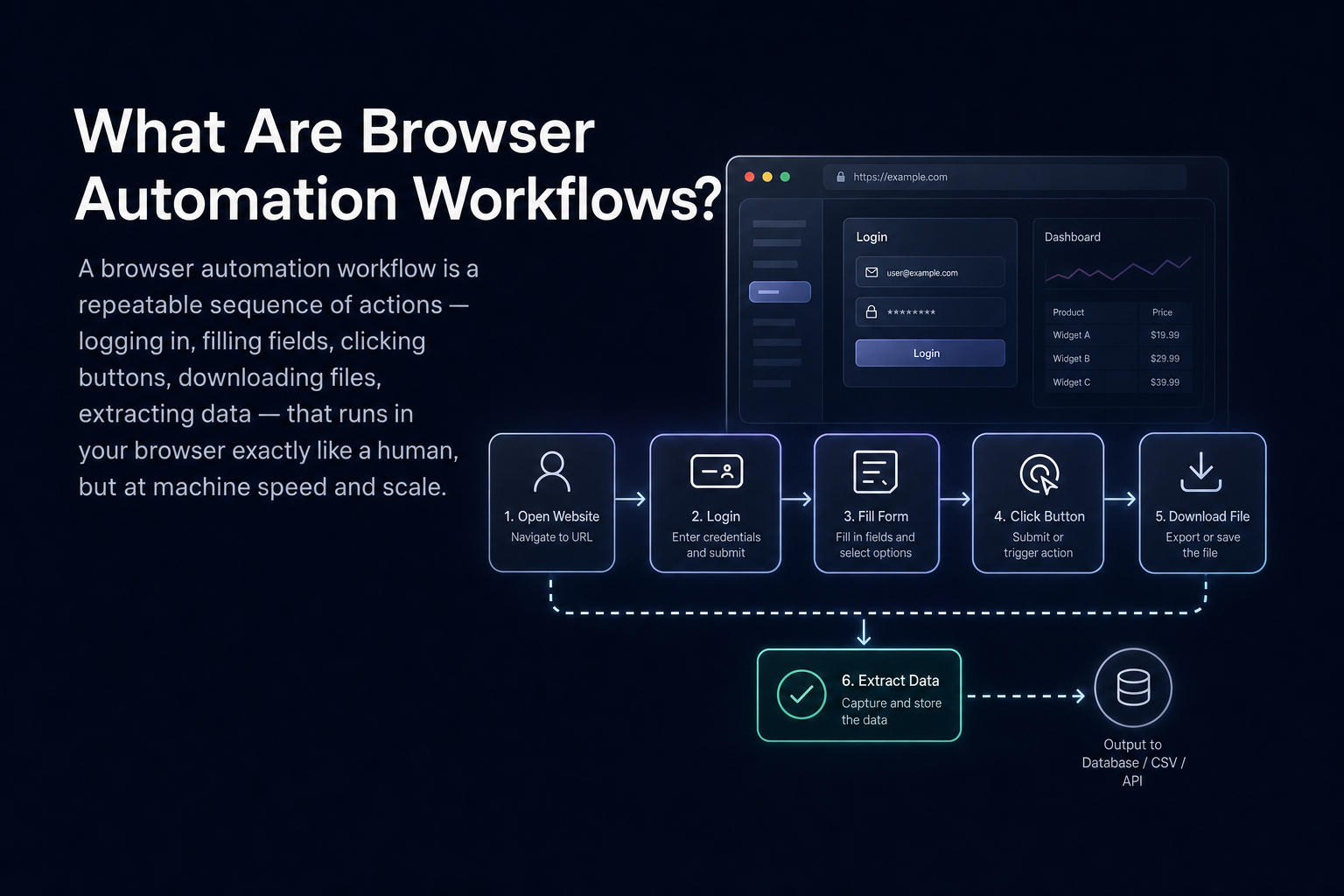
A browser automation workflow is a repeatable sequence of actions (logging in, filling fields, clicking buttons, downloading files, extracting data) that runs inside a real web browser without a human at the keyboard. The operative word is browser. These are not API calls, database queries, or file transfers. They're the kind of work that only exists on a screen: a carrier portal that requires a username and password before it will show you a rate, a government filing system that only accepts submissions through its own multi-step form, a vendor dashboard that lets you export data only after you click through three nested menus.
That class of work is surprisingly large. Somewhere between the systems that expose clean APIs and the processes a person handles entirely by hand, there is a wide band of workflows that live permanently behind a browser tab. No integration exists, no webhook fires, and no CSV arrives in your inbox automatically. Someone (or something) has to open the page, work through whatever authentication the site demands, and take the required action. When that "something" is a well-defined automation, you get speed, consistency, and a log you can act on. When it's a person doing it manually, you get bottlenecks, errors, and a process that scales only by adding headcount.
The eight workflows below represent the categories where that gap shows up most often in practice. Each one shares the same structural profile: no API, a layout that can change without notice, and steps that are entirely manageable for an Agentic Process Automation (APA) platform that reads live page state at runtime instead of relying on selectors that break the moment anything shifts. The table below maps each use case to what Skyvern does and what you get out of it.
# | Use Case | What Skyvern Does | Key Benefit |
|---|---|---|---|
1 | Fill Contact Forms at Scale | Opens each site, finds the form, personalises fields, submits, and logs the result | Consistent messaging, higher volume, verifiable submissions |
2 | Apply to Jobs on Multiple Boards | Uploads résumé once, populates every field, clicks Apply across the target list | Wider reach, flawless data entry, more applications in less time |
3 | Connect Legacy Logistics Platforms | Logs in, harvests shipment statuses or rate tables, pipes data to your ops system | Real-time visibility, fewer manual checks, one source of truth |
4 | Fetch Bank & Payment Statements | Signs in, selects date range, downloads PDFs, renames and files them logically | Guaranteed completeness, tidy file structure, smoother reconciliations |
5 | Sync Supplier Orders from Vendor Dashboards | Pulls latest CSV exports on a schedule, feeds inventory sheet, pings Slack if back-ordered | Up-to-date stock levels, quicker fulfilment, proactive alerts |
6 | Pull Ad Metrics for Client Reports | Collects spend, impressions, and ROAS from each ad dashboard, fills reporting template | Error-free numbers, automated report prep, happier clients |
7 | Download & File Insurance Certificates | Watches for new documents, downloads, renames with policyholder and date, files them | Instant availability, organised archives, stress-free audits |
8 | Monitor Prices and Reviews on Competitor Sites | Visits each URL daily, records price, grabs new reviews, alerts team on notable shifts | Faster pricing reactions, clear competitive insight, automated digests |
1. Fill Contact Forms at Scale
Cold outreach grinds to a halt when you’re pasting the same pitch into dozens of “Contact Us” pages. Hand Skyvern a spreadsheet of URLs and a message template, and it opens each site, finds the form (no matter the layout), personalizes the fields, submits, and logs the result.
What makes this harder than it sounds: contact forms vary wildly across sites. One labels its message field "Your Inquiry," another calls it "How can we help?", and a third buries the whole thing inside a two-step modal. Scripted tools hard-code against field names or positions, which means a single layout change can break an entire batch run. Skyvern reads each form visually, identifies what each field is actually asking for, and fills it the way a human would after scanning an unfamiliar page for the first time. CAPTCHAs that appear mid-form get handled as part of the normal flow. Submissions that fail (a required-field error, a rate-limit redirect, a site that times out) are logged with the specific reason, so you can re-run only the sites that need attention instead of guessing which ones came through. For teams running outreach campaigns across 50-plus domains per week, that submission log is the difference between a process you trust and one you're constantly auditing by hand.
Why it matters: Consistent messaging, higher volume, and verifiable submissions.
2. Apply to Jobs on Multiple Boards
Whether you’re a job seeker or a recruiter, re-entering the same details on Indeed, LinkedIn, Workday, and friends is mind-numbing. Skyvern uploads the résumé once, populates every required field, clicks Apply, and repeats across your target list.
Why it matters: Wider reach, flawless data entry, and more applications in less time.
3. Connect Legacy Logistics Platforms
Carrier tracking sites, warehouse dashboards, and customs portals often refuse to integrate. Skyvern logs into each, harvests shipment statuses or rate tables, and pipes the data into the system your ops team actually uses.
The fragmentation is the real challenge. A mid-size freight broker can manage 25 or more carrier relationships, each with its own portal, its own login flow, and its own session quirks. FedEx Freight, XPO, Saia, Old Dominion, a dozen regional carriers: they don't coordinate their layouts, and they update their portals on their own schedule without notice. When one of them changes their dashboard, a selector-based script breaks and the data gap compounds quietly across your ops team's daily reporting before anyone catches it. Forrester's RPA breakdown research puts weekly bot failures at 45% of companies, a figure that compounds quickly across a 25-carrier operation.
Skyvern sidesteps that brittleness by reading each portal's current state at runtime. It logs in, works through any authentication prompts, locates the relevant data on whatever layout the portal is showing that day, and delivers structured output your TMS or ERP can ingest directly. A workflow that pulls rate tables or shipment statuses from 15 carriers runs the same way after a portal redesign as it did before one. No code changes, no manual intervention, no operations manager chasing tracking data across browser tabs at 5 p.m.
Why it matters: Real-time visibility, fewer manual checks, and one source of truth for operations.
4. Fetch Bank & Payment Statements
Month-end close stalls when statements are scattered across banking and payment portals. Skyvern signs in with saved credentials, selects the right date range, downloads every PDF, renames them logically, and drops them into the correct cloud folder.
Why it matters: Guaranteed completeness, tidy file structure, and smoother reconciliations (though human review still matters before final close).
5. Sync Supplier Orders from Vendor Dashboards
Many supplier sites only offer browser-based CSV exports. On a schedule, Skyvern pulls the latest orders, feeds them to your inventory sheet, and pings Slack if anything is back-ordered.
The problem compounds as the supplier count grows. A retailer sourcing from 20 vendors faces 20 different portals, 20 different export formats, and 20 different sequences for generating a report. Some portals require setting a date range and clicking "Generate" before a download link appears; others bury the export behind a multi-step report builder. Skyvern handles each portal's specific flow without custom code per site, then normalizes the output before it reaches your inventory sheet. The Slack alert on back-ordered items means your fulfillment team can act hours before a stockout affects a customer order, instead of catching the gap in a weekly manual review when it's already too late to recover.
Why it matters: Up-to-date stock levels, quicker fulfilment, and proactive inventory alerts.
6. Pull Ad Metrics for Client Reports
Agencies waste hours copying KPIs from multiple ad platforms. Skyvern collects spend, impressions, and ROAS from each dashboard and fills your reporting template before the Monday stand-up.
Why it matters: Error-free numbers, automated report prep, and happier clients.
7. Download & File Insurance Certificates
Ops managers chase updated certificates across insurance carrier portals. Skyvern watches for new documents, downloads them as soon as they appear, renames each file with the policyholder and date, and files them in the right folder.
Why it matters: Instant document availability, organized archives, and stress-free audits.
8. Monitor Prices and Reviews on Competitor Sites
Manually checking competitor pages for price changes or fresh reviews is slow and inconsistent. Skyvern visits each URL daily, records the current price, grabs new reviews, and alerts your team when something notable shifts.
Why it matters: Faster pricing reactions, clear competitive insight, and automated review digests.
Where Things Stand in Mid-2026
The timing matters. According to PwC's AI agent survey, 79% of organizations have adopted AI agents in some form, but only 11% are running them in production. That gap is the defining challenge of mid-2026, and browser-based workflows are a big part of why it exists. Portal-heavy processes (carrier dashboards, payer portals, supplier sites) are exactly where most automation pilots stall: there's no API to connect to, the layouts shift without warning, and traditional scripts can't survive the first portal update.
Production-grade automation requires more than a successful demo run. It means the workflow keeps running after the vendor updates their portal in October. It means the system handles a 2FA prompt that appeared in the last maintenance window without a human logging in to fix it. It means a failed run produces a specific error code your team can act on, not a generic timeout that sends someone back to complete the task manually. Most tools that look good in a proof-of-concept fail these criteria the moment a real production environment introduces its full range of variability: credential rotation, session timeouts, anti-bot challenges, form fields that rearrange between one run and the next. That is the structural reason pilots stall at 11% production adoption, and it is precisely the class of problem Agentic Process Automation platforms are built to close.
The eight use cases above are a direct answer to that bottleneck. They're the kinds of workflows that sit inside that gap between adoption and production deployment: adopted in theory, stuck in pilot because the tooling couldn't handle the real execution environment. Agentic Process Automation (APA) closes that gap by making browser execution the mechanism, not the blocker.
How You Can Use Skyvern To Build Browser Automation Workflows
You have three entry points depending on how your team works. The Skyvern Cloud UI lets non-technical operators build and run workflows visually without writing any code. The Python SDK gives engineers a programmatic interface where a task is a function call. And the workflow builder, accessed from the same cloud interface or via API, lets you chain multiple steps (login, move through pages, extract, validate, file download) into a repeatable sequence with parameters you can swap at run time.
Running a Task with the Python SDK
Install the SDK (Python 3.11, 3.12, or 3.13) and point it at your API key from app.skyvern.com/settings:
pip install skyvernFrom there, a task is a single function call. Here is a working example that logs into a carrier portal, pulls rate information, and returns structured JSON your TMS can ingest directly:
from skyvern import Skyvern
import asyncio

skyvern = Skyvern(api_key="YOUR_API_KEY")

task = await skyvern.run_task(
    url="https://carrierportal.example.com/rates",
    prompt=(
        "Log into the portal using the stored credential. "
        "Find the rate table for LTL shipments from Chicago, IL to Atlanta, GA. "
        "Extract all available carrier rates and transit times. "
        "COMPLETE when the rate table is fully extracted."
    ),
    credential_id="cred_yourcarrierlogin",   # stored in encrypted vault, never sent to LLM
    data_extraction_schema={
        "type": "object",
        "properties": {
            "rates": {
                "type": "array",
                "items": {
                    "type": "object",
                    "properties": {
                        "carrier": {"type": "string"},
                        "transit_days": {"type": "integer"},
                        "rate_usd": {"type": "number"}
                    }
                }
            }
        }
    },
    webhook_url="https://your-system.example.com/webhooks/carrier-rates",
    wait_for_completion=True,
)

print(task.output)  # structured JSON, ready for downstream ingestion
Because credentials are stored in an encrypted vault and referenced by credential_id at runtime, they never appear in prompts, logs, or screenshots. This is a hard requirement for any portal handling sensitive data. The data_extraction_schema parameter defines the output shape upfront so downstream systems receive consistent JSON regardless of how the portal's rate table is laid out on that particular day. The webhook fires when the run completes, so your system gets notified instead of polling.
What Happens at Runtime
When the task runs, Skyvern reads the live page state visually at each step instead of replaying a recorded path. It works through the login flow (including any 2FA prompt that requires a TOTP code from the stored credential), locates the rate table by appearance and context, extracts the data, and returns structured output. If the portal has changed its layout since the last run, that change is new input to the agent, not a fatal breakpoint. There are no hardcoded selectors to patch.
Every run produces a full trace: page state, action sequence, authentication steps, structured output, and any exception that fired. If the same authentication step fails across three consecutive runs against the same portal, that is a signal the portal has changed its login flow, not random noise. The trace is a diagnostic instrument, not merely an archive.
Building Multi-Step Workflows
For the use cases that involve more than one goal (log in, then move to statements, then filter by date range, then download), the workflow builder chains blocks together. Each block handles a discrete step: a Login block for authentication, Navigation blocks for working through menus, a FileDownload block for the PDFs, and a FileUpload block to push them to S3. Parameters (date range, account number, folder path) get defined once and passed at run time, so the same workflow definition covers every account without modification.
Workflows also support ForLoop blocks for iterating across a list of portals or accounts in a single run, Validation blocks that check intermediate state before proceeding, and wait-based save-draft blocks for portals that time out mid-session. The same workflow can run against dozens of carrier portals or vendor dashboards without per-site code changes; the visual page reading handles the layout variation for each one.
If your team uses Make.com, n8n, Zapier, or Workato, Skyvern has native integrations with each so you can trigger tasks or workflows from inside the orchestration tool you already run. For AI assistants like Claude or Cursor, the Skyvern MCP server exposes browser automation as a callable tool. Your assistant can pull carrier quotes, extract payer data, or file forms in response to a natural-language prompt without switching contexts.
Final Thoughts on Browser Automation Workflows
If a workflow only exists inside a browser tab, Skyvern can run it for you, freeing your team to focus on work that actually moves the business forward. Pick the task that annoys you most, describe it in a paragraph, and let the dragon take it from there. Happy automating!
FAQ
What's the difference between Skyvern and traditional RPA tools like UiPath for automating carrier portals?
Traditional RPA tools like UiPath hard-code against HTML selectors, so a single portal redesign breaks the workflow silently: the script runs, returns no error, and delivers nothing. Skyvern reads each portal's live page state at runtime using computer vision, so a layout change is new input instead of a fatal breakpoint, and the workflow keeps running without code edits or manual intervention.
How do I automate multi-portal workflows in Skyvern without writing custom code per site?
Define the workflow once using a plain-English prompt or Python run_task() call with parameters like url, prompt, data_extraction_schema, and credential_id, then Skyvern handles navigation, authentication, and structured output across every target site. A single workflow definition runs across dozens of different portals - the same logic that pulls rate tables from one carrier works against others without per-site modifications.
Can Skyvern handle login flows and 2FA when automating vendor dashboards or insurance portals?
Yes. Credentials are stored in an encrypted vault and referenced by credential_id at runtime, so they never appear in prompts or logs. Skyvern supports TOTP-based authenticator apps (codes generated automatically from stored secrets) and email-based OTP via forwarding integration. Phone/SMS/voice 2FA is not currently supported, so portals that require SMS verification codes should be tested during a proof-of-concept before committing to production.
Skyvern vs Playwright for automating portals that change layouts frequently?
Playwright requires you to write and maintain selectors, so any portal that renames a field or restructures a form needs a developer to patch the script. Skyvern reads pages visually at runtime - there are no hardcoded selectors to break, making it the better fit for portal-heavy workflows across many sites that update on their own schedule. Playwright is the stronger choice for teams automating a single, stable, well-understood interface where deterministic execution and low per-run cost matter more than resilience to layout changes. For a deeper look at where selector-based tools go wrong, see common mistakes in browser automation and how to avoid them.
Why do most browser automation pilots stall before reaching production?
The demo environment is controlled; the production environment is not. Real portals rotate 2FA prompts, trigger anti-bot challenges, time out mid-session, and change layouts without notice. Tools that record clicks or rely on selectors fail the first time any of those conditions appear, and the failure is often silent. Production-grade automation requires self-healing page reading, state-aware authentication handling, specific error codes on failure, and structured output delivery - the capabilities Agentic Process Automation (APA) platforms are built around, and the reason PwC's data shows 79% of organizations have adopted AI agents but only 11% run them in production.
Keep reading
How to Automate Grocery Price Comparison Across Local Competitor Websites (April 2026)
When you're manually tracking grocery prices across competitor sites, you're always working with yesterday's data. Your analyst pulls prices Monday morning, but produce costs shift with supply chains, promotions drop at midnight, and by Wednesday you're making calls based on numbers that no longer reflect what shoppers actually see. Automated grocery price comparison uses computer vision to identify prices by appearance instead of fragile code selectors, so when competitor sites redesign their p
How to Automate Travel Booking with Browser Agents (August 2026)
Booking travel at scale means your team is stuck toggling between portals that look easy from the outside but turn into a mess the moment you need to process volume. Travel booking automation software solves this with browser agents that automate the full workflow, log into portals you've never configured them for, and keep running when sites update their UI, because they read pages by meaning instead of fragile code selectors that break constantly. TLDR: * Browser agents automate travel book
Automating Employee Onboarding and Benefits Enrollment Across HR Portals (March 2026)
You log into ADP for payroll, then Blue Cross for medical, then VSP for vision, then your 401(k) provider, then two state tax portals. Automating employee onboarding consolidates that into one workflow where you pass employee data once and automation handles every portal in parallel. The entire onboarding sequence across disconnected systems completes in minutes instead of consuming 40 hours of your team's time re-entering the same information with different login credentials and form structures
Put the browser to work
Use Skyvern for the work that lives in a browser.
Turn repetitive browser tasks into reliable workflows with Skyvern.