Five-Layer Framework for Agentic Process Automation (July 2026)
 Suchintan Singh21 min read
Your automation breaks at the same places every time: the login flow changes, a form gets restructured, a modal fires mid-session, the output lands in the wrong schema. Those aren't random failures. They map to specific layers in how any Agentic Process Automation (APA) system is built, and each one has its own failure mode, its own fix, and its own architectural requirements. Walk through all five and you'll have a cleaner way to diagnose what's actually going wrong.
TLDR:
- Agentic Process Automation (APA) applies when your target is a web portal with no API, multi-step workflows, changing layouts, and outputs that feed critical decisions downstream.
- RPA teams spend 30-70% of effort maintaining bots; APA agents read live page state at runtime instead, so a renamed button or restructured form doesn't break the workflow.
- The five layers (perception, reasoning, planning, execution, and learning) form a closed loop; remove any one and the workflow breaks in a specific, traceable way.
- Between-run learning means an agent that encounters a payer portal's new interstitial modal retains that dismissal pattern and applies it on every subsequent run against that portal group.
- As an Agentic Process Automation platform, Skyvern operates across all five layers simultaneously, reading pages visually at runtime and building approval gates and full run traces into the workflow spec from the start, though human review still matters before final submission on high-stakes workflows.
What Agentic Process Automation Is
Agentic Process Automation (APA) is a category of AI-driven workflow automation where software agents plan, execute, and recover from multi-step tasks autonomously across web interfaces that have no API. The agent reads the live page visually, decides what to do next, works through authentication flows, handles exceptions, and delivers structured output, all without a human directing each step.
Where traditional RPA replays recorded actions against fixed selectors, an APA agent reasons about the current state of the page at runtime. A portal that renames a button or restructures a form is just new input. The workflow keeps going.
The Four Conditions That Define APA
Not every automated workflow qualifies. APA applies when four conditions are present:
- The target interface is a web portal with no programmatic API, forcing the agent to interact through a browser the way a person would.
- The workflow spans multiple steps, requiring the agent to hold context across actions instead of executing a single isolated command.
- The environment changes without notice, meaning selectors, layouts, and authentication flows cannot be assumed stable across runs.
- The outputs feed important decisions downstream, making structured, auditable results a hard requirement, not a nice-to-have.
When all four conditions apply, the architectural demands outpace what scripted automation or simple AI wrappers can meet. That is the territory APA was built for.
How APA Differs from RPA and Intelligent Process Automation
Automation has gone through several distinct generations, and the differences between them go beyond marketing labels. They reflect fundamentally different architectural assumptions about what a machine can do on its own.
Traditional RPA browser automation works by recording sequences of clicks and keystrokes, then replaying them. It is fast to set up on a stable interface and brittle the moment anything changes. When a vendor updates their portal layout, renames a button, or introduces a new authentication step, the bot fails. Someone has to fix the script. RPA teams spend anywhere from 30 to 70% of their effort just maintaining existing bots (time that could go toward building new ones), a maintenance burden that compounds as the portfolio of automated workflows grows.
Intelligent Process Automation (IPA) added a layer of AI capabilities on top of that RPA foundation. Document parsing, optical character recognition, and basic decision logic could now sit alongside the replay engine. But the underlying execution model stayed the same: selector-based, brittle, dependent on a stable interface to function. IPA made RPA smarter at reading inputs. It did not make RPA more resilient to the environments those inputs came from.
Dimension | Traditional RPA | Intelligent Process Automation (IPA) | Agentic Process Automation (APA) |
|---|---|---|---|
Execution model | Records and replays fixed click sequences | Selector-based replay with AI-assisted input parsing | Reads live page state at runtime; no recorded path |
Resilience to UI changes | Breaks when a button is renamed or a form restructures | Breaks on layout changes; AI layer does not fix the execution model | Layout changes are new input, not a fatal breakpoint |
Authentication handling | Replays a recorded login path; fails on rotating 2FA | Same as RPA; no architectural improvement | Reasons about auth state at runtime; handles rotating 2FA and session-timeout modals |
Exception handling | No fallback; fails silently at unexpected steps | Limited; AI helps parse inputs but not recover mid-session | Built into the execution loop; escalates or routes exceptions autonomously |
Maintenance burden | 30 to 70% of effort spent maintaining existing bots | Similar to RPA; selector maps still require upkeep | No selector map to maintain; agent re-reads page state at runtime |
Structured output | Not guaranteed; depends on script design | Improved by document parsing and OCR layers | Schema defined upfront; consistent structured output regardless of portal layout |
Best fit | Stable, well-defined interfaces with no layout changes | Stable interfaces with complex document inputs | Portal-heavy workflows where layouts change without notice and no API exists |
Where Agentic Process Automation (APA) Breaks from Both
APA starts from a different assumption entirely. Instead of recording a path and replaying it, an APA agent reads the live page state at runtime, reasons about what it sees, decides what to do next, and adjusts when something unexpected appears. There is no selector map to maintain because the agent is not working from a map.
Three structural differences separate APA from its predecessors:
- Goal-directed planning replaces script replay. You give the agent an objective, not a sequence of steps. The agent works out the sequence at runtime, which means a portal that restructures its form between runs does not break the workflow; the agent reads the new layout and figures out the new path.
- Exception handling is built into the execution loop. When an authentication modal appears mid-session, or a CAPTCHA fires, or a form field behaves differently than expected, an APA agent has a way to reason about it. RPA has no fallback; it simply fails at the unexpected step.
- Structured output is defined upfront. The agent knows what it is supposed to return before it starts. Downstream systems receive consistent, schema-validated data regardless of what the agent encountered during the run, which is what makes APA viable for workflows that feed important decisions.
The practical consequence is that APA is suited for portal-heavy production workflows where layouts change without notice, credentials rotate, and the team managing the workflow cannot maintain code every time something breaks. RPA and IPA were built for stable, well-defined environments. APA was built for the ones that aren't.
Introducing the Five-Layer Framework
Think of agentic process automation as a stack, not a single capability. When an AI agent completes a multi-step workflow across a credential-guarded portal, it is drawing on several distinct layers simultaneously: perceiving the page, planning a sequence of actions, executing those actions in a browser, managing exceptions when something unexpected happens, and delivering structured output downstream. These layers interact constantly, and the failure of any one of them collapses the workflow.
The five-layer framework maps that stack. Each layer represents a discrete class of problems that any production-grade Agentic Process Automation (APA) system has to solve, and each one has its own failure modes, architectural requirements, and engineering tradeoffs. Understanding the layers separately is what makes it possible to diagnose where a workflow breaks and why.
Why the Layered View Matters
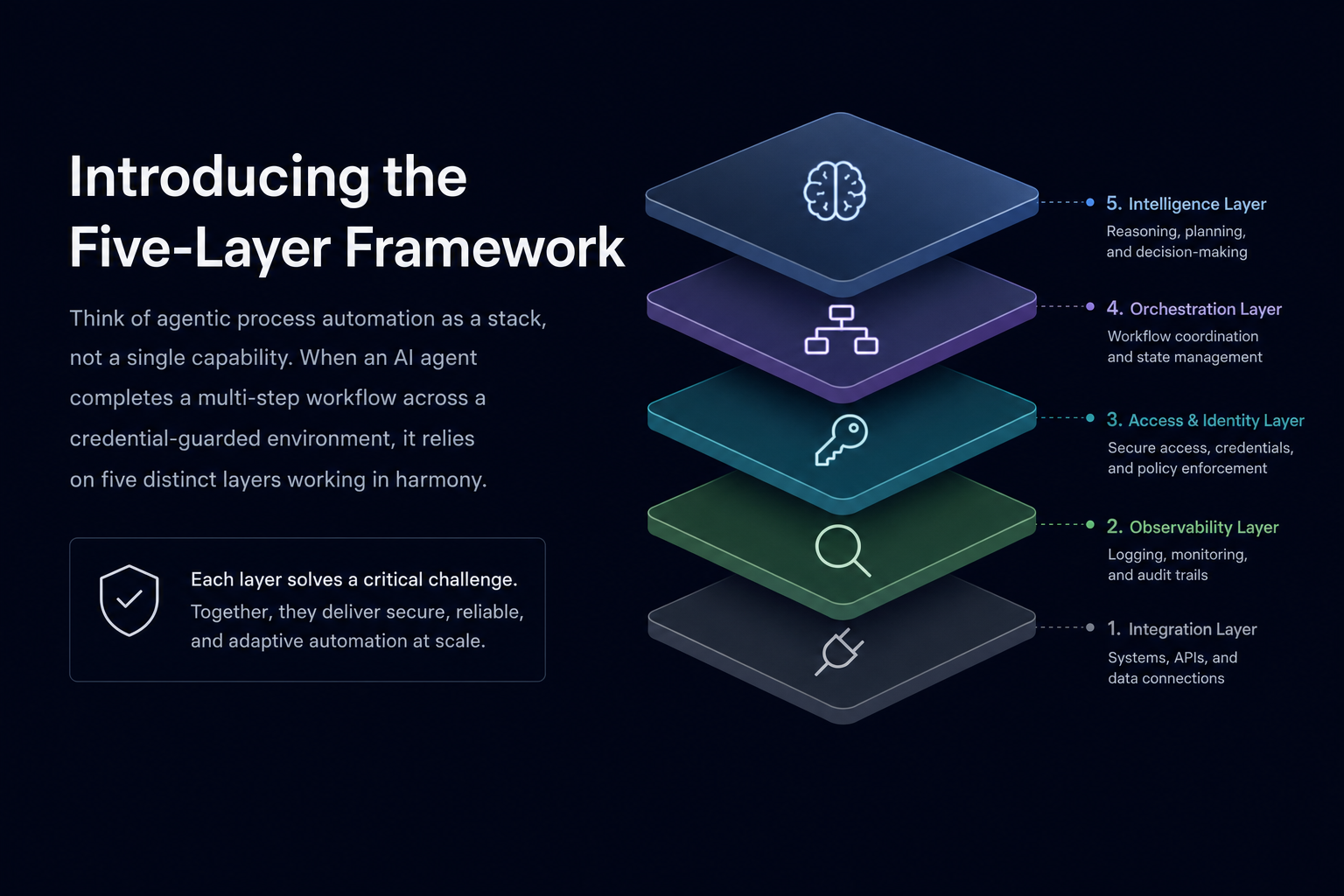
Most conversations about APA focus on what agents can do instead of how they do it. That framing works for early scoping, but it breaks down the moment a workflow hits production. A team that knows only that "the agent reads pages and fills forms" has no framework for debugging when the agent fails mid-session, no way to assess whether a given tool has the right architecture for their portal environment, and no basis for predicting where the system will need human intervention.
The five layers give that framework. They answer four questions any operations team should ask before committing to an APA approach:
- Where exactly does the automation perceive and interpret the environment it is working in?
- How does it convert a high-level goal into a specific sequence of actions?
- What happens when a step fails, a portal changes, or an authentication flow behaves unexpectedly?
- How does structured output get defined, validated, and delivered to downstream systems?
The sections below work through each layer in order, from perception at the bottom of the stack to output delivery at the top.
Layer 1: Perception
Perception is where agentic automation begins, and it's the layer that separates goal-directed agents from brittle scripts.
Traditional browser automation tools build a static map of a page at record time: selectors, XPath queries, DOM coordinates. When the portal changes, that map breaks, often silently. The script runs to completion, returns no error, and delivers nothing because the selector found no matching element. By the time an operator notices the downstream system hasn't received data, the portal may have already changed again.
An APA agent doesn't hold a cached map. It reads the live page visually at runtime, checking the actual page state as it appears at the moment of execution. That means a renamed button, a restructured form, or a new interstitial modal is just new input, not a fatal breakpoint.
What Perception Actually Covers
There are three distinct capabilities that make up the perception layer:
- Visual page reading: the agent reads the live page layout, not a pre-recorded selector map. Interactive elements are identified by appearance, position, and context, so a "Submit" button that moves columns or changes color is still recognizable.
- Live state evaluation: instead of assuming the page matches what was seen during setup, the agent checks actual page state at each step. This matters especially in multi-step flows where portals inject unexpected modals, session warnings, or CAPTCHAs between actions.
- Contextual element resolution: the agent reasons about the purpose of an element, not merely its position. A field labeled "NPI Number" on one payer portal and "Provider ID" on another resolves to the same intent, so the same workflow spec runs across both without modification.
Together, these capabilities let an APA agent handle the kind of portal variability that makes selector-based automation untenable at scale: layouts that change without notice, forms that differ across vendors, and pages that behave differently depending on session state. Operations teams managing eligibility checks across dozens of payer portals, or carrier quote workflows across 20+ logistics systems, see the most direct return from a perception layer built this way.
Layer 2: Reasoning
Layer 2 is where Agentic Process Automation (APA) moves beyond raw action execution into something more useful: the ability to reason about what to do next.
At the execution layer, an agent can click a button, fill a form, or extract a value from a page. Reasoning is what decides which button, which form, and what to do when the page looks different than expected. Without it, you have a sophisticated replay tool. With it, you have an agent that can handle the variability that real portals produce.
How Goal-Directed Planning Works in Practice
Reasoning in APA agents works through a planning loop. The agent receives a goal, reads the current page state, selects the next action most likely to advance toward that goal, executes it, then reassesses. This reflects how AI automation replaces fixed scripts with runtime decision-making, a pattern IBM describes as agentic workflows driven by autonomous decision-making at each step. This cycle repeats at every step instead of following a pre-recorded path.
That re-evaluation matters more than it might seem. Carrier portals add interstitial warnings. Payer portals restructure form fields after login. Government filing systems redirect mid-session. A recorded script has no mechanism to handle any of these, because it was built against a page that no longer exists. A reasoning layer treats each of those changes as new input and continues.
Three capabilities tend to separate shallow reasoning from production-grade reasoning:
- State awareness: the agent tracks where it is in a multi-step workflow and what has already been completed, so a session timeout mid-form doesn't restart the process from the beginning.
- Exception recognition: when the agent encounters an unexpected modal, a CAPTCHA, or a layout it hasn't seen, it identifies the condition as an exception instead of proceeding incorrectly, and either resolves it or escalates to a human.
- Goal decomposition: complex tasks get broken into sub-goals, each of which can be planned and verified independently before the agent moves to the next step.
Human judgment still matters here. Reasoning agents handle the deterministic parts of a workflow well, but outputs that feed critical decisions in compliance-sensitive workflows benefit from human review before action is taken downstream.
Layer 3: Planning
Planning is where agentic systems stop following instructions and start making decisions. An agent at this layer receives a goal, breaks it into a sequence of steps, determines what information it needs before it can act, and figures out what to do when a step fails or returns an unexpected result.
This is the layer that separates a script from an agent. A script executes a fixed path. A planning layer reads the current state, selects the next action, and adjusts when conditions change.
What Planning Actually Involves
Three capabilities define whether a planning layer is genuinely functional:
- Goal decomposition: the agent takes a high-level instruction ("get a freight quote for this shipment") and works out the sequence of sub-tasks required to complete it, including login, form navigation, data entry, and result extraction, without being told each step explicitly.
- State evaluation: before each action, the agent checks what the current page or system state actually is, not what it expected to find. If a session-timeout modal appears mid-workflow, a planning layer catches it and handles it instead of proceeding blindly.
- Exception routing: when a step fails or produces an ambiguous result, the planning layer decides whether to retry, take an alternate path, escalate to a human, or stop and surface the error with enough context to diagnose it.
Where Planning Breaks Down
Most planning failures are not random. They cluster around a few specific conditions worth knowing before building a workflow around any planning layer.
Portals that change their form structure or navigation flow mid-session are the most common source of planning failures. A planning layer that reads live page state visually at each step handles these; one that relies on a pre-recorded action map does not.
Long workflows with many dependent steps compound planning errors. A wrong assumption at step three produces incorrect inputs at step seven, and the failure often surfaces far from its origin, making it hard to trace. Planning layers that maintain a structured record of each decision and its inputs are considerably easier to debug than those that log only final outcomes.
Human-in-the-loop checkpoints still matter in high-stakes workflows. Before a submission triggers a financial transaction or a compliance record, human review of the planned action sequence catches errors that even a well-designed planning layer will occasionally miss.
Layer 4: Execution
Execution is where agentic plans meet real-world systems. Layers 1 through 3 handle perception, reasoning, and planning, but none of that matters if the agent cannot reliably act inside a browser, a desktop application, or an API endpoint. Layer 4 is the mechanism that closes that gap.
What Execution Actually Involves
Most people picture execution as clicking buttons and filling forms. That description is accurate but undersells the complexity. In portal-heavy workflows, a single execution sequence might involve working through a login page, handling a rotating 2FA prompt, waiting for a slow-loading data table, extracting structured results from an inconsistent layout, and recovering gracefully when any of those steps behaves differently than the previous run.
Three characteristics separate capable execution from brittle execution:
- Runtime page reading instead of pre-recorded selectors. An agent that reads the live page visually at each step can keep going when a portal restructures its layout. An agent relying on a saved selector map fails silently the moment an element moves.
- State-aware authentication handling. Portals that rotate credentials or 2FA on each session require the agent to reason about where it is in the auth flow, not replay a path it recorded once.
- Exception recovery without human escalation. Production workflows hit edge cases constantly. An execution layer that surfaces every unexpected state to a human operator does not scale. The agent needs a recovery strategy before it needs a human.
Where Skyvern Fits in the Execution Layer
Skyvern's execution model was built around these constraints. That execution model is the browser layer within Skyvern's broader Agentic Process Automation platform: reading pages visually is the mechanism, and credential management, approval gates, and audit trails are what make it production-grade. The agent reads the live page visually at runtime, uses goal-directed planning to sequence actions, works through authentication flows as they appear, and maps results to a defined output schema before returning them downstream. That last part matters: because the output schema is declared upfront, downstream systems receive consistent structured data regardless of which portal layout the agent encountered during the run.
This design means a layout change that would break a selector-based script is just new input to Skyvern. Each component reads live page state at runtime instead of failing against a stale assumption, though human review still matters before final submission on high-stakes workflows like prior authorizations or regulatory filings.
Layer 5: Learning and Adaptation
Two distinct forms of adaptation define this layer.
In-run adaptation is immediate. When the agent encounters an unexpected page state mid-session (a modal that wasn't there before, a field that resets on entry, a redirect that appears between form steps) it reads the current state, adjusts the action plan, and continues instead of stopping. This is reactive: the workflow survives the surprise.
Between-run learning works on a longer cycle. Each run produces a record of what the page looked like, what actions succeeded, and where exceptions fired. Over time, that accumulated history lets the system recognize patterns and apply them proactively on future runs. When an agent encounters a payer portal that adds an interstitial session-timeout warning mid-workflow, such as a modal that must be dismissed before the eligibility form loads, it retains that dismissal pattern and applies it on the next run against any portal in that payer group. The same applies to form validation quirks shared across a vendor's portal family, or login flows that rotate their 2FA prompt position after a UI update.
Why This Layer Matters in Production
The value here is not novelty; it's compounding reliability. A workflow that only handles what it was originally built for degrades over time as portals change. A workflow backed by both in-run adaptation and between-run pattern retention holds up across vendor updates, layout shifts, and authentication changes without requiring a developer to intervene each time.
For operations teams running hundreds of portal workflows across insurance payers, carrier quote systems, or government permit applications, that difference is the gap between automation that needs constant maintenance and automation that actually runs.
Human review still matters before final action on high-stakes submissions, but the recovery logic, state handling, and pattern recognition at this layer mean far fewer runs reach a human escalation in the first place.
How the Five Layers Form a Closed Loop
The five layers described above work because they reinforce each other in sequence. Perception feeds planning. Planning drives action. Action generates results that flow into integration. Integration surfaces edge cases that loop back through oversight. Nothing in that chain is optional, and no layer can compensate for a missing one.
Think of a prior authorization workflow spanning 40 payer portals. Layer one reads each portal visually, regardless of layout drift. Layer two reasons about what to do next when a modal or unexpected state appears mid-session. Layer three plans the correct sequence of form steps without a recorded path to follow. Layer four executes logins, 2FA prompts, and multi-page form submissions as live state problems, returning structured JSON to the practice management system whether the portal returned a PDF, a table, or a confirmation screen. Layer five retains patterns from each run and flags submissions that hit unexpected responses, applying what was learned on future runs against that payer group.
Remove any single layer and the workflow breaks in a specific, traceable way.
Where the Loop Closes
The closed-loop character is what separates Agentic Process Automation (APA) from earlier automation approaches, and understanding the APA maturity model helps teams gauge how far along this path they are. Traditional RPA scripts move in one direction: record, replay, report. When something outside the recorded path appears, the script fails and waits.
APA agents cycle. The oversight layer does more than catch failures; it generates signal that improves how the perception and planning layers handle future runs. Each new pattern the agent encounters gets absorbed into how it handles that portal group going forward. The loop is the product.
Operations teams managing portal-heavy workflows across insurance, logistics, and government filings are where this architecture earns its keep. Teams automating a single internal tool with a stable layout and an existing API will not see a return on the overhead this model introduces.
Governance, Audit, and Human-in-the-Loop Controls
As AI agents take on more consequential work, the question of who stays in control becomes as important as what the agent can do. Layer 5 covers the governance and oversight mechanisms that make agentic automation trustworthy enough to run in production environments where mistakes carry real costs.
Approval Gates and Human Handoffs
Not every step in a workflow should run autonomously. Some decisions, whether a payment above a certain threshold, a form submission to a government agency, or a data update affecting compliance records, warrant a human checkpoint before the agent proceeds. Well-designed APA systems build these approval gates into the workflow definition itself, so the agent pauses at a designated step, surfaces the relevant context, and waits for a human decision before continuing.
This is where the phrase "human-in-the-loop" moves from a marketing claim to an architectural requirement. The gate has to be a first-class workflow primitive, not an afterthought bolted on after the fact.
Audit Trails and Observability
Every agent run should produce a complete trace: which pages were visited, what actions were taken, what data was extracted, and what exceptions fired. This record serves two purposes. First, it gives operations teams a diagnostic instrument when something goes wrong. Second, it gives compliance teams the documentation they need when an auditor asks what happened and why.
In compliance-sensitive workflows, the audit trail is not optional. Teams reviewing explainable AI automation tools will find this layer especially relevant. Industries under compliance mandates need to show that a process ran within defined parameters, with human review at the right points, and with a recoverable record of every action taken.
Role-Based Access and Credential Governance
Governance also covers who can build, trigger, and modify workflows, and whose credentials are used to execute them. Credential storage, access scoping, and permission controls are the unsexy parts of Layer 5 that tend to matter most when something goes wrong. An agent that runs with credentials scoped beyond what the workflow needs creates unnecessary exposure. An agent whose workflow definition can be modified by anyone on the team creates a different kind of risk.
Human judgment still matters here. Governance tools set the guardrails; people still decide where those guardrails belong.
Applying the Five Layers Across Industries
The five layers of Agentic Process Automation (APA) are not an abstract framework. They show up differently depending on the industry, and understanding where each layer carries the most weight helps teams make better decisions about where to invest their automation effort.
Insurance and Healthcare
Portal sprawl hits hardest here. A mid-size insurer or healthcare network might maintain active workflows across dozens of insurance payer portals, each with its own login flow, session behavior, and form layout. The perception and planning layers do the heavy lifting: reading live page state at runtime, reasoning through 2FA prompts, and working through eligibility or prior authorization forms that change without notice. The workflow orchestration layer coordinates multi-portal processing in parallel instead of sequentially, which matters when a single authorization decision touches four or five payer systems. Human-in-the-loop controls still matter before final submission on high-stakes clinical workflows.
Logistics and Freight
Carrier portal workflows require the execution layer to move through portals that were never designed for programmatic access. The memory and learning layer earns its keep here: when a carrier portal adds a new interstitial screen or changes its rate confirmation layout, the agent retains that pattern and applies it on the next run against that carrier group. The output and integration layer delivers structured JSON rate data directly to a transportation management system, so downstream freight decisions happen on clean, consistent data instead of manually copied figures.
Legal and Government Filing
Court e-filing systems and government permit portals are some of the least predictable surfaces in production automation. Session timeouts mid-form, jurisdiction-specific validation rules, and multi-step document upload flows are all conditions the orchestration and execution layers handle together. Save-draft blocks keep workflow state across session breaks so a long government form doesn't have to restart from scratch after a timeout. Human review still matters before final filing on any document with legal consequence.
How Skyvern Operates Across All Five Layers
Skyvern is an Agentic Process Automation platform built to operate across all five layers simultaneously, which is what separates it from point solutions that handle only one or two of them. Browser execution is the mechanism; autonomous multi-step operation, structured output delivery, and governed handoff are the actual product.
At the perception layer, Skyvern reads pages visually at runtime instead of relying on selector maps or cached DOM snapshots. When a carrier portal restructures its layout or a payer portal adds an interstitial session-timeout warning, Skyvern sees the new state and continues instead of failing silently against a stale assumption.
Planning and Execution
At the planning layer, Skyvern converts a stated goal into a sequence of actions, reassessing at each step. This is not recorded replay. If a form validation rule changes mid-workflow, the agent reasons about the new constraint instead of running a fixed script into a dead end.
At the execution layer, authentication flows, 2FA prompts, and session-timeout modals are handled as they appear. Credential-guarded systems are a first-class concern, not an edge case patched after the fact.
Memory, Governance, and Human Handoff
At the memory layer, patterns persist across runs. When an agent encounters a portal that adds a new interstitial after login, it retains that dismissal sequence and applies it on the next run against the same portal group.
At the governance layer, every run produces a full trace: page state, action sequence, authentication steps, structured output, and any exception that fired. Approval gates and human-in-the-loop handoffs are built into the workflow spec, not bolted on afterward. For compliance-sensitive workflows where outputs feed critical decisions, that audit trail is the actual product.
Human review still matters before final submission on high-stakes runs, and Skyvern is designed to hand off cleanly when that moment arrives.
Code Example: Insurance Eligibility Check Across All Five Layers
The example below shows all five layers working together in a single Skyvern task. The output schema is defined upfront (structured output layer), credentials stay out of the LLM entirely (execution and governance layer), and the agent works through the auth flow and form as the page actually appears at runtime (perception and planning layers).
from skyvern import Skyvern
import asyncio

# Initialize with your API key — get yours at app.skyvern.com/settings
skyvern = Skyvern(api_key="YOUR_API_KEY")

async def run_eligibility_check():
    # Define the output schema upfront — downstream systems receive
    # consistent JSON regardless of which payer portal layout Skyvern reads
    eligibility_schema = {
        "type": "object",
        "properties": {
            "coverage_status": {
                "type": "string",
                "description": "Active, inactive, or pending"
            },
            "copay_usd": {
                "type": "number",
                "description": "Patient copay amount in dollars"
            },
            "deductible_remaining_usd": {
                "type": "number",
                "description": "Remaining deductible for the plan year"
            },
            "prior_auth_required": {
                "type": "boolean",
                "description": "Whether prior authorization is required for this member"
            }
        }
    }

    task = await skyvern.run_task(
        # Skyvern reads the live page visually at runtime — no selector map to maintain
        url="https://payerportal.example.com/eligibility",
        prompt=(
            "Log in, work through any 2FA prompt, and check eligibility "
            "for member ID 8675309. Extract coverage status, copay, "
            "deductible remaining, and whether prior auth is required. "
            "COMPLETE when the eligibility result is displayed."
        ),
        # Credentials stored in an encrypted vault — never passed to the LLM
        credential_id="cred_payer_portal",
        # TOTP code generated automatically from the stored vault secret
        totp_identifier="payer_portal_2fa",
        # Structured output schema — consistent JSON on every run
        data_extraction_schema=eligibility_schema,
        # Webhook delivers the result to your practice management system
        webhook_url="https://your-pms.example.com/webhooks/eligibility",
        wait_for_completion=True,
    )

    print(f"Run status: {task.status}")
    print(f"Extracted data: {task.output}")

asyncio.run(run_eligibility_check())
Because the output schema is declared before the run starts, the practice management system receives the same JSON structure whether the payer portal returned the result in a table, a PDF summary, or a confirmation screen. The authentication handling, exception recovery, and structured output delivery run without manual intervention, though human review still matters before acting on the data in high-stakes clinical workflows.
Final Thoughts on the Five Layers of Agentic Process Automation
Agentic Process Automation holds up in production because each layer handles a specific class of problems the others cannot. Perception reads what is actually on the page. Reasoning and planning decide what to do about it. Execution acts on those decisions in real portals with real authentication. Adaptation carries what was learned into the next run. Get one layer wrong and the whole workflow breaks in a way that is hard to trace, which is why the architecture matters before you build. Skyvern's APA platform is built on exactly this architecture. To see how it plays out on portals your team actually works with, book a demo with Skyvern.
FAQ
What is the difference between Agentic Process Automation and traditional RPA?
Traditional RPA records a fixed sequence of clicks and replays it. When a portal renames a button or restructures a form, the script breaks. Agentic Process Automation reads the live page state at runtime, reasons about what it sees, and adjusts when something unexpected appears, so a layout change is new input, not a fatal breakpoint. The practical gap shows up in maintenance: RPA teams spend 30 to 70% of their effort keeping existing bots working; APA agents handle portal variability without code changes between runs.
What's the fastest way to build a production APA workflow that handles authentication, exceptions, and structured output without maintaining selectors?
Define the output schema upfront using a data_extraction_schema parameter, store credentials once in an encrypted vault referenced by credential_id, and let the agent read the live page visually at each step: there are no selectors to patch when the portal changes. For TOTP-protected portals, pass a totp_identifier and the platform generates and enters the code automatically. Human review still matters before final submission on high-stakes workflows like prior authorizations or regulatory filings, but the authentication handling, exception recovery, and structured output delivery run without manual intervention.
How do the five layers of agentic process automation map to real portal workflows like insurance eligibility or government filings?
Each layer handles a distinct failure class: perception reads live page state so layout changes don't break the run; reasoning decides what to do next when a modal or CAPTCHA appears mid-session; planning breaks a high-level goal into sub-steps and routes exceptions; execution works through authentication flows and multi-page forms as they appear; and learning retains patterns (like a payer portal's interstitial session-timeout warning) and applies them on the next run. Remove any one layer and the workflow breaks in a specific, traceable way. For a 40-portal prior authorization workflow, all five run simultaneously on every execution.
Can Skyvern automate portal workflows that require two-factor authentication without exposing credentials to the LLM?
Yes. Credentials are stored in an encrypted vault outside the LLM layer, referenced by credential_id at runtime, and never passed to the model or visible in logs, screenshots, or prompts. TOTP codes are generated automatically from secrets stored in the vault; email-based OTP is supported via forwarding integration. The concrete limit: phone and SMS-based 2FA is not currently supported, so portals that mandate SMS or voice verification require a human handoff at the authentication step.
When does the five-layer APA framework add value, and when is it unnecessary overhead?
The five layers earn their keep when all four conditions apply: the target interface is a portal with no API, the workflow spans multiple dependent steps, the environment changes without notice, and the outputs feed important decisions downstream. Teams automating a single internal tool with a stable layout and an existing API won't see a return on the architecture. The visual-AI execution layer is built for portal sprawl and credential-guarded systems where brittle scripts fail constantly. If none of these four conditions apply, the overhead is unnecessary.
Keep reading
What Is Agentic Automation? The Ops Team Guide (July 2026)
Long gone are the days when 'automate it' meant recording a click path and hoping the portal never changed. That model breaks too often, costs too much to maintain, and falls apart the moment a vendor redesigns a form. Agentic automation takes a different architectural approach, and for ops teams managing portal-heavy workflows, the distinction matters considerably more than the marketing around it. Here's what it actually means and how to think about whether it fits your situation. TLDR: * A
RPA vs AI Agents: Comparing Methods and Choosing Right (July 2026)
The days of treating RPA and AI agents as two versions of the same thing are catching up with teams managing real production workflows. One replays a recorded sequence and breaks when the page changes. The other reads the current state of the page and reasons through whatever it finds. The comparison below maps out where each approach holds up, where it breaks, and how to match your actual workflow conditions to the right tool. TLDR: * RPA automates a fixed path and breaks silently when porta
APA Control Plane for Agentic Automation (July 2026)
If you're running agentic process automation across more than a handful of portals, the wall where individual agents fall short is familiar. State doesn't persist across session timeouts. Exceptions have nowhere to go. There's no audit trail when something goes wrong. APA control plane agentic process automation is the infrastructure layer that solves those problems, and understanding how it works changes how you think about building automation that actually holds up in production. Skyvern is an
Put the browser to work
Use Skyvern for the work that lives in a browser.
Turn repetitive browser tasks into reliable workflows with Skyvern.