The Case for Agentic Process Automation in 2026
 Suchintan Singh18 min read
The portals your team depends on most, insurance payer systems, carrier quote platforms, government permit applications, were built for people, not for automation scripts. Every time one of them changes, someone pays for it in maintenance hours or broken workflows. Agentic process automation takes a different architectural approach entirely, and the business case for making that switch is clearest when you look at where traditional automation keeps failing the same way for the same reason. This is the class of problem Agentic Process Automation (APA) platforms were built to solve, where browser execution is the mechanism, but autonomous multi-step operation, exception handling, and structured output delivery are the actual product.
TLDR:
- RPA bot failures are often silent: the script completes, returns no error, and delivers nothing because the selector found no match.
- Agentic Process Automation (APA) agents read the live page state at runtime instead of replaying a recorded path, so layout changes don't break the workflow.
- The business case for APA rests on three levers: labor cost avoidance, error reduction, and scaling transaction volume without proportional headcount.
- Pilots succeed because environments hold still; production deployments fail when portals rotate login flows, add 2FA prompts, or push layout updates mid-run.
- Governance isn't optional in APA: every run should produce a full trace covering page state, actions taken, authentication steps, and structured output.
- Skyvern is an APA platform built for portal-heavy workflows across 10 or more external systems where layouts change without notice and non-technical teams own the process.
Why Traditional RPA Falls Short
RPA was built for a specific kind of problem: repetitive, rule-based tasks running against stable, structured systems. When back-office software stayed consistent and IT teams could maintain integration scripts, that worked well enough. But the workflows that still consume the most manual labor in today don't look like that.
Most of the processes operations teams want to automate today run on web portals that have no API, require credential-based authentication, and change layout without any warning. Insurance payer portals, carrier quote systems, government permit applications, and vendor onboarding platforms all fall into this category. They were built for humans, not for selector-based bots.
Where the Architecture Breaks Down
RPA tools record interactions using DOM selectors or XPath references, then replay those recordings. The fundamental problem is that this approach assumes the page you recorded is the page you'll encounter on every future run. Portals don't hold that assumption.
When a vendor updates their layout, renames a button, or restructures a form, selector-based tools fail. And the failure is often silent: the script runs to completion, returns no error, and delivers nothing, because the selector found no matching element and the tool had no fallback logic. By the time someone notices the downstream system hasn't received data, the portal may have already rotated its layout again.
The maintenance burden compounds from there. 45% of companies face weekly bot breakdowns, and RPA teams spend 30-70% on maintenance instead of building new automation. For organizations managing dozens of external portals, that math becomes untenable fast.
The Credentials and Authentication Gap
Authentication is where traditional RPA runs into a wall that has no architectural solution. Static credential storage works until portals rotate session tokens, introduce 2FA prompts, or add interstitial modals that weren't there during the recording. Scripts that were built to replay a clean login path have no way to handle what they haven't seen.
This isn't a configuration problem. It's a structural one. A tool built on recorded replay cannot reason about authentication state. It can only match what it has already seen, which means every new security measure or session behavior the portal introduces becomes a manual maintenance task.
Operations teams running portal-heavy workflows typically end up with a dedicated RPA developer whose job is largely keeping broken bots from falling further behind. That's the ceiling the architecture imposes, and it's the condition Agentic Process Automation was built to replace.
What Agentic Process Automation Is
Agentic Process Automation (APA) is a category of workflow automation where AI agents plan, execute, and recover from multi-step processes without requiring human intervention at each step. Where traditional automation replays recorded actions, an APA agent reads the current state of a page, decides what to do next, handles exceptions as they arise, and delivers structured output when the work is done.
The distinction matters in practice. A recorded script assumes the page it sees today is the page it will see tomorrow. An APA agent makes no such assumption.
The Four Components That Define APA
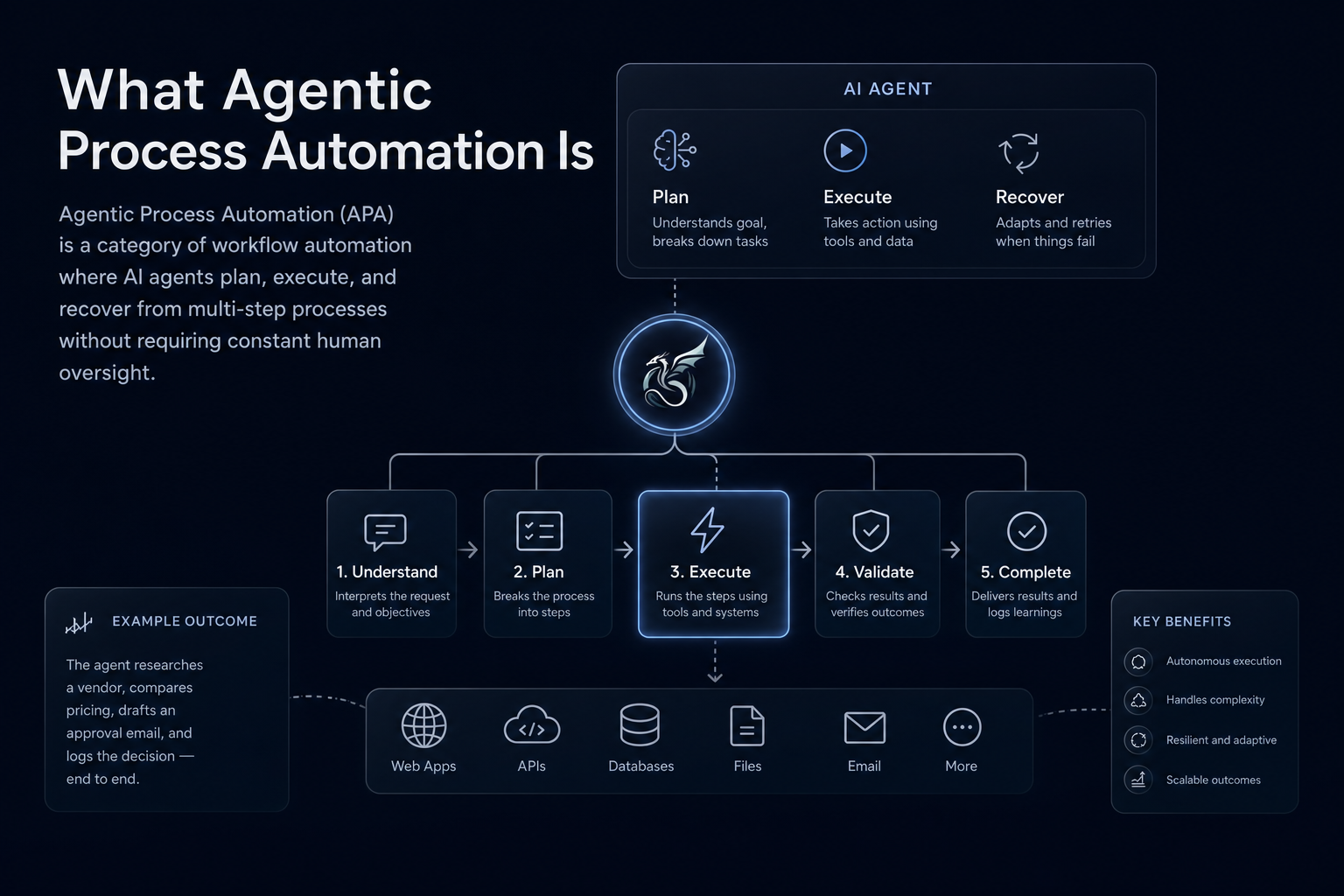
APA systems share a common architecture built from four connected parts:
- A runtime page reader that reads what is actually on screen instead of matching against a stored selector map, so layout changes do not break the workflow
- A goal-directed planner that converts a stated objective into a sequence of actions, re-checking at each step instead of replaying a fixed path
- An authentication handler that works through login flows, 2FA prompts, and session-timeout modals as they appear, reasoning about state instead of pattern-matching against a script
- A structured output extractor that maps results to a defined schema before returning them downstream, so receiving systems get consistent data regardless of which portal layout the agent encountered
Together, these four components explain why APA handles the class of workflows where traditional automation consistently breaks: credential-guarded portals, frequently changing layouts, and multi-step processes where exceptions appear mid-run and not at predictable points.
How APA Differs from RPA
Agentic Process Automation (APA) and Robotic Process Automation share a surface-level similarity: both automate repetitive work that humans would otherwise do manually. But the architectural gap between them is considerable, and it shows up immediately in production.
RPA browser automation works by recording and replaying interactions with a user interface. A bot is scripted to click a specific button at a specific location, fill a specific field by its selector ID, and follow a predetermined path through a workflow. When the underlying application changes, even slightly, the bot breaks. 45% of companies face weekly bot breakdowns, and RPA teams spend 30-70% of their effort maintaining bots instead of extending automation coverage.
APA takes a different architectural approach entirely. Instead of a recorded path, an APA agent receives a goal. It reads the live page state visually, reasons about what it sees, decides what action to take next, and adapts when the page changes. There is no selector map to maintain. If a portal renames a button or restructures a form, the agent reads the new layout and keeps working.
Dimension | Traditional RPA | Agentic Process Automation (APA) |
|---|---|---|
Execution model | Records and replays fixed selector-based paths | Reads live page state at runtime; re-checks at each step |
Layout change response | Silent failure: script runs, returns no error, delivers nothing | Treats layout change as new input; keeps working |
Authentication handling | Breaks on rotating 2FA, session-timeout modals, or new interstitials | Reasons about auth state at runtime; handles prompts as they appear |
Maintenance burden | 30-70% of RPA team effort spent maintaining broken bots | Near-zero layout-driven maintenance; no selector map to update |
Who can own the workflow | Requires a developer to script and repair paths | Non-technical ops leads can define workflows in plain language |
Exception handling | Bolted on; no recovery path for unanticipated states | Built into the execution model; mid-workflow exceptions are handled inline |
Three Concrete Consequences Worth Naming
The architectural difference produces concrete outcomes that matter to operations teams:
- Maintenance burden shifts from reactive to near-zero. RPA scripts require a developer every time an upstream portal changes. An APA agent re-reads the page at runtime, so layout drift does not generate a support ticket.
- Non-technical teams can own the automation. Because goal-directed agents do not require scripted paths, an ops lead can define a workflow in plain language without handing a specification to an engineer.
- Exception handling is built into the execution model, not bolted on. When a payer portal adds an interstitial session-timeout warning mid-workflow, an APA agent reasons about the new modal and works through it. A selector-based script has no recovery path for what it was never programmed to expect.
RPA was built to answer "can you automate this?" APA was built to answer "can you automate it reliably, across systems that change without warning, without a developer on call?" Those are different questions, and they require different architectures. Skyvern is an Agentic Process Automation platform, browser execution is the mechanism that lets it operate portals with no API, and the APA layer is what makes it production-grade: credential management, approval gates, audit trails, and exception escalation built into the execution model from the start.
Where APA Creates the Strongest Business Value
The business case for Agentic Process Automation (APA) concentrates in a handful of specific conditions. Not every workflow benefits equally, and knowing where APA delivers the most value helps teams decide where to deploy it first.
Portal-Heavy Industries With No API Coverage
Insurance, logistics, healthcare, and government contracting run on portals that have no API and no intention of building one. Every eligibility check, carrier quote, permit application, and prior authorization requires someone to log in, work through authentication, fill a form, and extract a result. APA agents handle these workflows without code that breaks when a portal updates its layout, making them the highest-return deployment target for most operations teams.
High-Volume Repetitive Work Across Fragmented Systems
When a team processes hundreds or thousands of similar transactions daily across different systems, the compounding cost of manual effort is where APA's return becomes clearest. A freight brokerage running quotes across 30 carrier portals, or a billing team checking eligibility across 40 payer systems, faces volume that human labor cannot match at the pace the business requires.
Workflows Where Audit Trails Matter
Compliance-sensitive workflows benefit from APA's structured output and logging in ways that manual processes and brittle scripts cannot match. Every run produces a traceable record: page state, actions taken, authentication steps, and output delivered. For operations teams in compliance-sensitive environments, that audit trail is part of the product.
Processes That Currently Require Dedicated Headcount to Maintain Scripts
If a team has an engineer whose primary job is keeping automation scripts from breaking every time a vendor updates a portal, APA eliminates the maintenance burden that consumes that headcount. The visual runtime approach means a layout change is new input for the agent, not a breakpoint requiring a developer fix. That is a structural constraint that affects every RPA tool reviewed in our today guide, regardless of how well the initial scripts were written. That freed-up engineering capacity can then go toward building new automation coverage instead of defending existing workflows against portal drift.
Human judgment still matters in high-stakes contexts, and APA works best when it handles the execution layer while people review outputs that feed critical decisions.
Quantifying the APA Business Case
Translating automation potential into financial terms is where APA initiatives tend to win or lose internal approval. The numbers, though, are worth laying out carefully because the value surfaces in three distinct places: labor cost avoidance, error reduction, and scale capacity that headcount alone cannot deliver.
Labor Cost Avoidance
The most direct line item is time. Portal-heavy workflows, whether insurance eligibility checks, carrier quote retrieval, or government permit filings, can routinely consume 15 to 40 minutes of staff time per transaction when done manually. Understanding the scope of AI automation in these workflows is the starting point for building a credible cost case. At volume, that compounds fast. A team processing 500 eligibility checks per week at 20 minutes each can burn roughly 167 staff hours weekly on a single workflow type. Agentic Process Automation (APA) runs those same checks in the background, without queuing, without fatigue, and without the throughput ceiling that human capacity imposes.
Error Reduction and Downstream Cost
Manual data entry across portal interfaces carries a consistent error rate, and in workflows where outputs feed important decisions, such as billing submissions or compliance filings, a single error can trigger rework cycles that cost far more than the original task. APA agents read the live page visually and write structured output to a defined schema, which removes the transcription step where most errors originate.
Scale Without Proportional Headcount
The third value lever is the one that tends to move finance teams. With manual or script-based approaches, volume growth requires proportional hiring. APA workflows scale concurrently, so a team managing 500 transactions per month can move to 5,000 without a corresponding staff increase, provided the underlying workflow is stable and the agent handles exception escalation correctly (which still requires human review on edge cases before final action).
Together, these three levers make APA attractive to operations teams at insurers, logistics brokers, and healthcare networks where portal sprawl and transaction volume have outgrown what manual processes or brittle scripts can handle.
The Pilot-to-Production Gap
The gap between a working pilot and a production deployment is where most automation initiatives stall. A proof of concept runs cleanly in a controlled environment, hits its targets, and earns sign-off. Then it goes to production and the real conditions show up: portals that rotate their login flows, forms that add new validation fields after a vendor update, workflows that need to run concurrently across dozens of accounts instead of sequentially against one.
Traditional RPA and script-based automation have no architectural answer to this. The pilot worked because the environment held still. Production doesn't hold still.
Why Pilots Succeed and Production Fails
Three conditions separate pilot success from production durability:
- Pilot environments are often stable test instances or sandboxed portals that don't reflect the layout instability, session rotation, and authentication edge cases that appear in live systems at volume. A script that runs cleanly against a static environment will encounter a different page the first time a vendor pushes an update.
- Pilots typically run sequentially, one workflow at a time. Production requires concurrency across hundreds or thousands of simultaneous runs, which surfaces race conditions, credential conflicts, and portal rate limits that a single-threaded test never touches. Organizations working through this transition often find an APA maturity model useful for staging their deployment approach.
- Pilots rarely test exception handling at the boundary cases that matter: a modal that appears mid-workflow, a 2FA prompt that rotates on each session, a form that adds a required field after the pilot was designed. These are the conditions that break production deployments within weeks.
Agentic Process Automation (APA) is built with these production conditions as first-class concerns, not edge cases to patch after launch. Because an APA agent reads the live page visually at runtime instead of replaying a recorded selector path, a layout change is new input, not a fatal breakpoint. Because exception handling is built into the execution model, a mid-workflow modal gets worked through without causing a silent failure that only surfaces hours later when the downstream system hasn't received data.
To be clear: APA doesn't eliminate the pilot-to-production gap entirely. Complex multi-system workflows still require careful configuration, and edge cases that require genuine human judgment still need approval gates built into the workflow design. But the gap narrows considerably when the execution layer is built for production variability from the start, not retrofitted to handle it after the first wave of breakages.
Governance, Risk, and Human Oversight
Agentic Process Automation operates at a layer where mistakes carry real consequences. When an agent submits a form, transfers data between systems, or triggers a downstream workflow, a silent failure or a misconfigured output can ripple through an entire operation before anyone notices. That's why governance isn't a feature you add to APA after the fact; it's an architectural requirement from the start.
The business case for APA depends on organizations being able to answer three questions with confidence: What did the agent do? Who approved it? And what happens when something goes wrong?
Audit Trails and Traceability
Every APA run should produce a full trace covering page state, action sequence, authentication steps, structured output, and any exception that fired. This isn't about record-keeping for its own sake. In compliance-sensitive workflows, an audit trail is the difference between a process that can be reviewed by a regulator and one that cannot. Finance teams matching vendor payments, HR teams processing benefits changes, and logistics teams submitting carrier filings all operate in environments where the answer to "what happened on that run?" needs to be retrievable and unambiguous, which is why explainable AI automation tools have become a priority for compliance teams.
Human-in-the-Loop Design
Autonomy and oversight aren't in opposition. Well-designed APA workflows include approval gates at the steps where human judgment still matters, and escalation paths when the agent encounters a condition it wasn't built to handle. For high-stakes submissions, such as prior authorizations, legal filings, or financial transactions, human review before final submission isn't a limitation of the system. It's the correct architecture for the risk level involved.
Risk Calibration by Workflow Type
Not every workflow carries the same risk profile, and governance controls should reflect that.
- Read-only data retrieval workflows, like pulling an eligibility status from a payer portal, carry low consequence if they fail. A retry handles it.
- Write workflows that submit forms or trigger external actions require more caution: structured output schemas, exception escalation, and in many cases a human checkpoint before the action fires.
- Workflows that touch sensitive data (healthcare records, financial account details, personally identifiable information) require full audit trails, role-based access controls, and in some deployment contexts, HIPAA-capable infrastructure. These are core considerations when assessing authentication-handling automation platforms for enterprise use.
The governance layer doesn't slow APA down. It's what makes the business case defensible to legal, compliance, and risk stakeholders who would otherwise block deployment.
How to Build the Internal Business Case
Building a compelling internal case for Agentic Process Automation (APA) requires more than a cost comparison. Decision-makers need to see the full picture: where manual processes are bleeding hours and headcount, where brittle scripts are generating maintenance debt, and where the compounding risk of doing nothing grows quietly in the background.
Four elements tend to move approvals forward.
Map the Actual Cost of the Status Quo
Before proposing anything, document what the current workflow actually costs. That means capturing loaded labor hours (salary plus benefits, management overhead, and error correction time), the frequency of exceptions that escalate to senior staff, and the downstream cost of delays. Operations teams often find that a process "taking 15 minutes" actually consumes 45 when you count verification, rework, and the handoffs in between.
Identify the Right Pilot Workflow
A good pilot has three qualities: it runs frequently enough to generate measurable data quickly, it involves enough manual steps that automation produces a visible time delta, and it does not require a policy change to automate. Carrier quote collection, insurance eligibility checks, and permit status lookups all tend to check these boxes because they are high-volume, portal-bound, and structurally repetitive, the same conditions that define strong use cases for intelligent process automation.
Quantify the Maintenance Burden of Existing Automation
If your team already runs RPA scripts or custom browser automation, pull the maintenance logs. RPA teams can spend between 30 and 70 percent of their effort maintaining bots as portals change. That number belongs in your business case, because it reframes APA not as a new cost but as a replacement for a hidden one.
Frame the Risk of Delay
Every quarter of manual processing on a high-volume workflow is a quarter of compounding exposure: data entry errors, compliance gaps, and staff time that could have gone elsewhere. Framing inaction as a cost, and a real one, beyond the missed opportunity, changes how the proposal lands with finance and leadership.
Human review still matters on outputs that feed critical decisions, and your business case should say so plainly. Stakeholders are more likely to approve a governed, auditable automation program than one that implies full autonomy where regulators or risk managers would push back.
Skyvern for Portal-Heavy APA Workflows
Skyvern is an Agentic Process Automation (APA) platform built for the class of workflow that breaks every other approach. It targets portal-heavy operations where there is no API, credentials rotate, layouts change without warning, and the team responsible cannot maintain code.
The core architecture has four connected components working together:
- A visual page reader that reads the live page state at runtime, not a cached selector map
- A goal-directed planner that converts a stated objective into a sequence of actions, re-checking at each step
- A credential and authentication handler that works through login flows, 2FA prompts, and session-timeout modals as they appear, reasoning about state
- A structured output extractor that maps results to a defined schema before returning them downstream
A layout change that would silently break a selector-based script is just new input here, each layer re-reads at runtime instead of failing against a stale assumption.
Code Example: Insurance Eligibility Check Across Payer Portals
Below is what a Skyvern-powered eligibility check looks like in practice. The agent logs into the payer portal, works through any 2FA prompt, retrieves the member's coverage data, and returns a structured result, with no selector map to maintain when the portal updates its layout.
import asyncio
from skyvern import Skyvern

# Initialize with your API key — store this in an environment variable in production
skyvern = Skyvern(api_key="YOUR_API_KEY")

async def check_insurance_eligibility(member_id: str, payer_portal_url: str):
    task = await skyvern.run_task(
        url=payer_portal_url,
        prompt=(
            f"Log into the portal using the stored credentials. "
            f"Check eligibility for member ID {member_id}. "
            f"COMPLETE when you have retrieved coverage status, copay, and deductible remaining."
        ),
        # Define the output schema upfront — downstream systems receive consistent JSON
        # regardless of which portal layout the agent encountered during the run
        data_extraction_schema={
            "type": "object",
            "properties": {
                "coverage_status": {
                    "type": "string",
                    "description": "Active, inactive, or pending"
                },
                "copay_usd": {
                    "type": "number",
                    "description": "Copay amount in USD"
                },
                "deductible_remaining_usd": {
                    "type": "number",
                    "description": "Remaining deductible in USD"
                },
                "plan_name": {
                    "type": "string",
                    "description": "Name of the insurance plan"
                }
            }
        },
        # totp_identifier routes 2FA codes to this run when the portal prompts for them
        totp_identifier="eligibility-ops@yourorg.com",
        # Deliver results to your system without polling
        webhook_url="https://your-system.example.com/webhooks/eligibility",
        # Block until the run completes for synchronous workflows
        wait_for_completion=True,
    )
    return task.output

# Run a single eligibility check
result = asyncio.run(check_insurance_eligibility(
    member_id="8675309",
    payer_portal_url="https://payerportal.example.com/eligibility"
))
print(result)
# {"coverage_status": "active", "copay_usd": 25.0, "deductible_remaining_usd": 850.0, "plan_name": "BlueCross PPO"}
Because the output schema is defined upfront, your receiving system gets the same JSON structure regardless of whether the portal updated its layout between runs. The totp_identifier parameter routes 2FA codes to this specific run when the portal prompts for them, and the webhook_url delivers the result asynchronously so your system does not need to poll for status on high-volume workflows.
Where This Fits in Practice
The workflows Skyvern handles most often share a few conditions:
- Portal sprawl across 10 or more external systems, each with its own login, layout, and authentication flow, where maintaining scripts across all of them is untenable, a gap the best AI RPA platforms are increasingly designed to close.
- Credential-guarded processes like insurance eligibility checks, carrier quote retrieval, and government permit filings, where 2FA and session management are first-class problems, not edge cases.
- Compliance-sensitive workflows where every run needs a full audit trail, approval gates, and structured output that downstream systems can consume without manual reformatting.
- Non-technical teams who own the process but cannot debug broken automation code every time a vendor updates their portal.
Skyvern, though, is not the right fit for every automation problem. Teams automating a single internal tool with a stable layout and an existing API will not see a return on the setup investment. The visual-AI layer is built for layout instability and credential sprawl; if neither applies, the overhead is unnecessary.
Human judgment still matters in high-stakes submissions. Outputs feed important decisions, and for compliance-bound workflows, human review before final action remains the right boundary.
Final Thoughts on Why Agentic Process Automation Outperforms Traditional RPA
Selector-based tools were built for a world where portals held still. That world does not exist for most operations teams anymore. The workflows that still consume the most manual labor in today run on credential-guarded systems that change without notice, and the architecture that handles them reliably is not the one built on recorded replay. Skyvern's Agentic Process Automation platform is built for exactly this condition, portal sprawl, credential complexity, and layout instability that makes script maintenance untenable. If a pilot-to-production gap or a mounting maintenance burden sounds familiar, talking through a specific workflow with Skyvern is a good place to start.
FAQ
Will Agentic Process Automation handle portal authentication if our payer or carrier systems rotate 2FA on every session?
Yes: an APA agent reasons about authentication state at runtime instead of replaying a recorded login path, so rotating 2FA prompts are handled as they appear without causing a silent failure. Skyvern supports authenticator-app TOTP and email-based OTP workflows natively; the concrete limit is that phone/SMS/voice-based 2FA is not currently supported, so portals that require SMS or voice verification codes need to be validated during a proof-of-concept before committing to production.
Agentic Process Automation vs. RPA for portal-heavy insurance and healthcare workflows?
APA is the stronger fit when portals change layout without warning, require credential-guarded authentication, or need to run at volume across dozens of systems simultaneously, conditions where RPA's selector-based replay model breaks and generates ongoing developer maintenance. RPA can work well for stable, internal back-office systems that expose consistent interfaces; for carrier quote portals, payer eligibility checks, and government filings that will never hold still, the architectural gap between the two approaches is too wide to close with configuration alone.
How do I build the internal business case for an Agentic Process Automation initiative?
Start by documenting the loaded cost of the status quo: actual staff hours per transaction including verification and rework, beyond the nominal task time. Then pull maintenance logs from any existing RPA or script-based automation. RPA teams can spend between 30 and 70 percent of their effort maintaining bots as portals change, and that figure belongs in the business case as a hidden cost being replaced, not a new cost being added. Pair that with a pilot workflow that runs frequently enough to generate measurable data quickly, such as carrier quote collection or insurance eligibility checks, where the time delta from automation is visible within weeks.
What is the pilot-to-production gap in APA deployments, and how does it affect our rollout plan?
The pilot-to-production gap is the failure pattern where an automation proof-of-concept runs cleanly in a controlled environment but breaks when it hits live conditions: portal layout instability, concurrent runs across dozens of accounts, and authentication edge cases that sandboxed test instances never surface. APA platforms narrow this gap because the execution layer reads live page state at runtime instead of replaying a recorded selector path, so a layout change is new input, not a fatal breakpoint, though complex multi-system workflows still require careful configuration, and edge cases requiring genuine human judgment need approval gates built into the workflow design before go-live.
When does Agentic Process Automation deliver the strongest return, and when is it the wrong tool?
APA delivers the clearest return when a team is processing high volumes of similar transactions across multiple external portals with no API, where layouts change without notice and maintaining scripts requires dedicated engineering headcount. It is not the right fit for teams automating a single internal tool with a stable layout and an existing API, the visual-AI execution layer is built for portal sprawl and credential complexity, and if neither applies, the setup overhead adds cost without adding value.
Keep reading
What Is Agentic Automation? The Ops Team Guide (July 2026)
Long gone are the days when 'automate it' meant recording a click path and hoping the portal never changed. That model breaks too often, costs too much to maintain, and falls apart the moment a vendor redesigns a form. Agentic automation takes a different architectural approach, and for ops teams managing portal-heavy workflows, the distinction matters considerably more than the marketing around it. Here's what it actually means and how to think about whether it fits your situation. TLDR: * A
RPA vs AI Agents: Comparing Methods and Choosing Right (July 2026)
The days of treating RPA and AI agents as two versions of the same thing are catching up with teams managing real production workflows. One replays a recorded sequence and breaks when the page changes. The other reads the current state of the page and reasons through whatever it finds. The comparison below maps out where each approach holds up, where it breaks, and how to match your actual workflow conditions to the right tool. TLDR: * RPA automates a fixed path and breaks silently when porta
APA Control Plane for Agentic Automation (July 2026)
If you're running agentic process automation across more than a handful of portals, the wall where individual agents fall short is familiar. State doesn't persist across session timeouts. Exceptions have nowhere to go. There's no audit trail when something goes wrong. APA control plane agentic process automation is the infrastructure layer that solves those problems, and understanding how it works changes how you think about building automation that actually holds up in production. Skyvern is an
Put the browser to work
Use Skyvern for the work that lives in a browser.
Turn repetitive browser tasks into reliable workflows with Skyvern.