OIG Exclusion List (LEIE): How to Run the Monthly Check for Your Whole Roster

The OIG exclusion list, officially the List of Excluded Individuals/Entities (LEIE), is the HHS Office of Inspector General's list of people and organizations barred from Medicare, Medicaid and all other federal health care programs (OIG). If your organization bills those programs, you need to know that nobody you employ or contract with is on it, when you hire them and every month after.
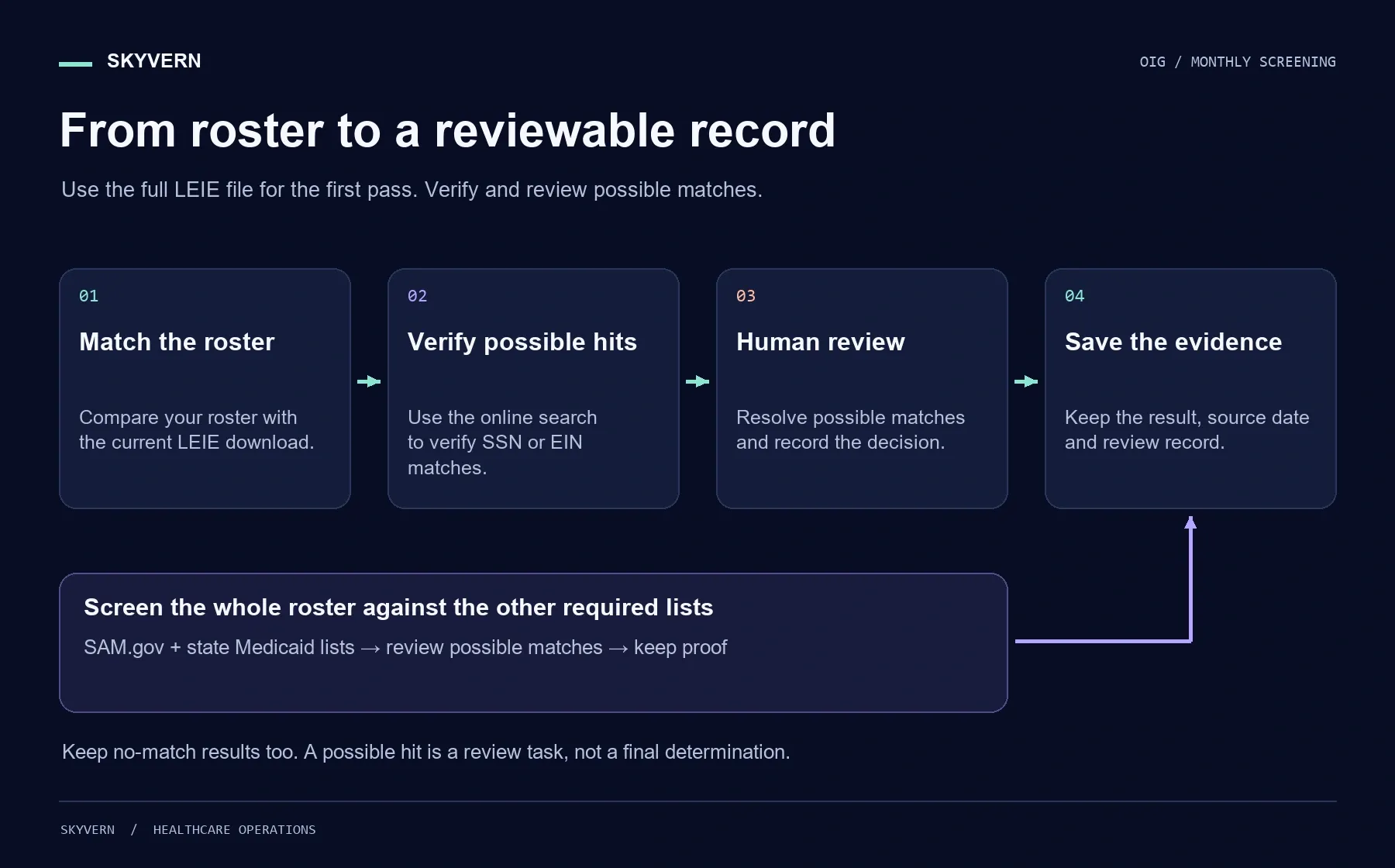
OIG publishes the list in two forms: a free CSV file you can download, and an online search that takes up to five names at a time. Neither one runs the monthly check for you. This guide covers the routine we recommend for a credentialing or compliance team with a roster of any size. You match the download against your roster, verify possible matches in the online search, file proof of every check, cover SAM.gov and your state lists, and send every possible match to a person. The last step shows how to run the browser part of that routine on a schedule with Skyvern.
When you finish, you'll have a monthly check that covers everyone on the roster, a dated record of each search, and a rule that no possible match is cleared without a person looking at it.
What happens if you employ someone on the list
Federal health care programs won't pay for any item or service an excluded person furnishes, orders or prescribes. OIG says the payment ban applies to anyone who employs or contracts with that person, no matter who submits the claim, and it covers administrative and management work as well as patient care (OIG Exclusions FAQ).
The fines come on top of the lost payments. Under the Civil Monetary Penalties Law, an organization that employs or contracts with someone it "knows or should know is excluded" faces a penalty of up to $20,000 for each item or service, plus an assessment of up to three times the amount claimed (42 U.S.C. 1320a-7a). The "should know" wording is why you should a dated record of every check, including the ones that find nothing.
Who to check, and when in the month
Check everyone before you hire or contract with them, then check the whole roster every month, after OIG's mid-month update.
OIG tells health care organizations to "routinely check the LEIE to ensure that new hires and current employees are not on the excluded list" (OIG). Because the payment ban reaches contractors and administrative staff, the roster should include contractors, vendors and non-clinical employees, not only clinicians.
If you bill Medicaid, monthly is the expected cadence. In a 2009 letter to state Medicaid directors, CMS said states should require providers to search the OIG website monthly, and that states with their own exclusion lists should remind providers to search those whenever they search the LEIE (CMS SMDL #09-001). Your state's provider agreement may set its own rules, so check it too.
OIG says both versions of the LEIE are "generally updated by the middle of each month," and each update covers the actions from the month before (OIG Exclusions FAQ). A check run on November 1, for example, uses the October update, which only includes actions through the end of September. Schedule yours after the mid-month update, and confirm the Last Update date on the download page before you start. OIG also offers email notifications when the LEIE is updated, through a link at the bottom of its pages.
Before you start
Gather these before the first run:
- A roster export. Full legal name, any other names used (maiden names, previous names), date of birth and NPI for each person. For organizations you contract with, the business name and EIN.
- SSNs, kept where they are. You only need a person's SSN to verify a possible match. Leave SSNs in your HR system and pull one only when Step 2 needs it.
- Owners for each part. Decide who can see SSNs, who reviews possible matches, and who signs off on the month.
- A written policy. Which lists you check, how often, who reviews hits, and where the records are filed.
- A place for the records. A folder or storage bucket with access limited to the people above.
Step 1: Download the LEIE and match it against your roster
For anything beyond a handful of names, the free download is the fastest first pass. OIG itself suggests downloading the list and using a spreadsheet or database when you need to search a large number of names (OIG Exclusions FAQ).
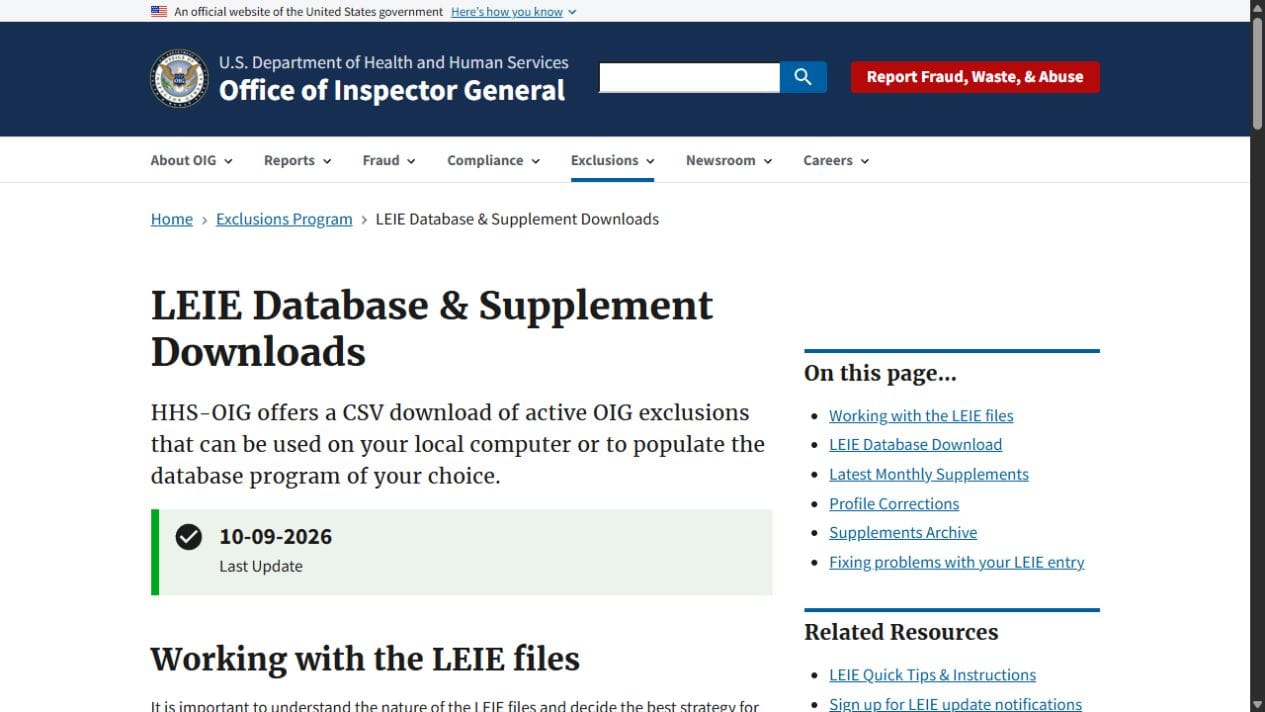
- Open OIG's LEIE Database & Supplement Downloads page and note the Last Update date.
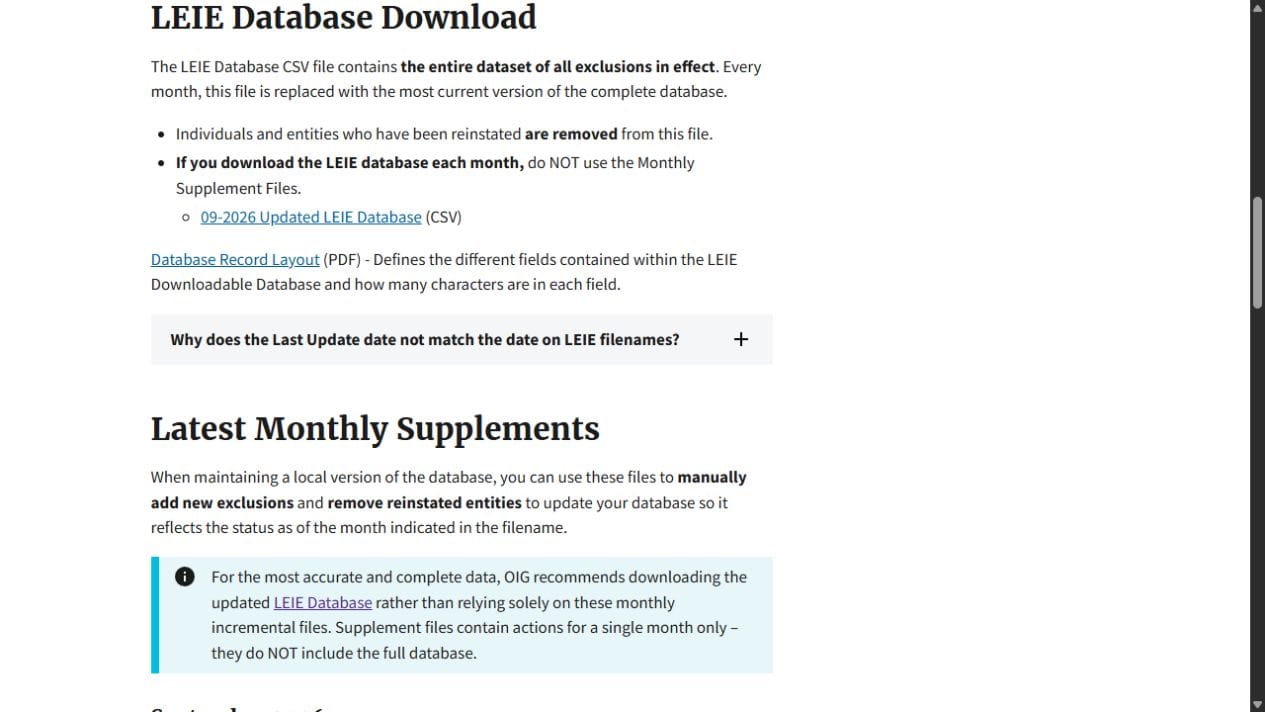
- Download the full LEIE Database CSV. OIG replaces this file every month with the complete list of current exclusions, and it removes people who have been reinstated.
- Skip the monthly supplement files. OIG says that if you download the full database each month, you shouldn't apply the supplements on top of it.
- Match your roster against the file on last name and first name, then compare date of birth and NPI wherever the LEIE record has them.
A name hit from this file is only a possible match. The download contains no SSNs, because the Privacy Act prohibits OIG from distributing them, so the file can't tell two people with the same name apart.
You should now have a list of possible matches, which may well be empty. Everyone else on the roster has cleared this month's OIG check.
Step 2: Verify each possible match in the online search
Only the online search can confirm a match, because it checks the SSN or EIN you enter against the excluded record (OIG Exclusions FAQ).
- Open the LEIE online search.
- Enter the name. You can search up to five names at once.
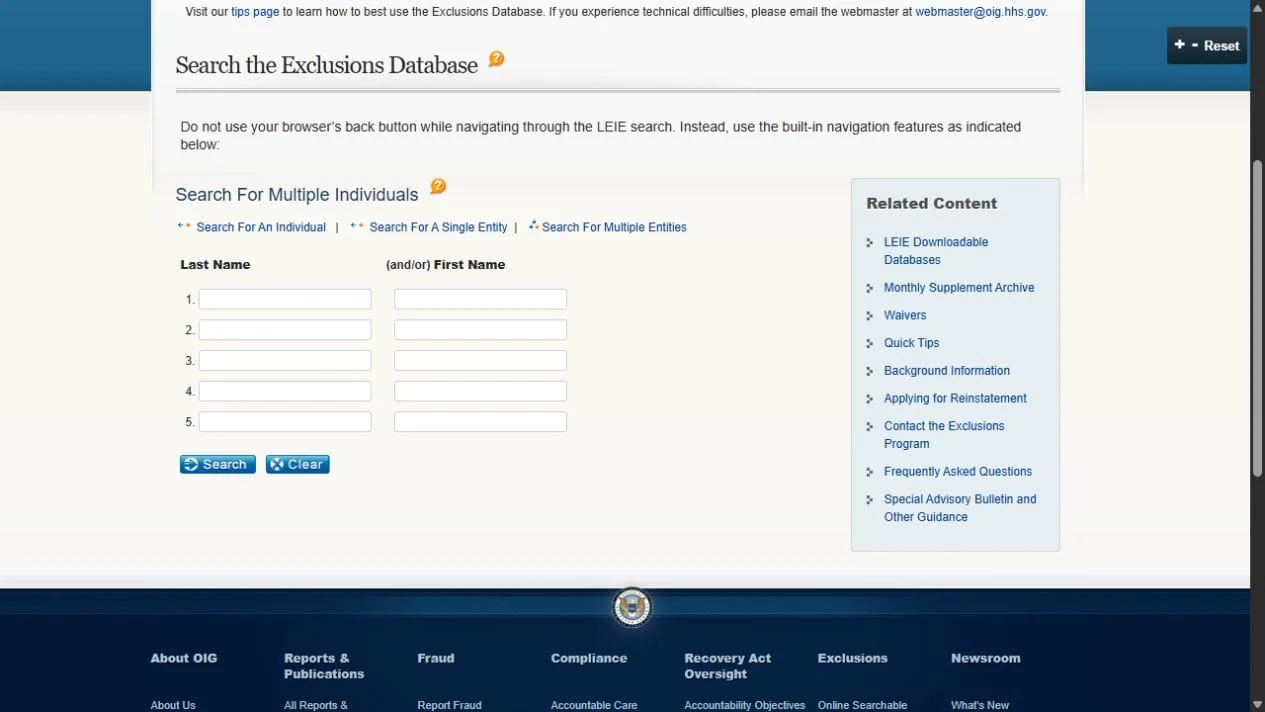
- On a result that looks like your person, select Verify.
- Enter the person's SSN, or the EIN for an organization.
- Read the result. The search tells you whether the number you entered matches the excluded record. It never shows you an SSN. It only uses the one you type to check the match.
Don't clear a possible match on a different middle initial or address alone. The address on an LEIE record may not be current, and the SSN check is the step that tells two people apart.
Every possible match from Step 1 should now be either cleared, with the verify result as proof, or confirmed.
Step 3: Save proof of every check
Keep a dated record of every check, including the ones that found nothing. A clean result you can't show later is hard to tell apart from a check that never ran.
For each monthly run, file:
- The LEIE file's Last Update date, the roster version you matched, and the match output from Step 1.
- A PDF or screenshot of each online search and verify result, with the date and URL on it.
- The name of the person who reviewed each possible match and what they decided.
Store the records where you keep other credentialing files, for as long as your record retention policy requires. If the proof includes identifying details, give it the same access limits as the roster.
Step 4: Add SAM.gov and your state Medicaid lists
A clean LEIE result doesn't cover everything, because the LEIE contains only the exclusions OIG itself imposed.
SAM.gov. The System for Award Management, run by GSA, lists debarment actions from many federal agencies, including OIG's exclusions (OIG Exclusions FAQ). Search it from the SAM.gov exclusions page as part of the same monthly run.
State Medicaid lists. Many state Medicaid programs keep their own exclusion lists, and CMS has told states that have one to remind providers to search it whenever they search the LEIE (CMS SMDL #09-001). Each state publishes its list differently. New York's Office of the Medicaid Inspector General offers an online search for up to five names at once, full downloads, and a short list of exclusions from the last 30 days. Texas HHS OIG has its own exclusions search. Check the list for every state where you bill Medicaid, using whatever format that state offers.
Step 5: Run the browser steps every month with Skyvern
Keep the CSV match in your spreadsheet, and put the browser work on a schedule: the verify searches, the SAM.gov and state searches, and the proof.
Steps 2 to 4 are where the time goes. A person can handle a few possible matches and one state list by hand. As the roster grows and you add state lists, the searches grow every month, and each one needs its own saved PDF. Skyvern runs that browser work as a workflow. It reads each page the way a person does, so you describe the task in plain language instead of scripting each click, and the same workflow keeps working when a search page changes its layout. Our healthcare page lists OIG exclusion monitoring alongside license checks for credentialing teams.
A monthly exclusion workflow uses these Skyvern blocks:
- File Parser reads a CSV or Excel file: the full roster for the SAM.gov and state searches, and the possible matches from Step 1 for the LEIE verify.
- Loop repeats the next blocks for each person on the list.
- Browser Task opens each search site, enters the name and, for the LEIE, runs Verify when there is a hit.
- Extraction records the result as structured fields: the person, the list, the date and the result.
- Print Page saves the result page as a PDF. Turn on Headers & Footers so each PDF carries the date, title and URL.
- Conditional sends any possible match to a Human Interaction block, which pauses the run and emails a reviewer with Approve and Reject buttons. The block times out after two hours by default, so set a longer timeout that fits your reviewer's schedule.
- Cloud Storage Upload files the PDFs in your S3 or Azure Blob storage, or Send Email sends them with the results attached.
To run it monthly, add a cron schedule with a time zone (schedules). For example, 0 9 16 * * with America/New_York runs at 9 a.m. Eastern on the 16th of each month, after the LEIE's mid-month update.
After the first scheduled run, your storage should hold one PDF per person per list, the results table should show a result for every row, and the reviewer should have a request for each possible match.
Pass SSNs into the workflow only for possible matches from Step 1, never the whole roster. Our healthcare page lists Skyvern as HIPAA compliant and SOC 2 Type II, and our pricing page lists HIPAA compliance on the Enterprise plan. If your runs will handle SSNs or patient data, talk to us about those terms before you start.
The same pattern covers the other public-record checks in credentialing, such as RBT and BCBA verification on bacb.com and the license checks in our credentialing guide.
If a check finds a match
Plan for these cases before the first run, so each possible match ends with a recorded decision.
- The name matches but the SSN doesn't. Two people share a name. Record the person as cleared and file the verify result as proof.
- The SSN verifies as a match. Federal programs won't pay for this person's work, so take them off anything billed to those programs right away and bring in your compliance lead and counsel. If they already worked for you while excluded, OIG's FAQ points to the Self-Disclosure Protocol.
- The person has changed their name. An exclusion may be listed under a previous name. Search every name in the "other names used" field, not only the current one.
- The LEIE record has no date of birth or NPI. OIG says that if a search result doesn't show a DOB, UPIN, NPI, SSN or EIN, OIG doesn't have that information to give you (OIG Exclusions FAQ). Use the SSN verify step to settle it.
- Someone you confirmed last month is gone from the list. OIG removes people from the download file once they are reinstated (LEIE downloads). Reinstatement requires written notice from OIG, so ask for a copy of that notice before they return to federally billed work, and file it with your records.
- You think an LEIE entry is wrong. OIG takes reports of errors in specific entries at exclusions@oig.hhs.gov.
Screening software or your own monthly check
Screening subscriptions fit large networks that want someone else to maintain the list sources. Your own monthly check fits teams with a known set of lists who want the evidence in their own systems.
Several companies sell exclusion monitoring as a service. Verisys, for example, offers CheckMedic OIG exclusion monitoring on top of its FACIS data set, which it says draws on more than 5,000 data sources, with alerts when a provider's status changes (Verisys). ProviderTrust sells exclusion monitoring too. If you bill Medicaid in many states and don't want to track each state's list yourself, a service like one of these is a reasonable choice.
Running the check yourself means you choose the lists and the proof lands in your own storage. The CSV pass needs nothing beyond a spreadsheet. The browser steps are the part that grows with your roster, and the part worth automating.
FAQ
Can I hire someone on the OIG exclusion list?
For any role that touches work paid by federal health care programs, in practice no. The payment ban covers anyone who employs the person and reaches administrative and management services, not only patient care (OIG Exclusions FAQ). OIG's Updated Special Advisory Bulletin on the Effect of Exclusion (May 2013) covers the details. Talk to counsel before you make an offer.
What's the difference between OIG and SAM.gov exclusions?
The LEIE lists only exclusions imposed by OIG. SAM.gov lists debarment actions from many federal agencies, and it includes OIG's exclusions too (OIG Exclusions FAQ). Check both every month.
How does someone get off the OIG exclusion list?
They have to apply for reinstatement and receive written notice from OIG that it was granted. It isn't automatic when the exclusion period ends. A person with a set exclusion period can start the process 90 days before it ends (OIG Exclusions FAQ). Mandatory exclusions, such as those for Medicare or Medicaid fraud convictions, last at least five years (OIG).
How often is the OIG exclusion list updated?
Monthly. OIG says both the online search and the download are generally updated by the middle of each month, and each update covers actions taken in the month before (OIG Exclusions FAQ).
Conclusion
The point of the monthly check is that nobody on your roster goes a month without a dated, verified result, and no possible match is cleared without a person deciding. The CSV match narrows the roster to its possible matches, the online verify step settles each one, and SAM.gov and your state lists cover the exclusions OIG doesn't hold.
If you're starting from nothing, run the LEIE match and verify step after this month's mid-month update, then add SAM.gov and one state list the following month. Once those run cleanly by hand, they're the steps to schedule. Exclusion checks are one part of credentialing, so licenses, board certifications and the other verifications still need their own checks.
Build your monthly screening workflow with Skyvern
If your team already owns the screening policy but spends hours repeating searches and saving evidence, Skyvern can take on those browser steps. Keep the LEIE CSV match in your existing process, then use a scheduled workflow to run the required online checks and collect the results for review. Your team still decides how to resolve each possible match.
Book an exclusion screening demo. Bring the lists you check, your roster size and the evidence you need to keep. Start with one source and a small test roster, then assess coverage, saved records and review time before expanding.
Keep reading
CVO Credentialing vs an In-House Team: When to Outsource and When to Automate
A credentials verification organization (CVO) checks a healthcare provider’s credentials with the original sources and reports the results to your organization. Outsourcing that work can make sense when you need outside expertise or extra capacity. If you already have a credentialing team, automating repeated online checks with Skyvern gives you a way to handle that work in-house instead of outsourcing it. We build Skyvern, an AI browser agent that automates license lookups, exclusion searches
Insurance Eligibility Verification Software: Clearinghouses, Services and Portal Automation Compared
HIPAA was passed in 1996, beginning the move toward national standards for electronic healthcare transactions, including X12 270/271 eligibility inquiries and responses. The standard is more than twenty years old now, but an electronic check can still come back without what the front desk needs for the visit, like the copay or a visit limit. Someone has to go and get it. That's the buying decision I want to help you make with insurance eligibility verification software: who completes the check
Healthcare BPO vs Automation for Prior Authorization: Growing Volume Without Growing the Team
Healthcare BPO, or business process outsourcing, means hiring another company to handle administrative work such as billing, insurance checks and prior authorization. It helps your practice growing without recruiting an internal team for every task. Much of that work still involves time-consuming, manual data entry and document retrieval. Someone copies patient details between systems, finds supporting records, uploads files and checks payer portals for updates. This is the type of work we bui
Put the browser to work
Use Skyvern for the work that lives in a browser.
Turn repetitive browser tasks into reliable workflows with Skyvern.