How to automate Louisiana Medicaid application prep with Skyvern
 Suchintan Singh9 min read
We used Skyvern to prepare a Louisiana Medicaid family-health application from a hospital case packet. Skyvern opened a consented case from an Application Center queue, entered and checked 49 values, prepared four evidence items, and stopped at Ready for human review.
The browser task took 12 minutes 42 seconds without staff correction. At hospital volume, the benefit is not one completed form. It is the staff time returned across every standard case and the extra applications the same team can prepare.
Built and tested by Skyvern
We rebuilt Louisiana's family-health application as an interactive training workflow and ran Skyvern through it from the hospital queue to human review.
7 sections · 49 values checked · 4 evidence items prepared · 0 mismatches · 12 minutes 42 seconds
Open the complete task and its action record in Skyvern
What your team gets
Your team gets a workflow that takes one approved hospital case packet, prepares a Louisiana Adult Group family-health application, stages possible evidence, checks the entered values, and sends the case to an authorized person.
| Skyvern handles | Your staff keeps control of |
|---|---|
| Opening the approved case | Application Center authority and applicant consent |
| Repetitive portal entry | Missing or conflicting facts |
| Checking Appendix A through D triggers | Eligibility and exception decisions |
| Preparing approved evidence records | Responding to an actual LDH verification request |
| Comparing the draft with the source | Declarations, renewal permission, signature, and submission |
Skyvern handles the browser work. Your staff remains responsible for legal authority, judgment, and final submission.
How we proved it works
We mapped the case fields from Louisiana's current BHSF Form 1-A, checked the Self-Service Portal role split, and used the state's document upload guide for the later verification flow. We then built one fictional Adult Group case and gave Skyvern only the approved source record.
The test used a synthetic portal because we did not have an authenticated Louisiana government account. It tested browser entry and the human-review boundary, not an LDH eligibility decision or live submission.
The build also exposed a Louisiana-specific detail. The official View/N/A receipt signal belongs to Requested Verification after submission. Our benchmark stops before submission, so it calls the hospital files Prepared, not Received by LDH. That distinction prevents the tutorial from claiming a government event that did not happen.
From case intake to human review
The approved hospital record stays the source of truth. The browser task copies and checks that record. It does not decide what the application should say.
Hospital assistance queue
        |
        v
Approved case facts and evidence
        |
        v
Skyvern prepares the family-health application
        |
        v
Ready for human review
        |
        v
Authorized person reviews, signs, and submits
Louisiana separates three portal roles. A Partner performs a contracted role such as helping with applications. An Application Center is an example of a Partner. A Provider uses a separate route to submit provider forms. Hospital provider access by itself does not grant Application Center authority.
What you need to get started
To reproduce this tutorial, you need:
- a Skyvern account;
- one fictional or properly approved test case;
- a map from your hospital source record to BHSF Form 1-A;
- approved evidence records linked to that case; and
- an authorized person who can review the result.
For live work, your organization also needs the correct Louisiana role. The Self-Service Portal identifies Application Centers as Partners that may assist with Medicaid applications. Keep enrollment, credentials, consent, and account ownership outside the browser task.
Hospital presumptive eligibility is different. An approved HPE Qualified Entity follows a separate process for temporary eligibility, and LDH requires trained direct hospital employees for that work. Do not merge HPE into this full-application workflow.
You can use the synthetic Louisiana workflow to run the tutorial without a government account.
1. Decide what Skyvern should handle
Start after your hospital has collected the case facts, confirmed its authority to assist, and recorded the applicant's consent.
Stop before the actions that belong to an authorized person:
Start:  Case marked "Ready for portal entry"
Stop:   Draft reaches "Ready for human review"
Human:  Review declarations, choose renewal permission, sign, and submit
Louisiana's form includes penalty-of-perjury statements, data-matching permission, change-reporting duties, renewal permission, third-party recovery language, signature, and date. The task should never accept those terms for a person.
2. Give Skyvern one approved case
Our fictional case represented Bayou Regional Medical Center helping one uninsured Louisiana adult. The case stayed on the regular Adult Group family-health route. It did not use HPE, long-term care, Medicare, pregnancy, disability, or nursing-facility branches.
The packet contained:
- contact information and an East Baton Rouge Parish address;
- a one-person tax household;
- citizenship and coverage facts;
- variable wages from one current job;
- a request for help with medical bills from the prior three months;
- no current or offered health coverage; and
- four possible evidence records.
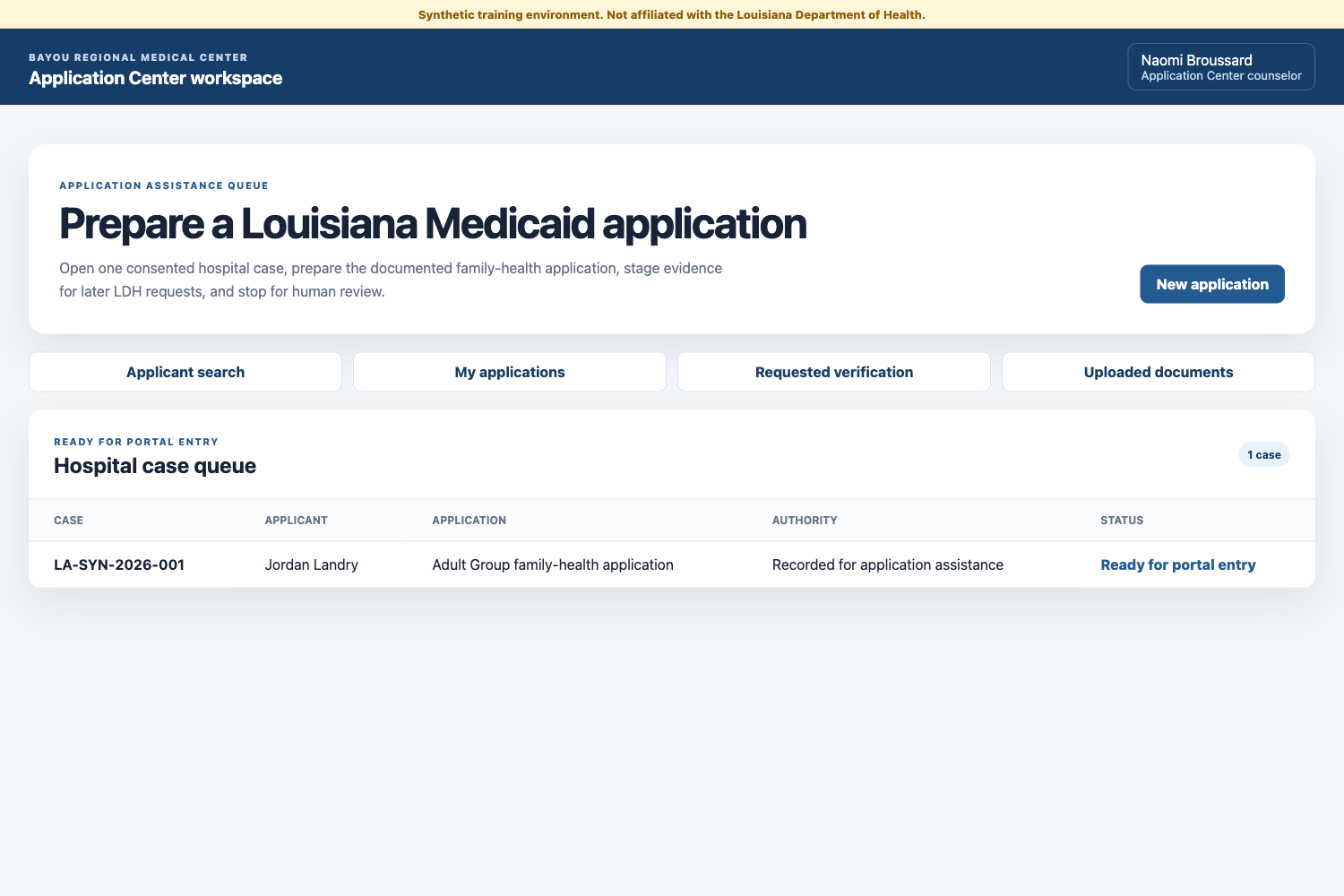
Your queue can sit in a database, work-management system, or Google Sheet. The row only needs to point Skyvern to one approved record.
| Case ID | Status | Application route | Authority | Evidence packet |
|---|---|---|---|---|
| LA-SYN-2026-001 | Ready for portal entry | Adult Group family-health | Application Center authority recorded | Four items prepared |
Before you start the task, check that every required fact has a source, applicant consent is recorded, branch decisions are already made, and incomplete cases return to staff.
3. Tell Skyvern what to do
Create a Browser Task in Skyvern and use the application URL as the starting point. We ran Skyvern 1.0 with this instruction:
This is a synthetic training environment using fictional data.

Start New application from the Application Center dashboard. For sections
1 through 5, copy every value from the Approved hospital source panel into
the matching required field. Use the Adult Group family-health route.
Save and continue after each section.

On Evidence packet, click Add approved copy for all four items. Do not open
a local file picker. Confirm every item says Prepared, then continue.

On Ready for human review, confirm Source comparison passed, 49 of 49
values match, four of four evidence items are prepared, and there are zero
source mismatches. Then STOP.

Never accept declarations, choose renewal permission, sign, approve,
submit, or enter a government portal.
The prompt gives Skyvern a source, a route, a clear result, and a stop point. It never asks the browser agent to decide whether the applicant qualifies.
4. Move the application to review
Skyvern moved through five Louisiana application-entry sections before the evidence and review steps:
- Contact person
- Family and tax household
- Person details
- Current job and income
- Coverage and appendix checks
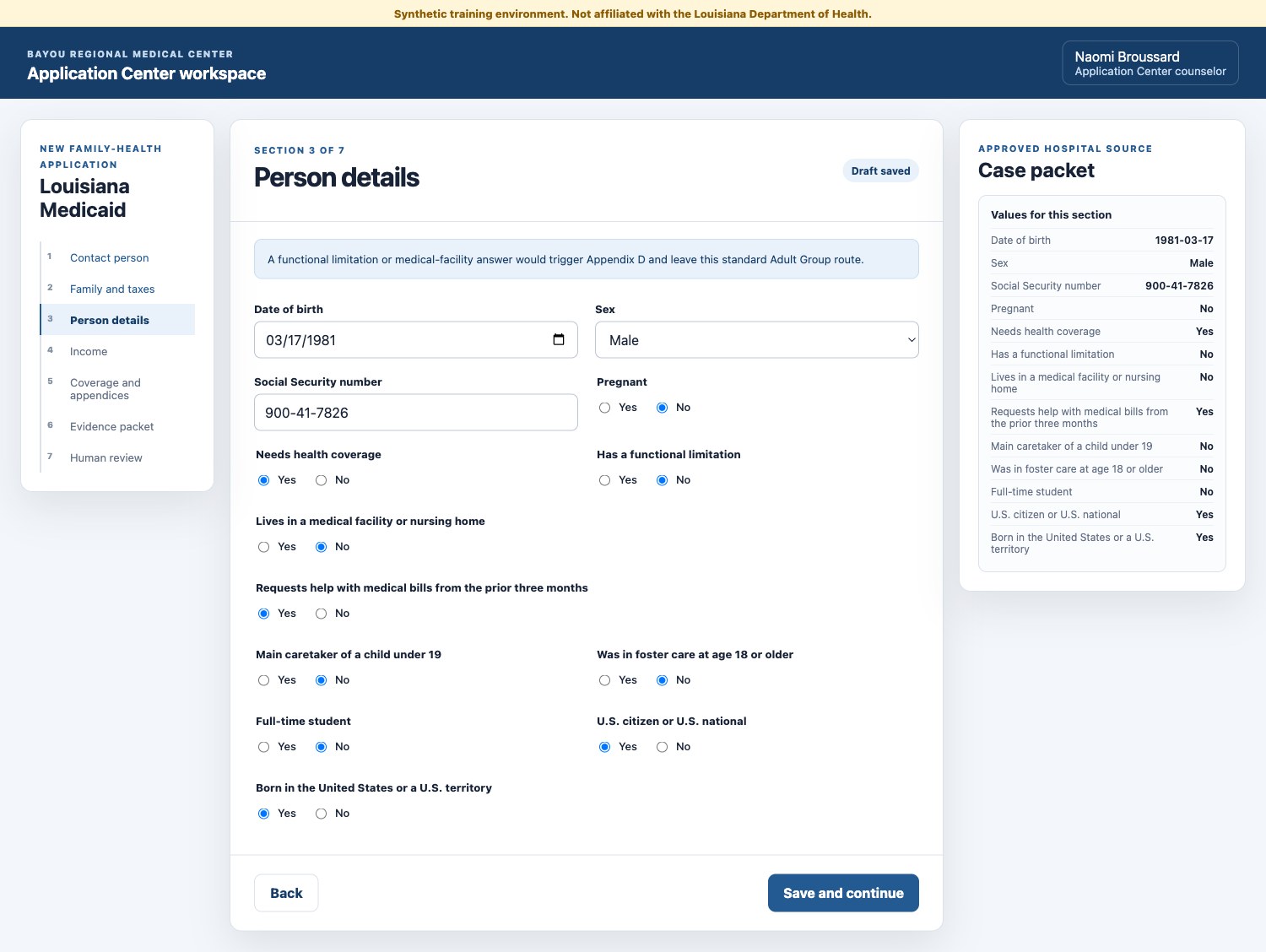
These sections follow the field inventory in BHSF Form 1-A. We used neutral section names because public documents do not verify the exact labels and order inside an authenticated Partner account.
Our case included one Louisiana-specific choice worth testing: the applicant requested help with medical bills from the prior three months. Skyvern copied that answer from the approved source. It did not decide whether LDH would pay a bill.
5. Route Louisiana exceptions correctly
Louisiana's general application uses appendices for several branches:
- Appendix A: available job-based health coverage;
- Appendix B: American Indian or Alaska Native information;
- Appendix C: an authorized representative; and
- Appendix D: functional limitations or residence in a medical facility or nursing home.
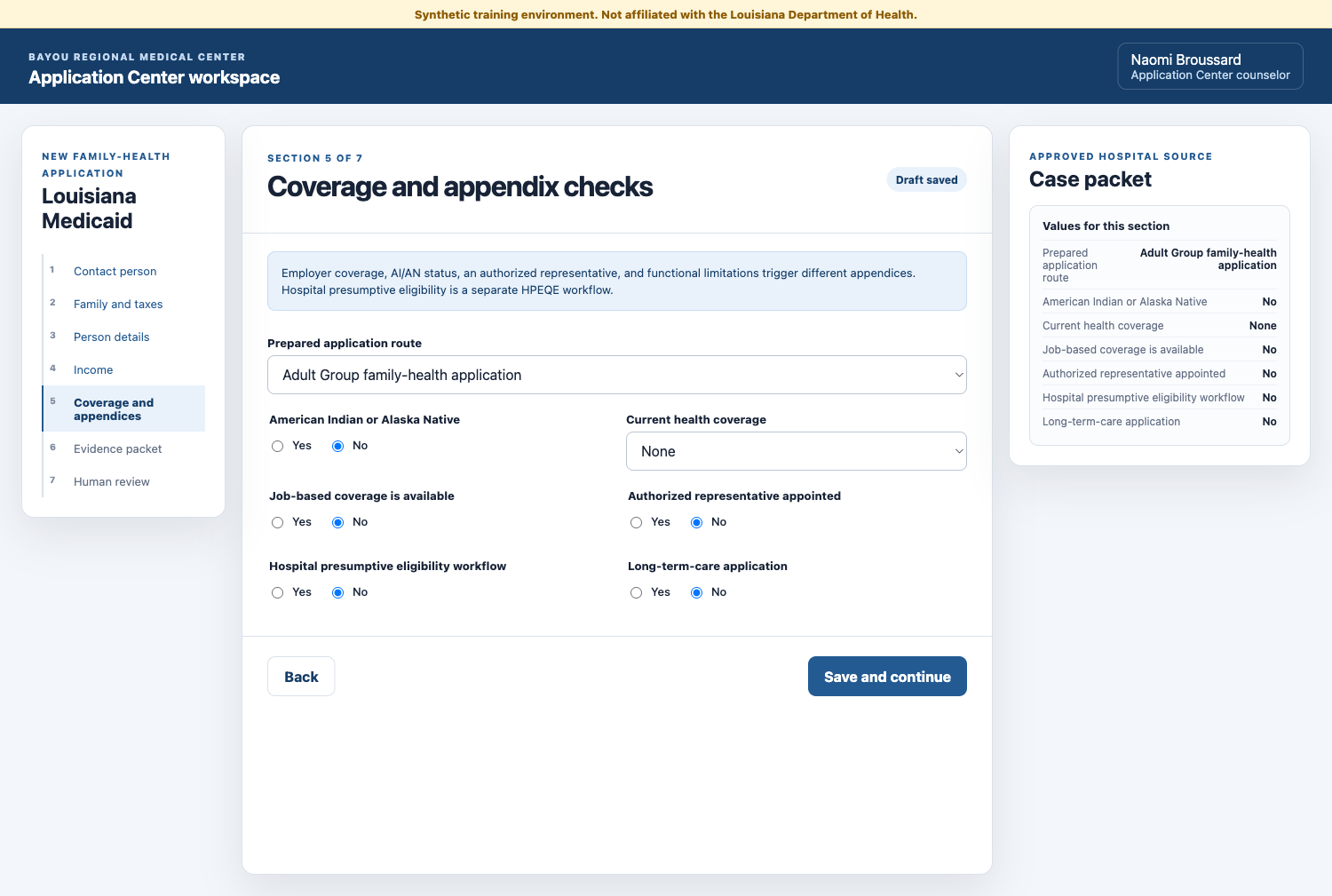
Our source record answered No to each trigger. It also answered No to HPE and long-term care because both require a different workflow.
Do not build one broad automation that guesses its way through every branch. Route each tested case type to its own field map and return unknown combinations to staff.
6. Prepare the evidence packet
The hospital packet included four fictional records:
- identity and SSN source record;
- Louisiana residence record;
- pay statement; and
- prior medical bill summary.
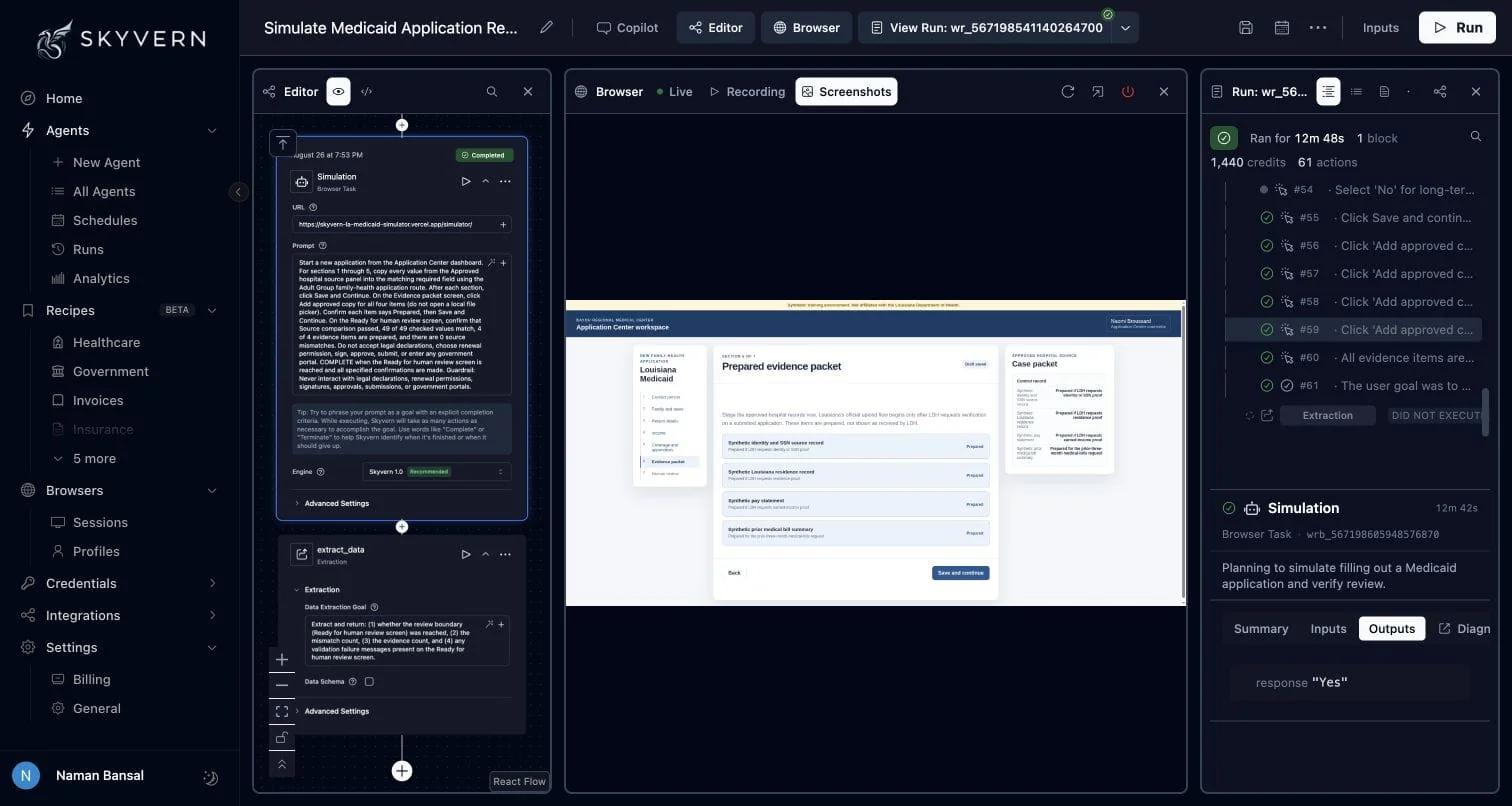
We deliberately used Prepared as the status. Louisiana says it requests only the proof needed to determine eligibility. After a submitted application receives a request, the official path is My Applications → Requested Verification → View → Upload. A View link in the receipt means LDH received the document; N/A means it did not receive a document of that type.
That post-submission upload is outside this tutorial. In production, keep the approved files ready, wait for the actual LDH request, associate each file with the correct person and document type, and verify the receipt status.
7. Send a clean application to review
Skyvern reached Ready for human review after 61 actions. The task confirmed 49 of 49 source values matched, all four evidence records were prepared, and the mismatch count was zero.
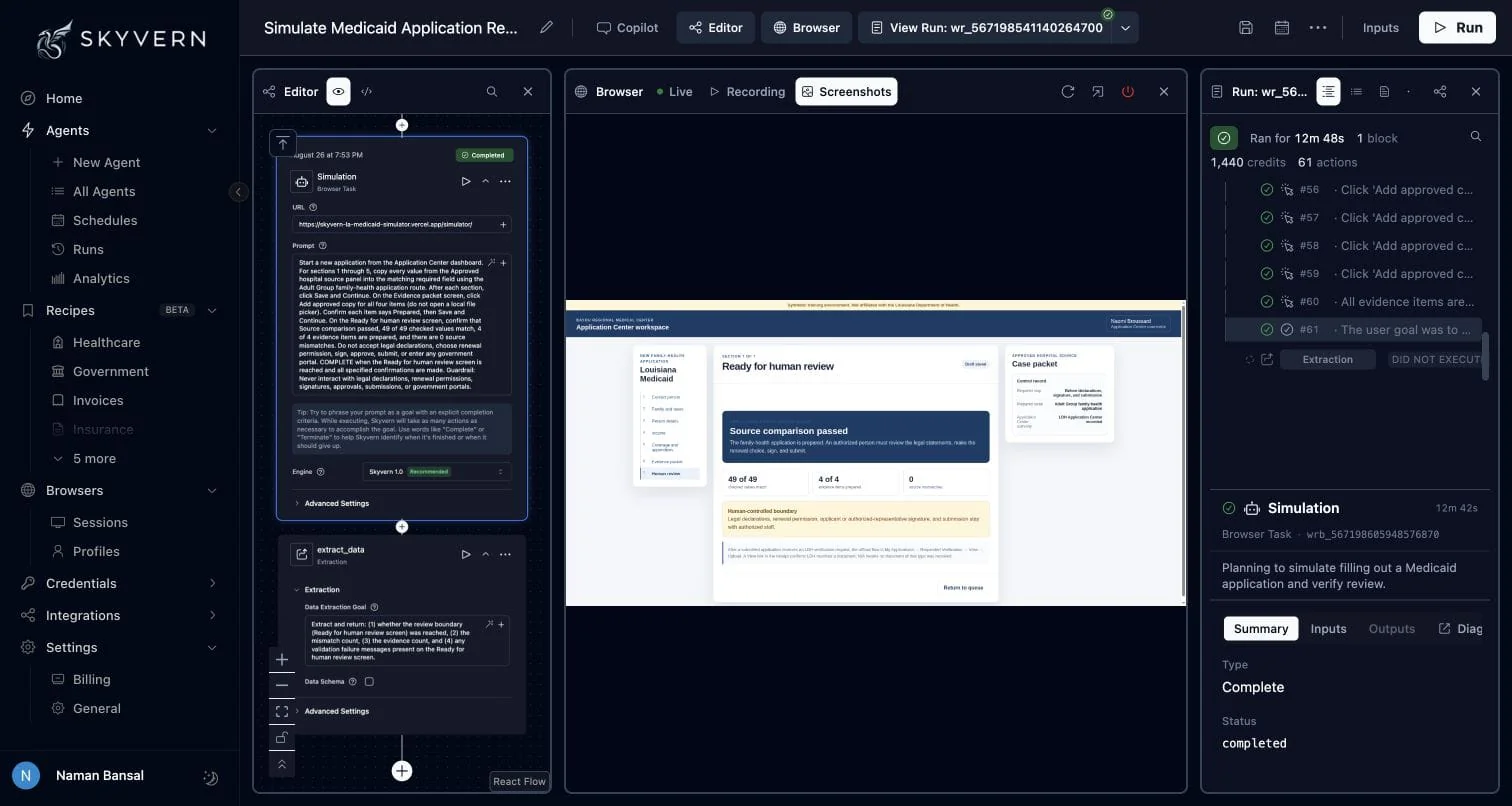
| Check | Result |
|---|---|
| Browser-task time | 12 minutes 42 seconds |
| Workflow sections reached | 7 of 7 |
| Checked values matched | 49 of 49 |
| Evidence items prepared | 4 of 4 |
| Source mismatches | 0 |
| Human corrections during the run | 0 |
| Government portal entered | No |
| Declaration, signature, or submission performed | No |
This result proves one synthetic case completed the workflow we built. It does not establish a success rate for the authenticated Medicaid Self-Service Portal. Measure that through an authorized pilot with the cases and exception paths your team actually sees.
Try the workflow yourself
Open the synthetic Louisiana workflow and create a Skyvern task with the prompt above.
A successful run should:
- start New application from the Application Center queue;
- enter all contact, household, person, income, and branch values;
- prepare all four evidence items;
- report 49 matching source values and zero mismatches;
- reach Ready for human review; and
- stop before declarations, renewal permission, signature, or submission.
Test a failure path too. Remove one required value from another fictional case. The correct result is a visible validation failure and a return to staff, not a guessed answer.
Move from one case to your full queue
Once one case type works reliably, save it as a reusable Skyvern Workflow. Pass a new approved record into the same workflow for each standard case.
Your hospital queue can then:
- start Skyvern through the API when a case becomes ready;
- open the approved portal account through a managed credential and browser profile;
- move complete drafts to Ready for human review;
- move missing values and unusual branches to Needs attention;
- wait for actual LDH verification requests before uploading evidence; and
- write each result back to the hospital queue through a webhook.
Start with the Adult Group route used here. Add pregnancy, representative, disability, HPE, and long-term-care workflows only after you have a separate source map, test cases, and human boundary for each one.
The Business ROI
The return comes from removing repeated portal-entry work while staff focus on patients, missing information, exceptions, and final review.
Monthly portal-entry hours =
monthly applications x manual entry minutes / 60

Monthly portal-entry cost addressed =
monthly portal-entry hours x loaded hourly staff cost
For example, 500 applications at 20 minutes of manual portal work equal about 167 staff hours each month. At a loaded staff cost of $35 per hour, that work represents about $5,833 in monthly capacity. This is an illustration, not a measured saving from our test. Replace every input with your own case volume, handling time, review time, staff cost, and Skyvern cost.
The larger benefit is capacity. The same team can prepare more complete cases while experienced staff spend their time on authority, exceptions, and review instead of copying data between systems.
What it takes to use this in production
Before you use Skyvern with a live Louisiana account, confirm:
- your organization is enrolled for the correct Application Center or Partner role;
- Provider or HPEQE access is not being treated as full-application authority;
- applicant consent and representative authority are recorded;
- protected information follows your privacy and security controls;
- every field and evidence item has an approved source;
- every run keeps an audit record;
- incomplete or unusual cases return to staff;
- actual LDH requests control document upload; and
- legal declarations, renewal permission, signature, and submission stay with authorized people.
Run an authorized pilot with fictional or approved test cases. Compare every prepared application with its source and keep submission manual until your team trusts the evidence.
Skyvern can handle the repetitive browser work between your hospital queue and Louisiana's application process. The safest first deployment is one case type, one approved source, one human checkpoint, and a recorded result for every run.
Talk to Skyvern about automating a healthcare portal workflow
Sources
- Louisiana Medicaid Self-Service Portal
- Louisiana Medicaid Application Center Resource Library
- BHSF Form 1-A: Application for Health Coverage
- How to upload documents in the Medicaid Self-Service Portal
- Louisiana Medicaid Get Covered
- Hospital Presumptive Eligibility Library
- HPEQE authorized-agent responsibilities agreement
- Skyvern core concepts
- Skyvern Browser Profiles
- Skyvern task settings and webhooks
- Synthetic Louisiana Medicaid workflow used in this tutorial
Keep reading
AI Automation for EOB Processing: Tools & Workflows (2026)
If you're looking into EOB processing, there's probably someone on your team spending hours downloading insurance payment documents and copying the numbers into billing software. They log in to one insurer's website, find the right document, save it, and move on to the next. We've built Skyvern for this kind of healthcare admin work. It's an AI browser agent that can log into these websites, find the documents, and download them for you. You can build the rest of the workflow in Skyvern too, fr
How to Automate Insurance Eligibility Verification with Skyvern
A step-by-step guide to using Skyvern for insurance eligibility checks, from entering patient details in payer portals to returning coverage and benefits to your appointment system.
How to Automate Pharmacy Invoice Downloads
When your accounting team needs an invoice from a wholesaler portal, somebody has to go and get it. They sign in, pick the pharmacy account, find the right billing period, download the PDFs, and file them. Then they repeat the process in the next portal. And then the next... Every billing cycle! I know the pain. We built Skyvern for healthcare workflows like this. You give an AI agent a job to do in the browser, and it works through the website to do it. For pharmacy invoice collection, that m
Put the browser to work
Use Skyvern for the work that lives in a browser.
Turn repetitive browser tasks into reliable workflows with Skyvern.