The 2026 Enterprise Guide to Agentic Process Automation

The 2026 Enterprise Guide to Agentic Process Automation

Long gone are the days when 'we automated it' meant you were done maintaining it. If you're running RPA at scale, a big chunk of your team's time is probably spent on upkeep, patching bots every time a vendor portal renames a field or shuffles a form layout. This enterprise guide to agentic process automation breaks down why that maintenance burden is an architectural problem, not an implementation one, and how agents that read pages visually at runtime change the math on portal-heavy workflows your current stack can't hold together.

TLDR:

  • RPA teams spend 30-70% of their effort maintaining bots, leaving portal-heavy workflows stuck in a manual-automation hybrid that compounds over time.
  • Agentic Process Automation (APA) agents read the live page visually at runtime instead of replaying recorded paths, so a portal layout change is new input, not a fatal breakpoint.
  • Production APA systems need four layers to hold up: perception, planning, execution with state-aware authentication, and structured output with a full audit trail.
  • 79% of organizations have adopted AI agents in some form, but only 11% run them in production, and the gap is architectural, not a confidence problem.
  • Skyvern handles credential-guarded portals with rotating 2FA by reasoning about authentication state at each step, though phone and SMS-based 2FA flows still require a human handoff.

What Is Agentic Process Automation?

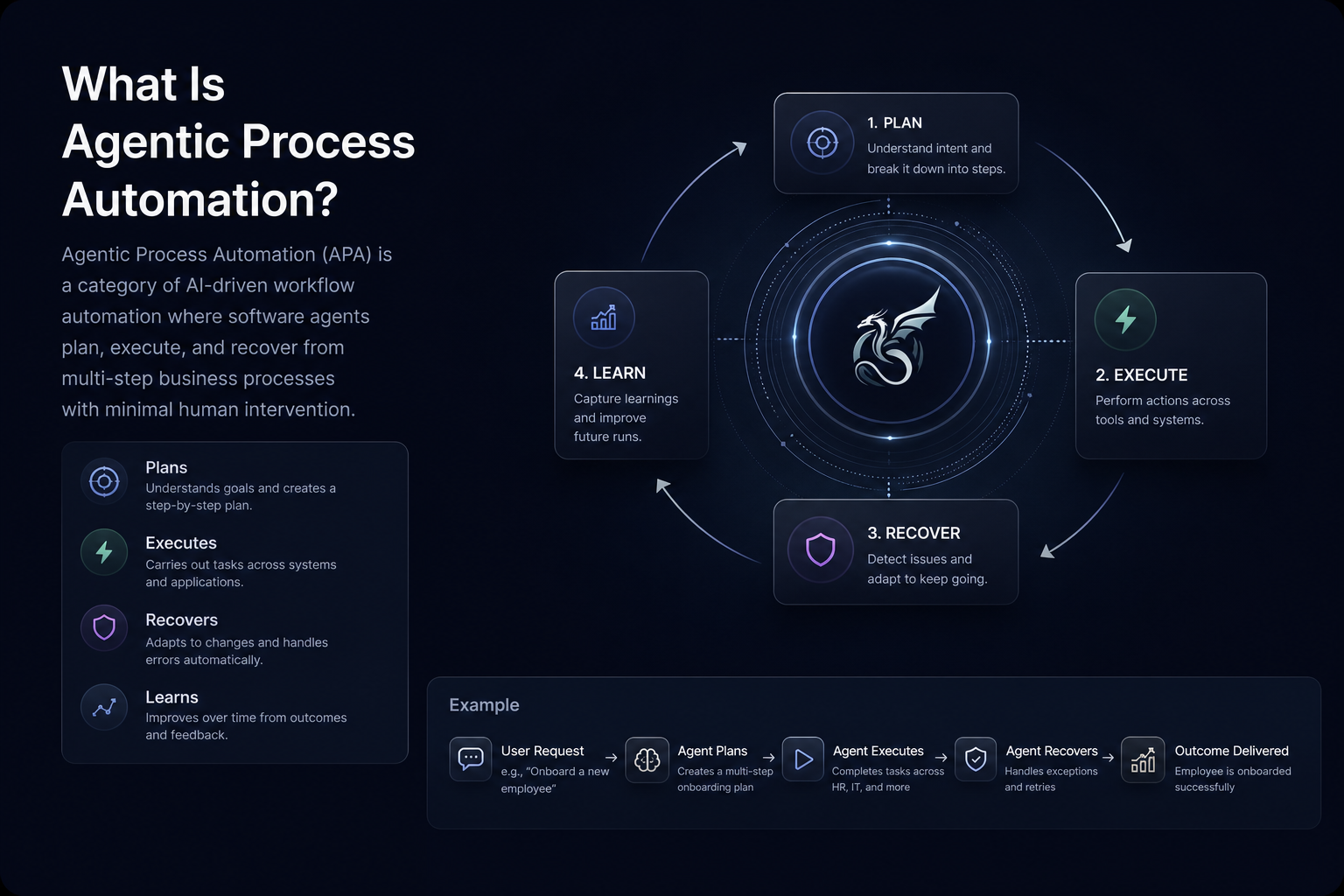
Agentic Process Automation (APA) is a category of AI-driven workflow automation where software agents plan, execute, and recover from multi-step business processes autonomously, without requiring a human to supervise each action or a developer to maintain brittle scripts.

The core distinction from traditional automation is architectural. RPA records actions and replays them. APA agents read the live page state at runtime, reason about what needs to happen next, and adapt when conditions change.

Three capabilities separate APA from prior automation approaches:

  • Goal-directed planning, where the agent receives an objective and works out the action sequence itself, instead of following a hardcoded script.
  • Exception handling that escalates to a human only when the agent encounters something outside its decision authority, keeping the workflow moving without constant oversight.
  • Structured output delivery, where results are returned in a defined schema regardless of what the agent encountered during execution, so downstream systems receive consistent data every time.

Why Legacy Automation Leaves Enterprises Stuck

Traditional automation tools were built for a different era of enterprise software. RPA bots record click paths, map DOM selectors, and replay those sequences against the same interface they were trained on. When that interface changes, the bot breaks. And in enterprise environments, interfaces change constantly.

The structural problem is maintenance. RPA teams spend 30-70% of their effort maintaining bots and not building new automation. Every vendor portal update, every form redesign, every authentication change creates a support ticket. At scale, that compounds into a maintenance backlog that consumes the capacity gains automation was supposed to deliver.

Three Failure Modes That Scale Badly

The brittleness shows up in predictable patterns across three areas:

  • Selector fragility means a renamed button or restructured form stops the workflow cold, often silently, with no error returned and no data delivered downstream until someone notices the gap hours later.
  • Authentication walls stop most tools at the login screen. Rotating 2FA, session-timeout modals, and credential-guarded portals require state-aware handling that recorded-replay tools were never designed to provide.
  • API gaps leave entire categories of workflows unautomatable. Carrier portals, payer systems, government permit applications, and benefits administration platforms rarely expose APIs. iPaaS tools like Zapier or Make stop exactly where these workflows begin.

The result is that enterprises end up in a hybrid state: partial automation covering the well-structured processes, manual labor covering the portal-heavy ones, and an RPA maintenance team holding the middle together. That is the gap Agentic Process Automation (APA) was built to close.

APA vs. RPA vs. AI-Powered Automation

Three terms dominate enterprise automation conversations right now, and they are frequently used interchangeably even though they describe architecturally distinct approaches. Getting the distinction right matters because each one carries different maintenance costs, different failure modes, and different ceilings for what it can actually automate.

Robotic Process Automation (RPA)

RPA tools like UiPath, Automation Anywhere, and Blue Prism automate repetitive tasks by recording and replaying interactions with software interfaces. They work by mapping specific UI elements through selectors, XPath queries, or DOM coordinates, then executing those paths on a schedule. AI RPA approaches attempt to solve these structural limits.

The core limitation is structural: RPA bots are built on a static assumption. The page you recorded is the page the bot expects on every future run. When a vendor updates their portal, renames a button, or restructures a form, the bot fails. The breakdown data reflects this: 45% of companies experience weekly bot breakdowns from changes in underlying applications. That maintenance burden is not an implementation problem. It is an architectural one.

AI-Powered Automation

AI-powered automation is a broad category that covers any workflow tool augmented with AI capabilities, including LLM-assisted data extraction, predictive routing, and intelligent document processing. Many RPA vendors have added AI layers to their products and rebranded accordingly.

The distinction worth drawing is between AI as a feature bolted onto a selector-based foundation versus AI as the execution model itself. A tool that uses an LLM to classify a document but still relies on hardcoded selectors to interact with a portal inherits all of RPA's brittleness at the interaction layer. The AI does not fix the underlying architecture.

Agentic Process Automation (APA)

APA is the category that treats AI as the execution model, not a bolted-on feature layer. Instead of recording a fixed path and replaying it, an APA agent reads the live page state at runtime, plans a sequence of actions toward a stated goal, works through authentication and exceptions as they appear, and delivers structured output downstream.

The table below summarizes how each approach handles the conditions that most commonly break enterprise automation workflows.

Condition

RPA

AI-Powered Automation

APA

Portal layout change

Bot fails silently

Depends on implementation

Agent re-reads the page and continues

Rotating 2FA or session auth

Requires scripted workaround

Partial, varies by tool

Handled at runtime as part of goal execution

Non-technical team ownership

Developer required for every fix

Often still developer-dependent

Goal-directed spec does not require code changes

Structured output to downstream systems

Requires custom mapping

Varies

Schema defined upfront; consistent JSON regardless of portal variant

Audit trail for compliance

Log files, varies by vendor

Varies

Full trace: page state, action sequence, auth steps, output

The architectural gap between RPA and APA is not a matter of degree. The UiPath vs Skyvern comparison makes this concrete. RPA was built to answer the question "can you automate this task?" APA is built to answer the follow-on question enterprises are now asking: "can you automate it reliably, across portals that change without notice, with governance controls, without a developer on call every time something breaks?" Those are different questions, and they require different architectures to answer. Skyvern is an Agentic Process Automation platform built to answer the second: browser execution is the mechanism for operating portals that have no API, and credential management, approval gates, and a full audit trail are what make that execution production-grade.

The Four Layers of a Production APA System

Four components work together in every production-grade Agentic Process Automation (APA) system. Understanding how they connect is more useful than sizing up any one piece in isolation, because the failure modes that sink real deployments almost always happen at the boundaries between layers.

The Perception Layer

This is where the agent reads the world. In selector-based tools, perception is a cached map of element IDs and XPath locations recorded at build time. In APA systems, perception happens at runtime: the agent reads the live page visually, identifying form fields, buttons, and navigation elements by their appearance and context, not by a stored location. When a portal redesigns its layout, the perception layer sees the new page and keeps going. There is no selector to break.

The Planning Layer

Perception hands off to planning. The agent takes a stated goal, reads the current page state, and decides the next action. This is not a recorded replay of steps captured during a demo run. The planner reassesses at each step, which means it can handle branching conditions, unexpected modals, and workflows that behave differently depending on account state or time of day. A workflow that hits a session-timeout warning between steps does not fail; the planner reads the warning and works through it.

The Execution and Authentication Layer

This layer carries out the actions the planner sequences: filling fields, clicking controls, uploading documents, working through login flows, handling 2FA prompts, and managing credential rotation. Authentication is treated as a first-class workflow concern, not an edge case. Portals that rotate their login behavior on each session require state-aware handling at this layer. Recording a session once and replaying it will fail as soon as the portal changes its authentication flow, which for many payer and carrier portals happens within days of the first run.

The Output and Governance Layer

The final layer captures results and makes them usable downstream. Structured output schemas defined before a run starts mean the downstream system receives consistent JSON regardless of which portal layout the agent encountered during execution. This layer also produces the audit trail: a full trace of page states, action sequences, authentication steps, and any exceptions that fired. For compliance-sensitive workflows, the audit trail is not a nice-to-have. It is the record that satisfies a reviewer asking what the agent did, when it did it, and what it returned.

The table below summarizes how each layer contributes to the system's overall behavior and where the most common failure points appear when a layer is missing or underdeveloped.

Layer

Primary Function

Common Failure When Underdeveloped

Perception

Reads live page state at runtime

Breaks on layout changes; silent failures when selectors find no match

Planning

Sequences actions toward a goal, reassessing at each step

Fails on branching workflows; cannot recover from unexpected states

Execution and Authentication

Carries out actions; works through login flows and 2FA

Session-replay failures when auth flows rotate; credential errors at scale

Output and Governance

Delivers structured results; generates audit trail

Inconsistent downstream data; no record for compliance review

Core Capabilities of APA Systems

Four capabilities define whether an APA system can hold up in production across the kinds of portal-heavy, credential-guarded workflows enterprise operations teams actually run.

Autonomous Goal Execution

APA agents work from a stated objective instead of a recorded script. Instead of replaying a fixed sequence of clicks, the agent reads the live page visually at runtime, determines what actions are needed to progress toward the goal, and reassesses after each step. A layout change that would break a selector-based script is just new input to a goal-directed agent.

Exception Handling and Escalation

Production workflows hit edge cases: unexpected modals, session timeouts, failed authentication, ambiguous form states. APA systems handle these inline when possible and route to a human approval gate when the situation falls outside what the agent can resolve autonomously. That escalation path is what makes APA appropriate for compliance-sensitive workflows where unresolved errors cannot simply be swallowed silently.

Structured Output Delivery

Agents return results in a defined schema instead of raw page content. Downstream systems receive consistent JSON regardless of which portal variant the agent worked through during the run, which removes the parsing layer that brittle scraping approaches require.

Audit Trail and Governance Controls

Every run produces a full trace covering page state, action sequence, authentication steps, and any exceptions. For operations teams in compliance-sensitive industries, the audit trail is often the deciding factor: it is what separates a production-grade APA deployment from a proof of concept. Explainable AI automation tools for compliance teams typically put exactly this kind of traceable record first.

Together, these four capabilities matter most to operations teams managing portal sprawl across insurance, logistics, healthcare, and government workflows where layout instability and credential rotation make script-based approaches untenable. Skyvern is built as an Agentic Process Automation platform around all four: browser execution for portals with no API, and credential management, exception escalation, and audit trails as the production layer that makes APA deployments viable for compliance-sensitive workflows.

Enterprise Use Cases for Agentic Process Automation

Agentic Process Automation (APA) earns its place in enterprise tech stacks by solving a specific class of problem: workflows that run on credential-guarded portals, have no API, and break automation scripts every time a vendor updates their interface. Four industry verticals show where this plays out most concretely.

Healthcare: Prior Authorization and Eligibility Verification

Prior authorization is one of the most documented bottlenecks in healthcare operations. Physicians submit an average of 39 prior authorizations per week, each routed through insurance payer portals with distinct login flows, form layouts, and documentation requirements. APA agents work through authentication, submit requests, and return structured results to practice management systems, with human review still required before any high-stakes clinical decision is acted upon.

Eligibility verification runs the same pattern across dozens of payer portals simultaneously, each with its own 2FA flow and session behavior, a challenge covered in detail when automating healthcare claims and EOB processing on payer portals. Where a script breaks silently the moment a portal restructures its layout, an APA agent re-reads the page at runtime and keeps going.

Insurance and Financial Services: Multi-Portal Data Workflows

Freight brokers, insurers, and financial operations teams manage carrier and underwriter portals that have no unified API. Insurance carrier portal workflows (quoting, coverage verification, and claims status checks) all require logging into separate systems, working through authentication, and extracting structured data. APA handles concurrency across portals, delivers consistent JSON output to downstream systems, and leaves a full audit trail on every run, which matters considerably in compliance-sensitive workflows where regulators want a traceable record.

Court e-filing portals and government permit systems are among the least standardized web interfaces in production use. Requirements vary by jurisdiction, session timeouts interrupt multi-step submissions, and layouts change without notice. APA agents work through these flows step by step, though human review still matters before any document is formally submitted, particularly in jurisdictions where filing errors carry legal consequence.

Operations and Procurement: Vendor Portals and Payroll Tax Registration

Operations teams at mid-market and enterprise companies routinely manage dozens of vendor portals for procurement, invoice processing, and supplier credentialing. Payroll tax registration across all 50 states adds further complexity, with each state using its own portal, requirements that change independently, and filing sequences long enough that a single session timeout can invalidate a submission in progress. APA handles the full sequence, retrying on failure and escalating to a human only when it encounters a condition outside its defined operating parameters.

Governance, Audit Trails, and Human-in-the-Loop Controls

Enterprise automation that touches compliance-sensitive workflows (healthcare prior authorizations, financial filings, government permit submissions) creates audit obligations that most AI agent frameworks were not built to satisfy. The question is not whether an agent completed the task. It is whether you can prove what it did, when it did it, and who approved it.

Agentic Process Automation (APA) platforms built for enterprise use handle this through four interlocking controls: full run traces, approval gates, role-based access, and exception escalation paths. Each run produces a complete record of page states visited, actions taken, credentials used, and structured output returned. Approval gates hold execution at defined checkpoints until a human confirms the next step. Role-based access determines which agents can touch which workflows. Exception escalation routes edge cases to a human reviewer instead of failing silently.

Where Human Judgment Still Belongs

Governance controls do not replace professional review. In healthcare, outputs feed critical decisions before a physician acts. In legal filings, human review still matters before documents are submitted to a court. In financial workflows, an approval gate is the mechanism, not a substitute for the judgment behind it.

The plain framing: APA handles the execution layer with a documented audit trail. The decisions that trail supports still belong to the people accountable for them.

The APA Adoption Gap: Pilots vs. Production

According to PwC's AI agent survey, 79% of organizations have adopted AI agents in some form, but only 11% are running them in production. That gap is not a confidence problem. It is an architecture problem.

Most enterprise pilots succeed because they are designed to succeed: controlled environments, clean data, cooperative systems, and a developer standing by. Production looks nothing like that. Production means portals that rotate their login flows, vendors that update their UI without notice, compliance teams that need an audit trail before they will sign off, and operations leads who cannot wait for an engineer every time something breaks.

Three structural conditions explain why pilots stall before reaching production scale:

  • The tooling was built for demos, not for durability. Selector-based scripts pass in a controlled environment and fail silently in production the moment a portal renames a field. The failure often goes undetected until a downstream system flags missing data, by which point the workflow has been broken for hours.
  • Governance requirements arrive after the pilot. Security reviews, audit trail requirements, role-based access controls, and approval gates are rarely part of the pilot scope. When compliance teams ask for them post-pilot, the tooling either cannot support them or requires a rebuild.
  • The maintenance math does not work at scale. A pilot covering two or three portals is manageable. A production deployment covering twenty portals means twenty scripts to maintain, each vulnerable to independent breakage. Most of that team's capacity goes to patching existing scripts, not expanding coverage.

Agentic Process Automation (APA) was built around the production problem, not the demo problem. The distinction matters because an architecture that reads pages visually at runtime, reasons about authentication state as it appears, and returns structured output against a defined schema does not accumulate the same fragility that selector-based tools do as the portal count grows. The pilot-to-production gap closes when the underlying architecture does not assume the page you saw during setup is the page you will see on every future run.

How to Build the Business Case for APA

Building a business case for Agentic Process Automation (APA) requires more than pointing to time savings. Executives need a structured argument that connects workflow pain to financial outcomes, and that argument has four components worth getting right before you walk into any budget conversation.

Quantify the Current Cost of Manual Workflows

Start with what the work actually costs today. For portal-heavy processes, count the hours spent per transaction, multiply by headcount, and factor in error rates. A team running 500 eligibility checks per month at 12 minutes each is spending 100 hours monthly on a single workflow. That number, priced at fully-loaded labor cost, is the baseline your APA investment gets measured against.

Map Maintenance Costs in the Current Automation Stack

If your organization already runs RPA, the maintenance burden is likely consuming a large share of your automation budget. A large share of that budget goes to keeping bots running as portals change and vendor updates break scripts, not to building new automation. That cost belongs in the business case as a hard line item, not a vague inefficiency.

Frame the Risk Side of Doing Nothing

Delayed automation carries its own cost: manual errors in compliance-sensitive workflows, backlogs during staffing gaps, and the compounding drag of scaling headcount instead of capacity. For compliance-heavy industries, the audit trail gap in manual processes is a risk that finance and legal will recognize as material.

Build a Three-Year TCO Model

The real case compares total cost of ownership over three years, not first-year licensing fees. Include implementation time, integration work, ongoing maintenance, and the expected reduction in manual labor hours. APA platforms with self-healing behavior and structured output delivery tend to show their advantage most clearly in year two and year three, once the maintenance cost differential compounds.

Human review still matters in high-stakes workflows, and that cost belongs in the model too. A realistic TCO that accounts for human-in-the-loop oversight is a more credible document than one that assumes full autonomous coverage.

What to Look for When Selecting an APA Solution

When assessing Agentic Process Automation solutions, the decision criteria fall into four areas that separate production-grade systems from tools that look capable in a demo but break under real-world pressure.

Reliability Across Changing Environments

The first question is whether the system can handle portals that change without notice. Selector-based tools break silently when a vendor renames a button or restructures a form. A production-ready APA solution reads pages visually at runtime, so layout changes are new inputs instead of fatal breakpoints.

Authentication and Credential Handling

Portal-heavy workflows almost always involve login flows, rotating 2FA prompts, and session-timeout modals. Check whether the system reasons about authentication state at each step or replays a recorded path. Replay-based approaches fail the first time a payer portal rotates its session behavior.

Governance and Auditability

For compliance-sensitive workflows, audit trails, approval gates, and role-based access controls are not optional features. Look for full run traces that capture page state, action sequences, authentication steps, and structured output at every step. The APA maturity model helps organizations assess where they stand across these governance dimensions.

Integration Depth and Structured Output

The system should return consistent, schema-defined JSON regardless of which portal layout it encountered during a run. Downstream systems cannot be built around outputs that vary in shape or completeness depending on what the agent saw.

Teams automating portal-heavy workflows across insurance, logistics, or healthcare will find these four criteria quickly expose the distance between tools that handle controlled demos and tools that hold up across hundreds of production runs per week. A review of the best AI RPA platforms shows how these criteria play out across the leading options.

How Skyvern Handles the Hardest APA Workflows

Three workflow categories separate basic browser automation from production-grade Agentic Process Automation (APA): credential-guarded portals, multi-step exception handling, and structured output extraction at scale. These are the categories where scripted tools run out of answers and where Skyvern's architecture was built to operate. Skyvern is an Agentic Process Automation platform: the browser execution layer is how it works through portals that have no API, and the platform layer is what makes that execution production-grade: credential management, approval gates, audit trails, and exception escalation.

Credential-Guarded Portals With Rotating Authentication

Most carrier, payer, and government portals rotate session tokens, require 2FA on every login, and occasionally throw interstitial modals between authenticated steps. Skyvern reasons about authentication state at runtime instead of replaying a recorded path, so a portal that adds an MFA prompt mid-session is new input, not a fatal breakpoint. When Skyvern encounters a payer portal that inserts a session-timeout warning before the eligibility form loads, it retains that dismissal pattern and applies it on the next run against any portal in that payer group.

Multi-Step Workflows With Exception Escalation

APA workflows that span dozens of steps across multiple portals need a way to surface ambiguity without halting entirely. Skyvern uses configurable approval gates so that when an agent reaches a decision point requiring human judgment, it pauses, escalates, and resumes after review. Phone and SMS-based 2FA flows that require physical device interaction are not supported and still require a human handoff, which is worth planning around before building a workflow that depends on them.

Structured Output Extraction Across Inconsistent Layouts

Payer portals, freight carrier sites, and permit systems each present data differently. Skyvern maps results to a defined output schema before returning them downstream, so the receiving system gets consistent JSON regardless of which portal layout the agent encountered during the run. Human review still matters before any structured output feeds a high-stakes downstream decision.

Code Example: Automating a Payer Portal Eligibility Check

The section above describes what Skyvern does when it hits a credential-guarded payer portal: logs in, handles 2FA, submits the eligibility request, and returns structured JSON. The example below shows what that looks like in practice using the Skyvern Python SDK. The workflow targets a payer portal that requires TOTP-based 2FA on every session; Skyvern generates the one-time code from a stored secret at runtime, so no credential ever passes to the model.

import asyncio
from skyvern import Skyvern

# Initialize the Skyvern client
skyvern = Skyvern(api_key="YOUR_SKYVERN_API_KEY")

async def run_eligibility_check():
    task = await skyvern.run_task(
        # Starting URL for the payer portal
        url="https://payerportal.example.com/eligibility",
        # Plain-language goal; no selectors or recorded paths required
        prompt=(
            "Log into the portal using the stored credentials. "
            "Check eligibility for member ID 8675309. "
            "COMPLETE when coverage status, copay, and deductible remaining are visible. "
            "TERMINATE if the member ID is not found or the portal returns an error."
        ),
        # 2FA identifier: Skyvern generates TOTP codes from the stored secret
        # and enters them at runtime without passing the secret to the LLM
        totp_identifier="eligibility-portal-2fa",
        # Schema defined upfront so downstream systems receive consistent JSON
        data_extraction_schema={
            "type": "object",
            "properties": {
                "coverage_status": {"type": "string", "description": "Active, inactive, or pending"},
                "copay_usd": {"type": "number", "description": "Copay amount in USD"},
                "deductible_remaining_usd": {"type": "number", "description": "Remaining deductible in USD"},
                "plan_name": {"type": "string", "description": "Insurance plan name as shown on the portal"}
            }
        },
        # Webhook delivers the result to your system when the run finishes
        webhook_url="https://your-system.example.com/webhooks/eligibility",
        # Block until the run finishes; use False for fire-and-forget
        wait_for_completion=True,
    )
    print(f"Run ID: {task.run_id}")
    print(f"Status: {task.status}")
    print(f"Eligibility result: {task.output}")

asyncio.run(run_eligibility_check())

Because the output schema is defined before the run starts, the receiving system gets the same four fields back regardless of which payer portal layout Skyvern encountered. If the portal restructures its form or rotates its authentication flow between runs, Skyvern re-reads the page at runtime and keeps going. Phone and SMS-based 2FA flows still require a human handoff and are not covered by this pattern, so validate that boundary before building workflows on portals that mandate SMS verification.

Final Thoughts on the Enterprise Guide to Agentic Process Automation

The pilot-to-production gap closes when the underlying architecture stops assuming the page you saw during setup is the page you will see on every future run. For operations teams managing portal sprawl across insurance, healthcare, logistics, or government workflows, that distinction is the whole ballgame. APA gives you goal-directed execution, state-aware authentication, structured output, and an audit trail your compliance team can actually use, though the decisions that trail supports still belong to the people accountable for them. Skyvern is the Agentic Process Automation platform built for this class of problem: portals with no API, layouts that change without notice, and workflows where a selector-based script is not a durable answer. Schedule a demo with Skyvern to walk through a workflow from your current stack.

FAQ

Will Skyvern handle authentication if payer or carrier portals rotate 2FA on every session?

Yes. Skyvern reasons about authentication state at runtime instead of replaying a recorded login path, so rotating 2FA prompts are handled as they appear, not treated as breakpoints. The concrete limit: phone and SMS-based 2FA flows that require physical device interaction are not supported and still require a human handoff, so portals like Availity or Medicare enrollment systems that mandate SMS verification should be validated in a proof-of-concept before production commitment.

What is the difference between Agentic Process Automation (APA) and RPA for enterprise portal workflows?

RPA records a fixed sequence of clicks mapped to specific UI selectors, then replays that sequence, meaning any portal layout change, renamed button, or restructured form breaks the workflow, often silently. APA agents read the live page state at runtime, plan toward a stated goal, and reassess at each step, so a layout change is new input instead of a fatal breakpoint; the structural difference also means APA produces a full audit trail, configurable approval gates, and schema-defined output that selector-based tools were never architected to provide.

Should I use Skyvern or UiPath for insurance carrier portal automation across 20+ portals?

Skyvern is the better fit when your carrier portal count is high, layouts change without notice, and the team managing workflows cannot maintain code after every vendor update: the visual runtime execution model means there are no selectors to patch when a portal restructures. UiPath is a reasonable choice for stable, well-structured internal applications where you have developers available for ongoing maintenance; for portal-heavy insurance workflows where 45% of companies experience weekly bot breakdowns from UI changes, the selector-based architecture compounds into a maintenance backlog that grows with portal count.

How do I build the business case for APA when my organization already runs RPA?

Start by pricing the maintenance burden directly: RPA teams spend 30-70% of their effort maintaining bots instead of building new automation, which means a large share of your current automation budget is defensive, not expansive. Build a three-year total cost of ownership model that includes implementation, integration, ongoing maintenance, and expected reduction in manual labor hours. APA platforms with self-healing execution tend to show their advantage most clearly in years two and three, once the maintenance cost differential compounds against your existing RPA spend.

How do I automate workflows on government or payer portals that time out mid-session?

Skyvern workflows support save-draft blocks positioned between steps to persist partial progress when portals log users out after inactivity. For portals with 10-minute session limits, checkpoints placed every five to seven minutes of expected execution time prevent timeout-related failures from restarting long submissions from scratch. For portals where the session timeout lines up with a human approval gate, save-draft blocks also function as state-management checkpoints that preserve which workflow branch was taken, so recovery logic knows where to resume after review periods lasting hours or days.