Page Object Model (POM) in Test Automation
 Suchintan Singh7 min read
I know why you’re looking into Page Object Model: you’re tired of fixing the same CSS selectors across five different tests every time someone changes a form. You copied the login steps a few times, the test suite grew, and now a small UI change means an afternoon of maintenance.
POM gives those repeated interactions a home. Your test scripts call a method like signIn(), and a page object handles the fields and buttons underneath. When a shared selector changes, you have one place to fix it.
I’m Skyvern’s CEO, by the way. When we built Skyvern, I wanted to get away from writing and maintaining those selectors by hand. I wanted to say “log in with this email and password” and let the automation figure out what to click.
So yes, I have a bias here. I’m writing a guide to Page Object Model while building a product that takes a different approach to browser automation.
POM still solves a useful problem: it keeps the details of interacting with a page out of every test that uses it. The tradeoff is that you still own those details. Someone has to write the locators, handle the waits, and update the page objects when the UI changes.
In this guide, I’ll walk through POM with Selenium and Playwright examples, including what belongs in a page object and what belongs in the test logic. Then I’ll explain why we took a different approach with Skyvern, and when that approach makes sense.
Page Object Model Fundamentals
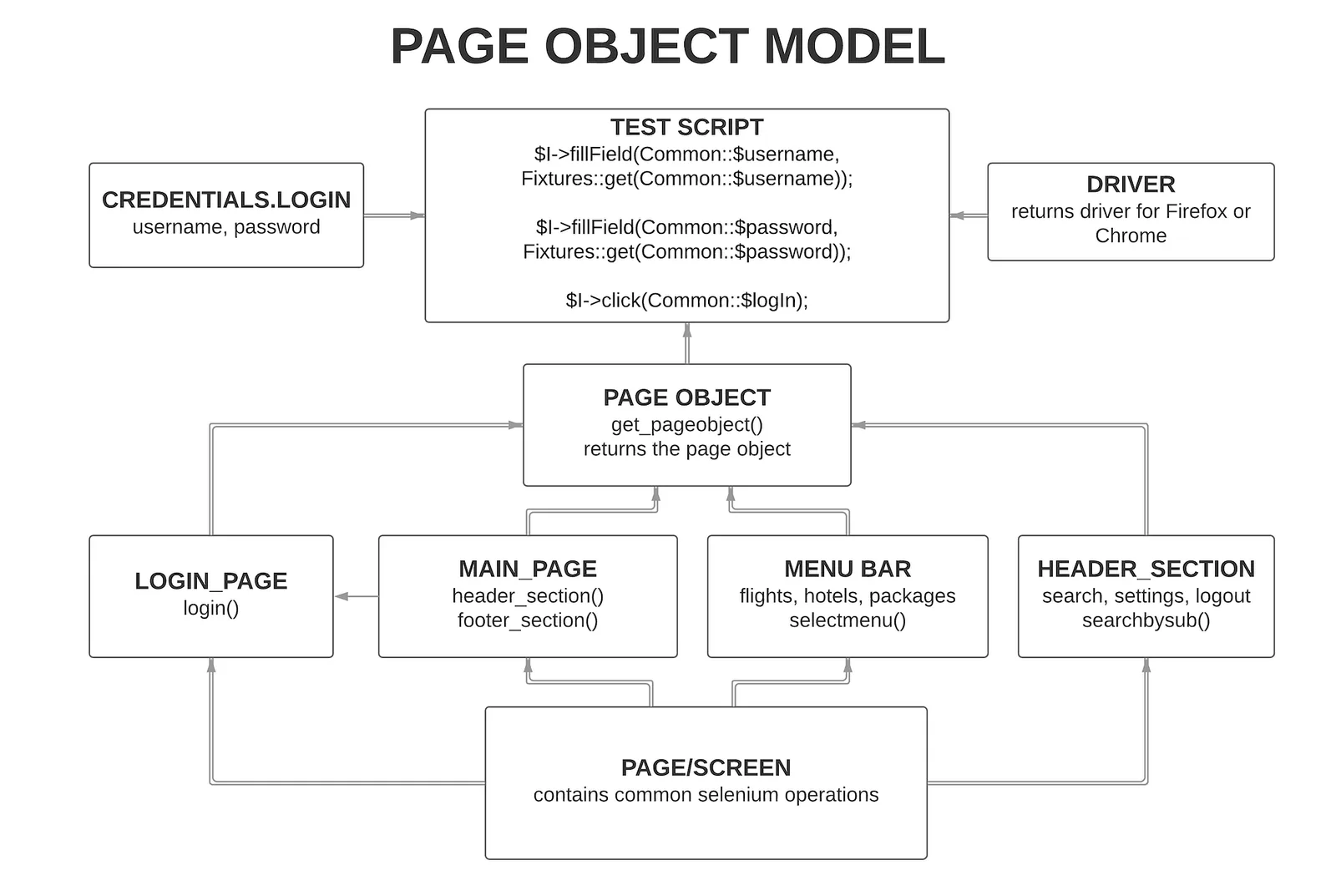
The Page Object Model (POM) is a design pattern in an automation framework that puts the locators and interactions for a page or reusable part of the UI behind an application-specific interface.
Martin Fowler wrote the pattern up in September 2013, and his definition is: wrap the page in an application-specific API, so tests can work with the page without digging through its HTML.
Selenium's documentation frames the same idea as services. The public methods represent the services the page offers. A sign-in screen offers signing in, not clicking a button.
The name misleads a little, and Fowler says so himself. Build objects around significant parts of the UI, not around whole pages. A search bar that shows up on ten screens should be one object that all ten share.
Think of POM as creating a blueprint for every page in your application. Each page class contains the web elements (buttons, forms, links) and the methods that interact with those elements. This creates an object repository where testers can easily locate and manipulate page components without digging into complex HTML structures. POM separates test logic from page structure, making your automation framework more resilient to UI changes and easier to maintain over time.
The pattern works by defining three key components: pages, elements, and actions. Pages represent an entire DOM or major sections, elements are the individual components like input fields or buttons, and actions are the methods that perform operations on those elements. This approach has become the gold standard across automation frameworks like Selenium, Playwright, and Cypress. Teams adopt POM because it promotes code reusability, reduces duplication, and creates a clear separation between test scripts and page-specific code.
Traditional POM, though, faces challenges with brittle locators and maintenance overhead as web applications become more complex and interactive. Modern AI browser automation tools are coming up to solve these limitations through computer vision and intelligent element detection.
Page object model Example in Selenium
Here is a quick example where we test a login page with Selenium, using POM.
A login test has two jobs: interact with the form and check the result. Put the interactions in a page object; keep the expected result in the test.
Inside LoginPage, store locators and use a WebDriverWait to find elements when needed:
private static final By EMAIL = By.id("email"); private static final By PASSWORD = By.id("password"); private static final By SUBMIT = By.id("sign-in"); public void signIn(String email, String password) { WebElement emailInput = wait.until(visibilityOfElementLocated(EMAIL)); emailInput.clear(); emailInput.sendKeys(email); WebElement passwordInput = wait.until(visibilityOfElementLocated(PASSWORD)); passwordInput.clear(); passwordInput.sendKeys(password); wait.until(elementToBeClickable(SUBMIT)).click(); } signIn() returns void because submitting the form could open the dashboard or show an error. Each test checks its own outcome:
@Test void validAccountReachesDashboard() { new LoginPage(driver).signIn("ada@example.com", "correct-horse"); DashboardPage dashboard = new DashboardPage(driver); assertEquals("ada@example.com", dashboard.signedInAs()); } @Test void lockedAccountShowsError() { LoginPage login = new LoginPage(driver); login.signIn("locked@example.com", "correct-horse"); assertEquals("This account is locked.", login.errorMessage()); } These snippets assume each test starts in a fresh browser at the login page. The page constructors wait for their screens to appear; signedInAs() and errorMessage() wait for nonempty text. The tests decide whether that text is correct. This follows Selenium’s guidance on page objects and assertions.
A method specifically for successful login could wait for and return DashboardPage. A general login method should allow both outcomes.
Storing By locators also avoids holding elements across rerenders. A WebElement points to a particular DOM node, which can become stale when replaced. Fresh lookups reduce that risk, although the page can still change between lookup and action.
Page object model in Playwright
Here is the same example of a login page with Playwright. Playwright supports the same structure. Its locators resolve elements when used, so storing a locator does not tie it to one DOM node.
Inside a LoginPage that holds Playwright’s page, the interaction can be:
async signIn(email: string, password: string) { await this.page.getByLabel('Email', { exact: true }).fill(email); await this.page.getByLabel('Password', { exact: true }).fill(password); await this.page .getByRole('button', { name: 'Sign in', exact: true }) .click(); } get error(): Locator { return this.page.getByTestId('error'); } The test uses Playwright’s retrying assertion:
await login.signIn('locked@example.com', 'correct-horse'); await expect(login.error).toHaveText('This account is locked.'); Exposing the error locator lets toHaveText() retry until the expected message appears or the assertion times out. Reading textContent() first and comparing the returned string only checks that snapshot.
Changing the button’s ID would not affect this role locator while its accessible name remains “Sign in.” If the name changes, decide whether that copy change is acceptable before updating the locator.
Fixtures can provide page objects and manage setup and teardown. They work alongside POM.
Page Object Model vs Page Factory
Page Factory is an enhanced implementation of the traditional Page Object Model. While POM provides the conceptual framework, Page Factory is an extension of POM in Selenium that uses annotations like @FindBy to initialize web elements at runtime, simplifying object creation and improving test readability.
The core difference is that traditional POM requires manual element location using driver.findElement() calls throughout your code. Page Factory automates this process through annotations, reducing boilerplate code by a lot.
Performance distinguishes these approaches in one specific way. Page Factory defers element lookup until first access (lazy loading), which can reduce unnecessary WebDriver calls at instantiation time. Elements are only located when actually needed, instead of during page object instantiation. The table below provides an overview of the features and the differences between POM and Page Factory.
Feature | Page Object Model | Page Factory |
|---|---|---|
Element Initialization | Manual using driver.findElement() | Automatic using @FindBy annotation |
Performance | Standard element lookup | Lazy loading with better performance |
Code Complexity | More boilerplate code | Cleaner, annotation-based code |
Maintenance | Higher maintenance overhead | Lower maintenance with annotations |
Page Factory's lazy loading approach means elements are located only when accessed, improving performance and reducing unnecessary web driver calls.
Best practices
- Extract shared components such as navigation and address forms. For repeated invoice rows, reuse one
InvoiceRowclass, identify each row by a stable key, and scope actions to that row. - Wait for the state the next action needs. Avoid fixed sleeps and mixing Selenium’s implicit and explicit waits, which can produce unexpected timeout behavior.
- Check business outcomes separately. Playwright’s actionability checks can establish that an export button is clickable; the test must still verify that the export finishes.
- Keep credentials, test data and browser lifecycle outside page objects. Let tests or fixtures handle setup and cleanup, avoid shared mutable instances, and reuse authentication setup when login itself is not under test.
- Diagnose failures before adding abstractions. Repeated edits across page classes and objects can reveal a missing shared component. Premature clicks can signal a wait problem. Selecting the wrong row after sorting can expose a positional locator.
Beyond POM: Why you should use Skyvern
POM approaches crumble when faced with changing web applications and constant UI changes. Skyvern eliminates these limitations entirely by using LLMs and computer vision to understand web pages contextually, removing the dependency on brittle locators that plague conventional automation frameworks.
It reads a screenshot and a representation of the DOM, chooses browser actions from a plain natural language instructions, and Playwright executes them. (Read our architecture docs!)
If you’re taking the same action on many different websites, the benefits of not having to create selectors manually is HUGE.
With modern LLMs, you can just describe tasks like this:
Open the invoices section. Download every unpaid invoice issued in August 2026. Return each invoice number, issue date, amount, currency, and downloaded file. If there are none, report that explicitly.
And Skyvern will not only figure out the selectors and get the job done, it will generate workflow code that can do this again and again deterministically.
Go try it out for yourself: Skyvern Quickstart
Skyvern in Practice: What Replacing a Page Object Looks Like
Here is what automating a vendor portal workflow looks like with the Skyvern Python SDK. The task below logs in, works through to the invoices page, and returns structured data, with no element IDs, no CSS selectors, and no XPaths anywhere in the code:
from skyvern import Skyvern
import asyncio

# Initialize the client with your API key
skyvern = Skyvern(api_key="YOUR_API_KEY")

async def check_invoices():
    # Describe the goal in plain language — no locators required
    result = await skyvern.run_task(
        url="https://your-vendor-portal.com",
        prompt=(
            "Log in with the provided credentials, go to the invoices page, "
            "and extract the three most recent invoice numbers and their amounts. "
            "COMPLETE when the invoice data has been extracted."
        ),
        # Define the output shape you want back
        data_extraction_schema={
            "type": "object",
            "properties": {
                "invoices": {
                    "type": "array",
                    "items": {
                        "type": "object",
                        "properties": {
                            "invoice_number": {"type": "string"},
                            "amount": {"type": "string"}
                        }
                    }
                }
            }
        },
        wait_for_completion=True,  # Block until the task finishes
    )
    return result.output

asyncio.run(check_invoices())
No page object. No locator strings. No driver.findElement() calls. The same code works across different vendor portals without any per-site modifications, and if a portal redesigns its invoice page tomorrow, nothing in this code breaks because there is nothing hardcoded to break.
Skyvern also supports role-based access control and approval gates at the workflow level. Organizations can restrict which users have permission to run specific workflows and require explicit approval before executing sensitive automations like financial transactions or government filings.
For teams struggling with POM's brittleness and overhead, Skyvern represents the next evolution in browser automation technology.
Keep reading

5 Best AI Browser Agents in 2026
The best browser agents can reliably and repeatedly handle jobs you would do by clicking through a web browser, like filling out a form, collecting documents, or updating customer records. So if you’re tired of wasting time filling out forms and clicking dropdowns, this article is for you. Before I continue, full disclosure: I am Skyvern’s CEO, a browser agent SDK written in Python built to automate workflows. It’s built specifically to handle complex business workflows, like dealing with heav
Browser MCP in 2026: What It Is, How It Functions, and the Best Servers Available
Most browser automation scripts fail the moment a site changes its layout. A button moves, a class name updates, and your carefully crafted Selenium script stops working. Skyvern solves this by giving AI agents live browser access instead of hardcoded selectors. The agent sees what's actually on the screen, decides what to do next, and adapts when things change. That's the difference between brittle scripts that need constant maintenance and automation that keeps working. This guide covers what
What Is Playwright MCP Server? How It Works and When to Use It (May 2026)
Playwright MCP Server connects AI coding assistants to browsers so they can automate web interactions conversationally. You describe a test scenario, the assistant spins up Playwright, executes the steps, and returns results. That flow works well for generating new tests or working through unfamiliar UIs. Where it starts breaking down is high-volume regression testing, stable workflows with fixed selectors, or production pipelines where token overhead compounds fast. TLDR: * Playwright MCP Se
Put the browser to work
Use Skyvern for the work that lives in a browser.
Turn repetitive browser tasks into reliable workflows with Skyvern.