Deleting RAG from our web agent made it 2.3x faster
 Suchintan Singh5 min read
TL;DR - We rewrote Skyvern from scratch using Pi as inspiration, making it 2.3x faster and score 90.5% on Odysseys benchmark. Try it out the via Open Source or Cloud.
💡 Recap: What is Skyvern? It’s an open source framework that helps non-technical teams prompt to build browser automations. Skyvern is model agnostic, and can be run with closed models like Claude, or open ones like Deepseek. We have helped thousands of companies automate things like interacting with healthcare portals, fetching invoices or utility bills, filling out government forms, applying to jobs, and more.
RAG? What are you talking about?
For those unfamiliar with agents, RAG stands for Retrieval Augmented Generation. It’s a way to pass information to an LLM so they make smarter decisions. For example, before asking questions to an LLM about a document, you could parse that document and feed it into an LLM. You can read more about it here.
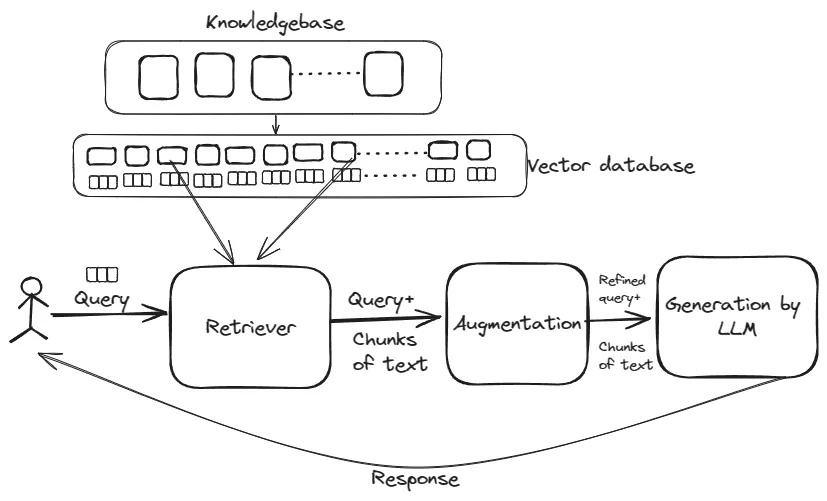
The first version of Skyvern was built using RAG. We would load up a website, screenshot and annotate it, condense it into a smaller list of elements, and send it to an LLM to take actions on.
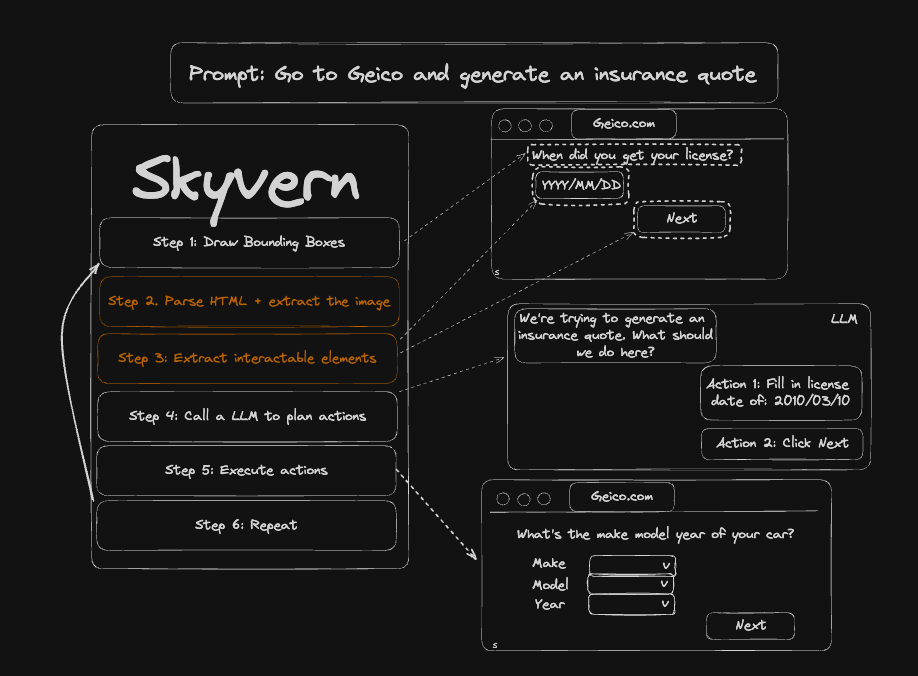
This worked great if you could identify every interactable element on a website with 100% accuracy. We thought we could eventually get there. We were wrong.
Except.. the web is messy. Accurately identifying every element on a website proved to be a nightmare. What started off as a nice little utility to identify interactable elements essentially turned into building a new DOM interpreter.
Parsing things like Shadow DOMs, iframes, select2 dropdowns, Kendo UI widgets, Canvas elements, …. this became an endless battle.
The worst part was that agent performance did not improve with better LLMs. Instead, it was bottlenecked by this DOM parsing logic. If it failed to correctly identify an element, the entire agent run failed.
This is a sign that we need to give the LLM more freedom.
Give the LLM freedom to do what it wants
RAG systems, if you aren’t careful, can assume that the pre-processing layer always happens ahead of any LLM calls, and don’t let the LLM decide when it is necessary. This was a good idea when LLMs weren’t good at following instructions, which meant that you couldn’t trust them to reliably pull the information when needed, but instruction following hasn’t been a big problem since the models released after Opus 4.5.
We noticed 2 moves in the market that highlighted this change in thinking:
- Coding agents like Claude code were moving away from embedding style code search to grep style code search because the models were increasingly getting better at using primitive tools to fetch the context they needed
- Minimalist coding agents like Pi were becoming increasingly popular, with extensions of Pi like Prime-intellect hitting SOTA on the ARC-AGI-3 benchmark by tuning the harness and letting the agent generate and execute python code as needed
So we asked ourselves: would the same approach work for browser agents? What if the agent started with the minimum context required, and gave it the ability to pull additional context as needed?
In practice, it means giving the agent the following tools:
- Scan the HTML with model-generated javascript
- Take any rustwright-supported action on the website, for example Click, Type, Scroll, Switch tabs, etc
- Take a screenshot
- Mark the run as final (success, or failed with reason)
The results were better than we expected
Our hypothesis was that we would see an increase in performance, in exchange for added cost and a slower processing speed. The new architecture should result more calls to the LLM to get the same task done.
To test this hypothesis, we split the test up into two branches:
- The leading public browser agent benchmark: Odysseys to test for accuracy
- A live A/B test across ~100,000 customer runs to test for speed / cost
Odysseys benchmark results
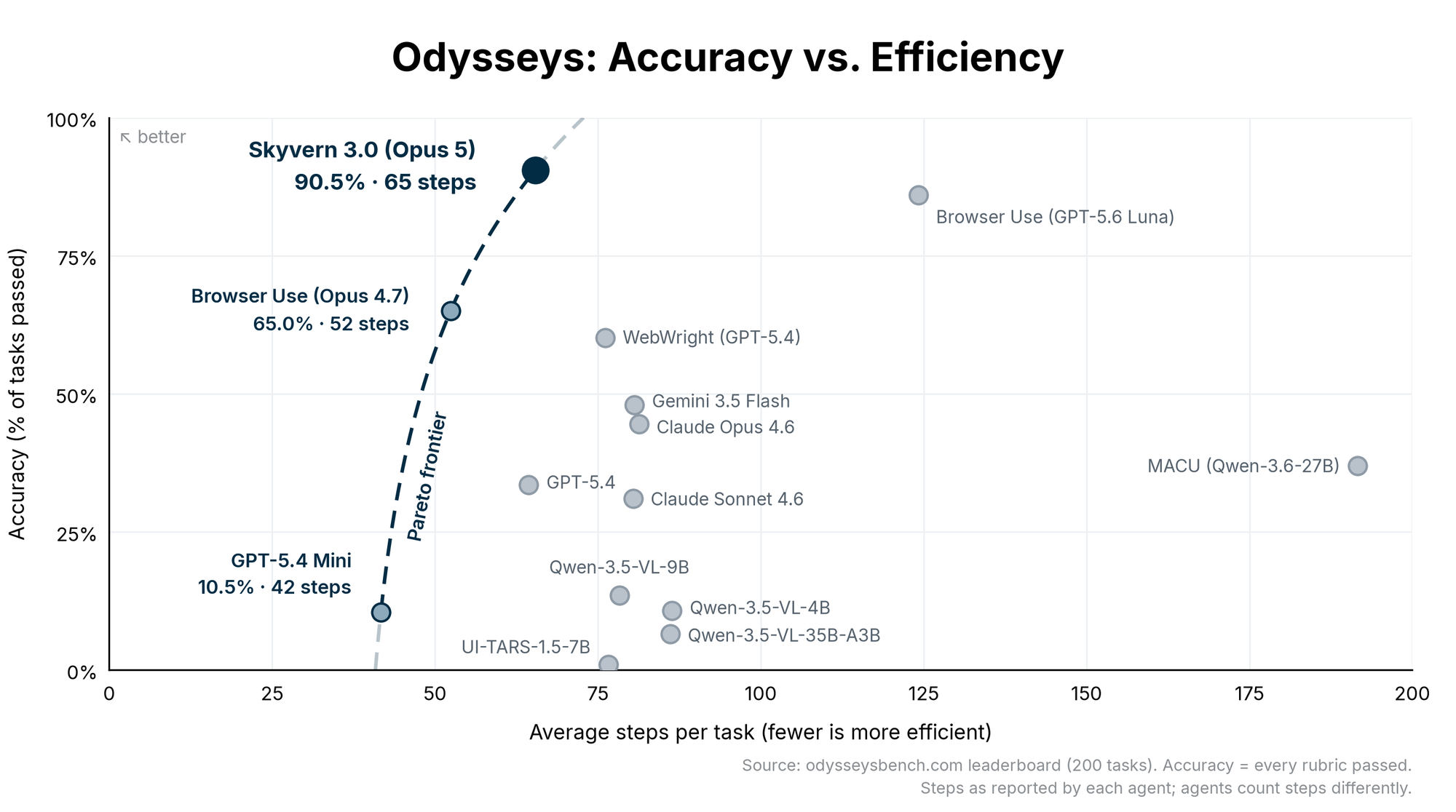
Skyvern 3.0 topped the Odysseys benchmark. It reported a 90.5% perfect rubric success rate, pretty much exactly as we expected. What surprised us though was that it was highly efficient in its runs, at only 65.4 average steps.
Production A/B Test results
We ran the production A/B test on approx 100,000 runs and measured the impact
| Skyvern 2.0 | Skyvern 3.0 | Improvement | |
|---|---|---|---|
| Mean run time | 593 s | 262s | 2.3x |
| Total cost per run | $0.039 | $0.0302 | -22.5% |
The production A/B test results were surprising. The new architecture was.. faster and cheaper? We expected at least one of these dimensions to be a net negative
Why was that the case? Digging into it, we found a few interesting things:
- Screenshot utilization dropped by 90% (27% —> 2.7% of all LLM calls). LLM calls with images go through a vision encoder to help the LLM “see” the image, which tend to be 1.7x slower than text-only encoders
- Token consumption increased by 52% (188K tokens / run —> 286K tokens per run) Average number of turns (ie LLM Calls) increased by 3.59x (6.4 —> 23), but tokens per turn decreased by 59% (29K tokens —> 12K tokens)
- Prompt Cache hit rates increased by 195% (27% —> 79.7%) because we stopped loading the screenshot or HTML on every turn, which meant a larger % of the prompt was cacheable
Despite the increased token usage, cached tokens carry a 70% discount, which explains the net reduction in cost.
So… are browser agents solved?
The answer is still no. They can still be improved across all 3 dimensions (cost, speed, accuracy).
Our team is now exploring the role of ”system one models” like Jev for browser agents. The current generation is still highly limited: 64K context window, no image processing, which causes unacceptable losses in accuracy, but we expect this to change over the next 6-12 months 🙂
Give Skyvern a try!
Run it via our Skyvern Open Source or Skyvern Cloud versions and let us know what you think!
Keep reading
Rustwright: Playwright rewritten in rust that occupies 70% less memory (and is 2.55x faster)
Hey everyone, Suchintan from Skyvern (YC S23). We run browser automation for AI agents at scale, and we're launching Rustwright: Playwright on an in-process Rust CDP engine. The engine consumes 70% less memory than Playwright, and is 2.55x faster to boot. We built this to improve Skyvern’s memory footprint, and thought this would be independently valuable to the broader community The whole idea fits in two lines: playwright-python: your code ──pipe──► Node driver ──CDP──► Chromium rustwrig
How We Cut Token Count by 11% and Boosted Success Rate by 3.9% Using HTML Instead of JSON in LLM Calls (Updated June 2026)
Every time Skyvern takes an action on a web page, it sends an annotated screenshot plus a structured description of every interactable element to a multimodal LLM: buttons, inputs, dropdowns, the works. That description is where a lot of tokens go. We'd been representing those elements as JSON, which is readable and explicit, but also verbose. After hearing from others in the space that HTML and markdown representations could cut token counts by 15% or more, we decided to test it ourselves. The
Getting Claude to QA Its Own Frontend Work | Updated July 2026
Just a brief recap: people use Skyvern to automate the repetitive browser work nobody wants to do: pulling invoices from vendor portals, filling out healthcare forms, extracting data from sites that don’t have APIs. You can try it out here: https://github.com/Skyvern-AI/Skyvern We’ve been using Claude code a lot and kept running into the same failure mode: the code looks kinda right, type checks pass, but when you go to test the changes, something’s off: button doesn’t fire, form overflows or t
Put the browser to work
Use Skyvern for the work that lives in a browser.
Turn repetitive browser tasks into reliable workflows with Skyvern.