Axiom vs Skyvern: Which Browser Automation Tool is Better? (June 2026)
 Suchintan Singh15 min read
Choosing between Axiom and Skyvern for browser automation means choosing between two fundamentally different approaches to handling the fact that websites change. Axiom records a workflow once and replays it using selectors tied to the page structure at that exact moment, which works until the site updates and breaks the script. Skyvern reads the page visually every time it executes, identifying buttons and fields by what they look like and what they do instead of by a stored XPath, so redesigns and layout shifts don't require manual intervention. This Axiom vs Skyvern breakdown covers deployment models, how each tool handles authentication and concurrency, what happens when portals update frequently, and where the architectural distance between the two becomes impossible to ignore.
TLDR:
- Axiom uses fixed selectors that break when portals change layouts; Skyvern reads pages visually at runtime and adapts without manual fixes.
- Axiom runs as a Chrome extension on a single machine; Skyvern runs in the cloud with parallel execution across multiple sessions.
- Skyvern handles 2FA, CAPTCHA, and credential storage natively; Axiom requires manual configuration or third-party workarounds.
- For low-volume workflows on stable sites, Axiom's per-run cost is lower; for high-frequency portal automation, Skyvern's total cost of ownership is lower when maintenance is factored in.
- Skyvern fits operations teams managing portal-heavy workflows across insurance, government, or financial systems where sites update frequently and authentication is required.
What is Axiom?
Axiom is a no-code browser automation tool built around a Chrome extension. You install the extension, record your clicks and keystrokes directly in Chrome, and Axiom packages that recording into a reusable bot. Capturing a workflow once is enough to make it repeatable.
Teams use it for web scraping, data entry, and form filling. The core appeal is the low barrier to entry. If you can do something in a browser, you can record it and run it again without writing a single line of code.
How Axiom Works
Axiom's recorder captures the exact selectors tied to the elements you interact with during recording. When the bot replays the workflow, it looks for those same selectors. This works well on stable pages with predictable layouts, but the moment a site renames a button, restructures a form, or shifts an element's position, the bot loses its reference point and breaks.
That fragility is the core tradeoff. Axiom is genuinely fast to set up, but the workflows it produces are tightly coupled to the page structure at the time of recording.
Key Features
- Chrome extension-based setup with no installation overhead, making it immediately accessible for individual users who want to automate browser tasks without infrastructure configuration.
- Visual recorder captures workflows by performing them once in the browser, eliminating the need to write code or understand DOM structure.
- Per-run pricing model that keeps costs predictable for low-volume, occasional automation tasks on stable sites.
- Pre-built templates and sharing capabilities let teams reuse common workflows across users without rebuilding from scratch.
- Scheduled execution support allows workflows to run on timers without manual triggering, though execution still ties to the extension environment.
Limitations
- Fixed selectors break when target sites rename buttons, restructure forms, or shift element positions, requiring manual re-recording after every portal update.
- Single-browser extension architecture limits concurrent execution and ties workflows to one machine, creating bottlenecks for teams needing parallel runs or scheduled jobs that run independently.
- Authentication handling requires manual credential storage through the interface, with multi-factor authentication and CAPTCHA challenges needing extra configuration or third-party workarounds.
- No self-hosted deployment option for industries with strict compliance requirements where data cannot leave controlled environments or teams needing to meet specific audit standards.
- Workflow complexity ceiling shows up in multi-step automations involving conditional branching, dynamic content, or exception handling that goes beyond linear replay.
Bottom Line
Individual users automating straightforward, repeatable tasks on stable sites with predictable layouts and basic login flows: this is where Axiom earns its place. The recorder is genuinely convenient for personal automation where workflows run sequentially and site changes are infrequent. It's not suited for operations teams managing portal-heavy workflows across insurance carriers, government systems, or vendor platforms where sites update without warning, authentication friction is the norm, and concurrent execution matters for processing volume.
What is Skyvern?
Skyvern is an AI browser automation tool built to automate workflows that run entirely inside a web browser, with no API required. Where selector-based tools break the moment a portal renames a button or restructures a layout, Skyvern reads the live page state visually at runtime using computer vision and LLM reasoning, identifies interactive elements by appearance and context, and keeps the workflow moving through layout changes that would kill a traditional script.
The core value proposition is straightforward: if a human can do it in a browser, Skyvern can automate it without APIs, without brittle scripts, and without breaking when websites change.
Key Features
- Skyvern reads pages visually instead of relying on DOM selectors, so workflows survive portal updates, redesigns, and layout shifts without manual script fixes.
- Built-in credential storage and 2FA/MFA handling lets Skyvern work through authenticated portals autonomously, covering the login flows that stop most automation tools cold.
- Concurrent workflow execution lets teams run multiple browser sessions in parallel, which matters for operations processing high volumes across many portals.
- Structured output delivery means extracted data comes back in clean, usable formats instead of raw HTML dumps that need downstream parsing.
- Full audit trails and human-in-the-loop approval gates make Skyvern a practical fit for compliance-heavy workflows where traceability still matters.
Limitations
- Teams whose entire automation surface is a single, stable internal tool with an existing API will find the visual-AI layer adds overhead without adding value.
- Setup and configuration carries a learning curve, particularly for teams without prior exposure to agentic automation workflows.
- At high concurrency and scale, infrastructure costs can grow considerably depending on session volume and workflow complexity.
- Edge cases involving heavily obfuscated UIs or non-standard display environments can still require human review or workflow tuning.
Bottom Line
Operations teams managing portal-heavy workflows across insurance payers, carrier portals, government filing systems, or financial platforms: this is the fit. It's not suited for engineering teams whose automation needs are fully covered by existing APIs or stable internal tools where a selector-based approach would hold up just fine.
Cross-Browser Support and Deployment
Axiom runs entirely in-browser as a Chrome extension, which keeps setup friction low but ties every workflow to a single browser session on a single machine. That architecture works fine for personal automation, but it creates real bottlenecks when teams need concurrent runs, scheduled jobs, or execution that doesn't depend on someone's laptop being open.
Skyvern runs in the cloud by default, with a self-hosted option for teams that need to keep data on their own infrastructure. Workflows run in isolated browser sessions, meaning you can execute dozens of tasks in parallel without any session bleed between runs. Scheduling, webhooks, and API triggers all work without a local machine in the loop.
What This Looks Like at Scale
For a single user automating one workflow at a time, Axiom's extension model works well enough, though teams weighing Selenium alternatives often need more scalable solutions. Three specific constraints (concurrency, scheduling independence, and compliance deployment) show where Axiom's extension architecture runs out of runway:
- Concurrent execution across many accounts or portals requires parallel sessions, which Axiom's single-browser model doesn't support without workarounds.
- Scheduled workflows in Axiom depend on the bot being configured to run on a timer, but execution still ties back to the extension environment instead of a persistent cloud runner.
- Self-hosted deployment matters for industries with strict compliance requirements where data cannot leave a controlled environment and browser automation security best practices must be followed. Skyvern supports this; Axiom does not offer an equivalent option.
- Teams managing credentials across multiple portals benefit from Skyvern's built-in credential vault, which stores and injects login details without exposing them in plaintext during workflow configuration.
For individual users with straightforward, single-session needs, Axiom's deployment model is a non-issue. For operations teams running workflows at any real volume, the cloud-native architecture is where the distance between the two tools shows up most clearly.
The table below compares both tools across the dimensions that decide which one fits your workflows.
Dimension | Axiom | Skyvern |
|---|---|---|
How It Handles Layout Changes | Records workflows using fixed selectors that break when portals rename buttons or restructure forms, requiring manual re-recording after each site update. | Reads live page state at runtime using computer vision and LLM reasoning, identifying elements by appearance and context so workflows survive redesigns without manual fixes. |
Deployment Model | Runs as a Chrome extension on a single machine, with no cloud execution or parallel session support. | Runs in the cloud by default with self-hosted option, executing workflows in isolated browser sessions that support parallel execution without local machine dependency. |
Authentication and Credentials | Stores credentials manually through its interface, requiring extra configuration or third-party workarounds for multi-factor authentication and CAPTCHA challenges. | Built-in encrypted credential vault, native 2FA and TOTP support, automatic CAPTCHA solving, and residential proxy support for anti-bot detection avoidance. |
Concurrency and Scale | Single-browser extension model limits concurrent execution, better suited to sequential or low-volume use cases where one workflow runs at a time. | Cloud-native architecture supports dozens of parallel sessions across multiple accounts or portals, with scheduling and API triggers that run without human presence. |
Best Fit | Individual users automating simple, repeatable tasks on stable sites with predictable layouts and basic login flows. | Operations teams managing portal-heavy workflows across insurance carriers, government systems, or financial platforms where sites update frequently and authentication is required. |
Handling Website Changes and Layout Adaptability
Website layouts change. Portals get redesigned. Buttons move, field names shift, and login flows get updated without warning. For any automation tool, how it responds to those changes is one of the most telling indicators of its long-term viability.
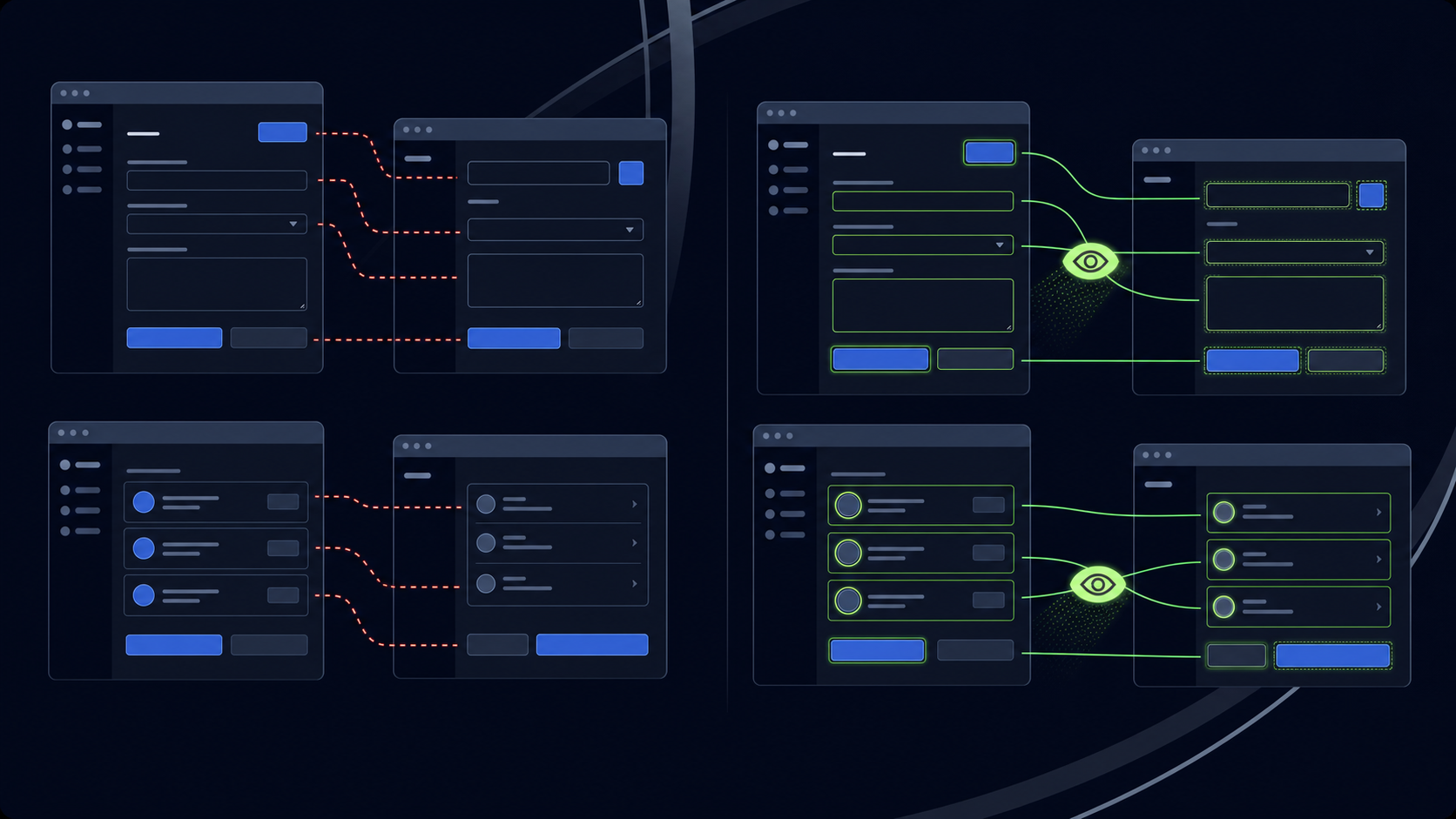
Axiom records your interactions and plays them back using fixed selectors. When the target site changes, those selectors break. Fixing them requires going back into the workflow editor, re-recording the affected steps, and republishing. For sites that update frequently, this becomes a recurring maintenance cycle with no natural end point.
Skyvern takes a different approach. Instead of replaying a recorded sequence, it reads the live page state at runtime using computer vision and LLM reasoning. It identifies elements by what they look like and what they do, not by a stored XPath or CSS path. When a button label changes or a form field moves, Skyvern re-reads the page and keeps going without requiring manual intervention.
How This Plays Out for Teams
The practical difference shows up most clearly in high-change environments: insurance carrier portals, government filing systems, vendor procurement pages. These sites update on their own schedules, and they rarely announce it. A selector-based workflow fails silently or throws an error. A visual-reading workflow adapts.
Teams running Axiom workflows across frequently updated sites often find themselves spending as much time repairing automations as running them, which is why many look to top browser automation tools for more resilient approaches. Skyvern's architecture shifts that burden from the user to the system, which matters considerably when the automation surface spans dozens of portals with independent update cycles.
Human oversight still matters for edge cases where layout changes introduce genuinely ambiguous states, but routine redesigns and incremental updates fall within what Skyvern handles without escalation.
Authentication, CAPTCHA, and Security Workflows

Both Axiom and Skyvern handle authentication, but the gap between their approaches becomes clear the moment a workflow requires anything beyond a standard username/password login.
Axiom relies on you storing and supplying credentials manually through its interface. For basic logins, that works. But multi-factor authentication, CAPTCHA challenges, and rotating credentials each require extra configuration or third-party workarounds that you have to wire together yourself.
Skyvern, on the other hand, was built with credential-guarded systems as a first-class concern. Four capabilities stand out here:
- Encrypted credential storage lets you store credentials once and reference them across workflows without exposing secrets in your task definitions or logs.
- Native 2FA and TOTP support means Skyvern can work through time-based one-time passwords automatically, so authentication flows that would normally interrupt an unattended run keep moving.
- Built-in CAPTCHA solving handles common challenge types without requiring external solvers or manual fallbacks patched in after the fact.
- Anti-bot detection avoidance through residential proxy support and browser fingerprinting reduces the rate at which portals flag and block automated sessions.
For teams running workflows across carrier portals, payer systems, or government filing sites, these aren't edge cases. They're the default state of the web. Axiom can handle simple logins, but production workflows at any scale will run into authentication friction that its tooling wasn't designed to absorb.
Workflow Complexity and Multi-Step Automation
Axiom handles straightforward, repeatable browser tasks well. Recording a sequence of clicks, filling a form on a stable page, scraping a table that never changes layout. These are the workflows where Axiom performs reliably. But as workflow complexity grows, the recorder-based model starts showing its limits.
Multi-step workflows that span authentication, conditional branching, and dynamic content require more than a replay of recorded actions and benefit from AI RPA platforms that handle complexity better. When a page displays differently based on user state or session data, a static recording has no mechanism to adapt. It replays what it memorized, and if the page looks different, it fails.
Skyvern, alternatively, reads the live page state at runtime instead of replaying a fixed sequence. Each step is checked against what's actually on the screen, so conditional flows, paginated results, and multi-stage form submissions work without scripting the exact path in advance. Workflows that involve logging in, working through 2FA, extracting structured data across multiple pages, and pushing results to an external system are the cases Skyvern was built around.
For teams running straightforward, single-site automations where the layout never changes, Axiom's recorder is often enough. For operations teams running multi-portal workflows with authentication, pagination, and exception handling baked in, the architectural gap between the two tools is considerable.
Pricing, Scale, and Runtime Economics
Axiom charges per workflow run, with costs scaling based on execution volume and complexity. For lightweight, recurring tasks, this can feel reasonable, but costs climb fast once you add multi-step workflows, retries, or concurrency across dozens of sessions. There's no native compute layer Axiom owns, so you're often paying for a coordination layer on top of whatever browser infrastructure you're already running.
Skyvern's pricing reflects its visual-AI execution model. Each task consumes compute for page processing, visual parsing, and LLM reasoning. So cost-per-run is higher than a simple script executor. Where Skyvern tends to win on economics is maintenance: teams that would otherwise spend engineer hours patching broken selectors after every portal update are offloading that cost entirely. The runtime cost trades against the maintenance cost, and for portal-heavy workflows that change frequently, that trade often favors Skyvern.
At scale, the comparison shifts further. Skyvern supports concurrent task execution across multiple browser sessions, which matters for operations teams running hundreds of workflows in parallel. Axiom's concurrency model is more limited and better suited to sequential or low-volume use cases.
The short answer: if your workflow volume is low and your target sites are stable, Axiom's per-run cost will likely be lower, though enterprise browser automation cost depends on multiple factors. If you're running high-frequency, multi-portal automation where sites change and maintenance compounds, Skyvern's total cost of ownership tends to be lower even when the per-run rate is higher.
Why Skyvern is the Better Choice
Axiom earns its place for individual users automating simple, single-browser tasks on stable sites. If that describes your automation surface, the recorder is a reasonable fit.
The case for Skyvern sharpens when conditions change: multiple portals, authentication friction, sites that update without warning, or workflows that need to run at volume. Those are the environments Skyvern was built for.
Three specific scenarios show where the distance between the two tools becomes impossible to close:
Portal layouts change without warning
Insurance carrier portals, payer systems, and government filing sites update on their own schedules. When they do, Axiom's recorded selectors fail and someone has to re-record the affected steps. Skyvern re-reads the live page state at runtime using computer vision and LLM reasoning, identifying buttons and fields by what they look like and what they do. A redesign that kills an Axiom workflow is a non-event for Skyvern.
Authentication is the default state, not an edge case
Eligibility checks across 20 or more payer portals, prior authorization workflows, carrier quote retrieval, and state tax filings all require credentialed login. Many require 2FA. Axiom handles basic logins and leaves the rest to third-party workarounds. Skyvern stores credentials in an encrypted vault, generates TOTP codes automatically, handles email-based OTP through forwarding integration, solves CAPTCHA challenges natively, and keeps the workflow moving through authentication friction that would stop most recorder-based tools completely. Phone-based SMS authentication remains a structural gap for both tools, but authenticator-app and email OTP flows run without manual intervention in Skyvern.
Volume requires parallel execution
A team running eligibility checks across hundreds of accounts cannot do it sequentially. Skyvern runs workflows in parallel across isolated browser sessions, with scheduling, webhook triggers, and API access that operate without a local machine in the loop. Axiom's single-browser extension model does not support this without workarounds.
For teams in insurance, healthcare credentialing, or government filing where sites update frequently and authentication friction is the norm, Skyvern's architecture removes the maintenance burden that selector-based tools leave behind. A workflow that needs constant repair only shifts the manual work somewhere else.
Code Example: Authenticated Payer Portal Eligibility Check
The example below shows a Skyvern workflow that logs into a payer portal, works through 2FA, and returns structured eligibility data. Three steps capture the full pattern: install the SDK, store credentials once, and run the task.
import asyncio
from skyvern import Skyvern

# pip install skyvern
skyvern = Skyvern(api_key="YOUR_API_KEY")

async def run_portal_workflow():
    # Store credentials once —once; the agent references them without sending
    # plaintext passwords to the LLM or exposing them in task definitions
    await skyvern.create_credential(
        name="Payer Portal Login",
        credential_type="password",
        credential={"username": "ops@yourorg.com", "password": "your_password"},
    )

    # Run the eligibility check —check; Skyvern reads the portal visually at runtime
    # and adapts if the layout has changed since the last run
    task = await skyvern.run_task(
        url="https://payer-portal.example.com",
        prompt=(
            "Log in and check eligibility for patient ID 12345. "
            "Extract coverage status and copay details. "
            "COMPLETE when the eligibility results page is displayed."
        ),
        # Pass TOTP identifier so Skyvern resolves 2FA automatically
        totp_identifier="ops@yourorg.com",
        # Return extracted data in a clean, structured format
        data_extraction_schema={
            "type": "object",
            "properties": {
                "coverage_status": {"type": "string"},
                "copay_amount": {"type": "number"},
                "deductible_remaining": {"type": "number"},
            },
        },
        # Send results to your system when the task finishes
        webhook_url="https://your-app.com/webhooks/eligibility",
        # Block until complete and return the output directly
        wait_for_completion=True,
    )

    print(task.output)

asyncio.run(run_portal_workflow())
Axiom has no equivalent path here. A recorder-based workflow stops at the login screen the moment a portal adds 2FA, and has no mechanism to read the live page state when the layout changes between runs. Skyvern handles both without any changes to the code above.
Final Thoughts on Selecting Browser Automation Tools
Axiom earns its place for simple, repeatable tasks on sites that don't change. For portal-heavy operations where sites update without notice, authentication friction is the norm, and workflows need to scale across dozens of concurrent sessions, the gap between a recorder and a visual-AI agent isn't close. Teams handling credentialing, eligibility checks, carrier quotes, or government filings know the maintenance burden of selector-based automation. Skyvern removes it. See how it works on your workflows.
FAQ
How should I decide between Axiom and Skyvern for my team's automation needs?
Start by checking three conditions: how frequently your target sites change layouts, whether your workflows require authentication and credential management, and whether you need concurrent execution across multiple portals. If you're automating a single stable site with predictable layouts and basic login flows, Axiom's recorder will get you running faster. If you're managing portal-heavy operations across insurance carriers, government systems, or vendor platforms where sites update without warning and credentials rotate, Skyvern's visual-reading architecture eliminates the selector-maintenance cycle entirely.
What's the core difference in how Axiom and Skyvern handle website changes?
Axiom records your interactions and replays them using fixed selectors tied to specific page elements—when a portal renames a button or restructures a form, those selectors break and require manual re-recording. Skyvern reads the live page state at runtime using computer vision and LLM reasoning, identifying elements by appearance and context instead of stored paths, so workflows adapt automatically when layouts change without requiring script updates.
Which teams get the most value from Skyvern's approach?
Operations teams running workflows across multiple portals where sites update independently: insurance eligibility checks across 20+ payer portals, prior authorization across carrier systems, government filing workflows, or vendor procurement across dozens of supplier platforms. The fit tightens when authentication friction (2FA, MFA, credential rotation) and layout instability are default conditions instead of edge cases, and when concurrent execution matters for processing volume.
What should I expect during Skyvern onboarding compared to Axiom?
Axiom's Chrome extension setup is immediate (install, record, run) but you're maintaining selector-based workflows from day one. Skyvern's setup carries a learning curve: configuring credential vaults, defining structured output schemas, and building workflows that read pages visually instead of replaying recordings takes longer upfront, but the maintenance burden shifts from you to the system once workflows are live, which matters considerably when your automation surface spans portals with independent update cycles.
Can Skyvern handle the authentication flows that typically block recorder-based tools?
Yes, Skyvern was built with credential-guarded systems as a first-class concern. Native 2FA and TOTP support, encrypted credential storage, built-in CAPTCHA solving, and anti-bot detection avoidance through residential proxy support handle authentication friction that Axiom's extension model requires third-party workarounds to solve. Phone/SMS-based 2FA remains a structural limitation for both tools, but email-based OTP and authenticator-app flows work autonomously in Skyvern without manual intervention mid-workflow.
Keep reading
Browser Use vs Browserbase: my honest comparison
Browserbase and Browser Use can both automate work in a browser, from collecting product data to filling out forms. Choosing between them comes down to what you want to build: a task you hand to an AI agent, a custom agent inside your application, or browser infrastructure for scripts you already run. I’m Skyvern’s co-founder and CEO by the way. We build a competing product, so I have a stake in this comparison. But I promise I won't promote our product (even though it's a great alternative to
6 Stagehand alternatives for browser automation in 2026
If you're looking for Stagehand alternatives, you probably want an AI browser agent that: * Works natively with Python scripts. * Can navigate and scrape complex websites efficiently. * Stays reliable as your workload grows from a few runs to thousands of browser jobs. That's the kind of workflow I built Skyvern for (Skyvern CEO here). I know, I know, Skyvern CEO's recommending Skyvern as a good alternative. Please just stay with me for a second here. Yes, Skyvern is a good Stagehand alt
Browser Use vs Stagehand: Which One Should You Pick?
Browser Use and Stagehand both let you use AI to automate browser tasks, such as collecting product data or filling out forms. When you’re deciding which to build with, their feature lists only tell you so much. You want to know how much code you’ll need to write, whether the automation completes your task correctly, and what repeated runs will cost. I'll be upfront: we build Skyvern, a competitor to both, but this blog post won't shill our product (you can try it here though). I’m keeping thi
Put the browser to work
Use Skyvern for the work that lives in a browser.
Turn repetitive browser tasks into reliable workflows with Skyvern.