How to automate Missouri Medicaid application prep for MO HealthNet
 Suchintan Singh7 min read
We built a working MO HealthNet application workflow and used Skyvern to prepare one hospital case from intake to review. Skyvern entered 46 approved values, completed the Prior Quarter Coverage branch for an unpaid hospital bill, prepared four case records, and stopped before the legal statements and signature.
For hospital operations leaders, that creates a practical automation unit: one complete standard case in, one checked application ready for a person out. Staff spend less time copying information into myDSS and more time resolving the cases that need judgment.
Built and tested by Skyvern
We mapped Missouri's current MO HealthNet application and hospital authority rules, built an interactive myDSS training workflow, and ran Skyvern from the hospital queue to human review.
7 sections · 46 values checked · 4 records prepared · 0 mismatches · 11 minutes 21 seconds
Open the complete Skyvern task
What your team gets
Your team gets a controlled workflow for a standard Missouri Adult Expansion Group case. It opens a case with documented representative authority, prepares the regular MO HealthNet application, records the prior-quarter hospital bill, checks every entered value, and sends the result to a person.
| Skyvern handles | Your team controls |
|---|---|
| Opening a case ready for entry | Appendix C or applicant-directed authority |
| Repeated contact, household, income, and coverage entry | Missing or contradictory facts |
| Copying the prepared Prior Quarter Coverage request | Whether the case belongs on that route |
| Preparing approved records | Any proof Missouri later requests |
| Comparing the draft with the source | Rights, electronic signature, and submission |
Missouri hospital presumptive eligibility is a different process. An approved hospital's trained employee may handle temporary PE, but the regular application still needs a separate workflow. This tutorial covers the regular application.
How we proved it works
We used Missouri's current IM-1SSL application, MO HealthNet application guidance, verification rules, and hospital PE material to build the field map. We then created one fictional uninsured adult case with an unpaid hospital bill from the prior quarter.
This was a controlled browser test, not an authenticated myDSS submission. It proves one synthetic case completed the workflow we built. Missouri DSS still verifies the facts and decides eligibility.
The hospital-bill branch is the part that makes this page useful. Missouri's Appendix A asks whether the person wants Prior Quarter Coverage for up to three months before the application and records month-specific residence, income, deductions, and unpaid bills. Skyvern can copy a prepared request. It cannot promise that DSS will approve it.
From hospital case to human review
Hospital financial-assistance queue
        |
        v
Approved case and Appendix C authority
        |
        v
Skyvern prepares the regular MO HealthNet application
        |
        v
Skyvern records the prior-quarter bill request
        |
        v
Authorized person reviews, signs, and submits
The approved hospital record remains the source. The browser task does not turn a bill or diagnosis into an eligibility decision.
What you need to get started
For the tutorial, you need a Skyvern account, a fictional or approved case, a field map, the case records, and a reviewer.
For live work, hospital staff either help while the applicant controls the account and signature, or act under Missouri's signed Appendix C appointment. Appendix C can appoint an individual or organization and limit what the representative may do. Both sides sign it.
Do not treat provider access or PE training as automatic authority to complete a regular application. Keep those roles distinct in your queue and access controls.
1. Start with one supported Missouri case
Our fixture is an uninsured 42-year-old Missouri adult living alone. She has one current job, a recent reduction in hours, no offered or current health coverage, and no pregnancy, disability, Medicare, facility, Social Security, or AI/AN branch.
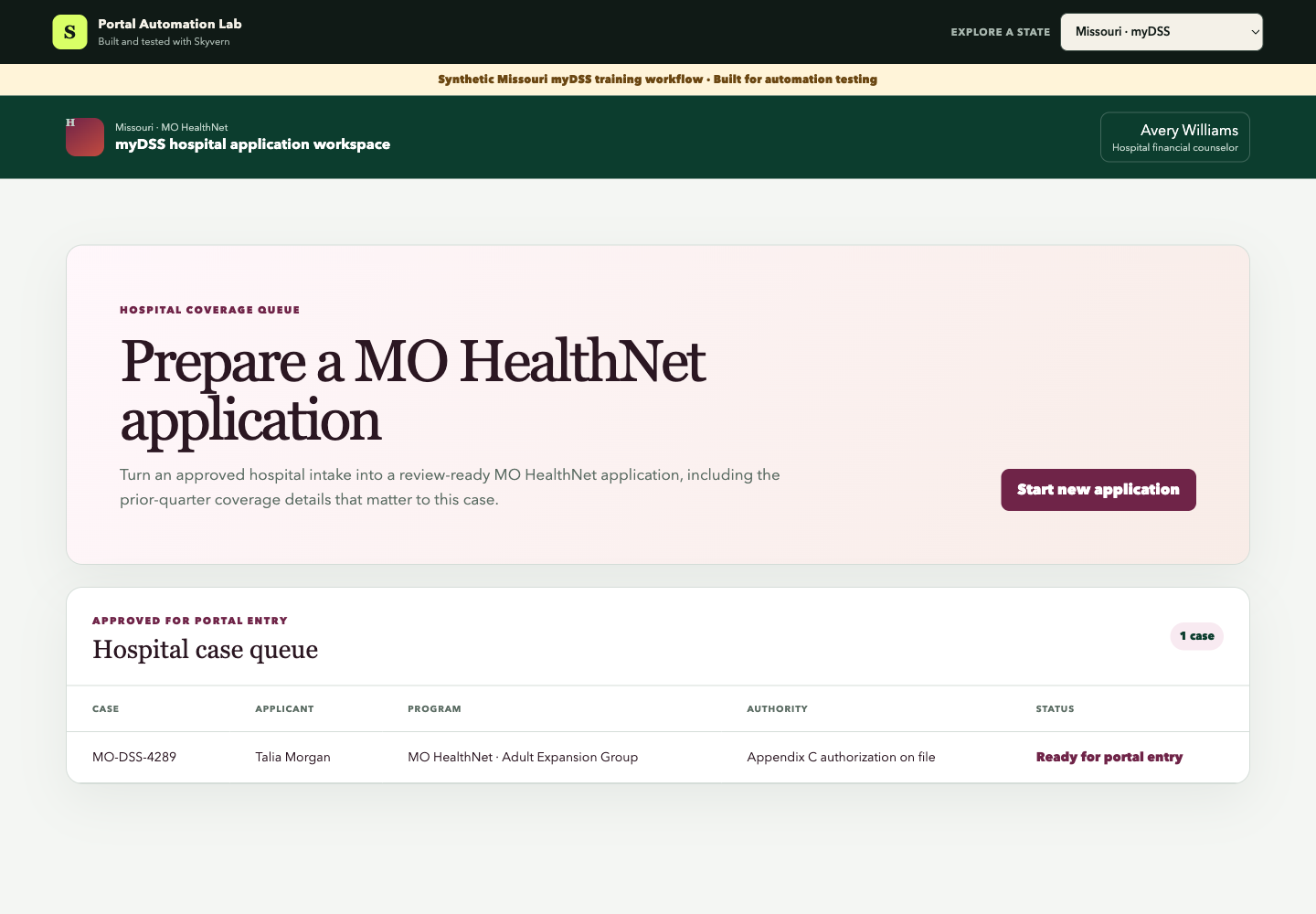
The hospital has a signed Appendix C allowing its financial counselor to help apply and receive case communications. The case is prepared for the Adult Expansion Group route; that is a routing input, not a promise of coverage.
2. Confirm the authority and application path
Before Skyvern touches the browser, record whether the operator is an applicant-directed helper or a properly appointed representative. Also confirm that the case belongs in the regular MO HealthNet application, not the hospital PE portal.
The task should stop when the authority record is missing, expired, or does not cover the action requested. Automation cannot repair a legal permission gap.
3. Enter the standard case facts
Skyvern completed:
- Representative authority and case path
- Applicant and contact information
- Household and tax details
- Income and work changes
- Health coverage and exception checks
- Prior Quarter Coverage
- Case documents
The coverage checks keep aged, blind, disabled, Medicare, VA, medical-facility, offered-job-coverage, and AI/AN routes out of this simple adult fixture. Missouri may require additional supplements for several of those cases.
4. Record the hospital-bill branch
The fixture requests Prior Quarter Coverage for a July 2026 hospital bill. Skyvern copies the request month, Missouri residence for that month, unpaid bill amount, and gross income from the approved packet.
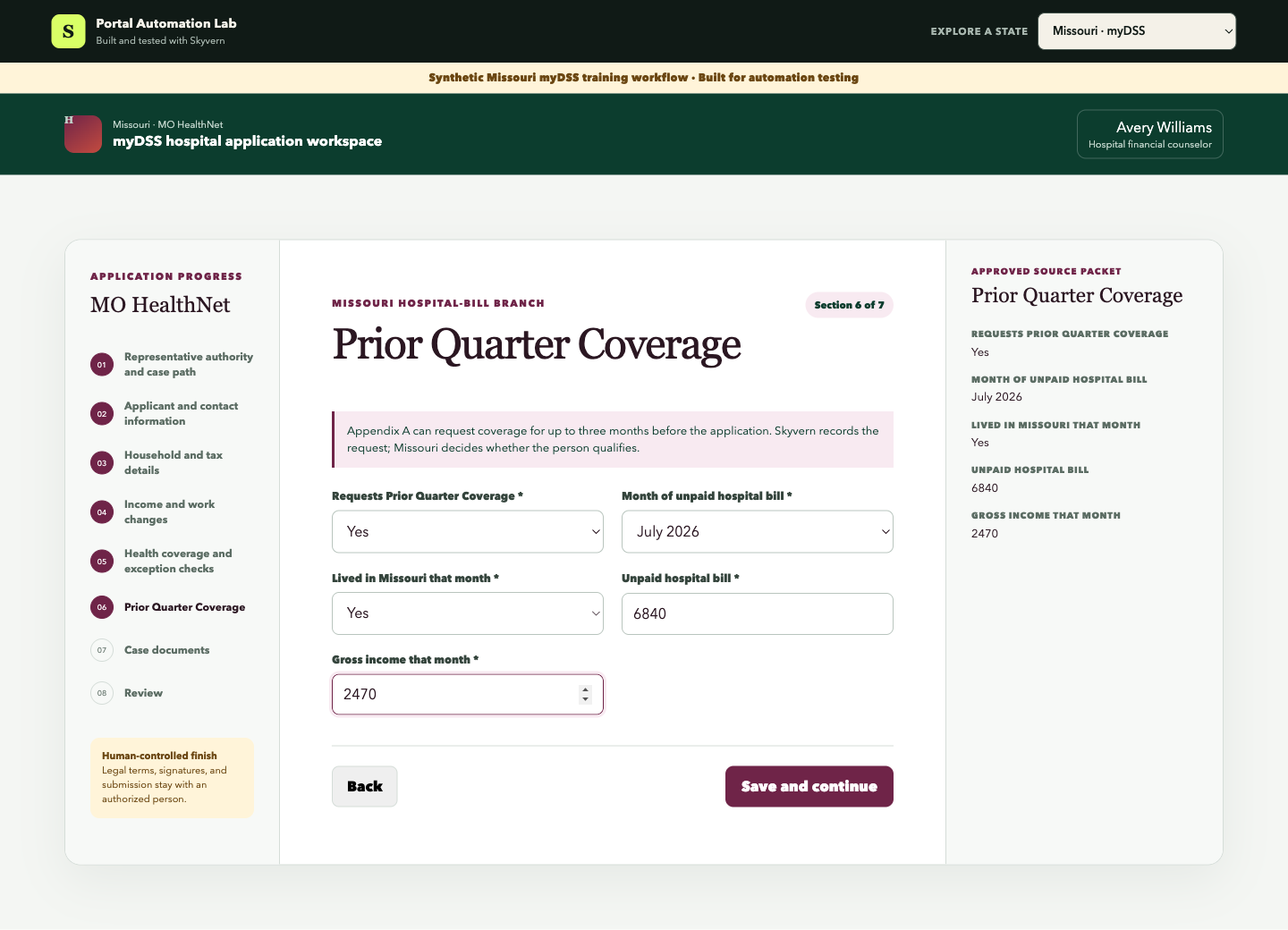
The words matter: the workflow records a request. It does not tell the patient the bill will be covered. DSS applies the program rules after submission.
If your hospital wants to automate this branch, your intake needs month-specific facts. A generic “has old bill” field is not enough.
5. Tell Skyvern what to do
We used this Browser Task instruction:
Open the prepared hospital case and start the new application.

For every section, copy each value from the Approved source packet into
the matching blank field exactly. Choose the exact matching option in
dropdowns. Complete the Prior Quarter Coverage section exactly from its
source packet. Save and continue after each section.

In Case documents, click Add approved copy for every listed record.
Continue to the final review.

Finish only when the page says Ready for human review and shows zero
mismatches, every document prepared, and Submission Not attempted.
Do not return to the queue.
The prompt defines the source, the exact state branch, and the stop point. Skyvern never decides whether the request qualifies.
6. Prepare the records tied to the case
The fixture prepares a recent pay stub, employer hours statement, July hospital bill, and an identity/citizenship record if DSS requests it.
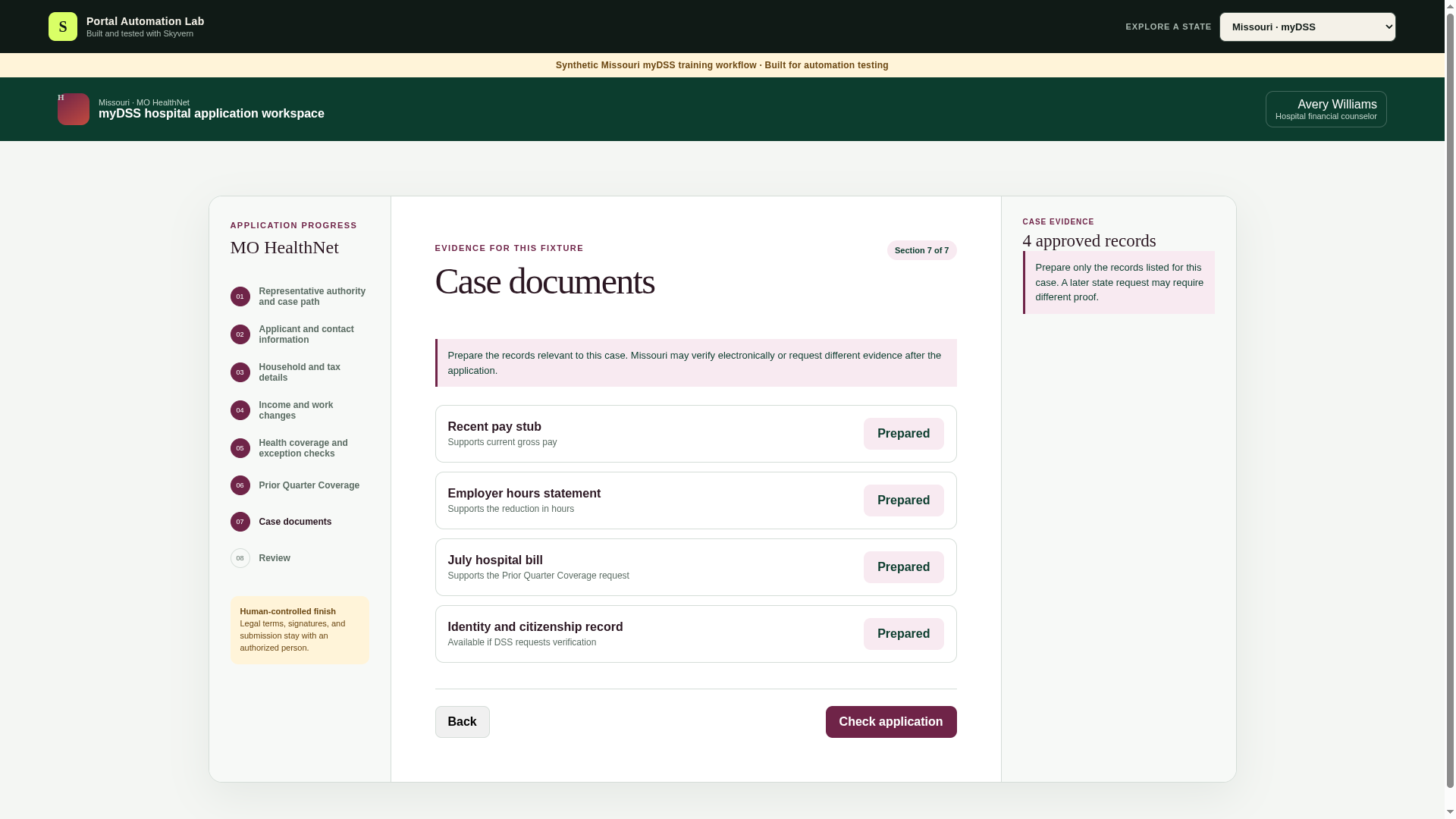
Missouri's verification page lists different proof for different facts and accepts records through its upload portal, fax, mail, or a Resource Center. Do not turn that list into one universal upload packet. Use the state's actual request and preserve the person and case association.
7. Send a clean application to review
At the final checkpoint, Skyvern confirmed 46 of 46 values matched, four of four records were prepared, and no submission was attempted.
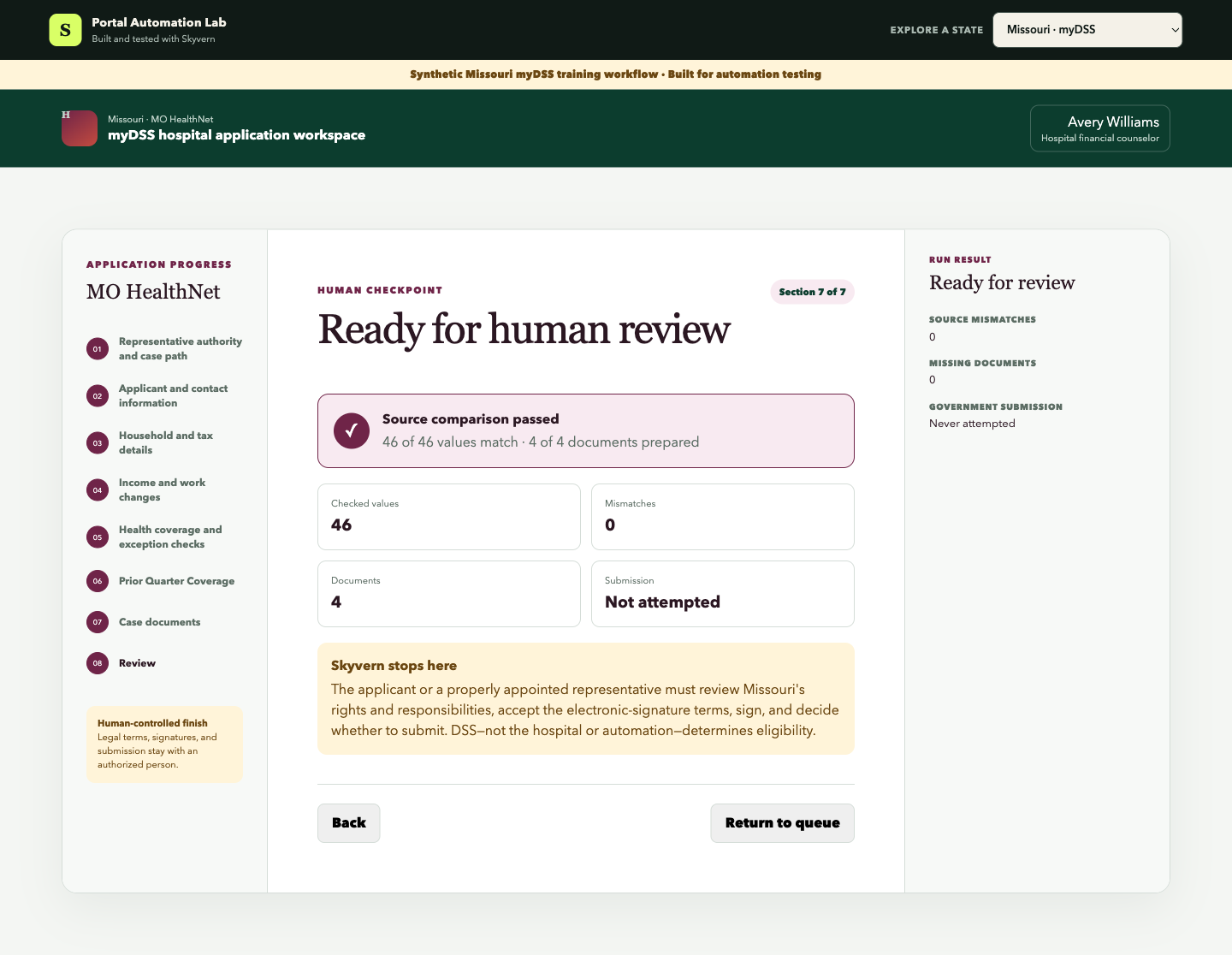
| Check | Measured result |
|---|---|
| Browser-task time | 11 minutes 21 seconds |
| Sections reached | 7 of 7 |
| Values matched | 46 of 46 |
| Case records prepared | 4 of 4 |
| Source mismatches | 0 |
| Human corrections during the run | 0 |
| Electronic signature or submission | No |
An authorized person still reviews Missouri's rights and responsibilities, optional contact choices, medical-support and estate-recovery terms, the electronic-signature agreement, signature, and Submit.
Try the workflow yourself
Open the Missouri myDSS training workflow and use the prompt above. A passing run reaches review with 46 matching values, all four records prepared, and no signature or submission attempt.
Then remove one month-specific bill value from a test case. The correct outcome is Needs attention, not an invented answer.
How to scale this system
Save the tested standard case as a reusable Skyvern Workflow. Start it from your hospital queue only after the source packet and authority check pass. Send the result back as Ready for review, Needs attention, or Portal changed.
Use a managed Browser Profile for the approved account and preserve the action record. Add separate workflows for offered job coverage, AI/AN, aged/blind/disabled cases, institutional cases, and hospital PE. Each changes the field map and operating authority.
For the Prior Quarter Coverage route, track the application month, each requested prior month, residence, income, deductions, and bill records separately. That turns the branch into reliable structured work rather than free-text notes.
The Business ROI
The operating return is the counselor time recovered across standard cases.
Monthly entry hours addressed =
ready applications x manual entry minutes / 60

Monthly entry cost addressed =
monthly entry hours x loaded staff cost
For example, 500 ready applications at 20 minutes of browser entry equal about 167 staff hours each month. At $35 per loaded hour, that is about $5,833 in monthly capacity. Replace these illustrative inputs with your own case volume, exception rate, review time, and Skyvern cost.
For Missouri, also measure how many prior-quarter bill requests reach review with all month-specific facts present. That is closer to the hospital's real financial outcome than raw task count.
What it takes to use this in production
Before an authenticated myDSS run, confirm:
- applicant-directed help or Appendix C authority is recorded;
- hospital PE access is not being treated as regular-application authority;
- protected information follows your privacy and security controls;
- every value and record has an approved source;
- prior-quarter facts remain month-specific and do not become a coverage promise;
- complex supplements and unexpected screens return to staff; and
- legal terms, electronic signature, and submission remain human-controlled.
Start with approved test cases and keep submission manual. Expand only after each route has its own source map, failure tests, and reviewer.
Skyvern can handle the repeated browser work between a ready hospital case and MO HealthNet review. Your team keeps the authority and the decisions that matter.
Talk to Skyvern about automating a healthcare portal workflow
Sources
Keep reading
AI Automation for EOB Processing: Tools & Workflows (2026)
If you're looking into EOB processing, there's probably someone on your team spending hours downloading insurance payment documents and copying the numbers into billing software. They log in to one insurer's website, find the right document, save it, and move on to the next. We've built Skyvern for this kind of healthcare admin work. It's an AI browser agent that can log into these websites, find the documents, and download them for you. You can build the rest of the workflow in Skyvern too, fr
How to Automate Insurance Eligibility Verification with Skyvern
A step-by-step guide to using Skyvern for insurance eligibility checks, from entering patient details in payer portals to returning coverage and benefits to your appointment system.
How to Automate Pharmacy Invoice Downloads
When your accounting team needs an invoice from a wholesaler portal, somebody has to go and get it. They sign in, pick the pharmacy account, find the right billing period, download the PDFs, and file them. Then they repeat the process in the next portal. And then the next... Every billing cycle! I know the pain. We built Skyvern for healthcare workflows like this. You give an AI agent a job to do in the browser, and it works through the website to do it. For pharmacy invoice collection, that m
Put the browser to work
Use Skyvern for the work that lives in a browser.
Turn repetitive browser tasks into reliable workflows with Skyvern.