How to automate Michigan Medicaid application prep in MI Bridges
 Suchintan Singh7 min read
We built a Michigan Medicaid application workflow for hospital financial assistance and ran Skyvern through it. Starting with one consented client record, Skyvern entered and checked 43 values, prepared four verification records, and stopped with the application ready for the client to review.
For a hospital, this turns MI Bridges entry into queue-based work. Navigators keep control of consent, missing facts, and exceptions. The client keeps control of the account, signature, and submission. Skyvern handles the repeated browser steps between them.
Built and tested by Skyvern
We mapped Michigan's healthcare application and Navigation Partner model from current state sources, built an interactive MI Bridges training workflow, and ran Skyvern from the hospital queue to client review.
7 sections · 43 values checked · 4 records prepared · 0 mismatches · 9 minutes 30 seconds
Open the complete Skyvern task
What your team gets
Your team gets a controlled workflow for a standard uninsured Michigan adult. It opens a case with recorded client consent, prepares the healthcare application, checks Michigan-specific branches, stages the approved records, and sends the result back to the client.
| Skyvern handles | Your team and client control |
|---|---|
| Opening a consented case | Navigation Partner status and client consent |
| Repeated application entry | Missing or contradictory facts |
| Checking Flint Water, foster-care, and insurance branches | Eligibility and program decisions |
| Preparing approved verification records | Responding to the actual MDHHS checklist |
| Comparing the draft with the source | Client review, signature, and submission |
This tutorial covers the full healthcare application. Michigan's hospital presumptive eligibility system is separate and needs its own trained staff, controls, and test.
How we proved it works
We used Michigan's current healthcare application, official MI Bridges Partner requirements, application-tracker guidance, and document guidance to map the workflow. We then built one fictional Healthy Michigan adult case and gave Skyvern only the approved source packet.
The test did not enter an authenticated MI Bridges account or ask MDHHS to decide eligibility. It tested browser entry, source comparison, and the human boundary on the workflow we built.
The Michigan research changed the design. A hospital cannot treat every Partner role as the same. Only a Navigation Partner provides one-on-one application help. An Access Partner supplies access to a device. A Referral Partner handles referrals. The client normally owns, signs, and submits the application.
From consented case to client review
Hospital Navigation Partner queue
        |
        v
Client consent and approved case record
        |
        v
Skyvern prepares and checks the application
        |
        v
Client reviews, signs, and submits
The source record tells Skyvern what to enter. The Skyvern run shows what happened in the browser. The client and trained Navigator handle the facts and legal actions that should not be automated.
What you need to get started
For the tutorial, you need a Skyvern account, a fictional or properly approved case, a field map, four approved test records, and a reviewer.
For live work, the hospital needs a registered MI Bridges Navigation Partner organization, trained individual Navigator accounts, and client consent. Michigan's Partner guidance also requires the organization to control user access and protect client information.
If hospital staff truly act as an authorized representative, use Michigan's separate appointment process and proof. Do not turn ordinary Navigator assistance into representative authority.
1. Start with one consented case type
Our fixture represents one uninsured Michigan adult living alone. He has one current job, a recent reduction in hours, no current insurance, and a recent hospital bill. He is not pregnant, disabled, institutionalized, Medicare-eligible, American Indian or Alaska Native, or a former foster youth.
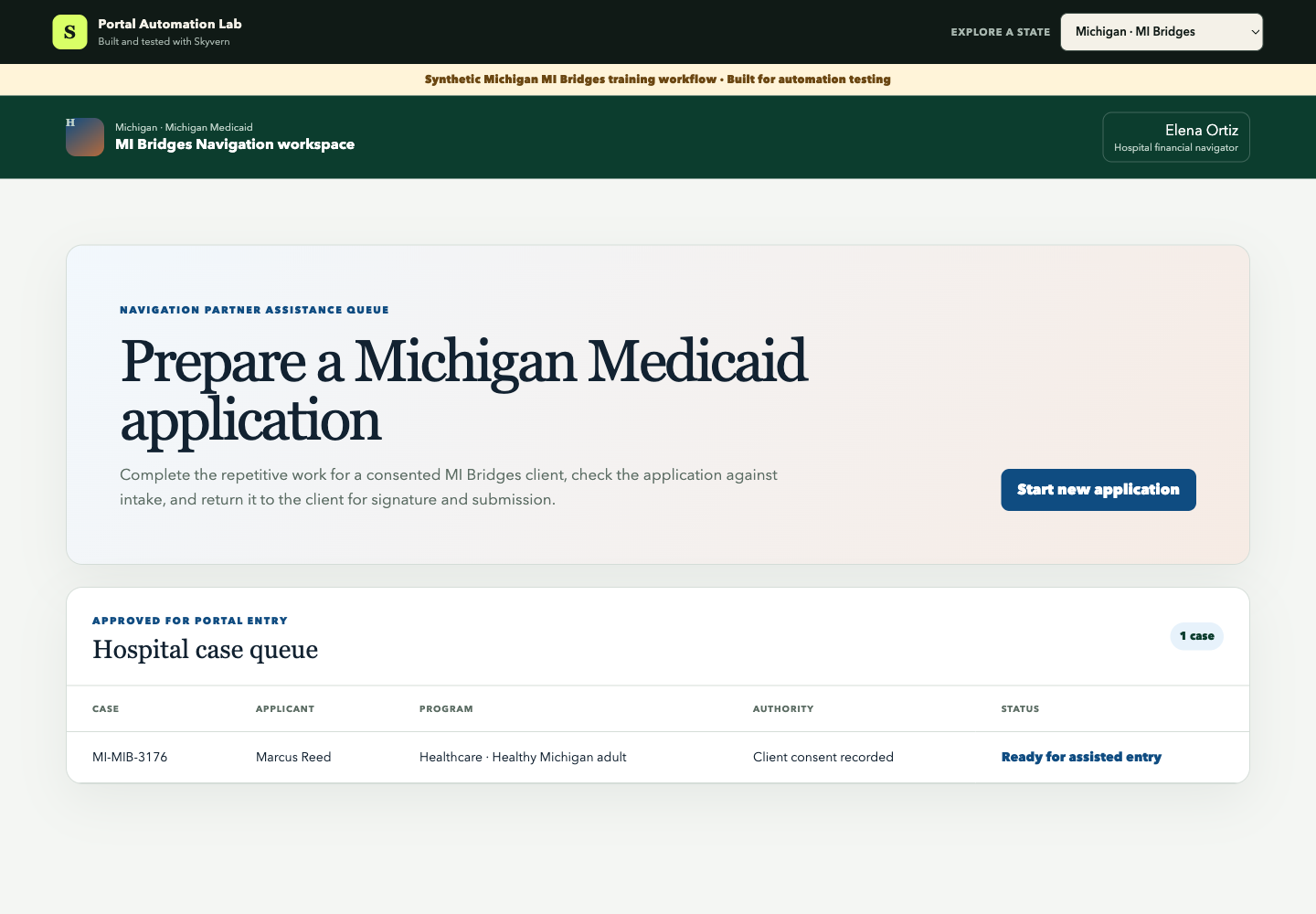
The prepared route is Healthcare coverage for a Healthy Michigan adult. MDHHS still makes the eligibility decision.
Before a case enters the queue, confirm that client consent is recorded, the applicant owns the correct account, every required value has a source, and the Navigator has already chosen the supported case route.
2. Keep the client in control
Skyvern records the Navigation Partner role, client consent, account owner, and program selection before it enters applicant data.
The safest operating boundary is:
Start:  Client has consented and the case is ready for entry
Stop:   Source comparison passes at Ready for human review
Client: Reviews, signs, and submits the application
The browser task cannot create consent, identity-proof the client, or decide that a hospital employee may sign for them.
3. Enter the Michigan-specific branches
The workflow moves through:
- Navigator access and client consent
- Applicant and contact information
- Household and tax details
- Michigan coverage questions
- Income and employment
- Insurance and appendix checks
- Verification packet
Michigan includes branches that cannot be copied from another state's page. The workflow explicitly records Flint Water exposure, former foster care, American Indian or Alaska Native status, offered job coverage, prior medical bills, and whether an authorized representative is involved.
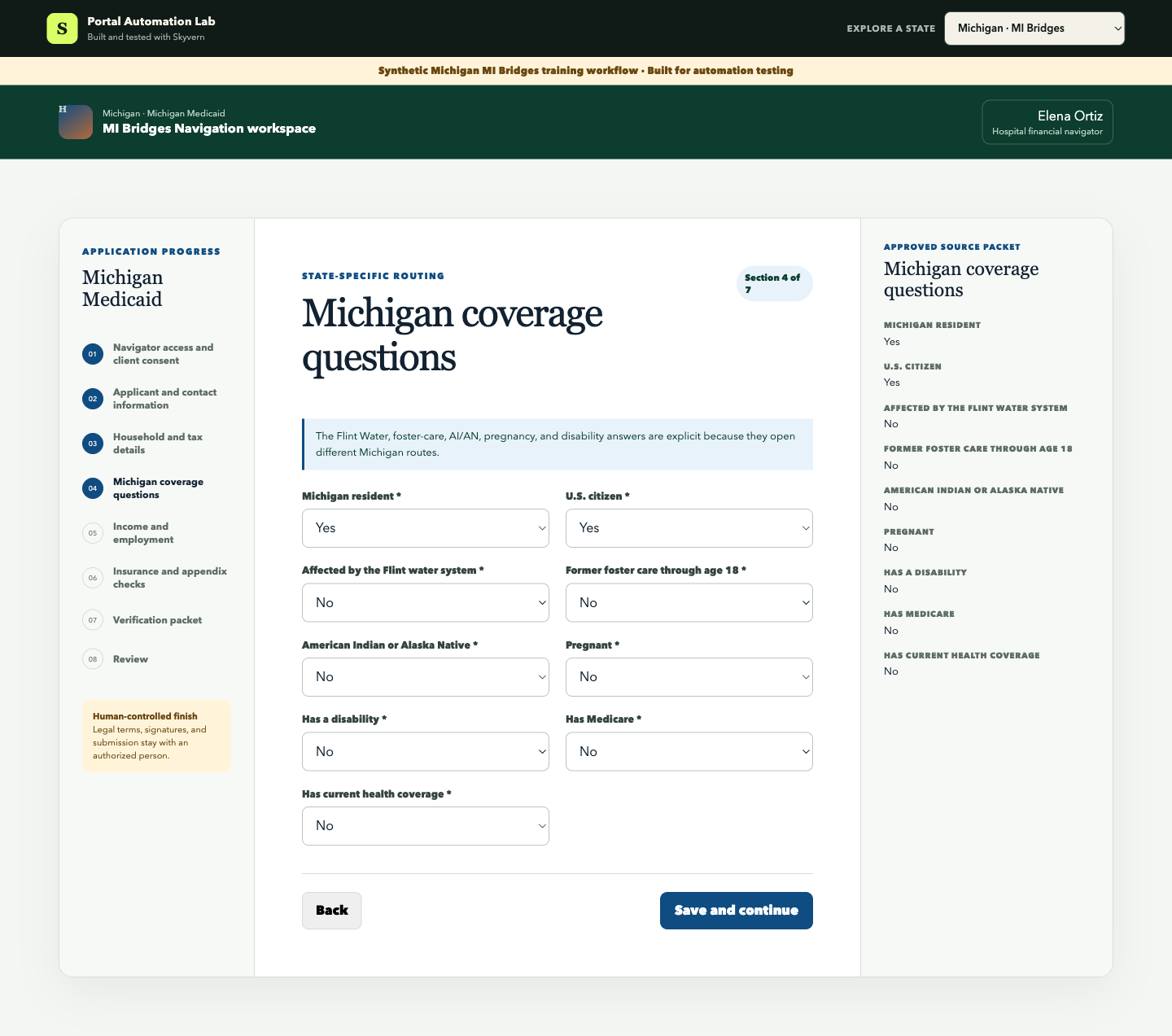
Our case answers No to the special routes. That is still recorded evidence, not a silent skip.
4. Tell Skyvern what to do
Create a Skyvern Browser Task with the Michigan training URL. We used this instruction:
Open the prepared Navigation Partner case and start the new application.

For every section, copy each value from the Approved source packet into
the matching blank field exactly. Choose the exact matching option in
dropdowns. Save and continue after each section.

In Verification packet, click Add approved copy for every listed record.
Continue to the final review.

Finish only when the page says Ready for human review and shows zero
mismatches, every document prepared, and Submission Not attempted.
Do not return to the queue.
This gives Skyvern a measurable job. It does not ask the browser agent to select a program, interpret an unclear fact, or sign for the client.
5. Prepare the verification packet
The fixture prepares a pay stub, employer hours statement, recent hospital bill, and an identity/citizenship record if MDHHS needs it.
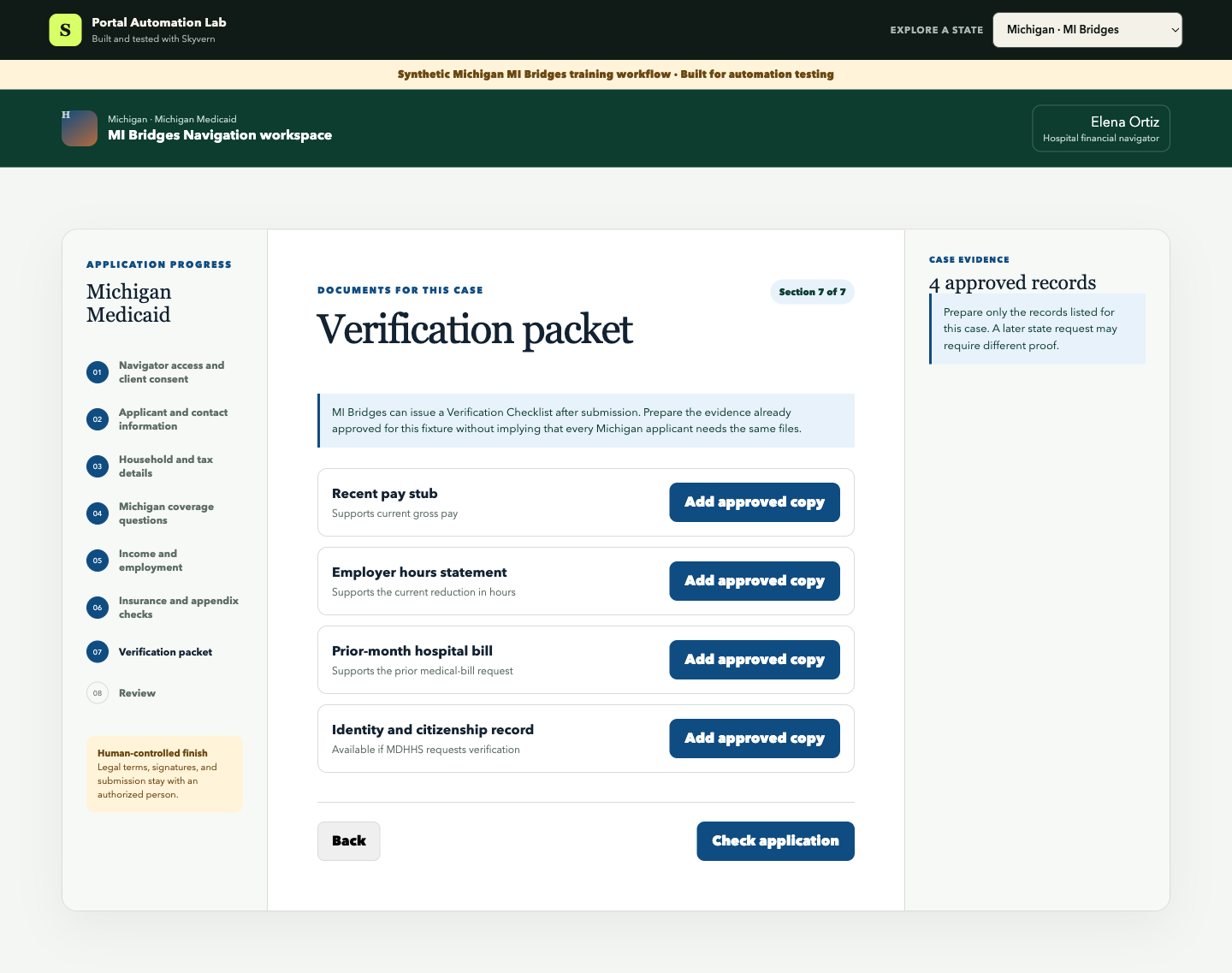
MI Bridges may issue a Verification Checklist after submission. The real checklist should decide which records your team uploads. In production, associate every file with the correct person and document type, check the portal's upload status, and return failures to staff.
6. Send the application back to the client
At the final screen, Skyvern compared all 43 entered values with the source packet, confirmed all four records were prepared, and stopped.
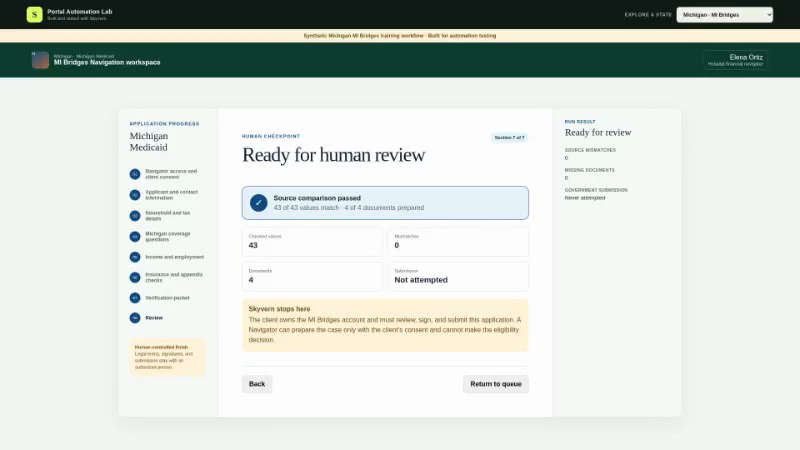
| Check | Measured result |
|---|---|
| Browser-task time | 9 minutes 30 seconds |
| Sections reached | 7 of 7 |
| Values matched | 43 of 43 |
| Verification records prepared | 4 of 4 |
| Source mismatches | 0 |
| Human corrections during the run | 0 |
| Signature or submission | No |
This is one completed synthetic workflow, not a production success rate. An authorized pilot needs to measure the household types, income sources, verification requests, and portal changes your hospital actually sees.
Try the workflow yourself
Open the Michigan MI Bridges training workflow and use the prompt above. A passing run reaches Ready for human review with 43 matching values, four prepared records, and no submission attempt.
Test a missing-data case too. If one required value has no approved source, the workflow should stop instead of guessing.
How to scale this system
Once the standard adult workflow passes an authorized pilot, save it as a reusable Skyvern Workflow. Start it from your hospital queue when a consented case becomes ready and write the result back through a webhook.
Use clear queue states: Ready for client review, Needs attention, and Portal changed. Keep the client account and consent attached to the case. Use an approved Browser Profile for portal access and preserve Skyvern's action record.
Build separate tested routes for multi-person households, offered job coverage, Flint Water cases, authorized representatives, disability, and hospital PE. Those routes change the source fields and the people who must act.
The Business ROI
The return comes from moving repeated entry out of the Navigator's day, not from removing the Navigator.
Monthly entry hours addressed =
ready cases x manual entry minutes / 60

Monthly entry cost addressed =
monthly entry hours x loaded staff cost
At 500 ready cases and 20 minutes of manual entry, a hospital spends about 167 staff hours each month on the browser work alone. At $35 per loaded hour, that is about $5,833 in monthly capacity. Replace these illustrative numbers with your volume, review time, exception rate, and Skyvern cost.
Track cost per review-ready case, not just task time. Include source mismatches, client-review time, missing documents, exceptions, and completed applications.
What it takes to use this in production
Before using an authenticated MI Bridges account, confirm:
- Navigation Partner registration and individual training are current;
- the client has given the required consent and owns the correct account;
- representative authority is used only when properly appointed;
- protected information follows your access and retention controls;
- every field and file has an approved source;
- special Michigan routes and unexpected screens return to staff; and
- the client or properly appointed representative controls signature and submission.
Start with approved test cases and keep submission manual. Expand only after each route has its own field map, failure cases, and accountable reviewer.
Skyvern can do the repetitive work between a consented hospital case and MI Bridges review. Your Navigators and clients keep the judgment and control that matter.
Talk to Skyvern about automating a healthcare portal workflow
Sources
Keep reading
AI Automation for EOB Processing: Tools & Workflows (2026)
If you're looking into EOB processing, there's probably someone on your team spending hours downloading insurance payment documents and copying the numbers into billing software. They log in to one insurer's website, find the right document, save it, and move on to the next. We've built Skyvern for this kind of healthcare admin work. It's an AI browser agent that can log into these websites, find the documents, and download them for you. You can build the rest of the workflow in Skyvern too, fr
How to Automate Insurance Eligibility Verification with Skyvern
A step-by-step guide to using Skyvern for insurance eligibility checks, from entering patient details in payer portals to returning coverage and benefits to your appointment system.
How to Automate Pharmacy Invoice Downloads
When your accounting team needs an invoice from a wholesaler portal, somebody has to go and get it. They sign in, pick the pharmacy account, find the right billing period, download the PDFs, and file them. Then they repeat the process in the next portal. And then the next... Every billing cycle! I know the pain. We built Skyvern for healthcare workflows like this. You give an AI agent a job to do in the browser, and it works through the website to do it. For pharmacy invoice collection, that m
Put the browser to work
Use Skyvern for the work that lives in a browser.
Turn repetitive browser tasks into reliable workflows with Skyvern.