Puppeteer vs Playwright: Which Should You Choose? (Benchmarked)
 Suchintan Singh8 min read
Puppeteer and Playwright can both make the first browser script easy. The difference shows up later, when that script becomes a production job or test suite that someone has to run and debug.
This guide compares what each tool gives you and what your team still has to build. We also ran both tools through the same browser workflow to see how performance changes when you launch a browser, create an isolated session, or reuse a page.
TL;DR
- Choose Puppeteer for focused browser automation in a JavaScript or TypeScript service, especially when you already have a runner and observability.
- Choose Playwright for cross-browser testing, work outside JavaScript or TypeScript, or a first-party test runner with built-in diagnostics.
- With both tools using their recommended locator APIs, our same-browser benchmark found nearly identical warm-run medians. Playwright was faster when each workflow created more browser state.
| Criterion | Puppeteer | Playwright |
|---|---|---|
| Core product | Browser-control library | Browser-automation library with a first-party Node.js test runner |
| Best fit | Focused automation inside a Node.js service | Cross-browser automation and end-to-end testing |
| Browser engines | Chrome and Firefox | Chromium, Firefox, and WebKit |
| Official languages | JavaScript and TypeScript | JavaScript, TypeScript, Python, Java, and .NET |
| Test tooling | Bring your own runner, assertions, fixtures, and reporting | Playwright Test includes projects, fixtures, assertions, retries, reports, and traces |
| Session isolation | Create and manage browser contexts in code | Playwright Test creates an isolated context for each test |
| Failure evidence | Capture screenshots, logs, and other artifacts yourself | Playwright Test can retain traces, screenshots, videos, and reports |
| Agent integration | Chrome DevTools MCP uses Puppeteer for Chrome automation and debugging | Playwright MCP exposes browser tools, while Test Agents create and repair tests |
What are you choosing?
Puppeteer gives a Node.js service direct browser control. Playwright gives you the same class of browser control and a broader testing system.
The APIs for navigation, input, and page evaluation are similar enough for the same known browser workflow. The surrounding work differs once browser control becomes a test suite.
| What the project needs | Puppeteer | Playwright |
|---|---|---|
| Launch and control a browser | Included | Included |
| Locate and interact with elements | Locator API and page APIs | Locator API with automatic waiting and assertions |
| Run a test suite | Choose a runner | Playwright Test for Node.js |
| Isolate tests | Create browser contexts in your setup | Isolated page and context fixtures per test |
| Retry and parallelize tests | Configure through your runner or job system | Built into Playwright Test |
| Inspect a failed run | Add the screenshots, logs, and recordings you need | Open a trace with actions, page state, console, and network data |
| Test WebKit | Not supported | Supported through Playwright's patched WebKit build |
Puppeteer adds less test infrastructure and fits systems you already own. Playwright removes more setup when browser automation is the test platform.
How does the same workflow differ?
A known invoice-download workflow shows the difference. It logs into a portal, opens the invoices page, downloads the latest PDF, and confirms the file arrived. Both libraries can execute the browser actions, but the surrounding responsibilities differ.
| Part of the workflow | Puppeteer | Playwright Test |
|---|---|---|
| Start with a clean session | Create a browser context and page in your setup | Receive an isolated context and page from fixtures |
| Find and use controls | Use locators or page selectors | Use locators with automatic actionability checks |
| Confirm the result | Add assertions through your chosen test or validation library | Use Playwright's web-first assertions |
| Retry a failed test | Implement the policy in your runner or worker | Configure retries by project or environment |
| Save failure evidence | Capture the artifacts your service needs | Retain traces, screenshots, videos, and reports |
| Run several variants | Build the matrix in your runner | Define browser and environment projects in one configuration |
Puppeteer's version is simpler if the service already handles execution, retries, and failure evidence. Playwright Test is simpler if you would otherwise build those test-specific pieces around Puppeteer.
Puppeteer is the better fit for a focused Node.js job
Puppeteer is a JavaScript and TypeScript library maintained by the Chrome Browser Automation team. It controls Chrome through the Chrome DevTools Protocol by default and Firefox through WebDriver BiDi.
Key features
- Browser navigation, input, page evaluation, screenshots, and PDFs
- Chrome and Firefox automation from Node.js
- Browser contexts for isolated sessions
- The ability to launch a browser or connect to an existing compatible process
Setup: Puppeteer adds little structure beyond the browser API. A test suite still needs a runner, assertion library, fixtures, retry policy, and failure reporting.
Best for: PDF or screenshot generation, rendered-page extraction, and known browser workflows inside a JavaScript or TypeScript service.
Tradeoff: Puppeteer keeps the automation layer small, but your application owns the surrounding test or job infrastructure. It also has no WebKit support. Puppeteer describes Firefox support as production-ready, although its WebDriver BiDi guide lists features that remain unavailable through that protocol.
Playwright is better when automation becomes a test platform
Playwright controls Chromium, Firefox, and WebKit from one API. Its browser library supports JavaScript, TypeScript, Python, Java, and .NET, while Playwright Test supplies a first-party runner for Node.js projects.
Key features
- Chromium, Firefox, and WebKit projects in one test suite
- Locators with automatic waiting and web-first assertions
- Isolated browser contexts for each test
- Fixtures, retries, parallel execution, reporters, and trace capture through Playwright Test
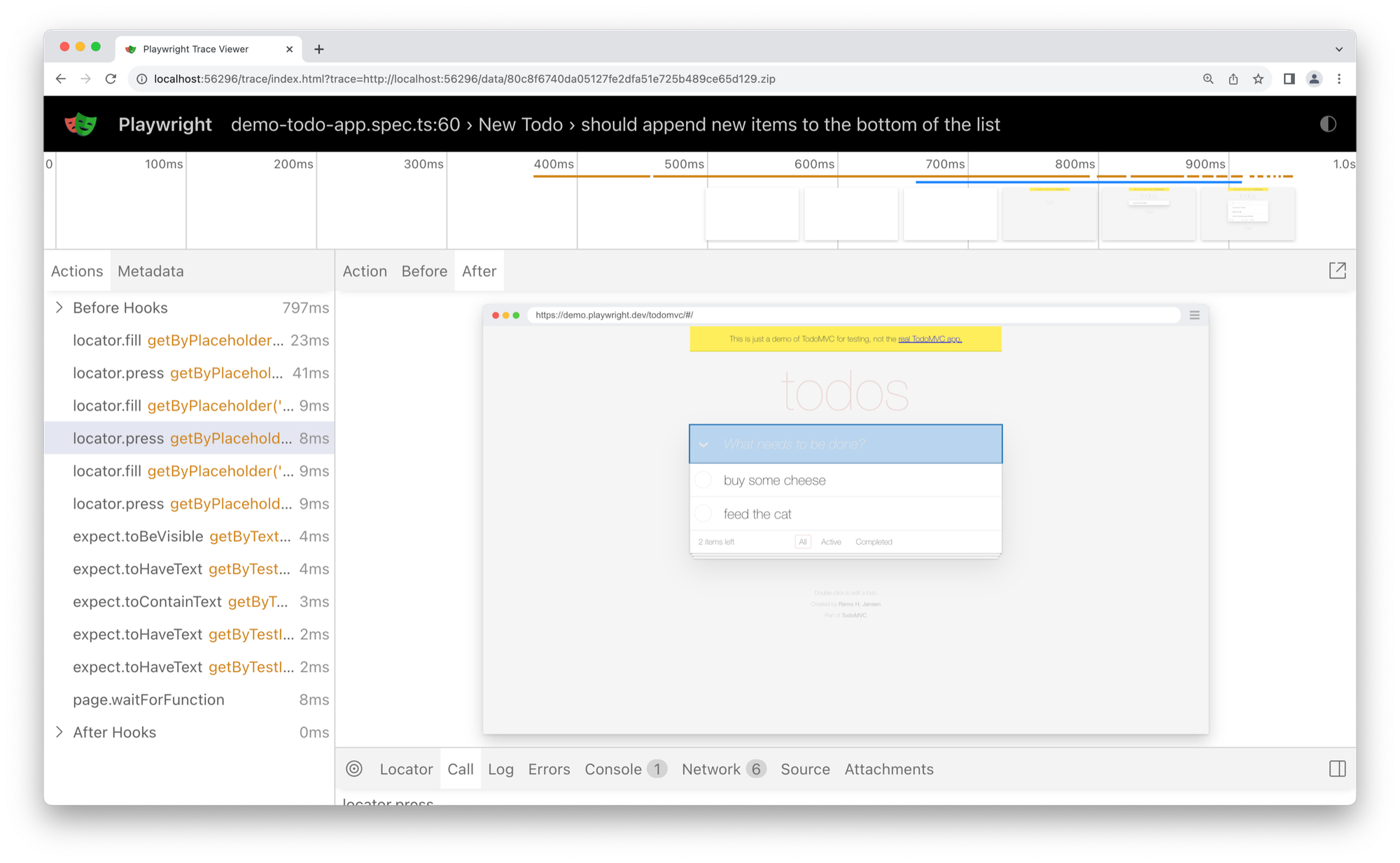
Playwright's Trace Viewer connects each recorded action to the page state and debugging data from that moment.
Setup: Playwright introduces its own runner, project configuration, fixtures, locator model, and tracing system. That is more structure than a small Puppeteer job, but it gives a growing test suite one shared operating model.
Best for: Cross-browser product testing, teams using Python, Java, or .NET, and CI suites that need useful evidence after a failure.
Tradeoff: A Chrome-only service with its own runner and observability may gain little from the additional test platform. Playwright also tests patched project builds of Firefox and WebKit rather than the branded Firefox and Safari applications.
How Skyvern uses Playwright
Skyvern uses Playwright with Chromium as its browser execution layer. Standard goto, click, and fill calls handle known steps. Skyvern adds AI-powered element location and multi-step task execution when the page or route is harder to predict.
That split lets a workflow keep stable steps deterministic and use AI for the parts that need page-level reasoning. Skyvern currently documents Chromium, so Playwright provides browser and session control here rather than cross-browser coverage.
What did a quick same-browser benchmark show?
We ran Puppeteer 25.8.0 and Playwright 1.62.1 against the same Chrome for Testing 149 binary on an Apple M5 Pro. A local page enabled a control after a short delay, accepted an invoice number, and exposed a completion state after another delay. Each library used its recommended locator API to navigate, enter the value, click when the control became available, and verify the result.
Each scenario ran sequentially in reversed batches. Cold runs launched and closed the browser for every workflow. Isolated-session runs reused the browser but created a clean context and page. Warm runs reused the browser and page. All 280 measured workflows succeeded. The median shows the typical run, while p95 is the time 95% of runs finished within.
| Scenario | Runs per library | Puppeteer median / p95 | Playwright median / p95 | Lower median |
|---|---|---|---|---|
| Cold launch and workflow | 20 | 576 ms / 597 ms | 476 ms / 484 ms | Playwright by 17% |
| Reused browser, new context and page | 60 | 242 ms / 267 ms | 218 ms / 239 ms | Playwright by 10% |
| Reused browser and page | 60 | 141 ms / 151 ms | 141 ms / 149 ms | Effectively tied |
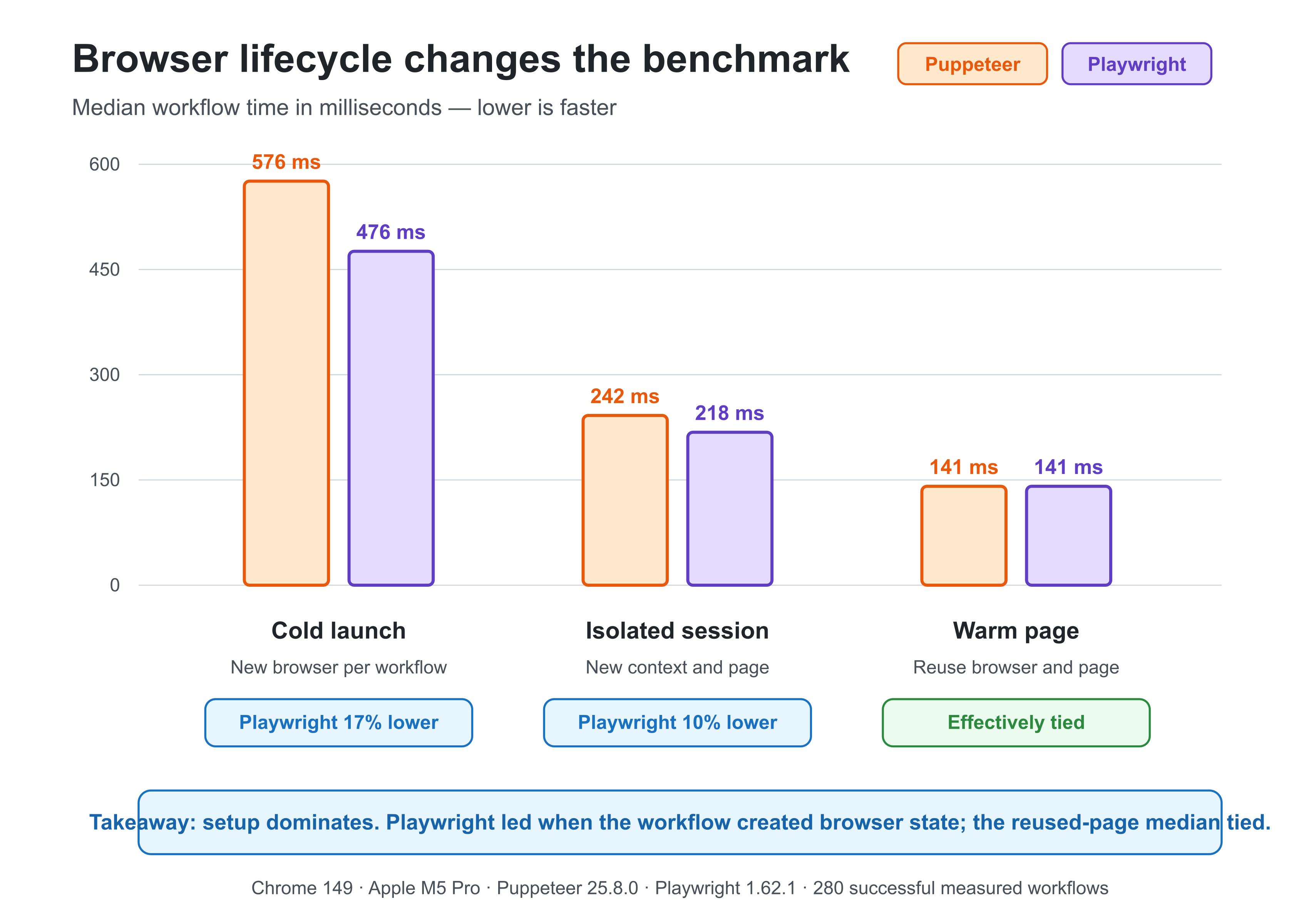
Playwright led when each workflow created browser state. Once both tools reused the browser and page, their median times were identical in this fixture.
This is a lifecycle microbenchmark, not a general speed ranking. It measures one local interaction in one Chrome build. It does not cover remote sites, concurrent sessions, memory use, scraping throughput, WebKit, Firefox, or long-running reliability.
Playwright and Puppeteer both perform readiness checks through their locator APIs. Once the harness used those APIs on both sides, the warm-run difference disappeared. The gap narrowed as the benchmark reused more browser state, which points to lifecycle setup rather than page interaction as the source of the difference in this fixture.
The isolated-session scenario is closest to normal Playwright Test execution because the runner shares a browser within each worker and creates an isolated context for every test. Playwright's median was 24 ms lower in that scenario. This local fixture cannot show whether that difference survives the network and application work in a production workflow.
Checkly's older direct benchmark also changed with the workload. The evidence points to lifecycle and workload as the performance decision, not the library name.
If latency matters, benchmark the complete job with your browser lifecycle, target pages, network, concurrency, and success condition.
Does AI tooling change the choice?
Both ecosystems now have official agent integrations, but they serve different jobs.
Chrome DevTools MCP uses Puppeteer to give coding agents Chrome automation, debugging, network inspection, and performance tools. It focuses on Chrome and Chrome DevTools.
Playwright MCP exposes browser actions and structured accessibility snapshots to MCP clients. Playwright Test Agents use separate planning, generation, and healing roles to create and repair Playwright tests.
Choose the integration that matches the job. Chrome DevTools MCP fits Chrome debugging and performance analysis. Playwright's tooling fits cross-browser automation and agent-assisted test maintenance.
Which should you choose?
| Your situation | Start with | Why |
|---|---|---|
| Generate PDFs or screenshots in a Node.js service | Puppeteer | Focused API and a narrow browser-control layer |
| Add automation to an existing Node.js worker | Puppeteer | It can use the runner, retries, and logs you already own |
| Run end-to-end tests across Chromium, Firefox, and WebKit | Playwright | One framework covers the browser matrix and test runner |
| Automate from Python, Java, or .NET | Playwright | Those bindings are officially supported |
| Diagnose CI failures with traces and reports | Playwright | The diagnostics are part of Playwright Test |
| Give an agent Chrome debugging and performance tools | Puppeteer ecosystem | Chrome DevTools MCP uses Puppeteer and Chrome DevTools |
| Create and repair cross-browser tests with agent tooling | Playwright | Playwright publishes MCP and Test Agent integrations |
Frequently asked questions
Is Playwright faster than Puppeteer?
Neither library is universally faster. Our local benchmark favored Playwright when a workflow created a browser or isolated session, while reused-page medians were nearly identical. Measure the complete job with your browser lifecycle, target pages, network, and success condition.
Does Puppeteer support Firefox?
Yes. Puppeteer supports stable Firefox through WebDriver BiDi by default. Its documentation describes the support as production-ready, but some Puppeteer features are unavailable through BiDi and throw UnsupportedOperation.
Does Playwright test Safari?
Playwright tests WebKit, not the branded Safari browser. Playwright recommends running WebKit on macOS when you need the closest environment for platform-dependent behavior.
Is Puppeteer better for web scraping?
Puppeteer is a good fit for Chrome- or Firefox-focused scraping in Node.js. Playwright becomes more attractive when you need isolated sessions, several browser engines, another supported language, or richer failure traces. Both require extraction validation and recovery logic.
Is it difficult to switch from Puppeteer to Playwright?
The basic navigation and interaction APIs are similar, so small scripts often migrate cleanly. The larger change is structural. Playwright Test introduces projects, fixtures, assertions, and tracing, while a Puppeteer project may already depend on another runner and custom helpers.
Keep reading
Browser Use vs Browserbase: my honest comparison
Browserbase and Browser Use can both automate work in a browser, from collecting product data to filling out forms. Choosing between them comes down to what you want to build: a task you hand to an AI agent, a custom agent inside your application, or browser infrastructure for scripts you already run. I’m Skyvern’s co-founder and CEO by the way. We build a competing product, so I have a stake in this comparison. But I promise I won't promote our product (even though it's a great alternative to
6 Stagehand alternatives for browser automation in 2026
If you're looking for Stagehand alternatives, you probably want an AI browser agent that: * Works natively with Python scripts. * Can navigate and scrape complex websites efficiently. * Stays reliable as your workload grows from a few runs to thousands of browser jobs. That's the kind of workflow I built Skyvern for (Skyvern CEO here). I know, I know, Skyvern CEO's recommending Skyvern as a good alternative. Please just stay with me for a second here. Yes, Skyvern is a good Stagehand alt
Browser Use vs Stagehand: Which One Should You Pick?
Browser Use and Stagehand both let you use AI to automate browser tasks, such as collecting product data or filling out forms. When you’re deciding which to build with, their feature lists only tell you so much. You want to know how much code you’ll need to write, whether the automation completes your task correctly, and what repeated runs will cost. I'll be upfront: we build Skyvern, a competitor to both, but this blog post won't shill our product (you can try it here though). I’m keeping thi
Put the browser to work
Use Skyvern for the work that lives in a browser.
Turn repetitive browser tasks into reliable workflows with Skyvern.