Director vs Skyvern: Which Browser Automation Tool is Better? (June 2026)
 Suchintan Singh11 min read
You've narrowed it down to Director vs Skyvern for browser automation, and now you need to know which one survives contact with real workflows. Director turns plain-language prompts into executable scripts anchored to selectors, so every time a portal renames a button or restructures a form, someone has to fix it manually. Skyvern uses computer vision to read pages visually at runtime, identifying interactive elements by appearance and context instead of DOM paths. That means when a layout shifts, the workflow keeps running instead of breaking. The browser automation comparison that matters is how each tool handles authenticated multi-step flows against sites that change without warning, and whether the output structure holds up when you need to feed data into downstream systems.
TLDR:
- Director generates selector-based scripts that break when portals change layouts or rename buttons.
- Skyvern reads pages visually at runtime using computer vision and LLM reasoning, adapting to changes without script updates.
- Selector-based workflows accumulate maintenance debt fast, requiring manual fixes for every page change.
- Skyvern includes native MFA/TOTP support and a credential vault that keeps logins out of plain-text workflow definitions.
Two Approaches to Browser Automation
Browser automation tools generally fall into two camps. The first records and replays DOM interactions, anchoring workflows to specific selectors, element IDs, and XPath expressions. This approach works when target sites are stable and predictable, but it accumulates maintenance debt the moment a portal changes. The second reads pages visually at runtime, identifying elements by appearance and context instead of hardcoded structure. That distinction is the core architectural split between Director and Skyvern, and it shapes everything from how each tool handles authentication to how much ongoing maintenance your team absorbs.
What is Director?
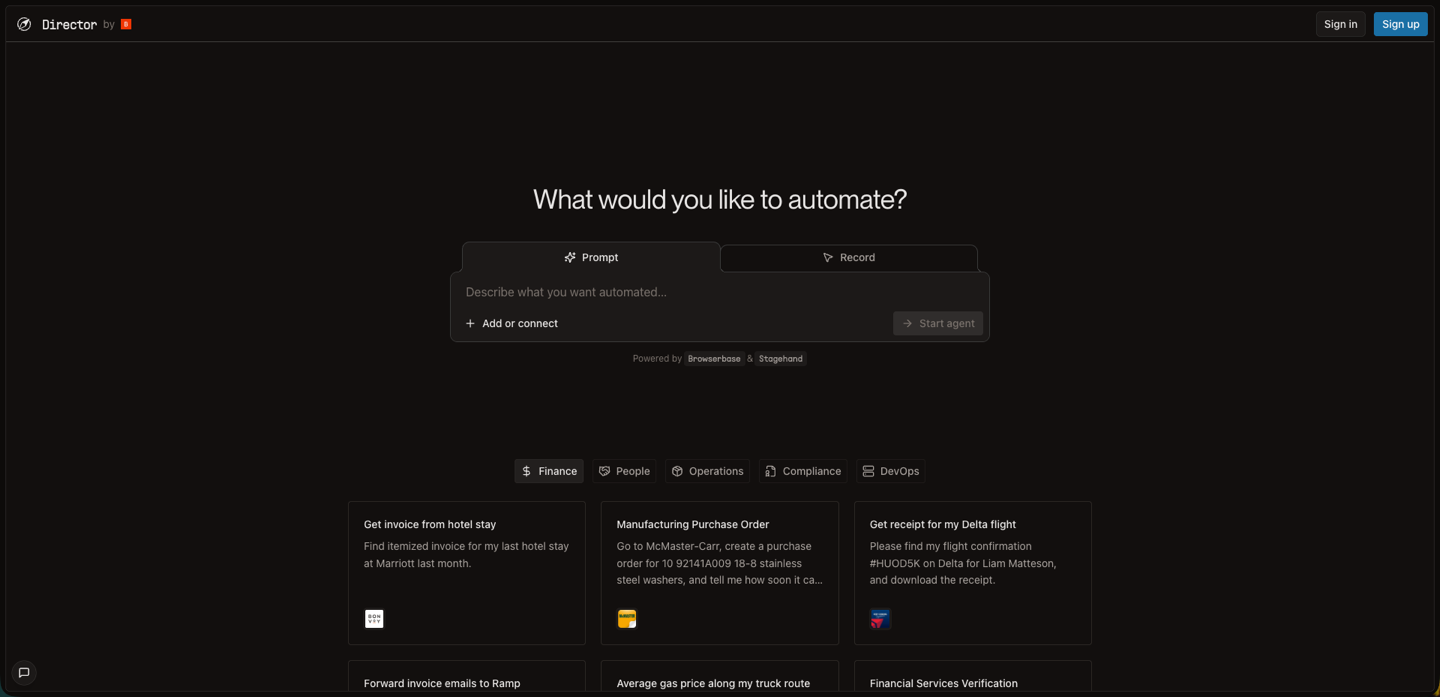
Director is Browserbase's no-code browser automation tool. It sits on top of Browserbase's Stagehand framework and takes plain-language descriptions as input, converting them into executable browser scripts that run on Browserbase's cloud infrastructure.
The pitch is straightforward: describe what you want done, and Director generates the automation for you. No selectors, no Playwright knowledge required. That positioning makes it appealing to operators, analysts, and marketers who need to automate web tasks but don't have a developer on call to write custom scripts for every workflow.
In Browserbase's broader ecosystem, Director functions as the accessible entry point. Browserbase handles the underlying browser infrastructure, and Director layers on the natural-language interface meant to close the gap between what non-technical users need and what raw browser automation typically demands.
Key Features
- Natural-language input. Describe workflows in plain language instead of writing code or configuring selectors manually.
- Cloud browser infrastructure. Runs on Browserbase's managed infrastructure, handling browser provisioning and session management.
- No-code interface. Accessible to non-technical users who need automation without developer resources.
- Session replay. Records and replays DOM interactions for straightforward, repeatable workflows.
- Integration with Browserbase ecosystem. Works within the broader Browserbase platform for teams already using their infrastructure.
Limitations
- Selector fragility. Generated scripts rely on DOM selectors that break when target sites change layouts, rename elements, or restructure forms. Industry data shows that 10–15% of crawlers now require weekly fixes due to DOM shifts, fingerprinting, or endpoint throttling.
- Limited MFA and CAPTCHA handling. Struggles with dynamic authentication challenges common on enterprise portals and carrier sites.
- Multi-step workflow constraints. Conditional branching and context-dependent decision points require manual script adjustments.
- Maintenance overhead. Every portal update that changes element structure requires script debugging and repair.
- No dedicated credential vault. Credentials are configured within workflows instead of stored centrally, increasing plain-text exposure risk.
Bottom Line
Director works well for teams automating stable internal tools with consistent layouts, low change frequency, and straightforward login flows: marketing teams pulling reports from known dashboards, analysts extracting data from predictable SaaS tools, or operations staff running one-off tasks against sites that rarely update. It's not suited for workflows targeting frequently-changing third-party portals, multi-step authenticated flows with MFA, or high-stakes processes where selector breakage causes compliance or production failures.
What is Skyvern?
Skyvern is an AI browser automation platform that uses computer vision and LLM reasoning to operate websites visually, identifying buttons, fields, and modals by appearance and context instead of DOM selectors or XPath. A single workflow definition can run across dozens of portals without per-site code adjustments, which makes it well-suited for operations teams dealing with fragmented, constantly-changing web infrastructure. It was built for regulated, portal-heavy industries where selector-based scripts break the moment a layout shifts.
Key Features
- Visual page reading. Reads each page at runtime using computer vision and LLM reasoning, so workflows self-heal when layouts or element IDs change without requiring code edits.
- Native MFA/TOTP support. Handles TOTP-based authentication natively through a dedicated credential vault that keeps sensitive logins out of plain-text workflow definitions.
- Structured data extraction. A
data_extraction_schemaparameter returns consistent JSON output every run, so extracted data is ready to feed downstream systems without post-processing. - Multi-step workflow execution. Handles conditional branching, dynamic content, and long-horizon tasks as a single goal-directed process without separate scripts for each step.
- CAPTCHA handling. Works through reCAPTCHA v2, hCaptcha, and custom challenges visually, without hardcoded selectors or third-party bypass services.
Limitations
- Learning curve. Teams transitioning from step-by-step scripting to goal-directed automation face a conceptual shift that can take one to two weeks to fully work through.
- SMS/voice 2FA not supported. Phone-based and SMS authentication flows remain a structural gap, blocking portals that require them.
- Advanced anti-bot detection. Portals with aggressive bot-detection systems can block workflows, and success rates vary by site, making proof-of-concept testing necessary before production commitment.
- Cloud storage limited to Amazon S3. Native file storage integration covers only S3; teams on GCP or Azure must route through S3 as an intermediary.
- Cost at scale. Per-step pricing at $0.05 per step can accumulate quickly for teams running high-volume workflows across many portals simultaneously.
Bottom Line
Skyvern is the stronger fit for operations and compliance teams in healthcare, insurance, legal, and government who run workflows against portals that change without warning and where authentication complexity and audit trails are non-negotiable. Teams processing high volumes of authenticated multi-step flows across carrier sites, government filing systems, or payer portals will get the most out of it. It exceeds what teams need for simple single-site automation with stable layouts and no compliance requirements.
Comparing Director with Skyvern
We looked at both of these tools against common categories of features that are important to teams looking for automation solutions.
- Automation approach and reliability
- Workflow complexity and multi-step automation
- Authentication and credential management
- Data extraction and output formatting
Automation Approach and Reliability
Director takes a selector-based approach to browser automation. It records and replays DOM interactions, meaning every workflow is anchored to specific element IDs, XPath expressions, or CSS selectors. When the underlying page changes (a button gets renamed, a form gets restructured, a portal updates its layout) those selectors break, and someone has to fix them manually.
Skyvern reads pages visually using computer vision and LLM reasoning at runtime. Instead of referencing a hardcoded selector, it identifies interactive elements by their appearance and context each time it runs. A login form that moved, a dropdown that got relabeled, a multi-step portal flow with inconsistent layouts across sessions. Skyvern works through all of it without requiring a script update.
For teams running automations against stable, well-documented internal tools, Director's selector-based approach can hold up reasonably well. But most real-world browser automation targets third-party portals, carrier sites, government forms, and vendor dashboards that change without notice.
- Selector-based workflows accumulate maintenance debt fast. Each page change that breaks a selector is a ticket, a debugging session, and a delay in whatever that workflow was supposed to deliver.
- Skyvern's visual approach means the workflow either completes or raises a structured exception; it won't silently misfire because a class name changed.
- For authenticated flows, multi-step forms, and dynamic content, the reliability gap between the two approaches gets considerably wider over time.
Workflow Complexity and Multi-Step Automation
Workflow complexity is where the gap between Director and Skyvern becomes most visible.
Director handles straightforward, single-site automation well. It can record and replay click sequences, fill forms, and extract data from pages with consistent layouts. But multi-step workflows that span login flows, dynamic content, and conditional branching tend to expose its limits. When a page loads differently than expected, or a form requires a decision mid-sequence, Director's scripted approach often stalls.
Skyvern reads each page visually at runtime and reasons about what to do next based on the current state of the browser. A workflow that requires logging into a portal, working through a multi-page form, handling a CAPTCHA, and extracting a confirmation number runs as a single goal-directed task. There is no separate script for each step.
Three workflow types expose the most distance between the two tools around workflow complexity and multi-step automation:
- Multi-portal tasks that require switching between authenticated sessions and carrying data across steps
- Conditional paths where the next action depends on what the page returns (error states, partial results, redirected flows)
- Long-horizon tasks where a human would naturally pause, read, and decide before continuing
Skyvern handles all three without requiring the workflow to be re-scripted each time the underlying site changes.
Authentication and Credential Management
Both Director and Skyvern treat authentication as a first-class problem, but they solve it through very different mechanisms.
Director handles authentication primarily through session management and cookie persistence. You configure credentials in your workflow, and Director stores and replays them across runs. This works well for straightforward login flows, but breaks down on sites with MFA, CAPTCHA challenges, or dynamic token-based auth. Teams working with carrier portals or government sites that rotate security challenges tend to hit this ceiling quickly.
Skyvern approaches credential management through a dedicated vault system. Credentials are stored once and referenced by ID at runtime, so sensitive data never appears in plain text inside a workflow definition. Skyvern also works through TOTP-based MFA natively, handling the one-time code generation as part of the login sequence without manual intervention.
Here is how the two tools compare on authentication capabilities:
Capability | Director | Skyvern |
|---|---|---|
Stored credential vault | No | Yes |
MFA / TOTP support | Limited | Native |
CAPTCHA handling | No | Yes |
Session replay | Yes | Yes |
Credentials in plain text risk | Higher | Lower |
For teams automating workflows behind enterprise logins, SSO walls, or portals with rotating security challenges, the gap here matters considerably.
Data Extraction and Output Formatting
Director extracts data as part of its automation flows, with output structure following whatever the natural language prompt specifies at script generation time. For a one-off retrieval task, that works fine. But without formal schema validation, output format can drift between runs, which creates real problems when extracted data needs to feed a database or integrate with a downstream system expecting consistent field names and types.
Skyvern handles this through a data_extraction_schema parameter. Teams define the exact JSON shape they need once, and every run returns data in that structure. No post-processing to normalize field names, no guessing whether a value came back as a string or an integer.
File handling follows the same pattern. Invoices, PDFs, and downloaded documents are exposed as retrievable artifacts after each run, deliverable via webhook and pushable to Amazon S3. Field-level explainability shows which data was mapped where and why, so the audit trail builds itself instead of requiring a separate logging layer.
Why Skyvern is the Better Choice
For operations teams in healthcare, insurance, legal, or government, where portals shift layouts and errors carry real consequences, Skyvern was built for that environment. The self-healing visual approach means a portal redesign doesn't kill your workflow. Credential vault keeps sensitive logins out of plain-text workflow definitions. And the audit trail gives compliance teams something they can actually point to.
Director works well for low-stakes, one-off tasks where the target site is stable and the output doesn't need to plug into a production system. Quick data pulls, basic form fills, simple lookups are reasonable fits for a script-generation tool running inside Browserbase's infrastructure.
The gap opens when you're running workflows at volume, against sites that change without notice, behind authentication walls that rotate. A script that worked last Tuesday doesn't survive a portal update.
Code Example: Running an Authenticated Multi-Step Workflow
The code below runs a full carrier portal workflow (login with stored credentials, TOTP-based MFA, multi-step form interaction, and structured JSON extraction) in a single run_task() call. No selectors, no step-by-step scripting, and nothing that breaks when the portal rearranges its layout.
import asyncio
from skyvern import Skyvern

# Initialize with your API key
client = Skyvern(api_key="YOUR_API_KEY")

async def run_carrier_workflow():
    task = await client.run_task(
        url="https://carriersportal.example.com/login",
        # Plain-language goal — no selectors or step scripts required
        prompt=(
            "Log into the carrier portal, navigate to the policy documents section, "
            "find the most recent certificate of insurance, and extract the policy details. "
            "COMPLETE when the policy details are fully extracted."
        ),
        # Reference stored credentials — never passed to the LLM
        credential_id="cred_your_carrier_credential_id",
        # Route TOTP codes from your authenticator app
        totp_identifier="your-totp-email@company.com",
        # Define the exact JSON shape you need downstream
        data_extraction_schema={
            "type": "object",
            "properties": {
                "policy_number": {"type": "string", "description": "The policy number"},
                "coverage_amount": {"type": "string", "description": "Total coverage amount"},
                "effective_date": {"type": "string", "description": "Policy effective date"},
                "expiration_date": {"type": "string", "description": "Policy expiration date"},
                "insured_name": {"type": "string", "description": "Name of the insured party"},
            }
        },
        # Block until the task completes and results are ready
        wait_for_completion=True,
    )

    print(task.status)   # "completed" or "failed"
    print(task.output)   # Structured JSON matching the schema above

asyncio.run(run_carrier_workflow())
Because Skyvern reads the portal visually at runtime, the same code runs unmodified the next time the carrier updates their UI. The credential_id references your vault entry so raw credentials never appear in the workflow definition, and data_extraction_schema guarantees the output structure matches what your downstream system expects, every run, regardless of how the page renders.
Final Thoughts on the Right Browser Automation Approach
Director fits teams automating internal tools with predictable layouts and low change frequency. Skyvern was built for operations teams in healthcare, insurance, and legal where portals shift constantly and errors compound fast. The maintenance burden of selector-based automation shows up gradually, then all at once, usually right when you need the workflow most. Visual automation that reads pages at runtime means your workflows survive the next portal update instead of breaking on it. Schedule a demo and we'll walk through how Skyvern handles the specific portals giving your team trouble.
FAQ
How do I decide whether Director or Skyvern is the right fit for my workflows?
Start by looking at the target sites: if you're automating stable internal tools with predictable layouts, Director's selector-based approach can work. But if you're working across third-party portals, carrier sites, or government forms that change without notice, Skyvern's visual approach eliminates the maintenance burden that comes with selector breakage.
What's the core technical difference between how Director and Skyvern handle site changes?
Director generates scripts that reference specific DOM selectors. When a portal renames a button or restructures a form, those selectors break and someone has to fix them manually. Skyvern reads each page visually at runtime using computer vision and LLM reasoning, so it identifies elements by appearance and context instead of hardcoded structure, which means the workflow keeps running through layout changes without requiring code updates.
Who is Skyvern built for, and when is it overkill?
Skyvern was built for operations and compliance teams in healthcare, insurance, legal, and government; industries where portals change frequently, authentication is complex, and errors carry real consequences. Teams looking for simple single-site automation may find its capabilities go beyond what they need.
Can Director handle multi-step workflows with authentication and conditional logic?
Director works well for straightforward login-and-replay sequences, but multi-step workflows that require MFA, CAPTCHA handling, or conditional branching based on dynamic page content tend to expose its limits. Skyvern handles TOTP-based MFA natively through a credential vault, works through CAPTCHA challenges visually, and reasons about conditional paths at runtime without requiring separate scripts for each decision point.
What should I expect during onboarding if I'm moving from a selector-based tool to Skyvern?
Skyvern workflows are defined through natural-language prompts, a visual builder, or the Python SDK. Teams can start building without rewriting existing scripts as selectors. The learning curve comes from shifting to goal-directed automation instead of step-by-step scripting, but most teams can set up their first workflows in 2–3 hours, with full optimization taking 1–2 weeks depending on complexity.
Keep reading
6 Selenium Alternatives for Faster Browser Automation
Here is my guess: you are tired of fixing scripts that break every time a website changes its layout and you are looking for an alternative. Selenium has been the most popular testing framework for years. It’s open source, it runs tests across every major browser, OS and language. But Selenium leans on XPath selectors and DOM parsing. It makes automations unreliable when a site changes even a little. We started Skyvern to fix exactly this problem (I am Skyvern's CEO), using LLMs and computer

7 Playwright MCP Alternatives for Better Browser Automation
Compare seven Playwright MCP alternatives that reduce context overhead, retries, and stalled agent runs. Find the right option for your workflow.
9 Prior Authorization Companies Compared (2026)
Compare nine prior authorization companies by workflow coverage, setup, human review, who each product serves, and the work each leaves to your team.
Put the browser to work
Use Skyvern for the work that lives in a browser.
Turn repetitive browser tasks into reliable workflows with Skyvern.