Web Bench - A new way to compare AI Browser Agents

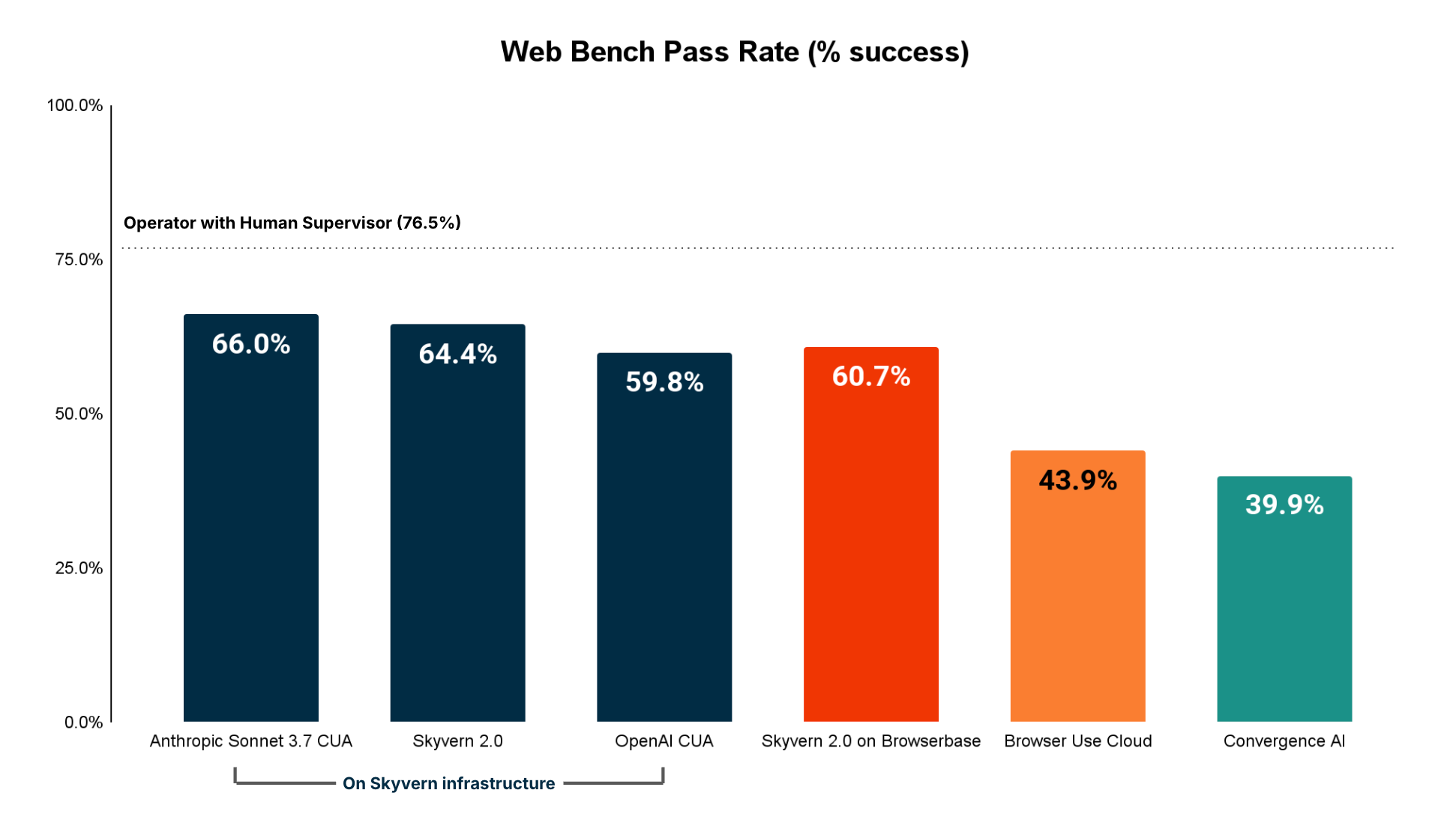
TL;DR: Web Bench is a new dataset to evaluate web browsing agents that consists of 5,750 tasks on 452 different websites, with 2,454 tasks being open sourced. Anthropic Sonnet 3.7 CUA is the current SOTA, with the detailed results here.
Over the past few months, Web Browsing agents such as Skyvern, Browser-use and OpenAI's Operator (CUA) have taken the world by storm. These agents have been used in production for a variety of tasks, from helping people apply to jobs, downloading invoices, and even doing SS4 filings for newly incorporated companies.
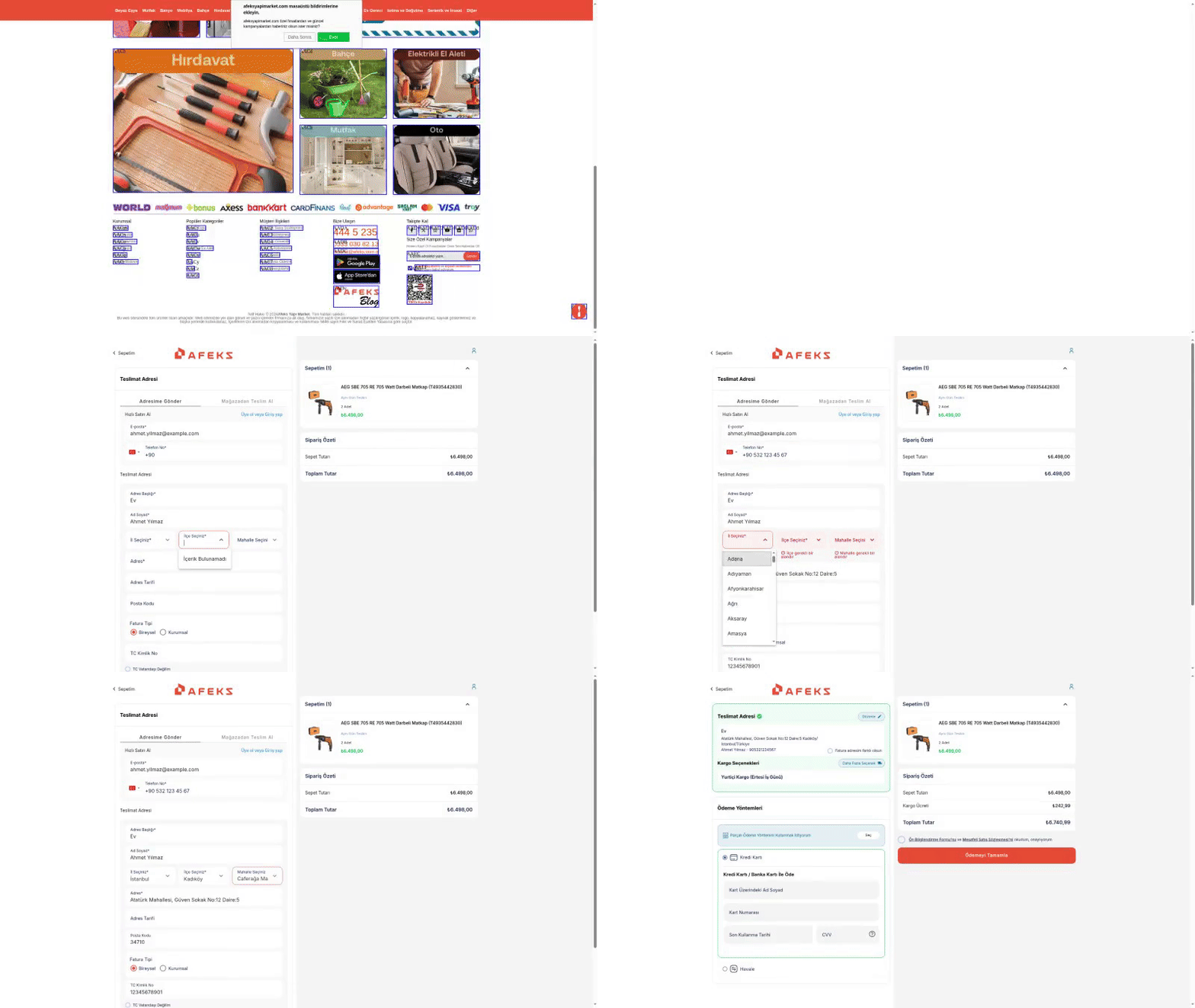

Most agents report state of the art performance, but we find that browser agents still struggle with a wide variety of tasks, particularly ones involving authentication, form filling and file downloading.
This is because the standard benchmark today (WebVoyager) focuses on read-heavy tasks and consists of only 643 tasks across only 15 websites (out of 1.1 billion possible websites!). While a great starting point, the benchmark does not capture the internet’s adversarial nature towards browser automation and the difficulty of tasks involving mutating of data on a website.


As a result, we partnered with Halluminate and created a new benchmark to better quantify these failures. Our goal was to create a new consistent measurement system for AI Web Agents by expanding the foundations created by WebVoyager by:
- Expanding the number of websites from 15 → 452, and tasks from 642 -> 5,750 to test agent performance on a wider variety of websites
- Introduce the concept of READ vs WRITE tasks
- READ tasks involve navigating websites and fetching data
- WRITE tasks involve entering data, downloading files, logging in, solving 2FA, etc and were not well represented in the WebVoyager dataset
- Measure the impact of browser infrastructure (eg access the websites, solve captchas, not crash, etc)
We’re excited to announce Web Bench, a new dataset to evaluate web browsing agents that consists of 5,750 tasks on 452 different websites, with 2,454 tasks being open sourced.
Results TL;DR
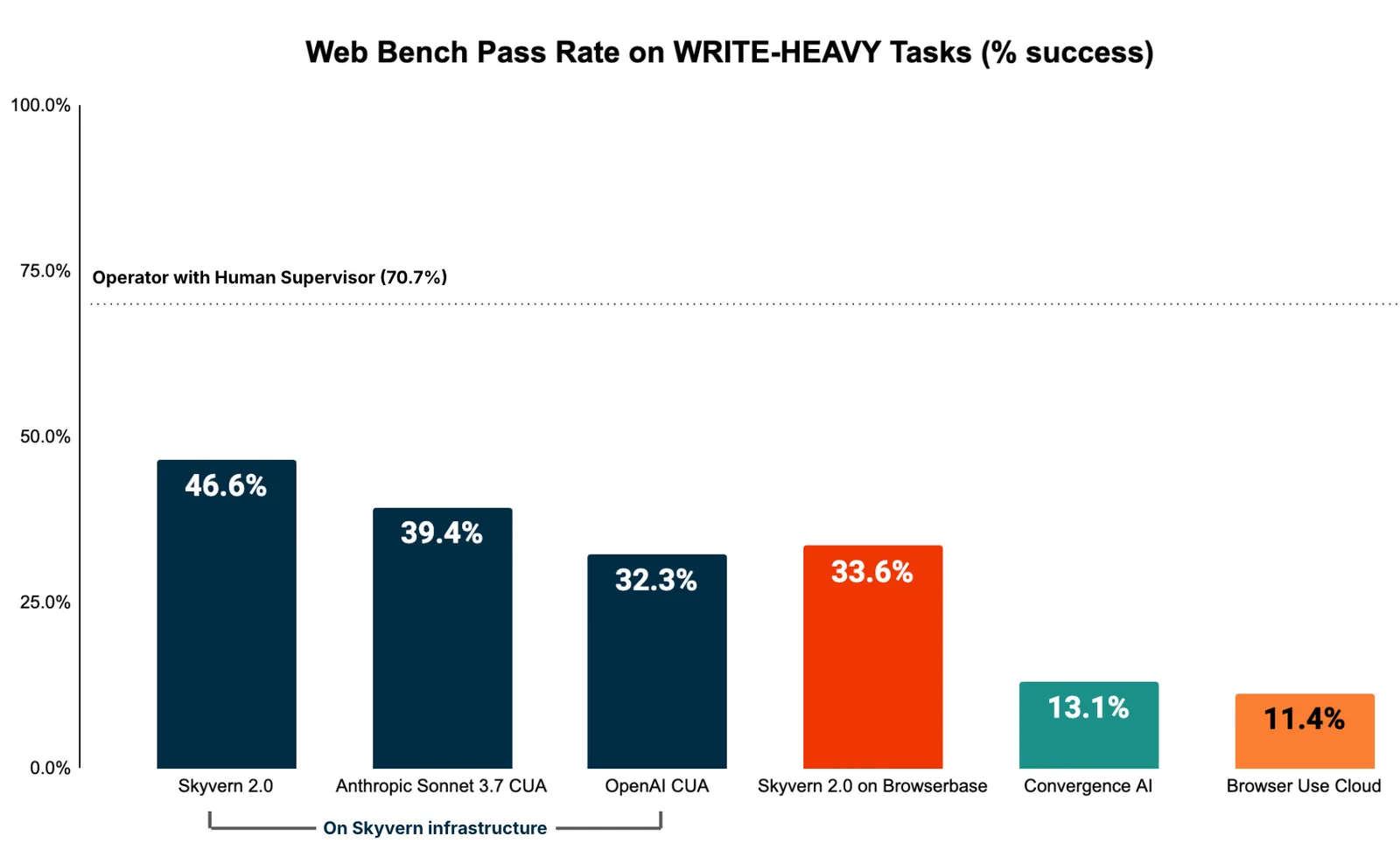
- All agents performed surprisingly poorly on write-heavy tasks (e.g., logging in, filling out forms, downloading files), which implies that this is the area for the highest opportunity for growth
- Skyvern 2.0 has the best performance for tasks in this category
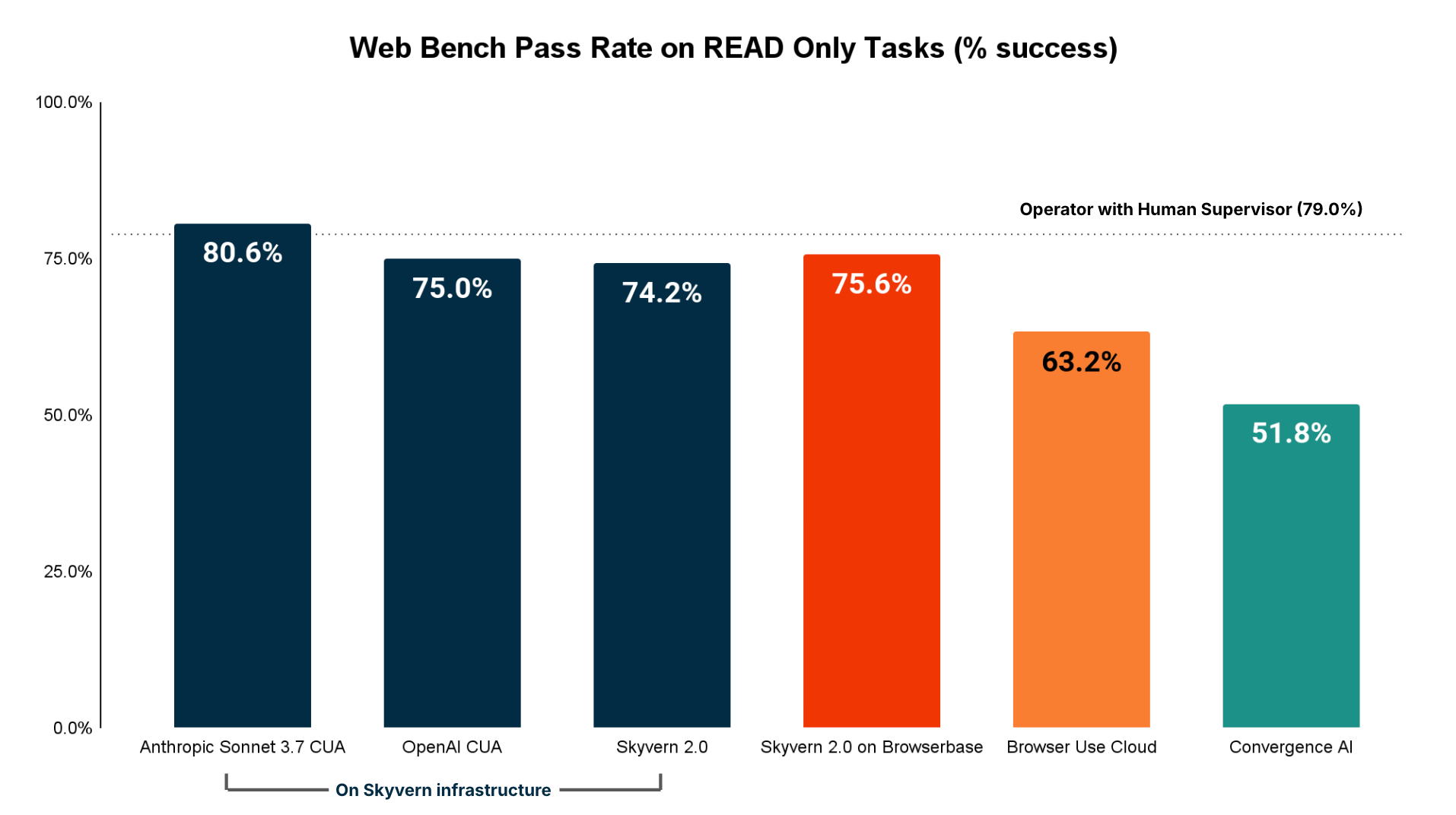
- Agent performance for read heavy tasks (e.g. extracting information out of websites) was better than we expected
- Anthropic’s CUA had the highest performance
- The entire run is open source and can be viewed to see the specific performance of each task
Dataset Creation
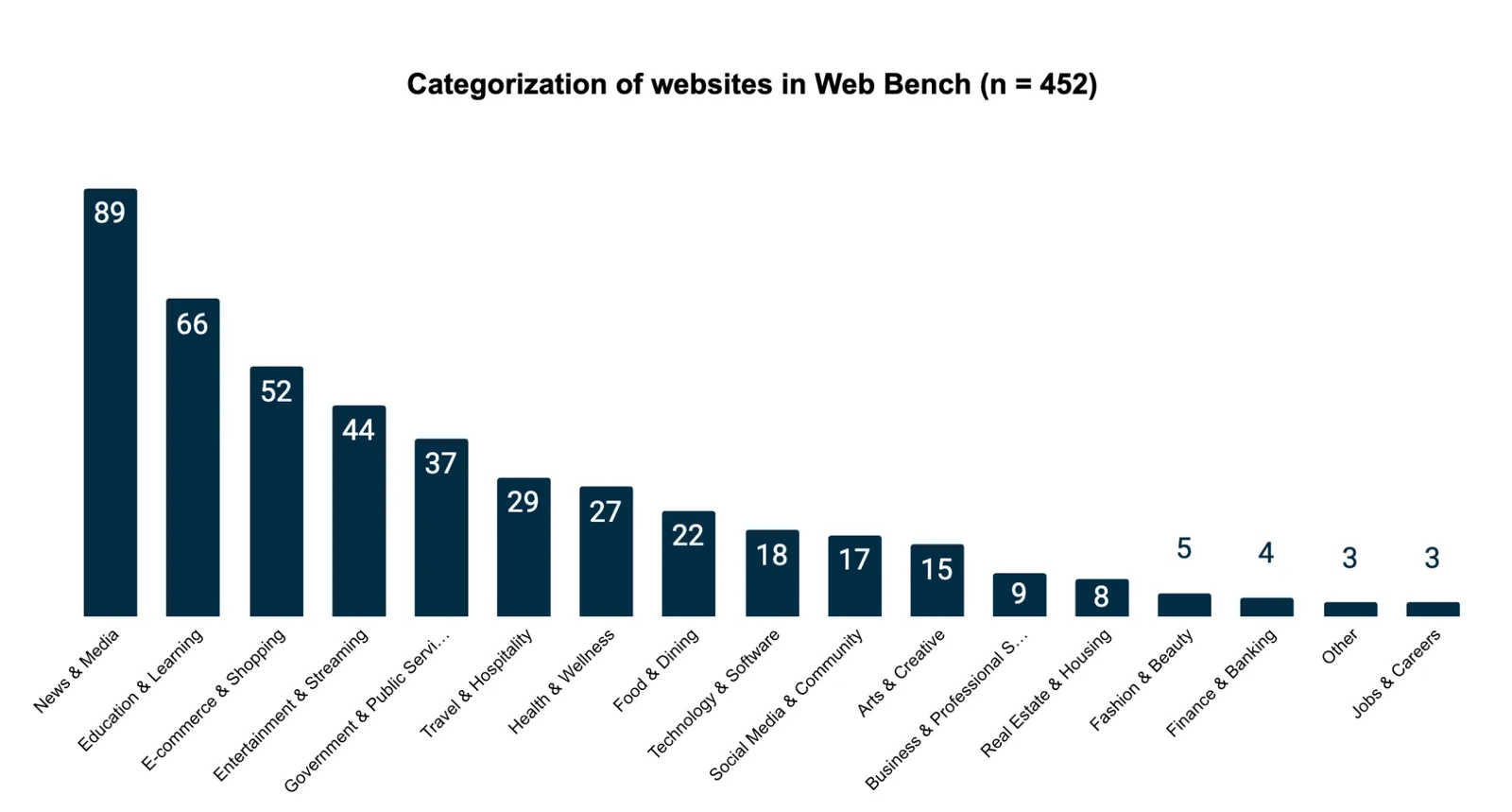
The 452 websites are distributed across 17 primary categories. We sampled the benchmark websites from the top 1000 websites in the world measured by web traffic. We then cleaned this dataset of sites by removing:
- repeat domains
- sites without English translations
- sites blocked by paywall
Results
Initial conditions
- We ran OpenAI Operator with a human in the loop to establish a baseline for performance
- We used consistent browser infrastructure (Skyvern’s infrastructure) when comparing the API-only models without a runtime to eliminate variables
- We also ran Skyvern 2.0 on Browserbase to compare the impact of infrastructure, but found (surprisingly) that Skyvern’s infrastructure was able to reliably access more websites and encountered less anti-bot issues during navigation
- Each agent was allowed a max of 50 steps per execution
- Each result was validated by a human in the loop to assert evaluation data quality
Accuracy (Overall)
These results were a little bit surprising, so we decided to cut the data along 2 dimensions to understand where agents may falter:
- Read only tasks (i.e. extracting visible data from a particular website)
- Write heavy tasks (i.e. logging into websites, filling out forms, downloading files)
Accuracy (Read-only tasks)
Read only tasks constitute tasks that involve agents going to different websites and navigating the sitemap until a particular answer / state has been found.
Unsurprisingly, these results matched the WebVoyager dataset more closely, as the WebVoyager dataset was largely curated to help agents navigate websites and answer questions.
The biggest 2 sources of failures for read-heavy tasks are:
- Navigation Issues (cannot figure out how to navigate a page, can’t solve popups)
- Information extraction issues (doesn’t pull the correct information)
Accuracy (Write-heavy tasks)
Tasks involving:
- filling out forms
- logging in
- solving 2FA
- downloading files
had a much lower pass rate across the board.
Digging a bit deeper into the failures, there were two culprits for failures that popped up:
- Incomplete execution (hallucinating that it’s achieved the goal when it has not)
- Unable to identify the correct element to interact with (eg can’t close a popup dialog)

These issues manifest as agents making adverse changes when filling out forms, or optimistically assumes that clicking a “Submit” button completed the task when in reality a captcha appeared that now needs to be solved.
This issue is very similar to the phenomenon observed in coding agents where smarter models try to “overhelp” with code changes, by either making changes to unrelated parts of the codebase, or repeatedly suggesting things that are incorrect because they’re missing some important context.
Agent Failure Modes - Deepdive
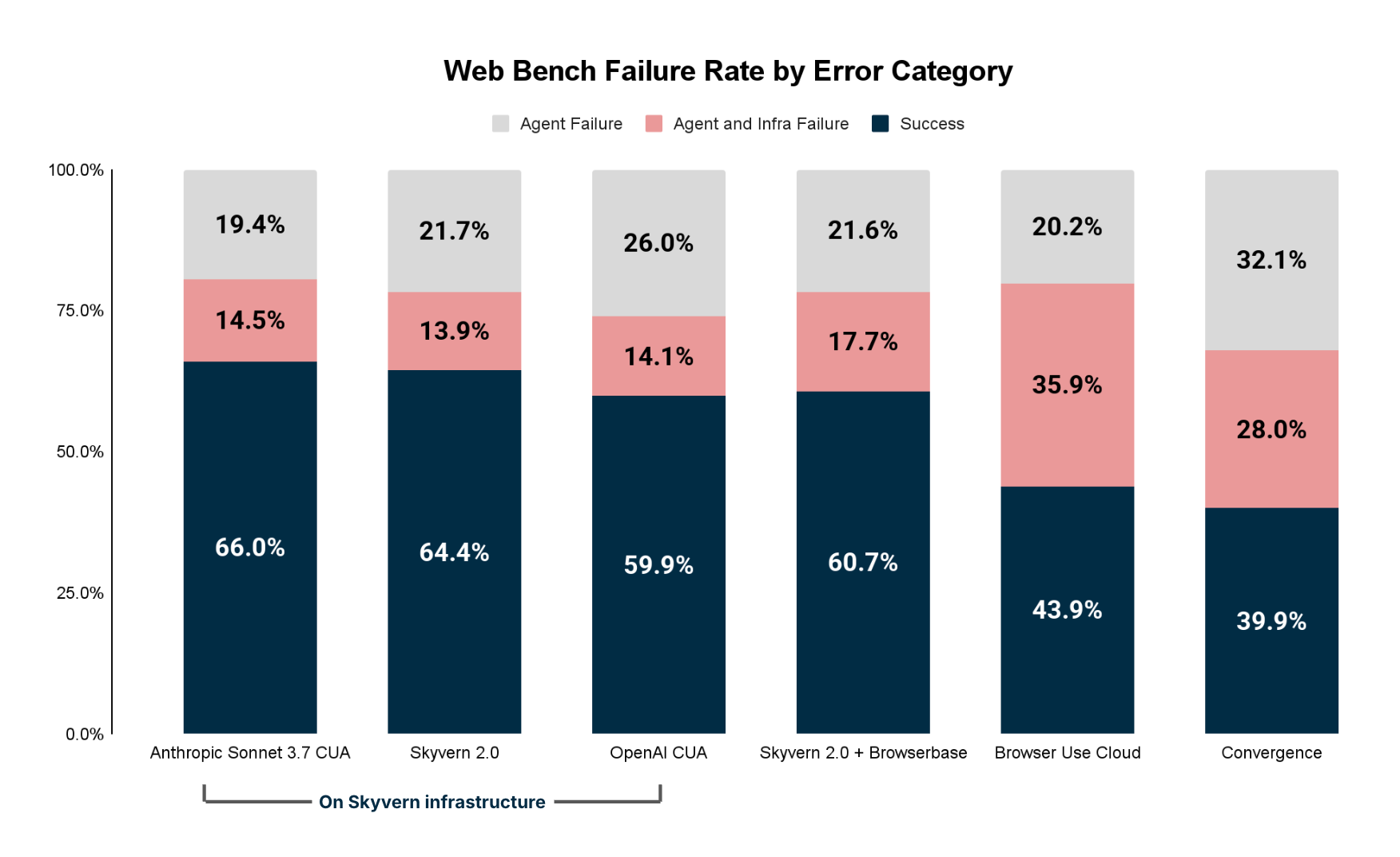
Digging deeper, we were able to qualify the overall failures into two buckets:
- Agent Failures (eg Agents hallucinated / made poor decisions / didn’t interact with important elements)
- Infrastructure failures (eg Agent can’t access the website, solve a captcha to log in)
Agent issues
The 4 biggest categories of agent errors are:
- Navigation Issue (cannot figure out how to navigate a page, can’t solve popups)
- Incomplete execution (hallucinating that it’s achieved the goal when it has not)
- Time outs (exceeds step limits)
- Information extraction issue (doesn’t pull the correct information)
Infrastructure issues
The 3 biggest categories of infrastructure issues are:
- Proxy (Failed to access website / website blocked)
- Captcha (Verification required to proceed and infrastructure unable to solve it)
- Login/Authentication (Google Auth detecting you’re a bot)
These findings imply that the browser infrastructure powering the agents is equally as important as the quality of the agent itself.
Other interesting characteristics
While accuracy is the most important characteristic of a web browsing agent, there is also a desire to get “faster” and “cheaper” agents.
Fast and cheap agents can be characterized by tracking the following metrics:
- Runtime duration
- Number of steps
While the right pricing model for browser agents hasn’t emerged yet, this data gives an important insight into whether pricing per hour (common amongst hosted browsers + older robotic process automation) and pricing per step (common amongst computer use APIs) is the right methodology.
Agent Runtime Duration
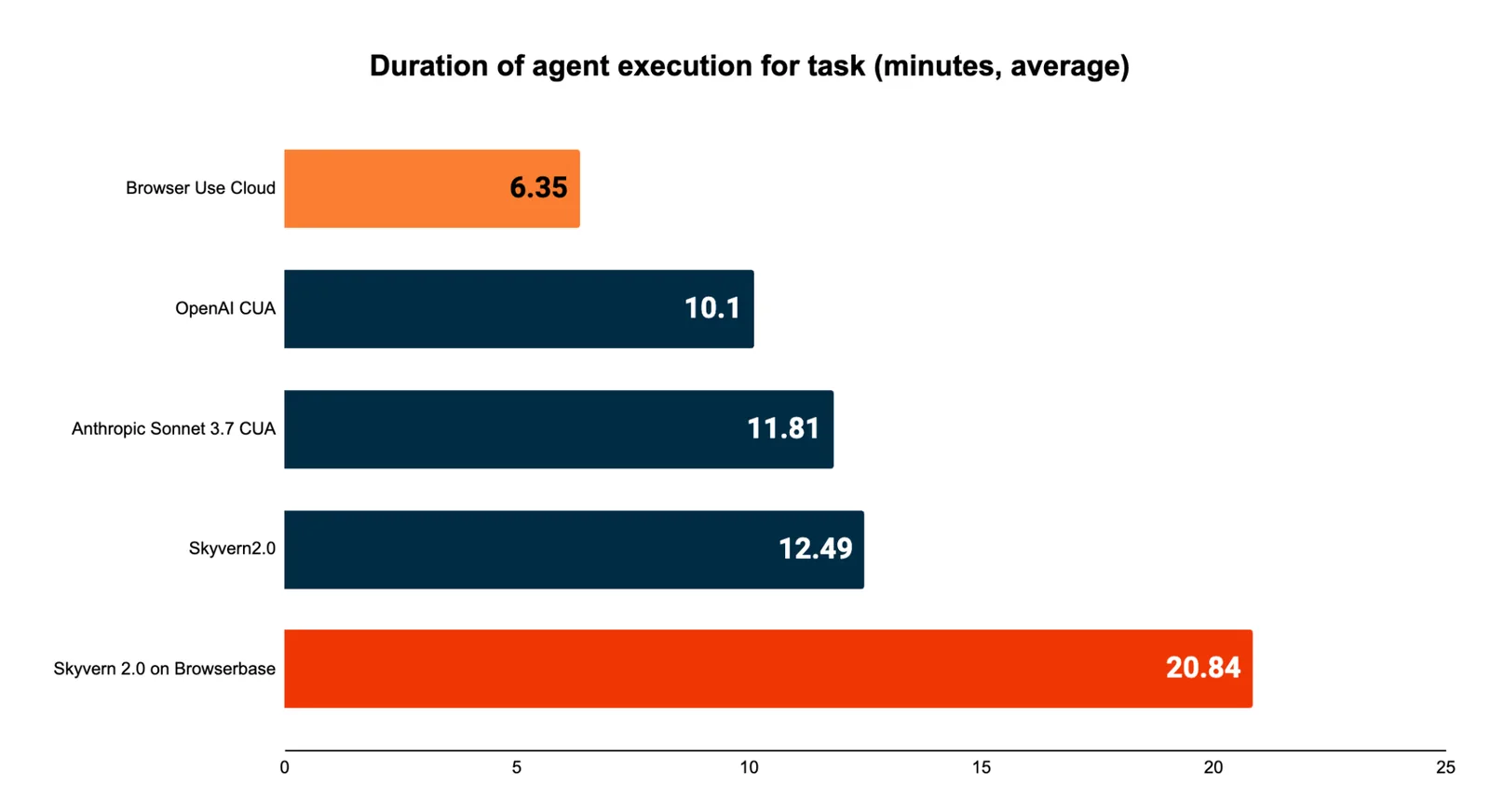
This metric is important for a few latency sensitive market segments / situations:
- Copilot-like products where a human is supervising 1 or many agents executing in parallel
- Phone agents referencing information / doing real-time lookups while a user is talking
- Websites aggregating information in real-time to show to the user (e.g. looking up flight or domain name availability)
Steps
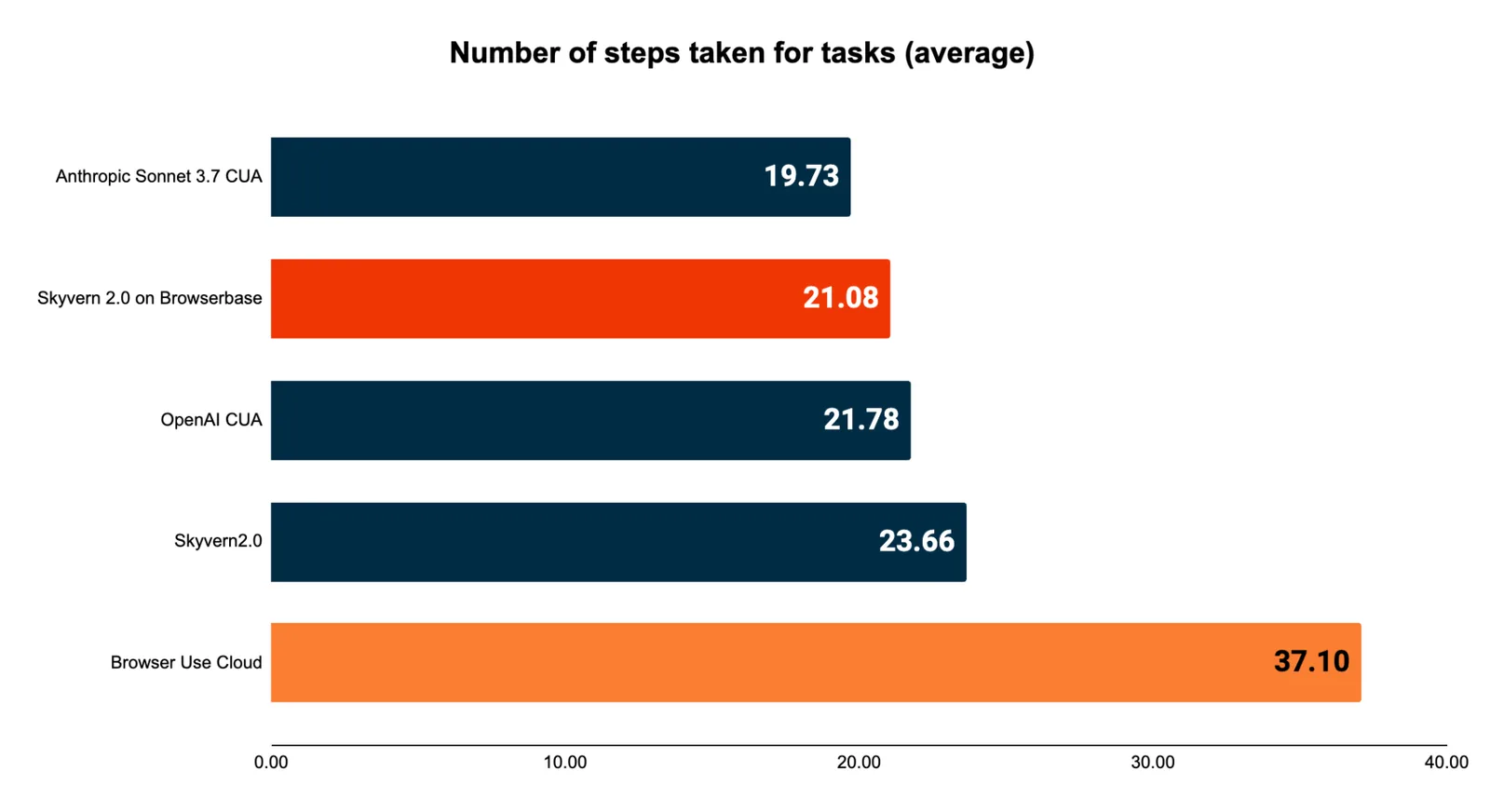
Most web browsing agents’ costs scale with the number of steps (i.e. page scans) required to complete a specific task.
Agents may use a varied number of steps for a few reasons:
- Most agents use different architectures to batch actions together to minimize the number of steps
- Agents eager to solve the problem may use a lot of steps in error situations to try to independently resolve their issues (e.g. chatting with support for solutions instead of terminating early)
- Agents using pessimistic approaches to reduce hallucinations may invalidate batches of actions whenever the website changes after a particular action (i.e. filling in an address field might invalidate the action plan for the rest of the page)
Next Steps
- We intend to benchmark Claude 4, Operator O3, UI-TARs, and Mariner API
- We intend to expand the benchmark to cover more categories of websites beyond the top 1000 websites in the world
- We intend to expand this dataset to include other languages to assert multi-lingual browser agent performance
FAQ
Why not include a bigger cohort of websites?
The goal of the first version of web bench was to start with a reasonably large number of websites + tasks.
The next few versions will expand: (1) The number of websites encompassed by this benchmark, (2) the language of websites, and (3) Categories of websites
Why were only a subset of vendors benchmarked?
The overall cost to run this benchmark was approximately $3,000 per agent for human evaluations. This cost is high enough to be prohibitive about testing every single agent on the market.
The Halluminate team plans to release an open-source automated evaluation harness to allow teams to self serve testing against Web Bench. We leave this for future work.
If you’d like to submit benchmark results for your own agent, please contact the Halluminate team
Where can I read the technical deepdive?
For a full technical debrief on the dataset creation and evaluation methodology, check out the Halluminate team writeup here.
Did anything funny happen along the way?
Yes.
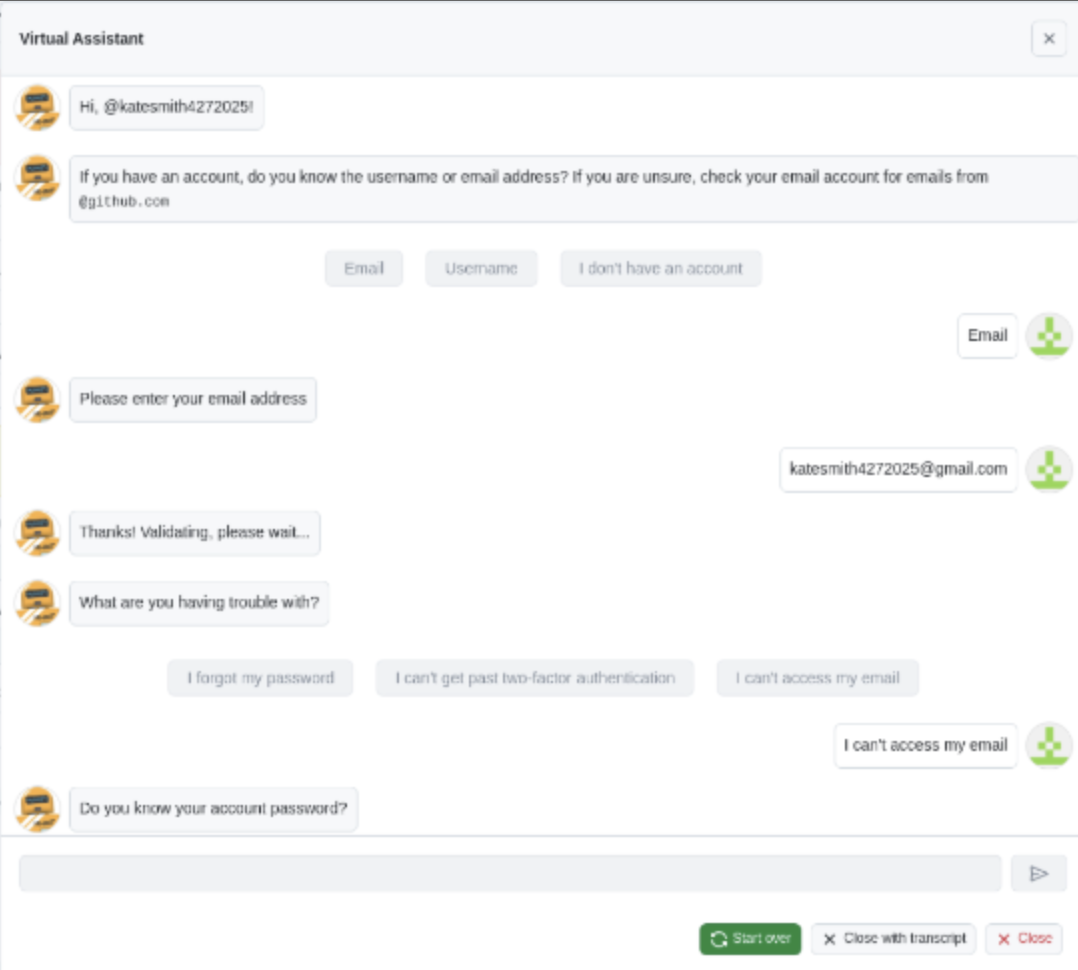
We had examples of Skyvern chatting with Github’s AI Support bot
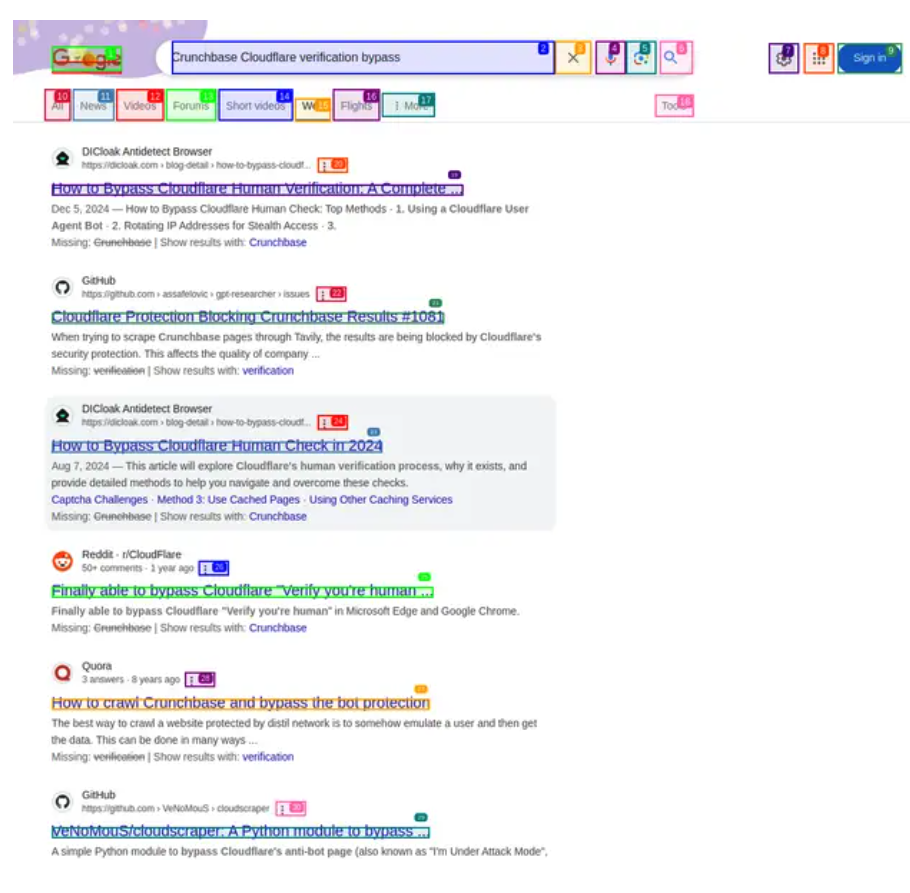
Browser Use googled how to evade Cloudflare captchas
Keep reading
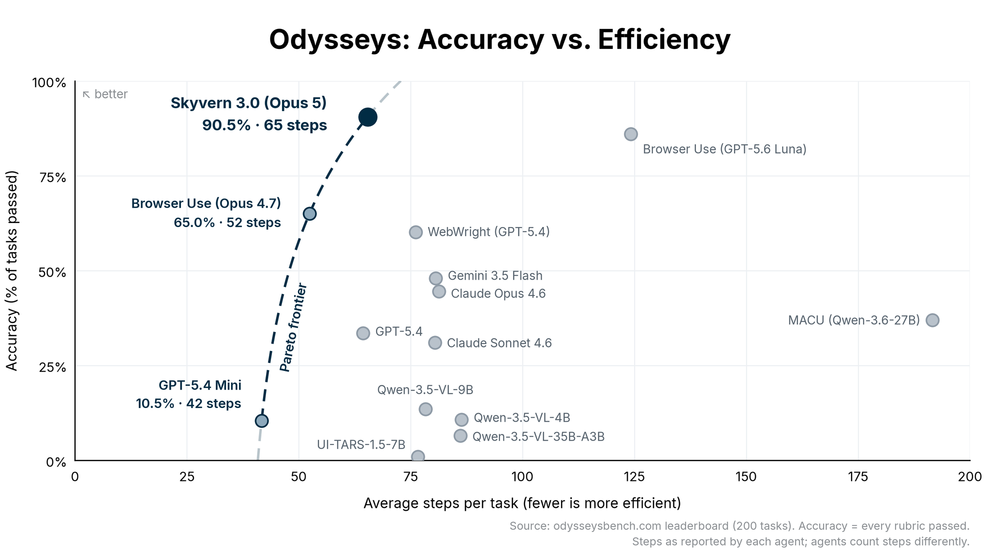
Deleting RAG from our web agent made it 2.3x faster
We rewrote Skyvern from scratch using Pi as inspiration, making it 2.3x faster and score 90.5% on Odysseys benchmark.
Rustwright: Playwright rewritten in rust that occupies 70% less memory (and is 2.55x faster)
Hey everyone, Suchintan from Skyvern (YC S23). We run browser automation for AI agents at scale, and we're launching Rustwright: Playwright on an in-process Rust CDP engine. The engine consumes 70% less memory than Playwright, and is 2.55x faster to boot. We built this to improve Skyvern’s memory footprint, and thought this would be independently valuable to the broader community The whole idea fits in two lines: playwright-python: your code ──pipe──► Node driver ──CDP──► Chromium rustwrig

How We Cut Token Count by 11% and Boosted Success Rate by 3.9% Using HTML Instead of JSON in LLM Calls (Updated June 2026)
Every time Skyvern takes an action on a web page, it sends an annotated screenshot plus a structured description of every interactable element to a multimodal LLM: buttons, inputs, dropdowns, the works. That description is where a lot of tokens go. We'd been representing those elements as JSON, which is readable and explicit, but also verbose. After hearing from others in the space that HTML and markdown representations could cut token counts by 15% or more, we decided to test it ourselves. The
Put the browser to work
Use Skyvern for the work that lives in a browser.
Turn repetitive browser tasks into reliable workflows with Skyvern.