Best Practices for Web Scraping Without Getting Banned (Updated June 2026)

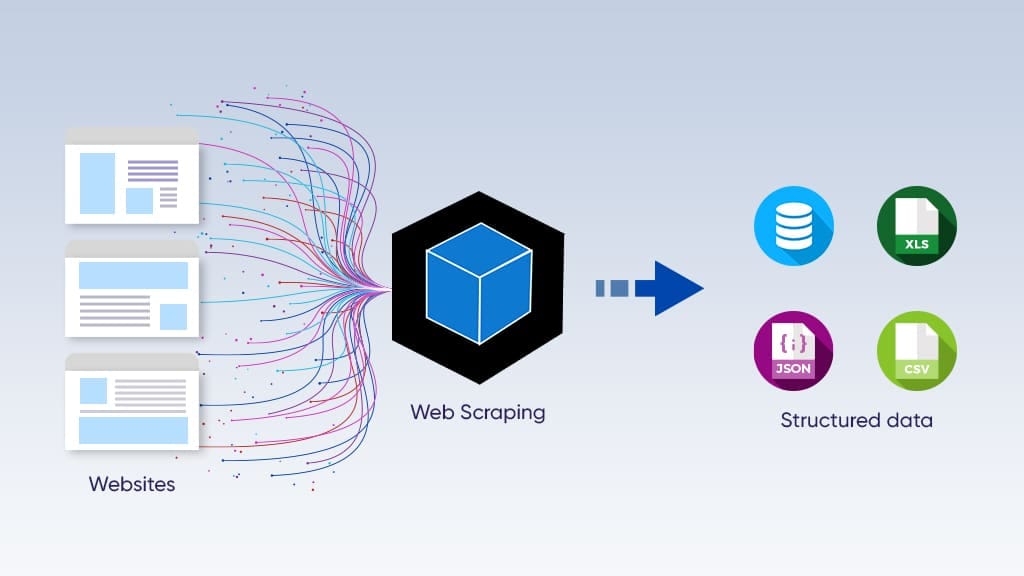
Web scraping lets users quickly collect large amounts of data from the internet. All web scrapers, though, face the danger of being banned by websites that have implemented anti-bot restrictions around their data. This post covers the best practices for web scraping while avoiding bans. We will cover common anti-bot actions websites use, present strategies to lower these risks, and discuss the effective use of tools like proxies and headless browsers. Following these guidelines will give web scrapers the necessary components to tackle the tough world of web scraping!
TLDR
- Anti-bot measures have grown more sophisticated. Modern detection systems use machine learning and behavioral fingerprinting, so rotating IPs or user agents alone no longer gets you through.
- Rate limiting and honeypot traps are common blockers. Scraping too fast or interacting with hidden page elements triggers blocks and bans quickly.
- Spreading requests across a proxy pool reduces exposure. A single IP is easy to flag; rotating across residential or ISP proxies distributes traffic and lowers detection risk.
- Headless browsers handle JavaScript-heavy pages. Sites that load content dynamically require a browser that can execute scripts, going beyond raw HTML fetching.
- Keeping scraping tools current is ongoing work. Site layouts and anti-bot rules change often. Tools that adapt visually require far less manual maintenance than selector-based scrapers.
- Skyvern handles CAPTCHAs, proxies, and dynamic layouts out of the box. Its built-in CAPTCHA solver, proxy network, and computer vision layer reduce the maintenance burden that comes with traditional scraping setups.
The Web Scraping Scene in 2026
The anti-bot arms race has intensified considerably this year. Imperva's 2026 Bad Bot Report shows that bots now account for 53% of all global web traffic, with bad bots alone making up 40%, marking the seventh consecutive year of growth in malicious automated activity.
Cloudflare and similar providers rolled out AI-powered detection systems that analyze behavioral patterns, fingerprinting signals, and network characteristics simultaneously. Rotating user agents or switching IPs no longer gets you past modern defenses, especially since bot detection systems now analyze over 15 million unique TLS/JA4 fingerprints daily and match them against claimed user-agent strings, flagging mismatches instantly.
Sites now use machine learning models that adapt in real time to scraping tactics, which means the window between a bypass technique working and being detected has shrunk from weeks to days.
On the compliance side, data collection practices are under tighter scrutiny. Regulations around data minimization and responsible scraping are being enforced more consistently, and organizations are treating these requirements as design constraints from the start instead of afterthoughts. Teams building scrapers in mid-2026 need to document what data they're collecting, why they need it, and how long they're keeping it, especially when the data touches anything resembling personal information.
Where selector-based scrapers break every time a portal updates and require constant maintenance to stay ahead of detection systems, tools that read pages visually and adapt to layout changes keep running with less manual intervention. The total cost of maintaining brittle scripts against both layout changes and evolving anti-bot systems has pushed more teams toward automation platforms that handle both problems at the infrastructure level.
Common Anti-bot Measures in Web Scraping
Many websites implement anti-bot measures to block, deter, and detect scraping efforts. Understanding these challenges can help you efficiently work through the process of building web scrapers.
- CAPTCHAs. CAPTCHA stands for Completely Automated Public Turing test to tell Computers and Humans Apart. Web scraping bots often fail to successfully solve these tests, which usually require a human to identify or interact with distorted text or objects. Skyvern's built-in CAPTCHA solver is designed to automatically solve various tests and avoid typical bot blocks.
- Rate limiting. This restricts how many requests can reach a server in a certain time, which prevents excessive server loads. Each website sets certain request thresholds as indicators of automated activity and exceeding these limits leads to a likelihood of temporary or permanent blocking.
- Honeypot traps. Honeypots are aspects of pages hidden from humans but identifiable by bots. These traps might include hidden forms or links, and when bots engage with them, it triggers an alert which can lead to banning the scraper's IP.
Knowing how these anti-bot measures work is key for anyone getting into web scraping. These systems identify and restrict bot activity, and understanding how they function helps build better scraping strategies.
Best Practices for Web Scraping
Following guidelines for best practices can help scrapers avoid getting blocked or banned while obtaining needed information from target websites.
Headless browsers
These browsers operate without a graphical interface but are able to programmatically interact with web pages. This is important for scraping sites with heavy JavaScript where the data is dynamically loaded. Skyvern uses headless browsers to handle complex page elements more effectively than traditional scraping methods.
Management of request rate
Sending too many requests too quickly triggers anti-bot systems. A starting point for most sites is 1–2 requests per second, with randomized delays of 2–5 seconds between requests. For sites with stricter rate limits, dropping to one request every 10–15 seconds and varying the interval further lowers the chance of a block.
Rotating user agents
Websites can see identifiable user agents. So, using different user agents for each request helps make scraping look more like normal user activity, which decreases flagging risk considerably.
Keeping scraping tool up to date
Websites change their layouts and defenses often. Traditional web scrapers will need to be updated to work through these changes. Skyvern combines computer vision and AI to imitate human browsing, which makes it possible to adapt to dynamic web layouts.
Error handling
Scrapers should be able to handle HTTP errors or unexpected changes. For example, retrying failed requests with random delays can sneak past temporary blocks, making your scraping setup more reliable.
Using proxies
A single IP might easily be logged and banned. A pool of proxies spreads requests over various IPs. This strategy helps when sites have strict anti-scraping rules. Skyvern’s built-in proxy network supports country, state, or even precise zip-code level targeting.
By following these best practices for web scraping, we can confidently gather important data while reducing disruptions from anti-bot measures.
Code Example: Extracting Structured Data with Skyvern
The snippet below shows how to run a Skyvern task that scrapes structured data from a product listing page. It routes traffic through a US residential proxy, defines a schema for the data you want back, and waits for the result — handling JavaScript rendering, proxy rotation, and CAPTCHA challenges at the platform level.
import asyncio
from skyvern import Skyvern

skyvern = Skyvern(api_key="YOUR_API_KEY")

async def scrape_product_listings():
    task = await skyvern.run_task(
        # Describe the goal in plain language — no XPath or selectors needed
        prompt=(
            "Go to the product listings page and extract the name, price, "
            "and availability for each item shown. "
            "COMPLETE once all visible listings are extracted."
        ),
        url="https://example-store.com/products",

        # Route through a US residential proxy to reduce detection risk
        proxy_location="RESIDENTIAL",

        # Define the shape of the data you want returned
        data_extraction_schema={
            "type": "array",
            "items": {
                "type": "object",
                "properties": {
                    "name":         {"type": "string", "description": "Product name"},
                    "price":        {"type": "string", "description": "Listed price, e.g. $29.99"},
                    "availability": {"type": "string", "description": "In stock, Out of stock, etc."}
                }
            }
        },

        # Block until the task finishes so you can read output directly
        wait_for_completion=True,

        # Optional: cap steps to control cost on large pages
        max_steps=20,
    )

    print(task.output)  # Returns structured JSON matching the schema above

asyncio.run(scrape_product_listings())
Swap proxy_location to any country preset (e.g., "RESIDENTIAL_GB") or pass a GeoTarget object like {"country": "US", "subdivision": "CA"} for state-level targeting. For longer-running scrapes, replace wait_for_completion=True with a webhook_url so your server receives the result asynchronously instead of holding an open connection.
What's Shifting in Mid-2026
Anti-bot systems have pushed past basic headless browser detection. Modern detection now runs behavioral profiling, device fingerprinting, and network analysis all at once, so standard headless configurations raise flags on most major platforms without additional stealth configuration. Teams are moving toward full browser instances or managed cloud browsers that pass real-browser checks by default, which reduces the custom evasion work needed just to reach the data.
The other shift worth noting is toward AI-native extraction. Instead of writing selectors that break every time a site updates, teams are describing the data they want and letting models interpret the page structure. This approach handles layout changes at runtime without code edits, and it opens scraping work to non-engineer team members who previously had to wait on a developer for every change.
Both shifts point in the same direction: the overhead cost of maintaining scraper scripts against evolving sites and evolving defenses is pushing teams toward infrastructure that handles adaptation at the platform level. That's the practical argument for tools like Skyvern, which reads pages visually and carries a built-in proxy network, instead of rebuilding those layers from scratch each time a site changes.
Final Thoughts on Best Practices for Web Scraping
In conclusion, mastering web scraping takes technical skills and a good grasp of practices that prevent bans. In this blog post, we talked about anti-bot measures that sites use to guard their data and discussed strategies like using proxies and headless browsers to deal with those challenges. Follow these best practices to boost your scraping performance and help stay in safe limits. Remember, scraping that's done the right way leads to sustainable data collection, so start applying these methods now and tap into the vast data available online!
FAQs
What is the most common reason web scrapers get banned?
The most common reason is sending too many requests too quickly. When a scraper hits a site at machine speed, it triggers rate-limiting systems that flag or block the source IP. Other frequent causes include reusing the same user agent across all requests, engaging with honeypot elements hidden from normal users, and failing to solve CAPTCHA challenges. Most bans come from one of these four patterns, and each one has a practical fix.
How do proxies reduce the risk of getting blocked?
A single IP sending many requests is easy to flag. A proxy pool spreads those same requests across dozens or hundreds of IPs, so no single address crosses the threshold that triggers a block. Residential and ISP proxies look more like real user traffic than datacenter IPs, which makes them harder for anti-bot systems to filter. Geographic targeting adds another layer, routing requests through IPs that match the expected location of a site's user base further lowers suspicion.
What are honeypot traps and how do they catch scrapers?
Honeypots are page elements invisible to human visitors but fully accessible to automated bots. They might be hidden form fields, links with zero opacity, or off-screen anchors. A real user scrolling through a page never sees or clicks them. A bot parsing the raw HTML often does. When the scraper interacts with a honeypot element, the site logs the event and blocks the IP. Avoiding them comes down to loading pages the way a browser does, so the scraper sees the page as a human would, not as raw markup.
Why do scrapers need headless browsers for JavaScript-heavy sites?
Many modern sites load their content dynamically through JavaScript after the initial HTML response. A scraper that only fetches raw HTML gets an empty shell with no data. A headless browser runs the full page, executes scripts, and captures the fully loaded result, the same content a real user would see. For sites that defer data loading or require user interaction to trigger API calls, a headless browser is the only way to reach the content reliably.
How does Skyvern handle CAPTCHAs and anti-bot detection?
Skyvern includes a built-in CAPTCHA solver that works through common challenge types including reCAPTCHA v2 and hCaptcha using visual reasoning, without relying on hardcoded selectors or third-party solving services. Its native proxy network and Microsoft Edge stealth browser configuration reduce the chance of triggering detection systems before a CAPTCHA even appears. For sites with aggressive bot detection, Skyvern also supports a Browser Use runtime integration that achieves higher success rates on high-security sites. Teams, though, should run proof-of-concept testing against specific target portals before committing to production, since success rates vary by site and detection technology.
How often do web scraping tools need to be updated?
Selector-based scrapers break whenever the target site changes its layout, which can happen weekly on actively maintained sites. That means constant patching just to stay functional. Tools that read pages visually, like Skyvern, adapt to layout changes at runtime without code edits, so the maintenance cycle is considerably shorter. That said, anti-bot rules evolve independently of layout. Any scraping setup needs periodic review to confirm it keeps pace with updated detection systems, regardless of how the underlying tool works.
Keep reading
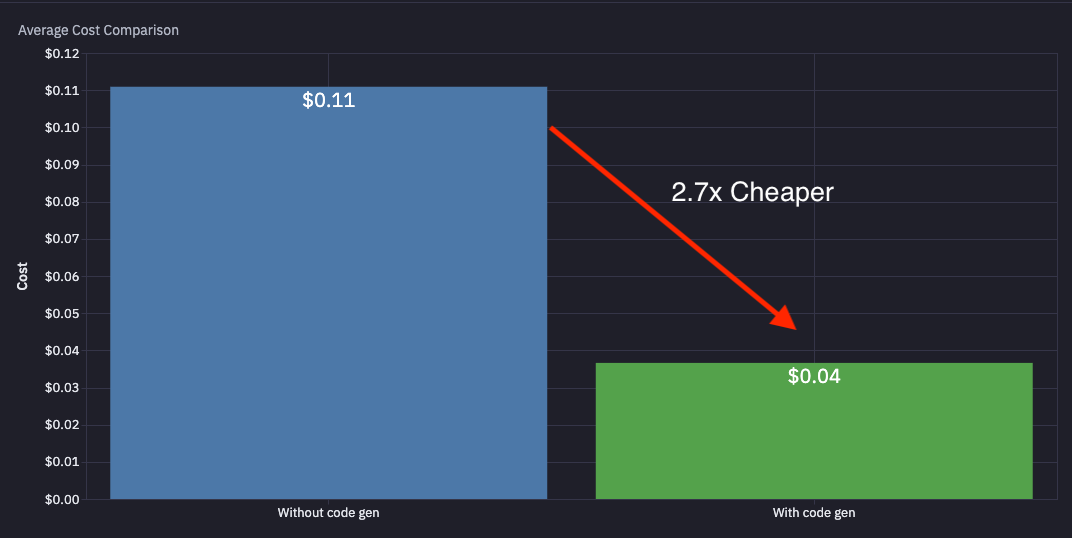
Asking AI to build scrapers should be easy right?
TL;DR - We just gave Skyvern the ability to write and maintain its own code, making it 2.7x cheaper and 2.3x faster. Give it a prompt (or a series of prompts), and the AI will generate and maintain playwright code while it runs. Try out the via Open Source or Cloud 💡 Recap: What is Skyvern? It’s an open source tool that helps companies automate things in the browser with AI. We use computer vision + LLMs to turn prompts into automations that run. We serve both technical and non-technical custo
Python Web Scraping Tutorial: Complete Guide Updated July 2026
You've probably spent hours wrestling with Python scraping libraries that break whenever a site updates. Tools like Beautiful Soup and Selenium were built for a simpler web (one that no longer exists in 2025). Modern websites actively block scrapers with shifting layouts, anti-bot measures, and JavaScript execution that make XPath selectors useless overnight. A scraper that works today can break within days on sites with frequent layout updates or active anti-bot policies. In this post, we'll c
What Are Residential Proxies? Complete Overview August 2026
You've likely hit that frustrating wall where your web scraping gets blocked or certain sites just won't load from your location. When residential proxy vs VPN becomes a consideration, you're usually dealing with automation challenges that need smarter solutions than basic scripts can provide. The truth is, residential proxies have become important for anyone serious about reliable web automation, but there's a lot of confusion about what they actually do and when you need them. TLDR: * Resi
Put the browser to work
Use Skyvern for the work that lives in a browser.
Turn repetitive browser tasks into reliable workflows with Skyvern.