Best AI RPA Tools for Invoice Processing and Document Automation (April 2026)

Someone on your AP team is logging into vendor portals right now, clicking through authentication flows, downloading invoices, and manually entering line items into your ERP. That process costs $12 to $30 per invoice when you factor in labor time and error correction. Intelligent document processing tools automate that entire workflow: portal login, invoice download, data extraction, and ERP integration, without breaking when vendors change their website layouts. The tools below show you which ones handle multi-vendor scalability without requiring custom configuration for each portal.
TLDR:
- AI RPA uses computer vision and LLMs to extract invoice data by meaning, not position
- Manual invoice processing costs $12-30 per invoice; automation drops that to $1-5
- Skyvern works immediately on any vendor portal without site-specific configuration
- Traditional tools like UiPath require weeks of custom training to reach 70% automation rates
- Skyvern automates invoice processing using computer vision that self-heals when vendor portals change layouts, handles 2FA and CAPTCHA natively, and integrates directly with QuickBooks, Xero, and NetSuite
What Is AI RPA for Invoice Processing and Document Automation?
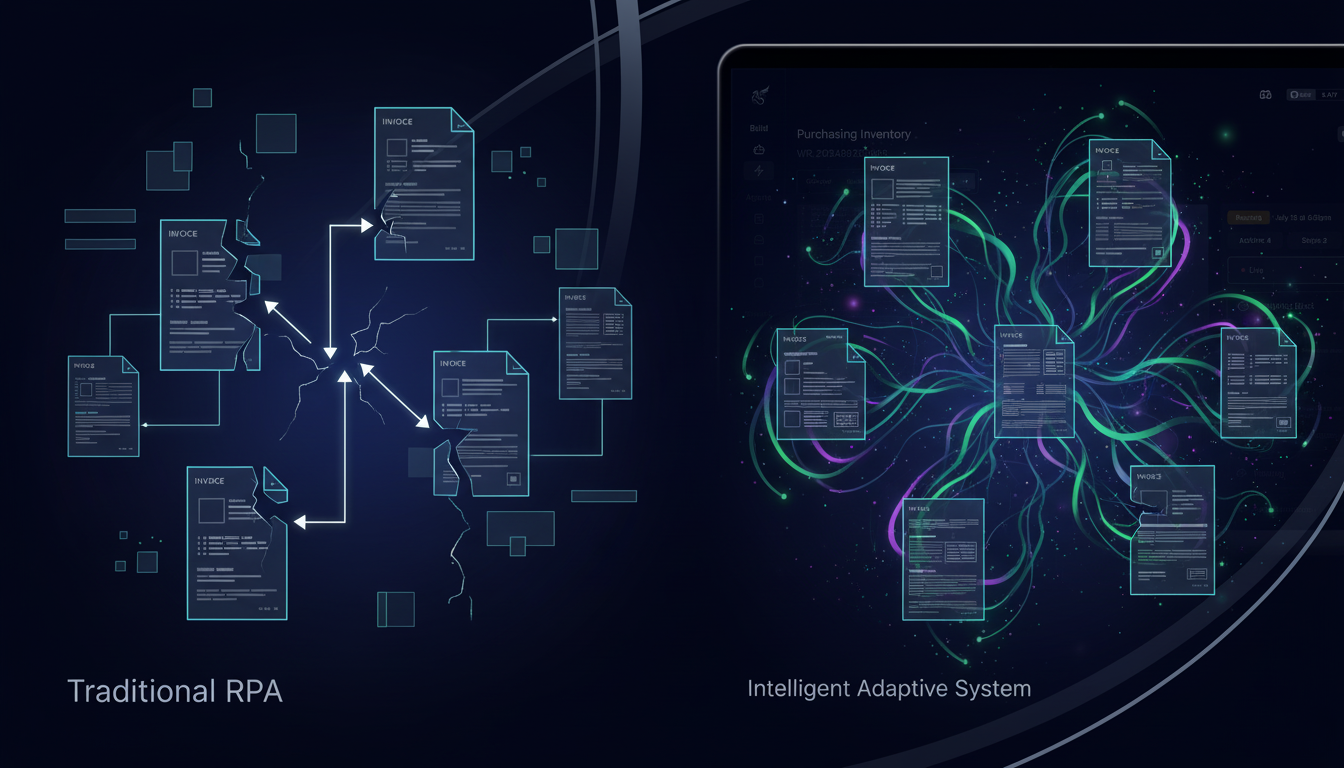
Traditional RPA follows rigid rules. Feed it an invoice from a new vendor with a slightly different layout, and it either fails silently or returns garbage data. AI RPA works differently. It combines computer vision, machine learning, and LLMs to read documents the way a human would: by meaning, not by position.
For invoice processing, that distinction matters a lot. Invoices come in hundreds of formats. Line items shift columns. Dates appear in different corners. Totals get buried in footers. AI RPA tools extract the data that matters: invoice numbers, amounts, line items, vendor details, regardless of where it lives on the page.
Document automation extends this further. Purchase orders, receipts, contracts, EOBs, and remittance files all carry structured data locked inside unstructured layouts. Instead of manually keying that data into accounting systems, AI RPA reads the document, pulls the fields, and pushes structured output downstream automatically, at scale.
How We Ranked AI RPA Tools for Invoice Processing
Picking the right AI RPA tool for invoice processing isn't about which demo looks cleanest. The differences that matter show up when you're running hundreds of invoices from different vendors, hitting authenticated portals, or dealing with a layout that changed overnight. There are a number of criteria worth looking at here:
- AI adaptability: whether the tool uses computer vision to read documents by meaning instead of relying on positional selectors that break when formats shift
- Layout resistance: can it self-heal when vendor templates change, or does someone have to fix it manually every time?
- Authentication handling: native support for login flows, 2FA, CAPTCHA solving, and credential management for portal access
- Multi-vendor scalability: does one workflow cover dozens of vendors, or does each vendor need its own configuration?
- Data extraction accuracy: how reliably does it capture invoice numbers, dates, line items, and totals across varied formats?
- Integration capabilities: how cleanly does it connect to ERP systems, accounting software, and AP workflows?
- Cost structure: transparent pricing that scales with usage without hidden licensing fees buried in the fine print
No single tool scores perfectly across all seven. But these dimensions tell you where a tool will hold up in production and where it will quietly break down at scale.
Best Overall AI RPA for Invoice Processing: Skyvern

Skyvern uses computer vision and LLMs to read vendor portals the way a human does, by visual understanding instead of fragile CSS selectors or XPath dependencies. That approach lets it work across any vendor billing portal, download invoices, extract structured data, and push results to accounting systems without breaking when websites redesign their interfaces overnight. For AP teams logging into 10-100+ vendor portals monthly, that reliability compounds fast.
Key Features
- Works immediately on any vendor portal without site-specific configuration or training data, with a benchmark score of 85.8% on WebVoyager
- Self-heals when vendor portals change layouts so no maintenance is needed to keep automations running
- Native 2FA and CAPTCHA solving for accessing login-gated billing portals across hundreds of vendors
- Runs workflows in parallel across dozens of vendor portals simultaneously to clear AP backlogs
- Integrates with QuickBooks, Xero, NetSuite, and S3 via webhook for clean data flow into accounting systems
Limitations
- Requires comfort with API concepts and YAML-based workflow definitions to get started
- Operates as a newer platform with a smaller community compared to existing tools like Selenium or UiPath
- Cloud service pricing scales with usage, which may be a consideration for teams with very high automation volumes
- May require fine-tuning for highly specialized or complex edge cases
- Learning curve for teams unfamiliar with AI-driven automation approaches
Bottom Line
Skyvern is best for finance and AP teams that need to process invoices across multiple vendor portals with authentication complexity, and it delivers the strongest results for organizations where vendor portal layouts change regularly. Teams processing 1,000 or more invoices monthly will see the greatest return, particularly those that have hit the maintenance ceiling on traditional RPA or are managing dozens of vendor relationships without dedicated engineering resources to build and maintain per-vendor configurations.
UiPath Document Understanding
UiPath Document Understanding combines OCR, AI, and machine learning to automate invoice data extraction within the broader UiPath RPA ecosystem. It targets organizations already invested in UiPath infrastructure who need intelligent document processing for invoices, purchase orders, and receipts. But the real limitations show up at deployment time, where the tool requires a lot of upfront configuration before reaching production-level automation rates.
Key Features
- Pre-trained ML models for common invoice formats that reduce initial training requirements
- Document classification to route different invoice types to appropriate extraction workflows
- Validation Station for human review when extraction confidence falls below defined thresholds
- Integration with UiPath AI Center for custom model training on organization-specific document formats
- Broad ecosystem compatibility for organizations already standardized on UiPath RPA infrastructure
Limitations
- Automates only 30% of invoices without custom training, requiring additional model configuration to reach 70% automation rates
- Enterprise licensing starts at $10,000 USD annually, which prices out most mid-market teams
- Requires weeks to months of upfront setup before reaching production-level straight-through processing
- Model retraining is needed whenever vendor document formats change, creating ongoing maintenance overhead
- Poor fit for teams with varied vendor formats or those needing fast time-to-value
Bottom Line
UiPath Document Understanding is best for large enterprises already standardized on UiPath RPA that process high volumes of invoices from long-term vendor relationships where document formats stay relatively stable. Teams that need fast deployment, handle varied vendor formats, or lack dedicated RPA developers to manage ongoing model training will find the configuration overhead and licensing costs difficult to make a case compared to approaches that deliver higher automation rates without the training burden.
Automation Anywhere IQ Bot
Automation Anywhere IQ Bot adds cognitive capabilities to the Automation Anywhere RPA ecosystem, using computer vision and machine learning to extract data from semi-structured and unstructured documents. It integrates directly with Automation Anywhere's Control Room to extend existing bot workflows with intelligent document processing for invoices, purchase orders, and other financial documents. But the limitations stack up quickly in production, where OCR accuracy issues and infrastructure requirements create friction that works against the goal of straight-through processing.
Key Features
- Pre-built domain templates for invoices that accelerate initial setup for common document types
- Machine learning that improves extraction accuracy as the system processes more document samples
- Python scripting support through the Custom Logic feature for data transformation and validation
- Integration with Automation Anywhere bot workflows for end-to-end process automation
- Control Room integration for centralized management of document processing across the organization
Limitations
- Pricing starts at $10,000 USD annually, which is steep compared to usage-based alternatives
- OCR accuracy issues push a meaningful percentage of documents into manual validation queues, undercutting straight-through processing goals
- Requires 16 GB RAM and 500 GB hard disk space yet still causes severe performance issues during installation and execution
- Bot downloads can take 7 to 8 minutes, creating deployment friction that compounds across implementations
- Poor fit for teams focused on cost-effective scaling or high straight-through processing rates
Bottom Line
Automation Anywhere IQ Bot is best for organizations with existing Automation Anywhere RPA deployments that want to add document intelligence to existing invoice workflows without introducing a second vendor. Teams focused on minimizing validation overhead, controlling licensing costs, or achieving high straight-through processing rates will find it difficult to make a case for the investment compared to approaches that deliver stronger automation rates out of the box.
Feature Comparison Table of AI RPA Invoice Processing Tools
The tools covered in this comparison vary widely in how they handle real-world invoice and document automation. The table below summarizes where each one stands across the dimensions that matter most for production deployments.
Feature | Skyvern | UiPath Document Understanding | Automation Anywhere IQ Bot |
|---|---|---|---|
AI-Driven Adaptation | Yes (computer vision and LLM-driven understanding adapts to layout changes without maintenance) | Partial. Requires custom training to reach production automation rates | Partial (machine learning improves over time but requires substantial initial setup) |
Layout Resistance | Yes. Self-heals when vendor portals redesign interfaces | Limited. Model retraining required when document formats change | Limited. Struggles with format variations outside training data |
Native 2FA/CAPTCHA | Yes. Built-in authentication handling including MFA and CAPTCHA solving | No. Requires separate authentication configuration | No. Requires third-party authentication integration |
Multi-Vendor Scalability | Yes. Single workflow covers hundreds of vendors without vendor-specific config | Limited. Templates or training data required per vendor format | Limited. Pre-built domains help but customization still needed |
Straight-Through Processing | 85.8% on WebVoyager without configuration | 30% without training; 70% after custom training | Variable (OCR accuracy issues push substantial volume into manual queues) |
Setup Time | Immediate. Works on day one | Weeks to months for model training and validation setup | Weeks for domain configuration and testing |
Maintenance Burden | None. AI adapts automatically | Ongoing model retraining when vendor formats evolve | Ongoing tuning and exception handling |
Pricing Model | Transparent pay-per-step, no hidden fees | Enterprise licensing starting at $10,000+ annually | Enterprise licensing starting at $10,000+ annually |
Deployment Options | Open-source self-hosted or managed cloud | Cloud or on-premises (UiPath infrastructure required) | Cloud or on-premises (Automation Anywhere infrastructure required) |
Best For | Teams needing immediate invoice automation across multiple vendor portals without maintenance | Large enterprises with existing UiPath RPA infrastructure processing stable invoice formats | Organizations standardized on Automation Anywhere adding document intelligence |
Why Skyvern Is the Best AI RPA for Invoice Processing
Most invoice automation tools make you choose between speed and reliability. Configure fast, break often. Build something durable, spend weeks on setup and months on maintenance. Skyvern skips that tradeoff entirely. Computer vision reads vendor portals by meaning, so automations work on day one and keep working when layouts change. No selectors to update. No per-vendor configuration. No maintenance backlog eating into the time you saved.
For AP teams running invoices across dozens of vendor portals, that compounds quickly. One workflow covers every vendor. Authentication, CAPTCHA, MFA, all handled natively. Structured data flows directly to QuickBooks, NetSuite, or Xero via webhook, with full audit trails for compliance. The result is 300-600% first-year ROI for organizations processing 1,000+ invoices monthly, without the developer overhead that makes traditional RPA unsustainable at scale. This return potential aligns with broader market momentum, as global RPA market growth projections, driven by AI-powered automation adoption across finance and AP functions.
Final Thoughts on RPA Software for Invoice Workflows
RPA software built with computer vision handles what traditional automation can't: vendor portal layouts that change overnight without breaking your workflows. Your finance team gets straight-through processing across hundreds of invoice formats with one workflow instead of per-vendor configuration. Talk to us about cutting your invoice processing costs without adding maintenance overhead to your engineering backlog.
FAQ
How do you choose the right AI RPA tool for invoice processing across multiple vendors?
Look for computer vision capabilities that read documents by meaning instead of positional selectors, native authentication handling for 2FA and CAPTCHA, and multi-vendor scalability where one workflow covers dozens of vendors without per-vendor configuration. Assess whether the tool self-heals when vendor portals change layouts or requires ongoing maintenance to keep automations running.
What's the difference between AI RPA and traditional RPA for invoice automation?
Traditional RPA follows rigid rules based on CSS selectors and XPath that break when invoice layouts change, requiring manual fixes every time a vendor updates their template. AI RPA uses computer vision and machine learning to read documents by meaning instead of position, so it extracts data correctly regardless of where invoice numbers, dates, or line items appear on the page.
Can AI RPA tools handle vendor portals with login requirements and multi-factor authentication?
Not all AI RPA tools handle authentication complexity equally. Look for native 2FA support, CAPTCHA solving, and credential management built into the platform instead of requiring separate integrations. Tools without these capabilities force teams to manually handle logins or use workarounds that break automation workflows.
How long does it take to deploy invoice automation with AI RPA?
Setup time varies dramatically by approach. AI-powered tools with computer vision work immediately on vendor portals without site-specific configuration, while traditional RPA and document understanding platforms require weeks to months for model training, validation setup, and per-vendor customization before reaching production automation rates.
Which AI RPA approach works best for teams with limited technical resources?
Teams without dedicated RPA developers should assess tools based on whether they require extensive training data, custom model configuration, or ongoing selector maintenance. Computer vision-based platforms that work on day one without vendor-specific setup deliver faster time-to-value for teams with limited technical resources compared to solutions requiring custom training or per-vendor configuration.
Keep reading

Browser Use vs Browserbase: my honest comparison
Browserbase and Browser Use can both automate work in a browser, from collecting product data to filling out forms. Choosing between them comes down to what you want to build: a task you hand to an AI agent, a custom agent inside your application, or browser infrastructure for scripts you already run. I’m Skyvern’s co-founder and CEO by the way. We build a competing product, so I have a stake in this comparison. But I promise I won't promote our product (even though it's a great alternative to

6 Stagehand alternatives for browser automation in 2026
If you're looking for Stagehand alternatives, you probably want an AI browser agent that: * Works natively with Python scripts. * Can navigate and scrape complex websites efficiently. * Stays reliable as your workload grows from a few runs to thousands of browser jobs. That's the kind of workflow I built Skyvern for (Skyvern CEO here). I know, I know, Skyvern CEO's recommending Skyvern as a good alternative. Please just stay with me for a second here. Yes, Skyvern is a good Stagehand alt

Browser Use vs Stagehand: Which One Should You Pick?
Browser Use and Stagehand both let you use AI to automate browser tasks, such as collecting product data or filling out forms. When you’re deciding which to build with, their feature lists only tell you so much. You want to know how much code you’ll need to write, whether the automation completes your task correctly, and what repeated runs will cost. I'll be upfront: we build Skyvern, a competitor to both, but this blog post won't shill our product (you can try it here though). I’m keeping thi
Put the browser to work
Use Skyvern for the work that lives in a browser.
Turn repetitive browser tasks into reliable workflows with Skyvern.