
New Month New Docs

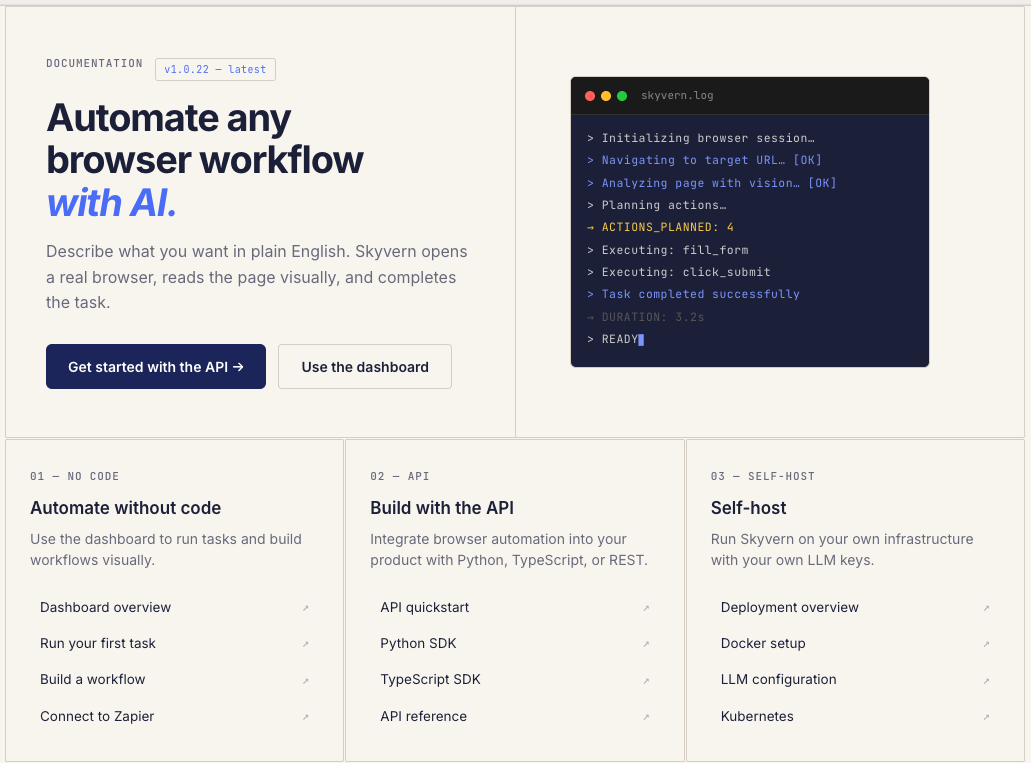
We just shipped something we should have shipped a long time ago: real documentation.
If you've ever tried to use Skyvern and found yourself digging through GitHub issues, Discord threads, or old blog posts to figure out how something works — that's on us. We had the classic startup problem: we were shipping features faster than we could explain them.
So we built skyvern.com/docs from the ground up. Not a README with some curl examples. Actual, structured documentation that covers everything from "what is this thing" to "how do I deploy it on my own infrastructure."
The Problem: Three Audiences, Zero Docs
Skyvern has three very different types of users:
- No-code operators who want to automate browser tasks from a dashboard without writing a single line of code
- Developers who want to call our API from Python or TypeScript and integrate browser automation into their existing stack
- Self-hosters who want to run the whole thing on their own infrastructure with their own LLM keys
We were trying to serve all three with a README and some blog posts. It wasn't working. Users were constantly asking the same questions in Discord. Onboarding calls were turning into documentation walkthroughs. Support tickets were about things that should have been a 30-second docs lookup.
What's Actually in There
The docs are organized around how you actually use Skyvern:
- Getting Started — A quickstart that gets you from zero to your first automated browser task in about 5 minutes. Sign up, grab an API key, run three lines of code (or just use the dashboard — no code required)
- Architecture — Our Planner-Agent-Validator framework explained properly for the first time. How the agent loop works, why we combine visual reasoning with DOM analysis instead of relying on brittle selectors, and what happens when things go wrong (the Validator catches it and feeds back to the Planner, which retries)
- Core Concepts — Tasks, Workflows, Blocks, Runs, Credentials, Browser Sessions, Schedules, Artifacts, and Engines. Every concept has its own page with actual examples, not just type definitions
- Running Tasks — The full API spec with Python, TypeScript, and cURL examples. Polling, webhooks, and sync waiting. Artifact retrieval with screenshots, recordings, HTML snapshots, and LLM traces
- Workflows — How to chain multiple browser tasks together with our visual builder or via API. 20+ block types including Navigation, Action, Extraction, Validation, Login, File Download, HTTP Request, Code, and more — each one documented with when and why to use it
- Credentials & Auth — Encrypted credential storage, browser profile injection, 2FA detection, and integrations with external vaults like Bitwarden and 1Password
- Self-Hosting — Docker and Kubernetes setup guides. LLM configuration for Vertex AI, Azure OpenAI, or whatever you're running. The whole thing is open source, and now you can actually deploy it without reverse-engineering our Docker Compose files
- Use Cases — Bulk invoice downloading, job application pipelines, healthcare portal data extraction — real workflows with step-by-step walkthroughs, not toy examples
Why This Matters
Good documentation is the difference between "I tried Skyvern and couldn't figure it out" and "I had my first automation running in 5 minutes." We were losing users at the onboarding step — not because the product didn't work, but because they couldn't find how to make it work.
A few things we're particularly proud of:
- Core API endpoints have working examples in Python, TypeScript, and cURL. Copy, paste, run.
- The quickstart actually works. We tested it with people who had never seen Skyvern before. Five minutes, start to finish.
- Self-hosting is a first-class citizen. Most cloud products bury self-hosting instructions in a footnote. We put it front and center in the Developers section because that's how a lot of our users run Skyvern.
- The changelog is real. Every release from v1.0.15 onward, with actual descriptions of what changed and why. Adaptive caching, browser profiles, new LLM support (Gemini 3, Claude Opus 4.6), MCP consolidation — it's all in there.
Check it out: skyvern.com/docs
We're going to keep shipping docs alongside features from now on. If something is missing or unclear, tell us — open an issue on GitHub or drop into our Discord.