> ## Documentation Index
> Fetch the complete documentation index at: https://skyvern.com/docs/llms.txt
> Use this file to discover all available pages before exploring further.
# Overview
> Production-ready cookbook examples for Skyvern browser automation including bulk invoice downloading, job application filling, and healthcare portal data extraction.
Cookbooks are complete, production-ready agent examples that demonstrate how to use Skyvern Browser Automation agent in real-world use-cases.
Each cookbook walks through the agent step-by-step, explaining design decisions and showing you how to adapt it for your use case.
***
## Available cookbooks
Download invoices from vendor portals, parse PDFs to extract amounts, and email a summary with attachments.
Search for jobs on any portal, extract listings, generate tailored answers with AI, and submit applications automatically.
Extract patient demographics and billing data from EHR portals like OpenEMR using residential proxies and browser profiles.
***
## Getting your API key
All cookbooks require a Skyvern API key. Here's how to get one:
Sign up at [app.skyvern.com](https://app.skyvern.com) or log in to your existing account.
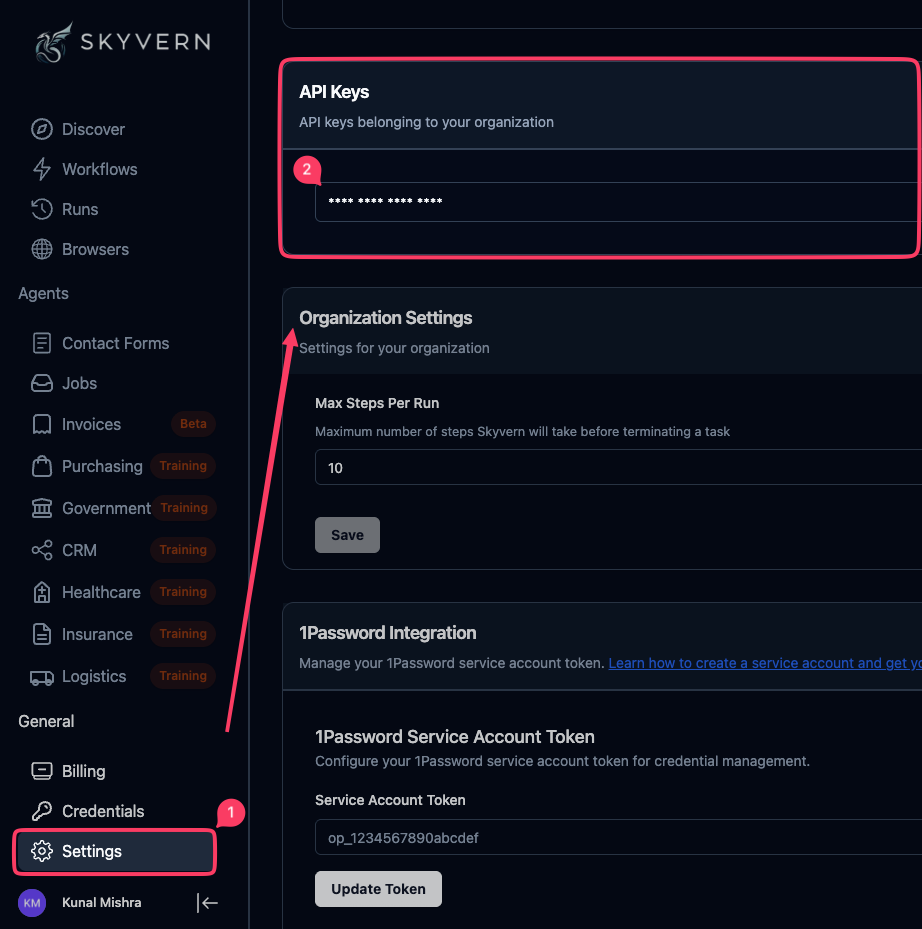
Click **Settings** in the left sidebar, then copy your **API Keys**.
 Set the `SKYVERN_API_KEY` environment variable in your shell.
```bash theme={null}
export SKYVERN_API_KEY="your-api-key"
```
Or add it to your `.env` file:
```bash theme={null}
SKYVERN_API_KEY=your-api-key
```
***
## Other Resources
If you're new to Skyvern agents, start with these foundational guides:
Learn agent basics: parameters, blocks, and data passing
Complete reference for all block types
Set the `SKYVERN_API_KEY` environment variable in your shell.
```bash theme={null}
export SKYVERN_API_KEY="your-api-key"
```
Or add it to your `.env` file:
```bash theme={null}
SKYVERN_API_KEY=your-api-key
```
***
## Other Resources
If you're new to Skyvern agents, start with these foundational guides:
Learn agent basics: parameters, blocks, and data passing
Complete reference for all block types