> ## Documentation Index
> Fetch the complete documentation index at: https://skyvern.com/docs/llms.txt
> Use this file to discover all available pages before exploring further.
# Bulk Invoice Downloader
> Build an agent that logs into vendor portals, finds order history, filters by date, and downloads invoices as PDFs.
Automate invoice collection from any vendor portal.
This cookbook creates an agent that takes in a vendor portal URL, logs in using saved credentials, finds order history, filters by date and finally downloads and emails the invoices as PDFs.
***
## What you'll build
An agent that:
1. Logs into a customer account portal
2. Navigates to order history and filters by date
3. Extracts order metadata from the page
4. Downloads invoice PDFs for each order
5. Parses invoice data from each PDF
6. Emails a summary with PDFs attached
***
## Prerequisites
* **Skyvern Cloud API key**: Get one at [app.skyvern.com/settings](https://app.skyvern.com/settings) → API Keys
Install the SDK:
```bash Python theme={null}
pip install skyvern
```
```bash TypeScript theme={null}
npm install @skyvern/client
```
Set your API key:
```bash theme={null}
export SKYVERN_API_KEY="your-api-key"
```
***
## Sample Vendor Portal
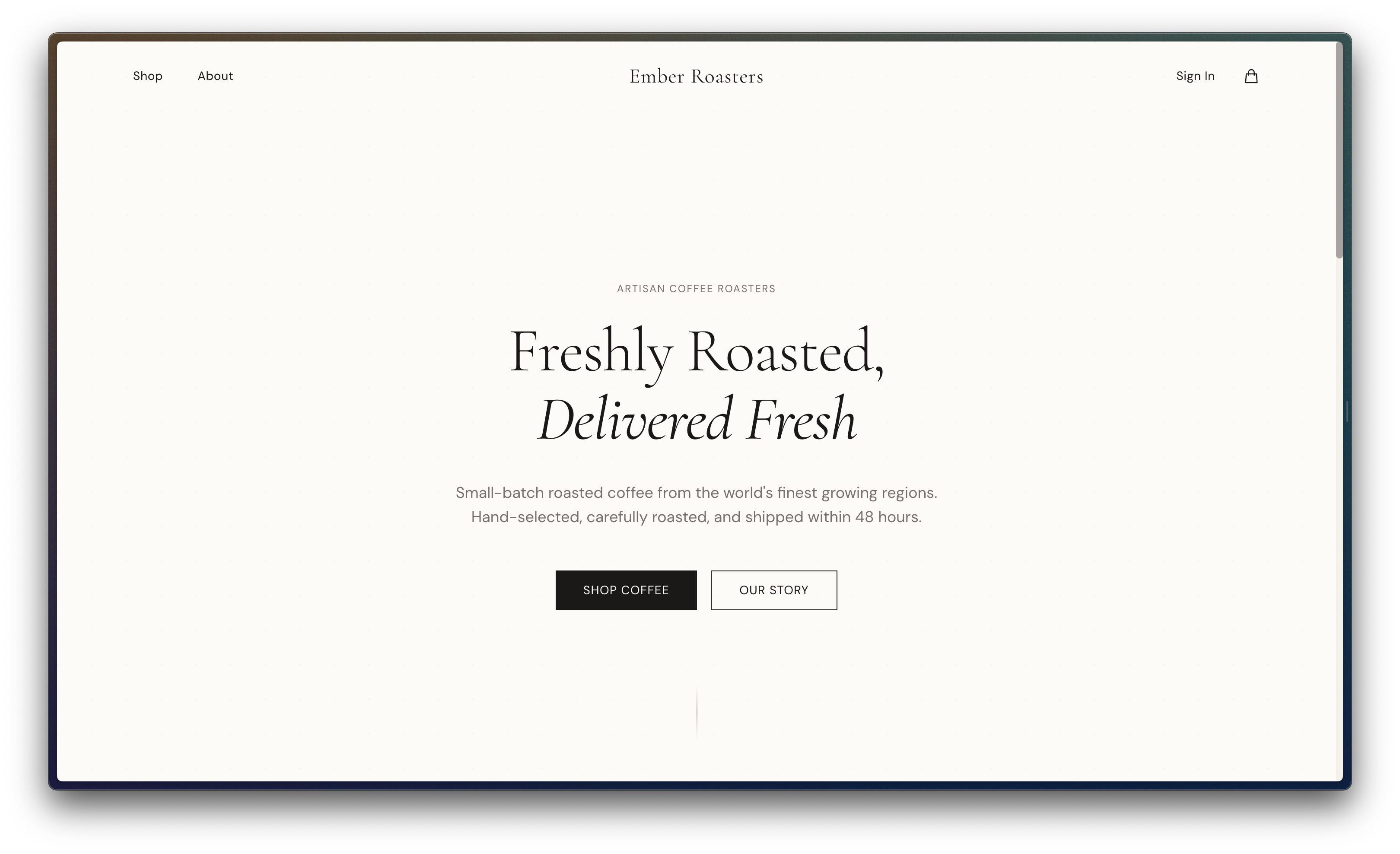
We'll use *Ember Roasters*, a fake coffee retailer website created for agent automation testing.
Change `portal_url` to use your vendor's portal URL.
| Field | Value |
| -------------- | -------------------------------------------------------------------------- |
| URL | [https://ember--roasters.vercel.app/](https://ember--roasters.vercel.app/) |
| Login email | [demo@manicule.dev](mailto:demo@manicule.dev) |
| Login password | helloworld |
 ***
## Step 1: Store credentials
Before defining the agent, store the login email and password Skyvern will use. This keeps secrets out of your agent definition and away from LLMs.
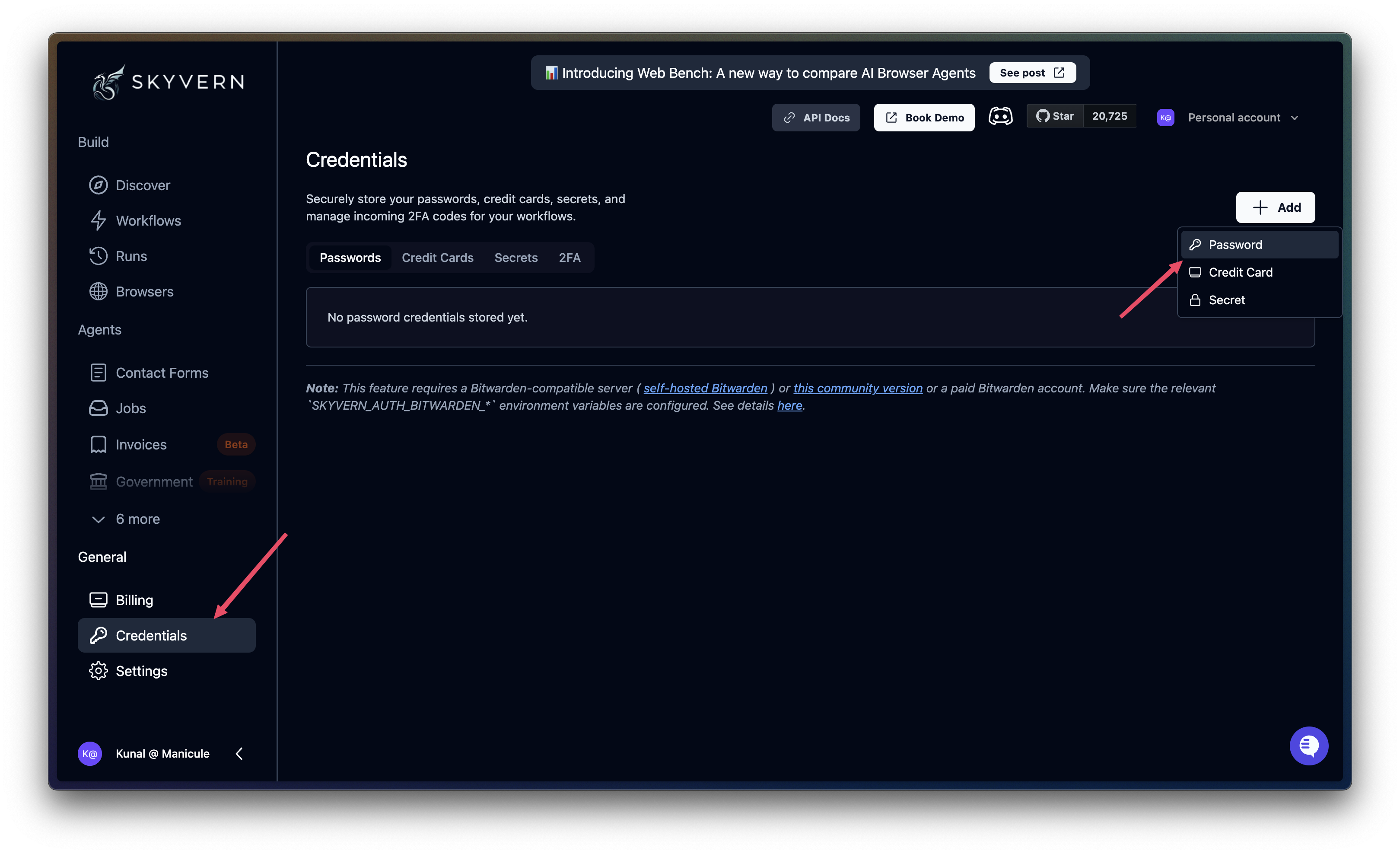
Go to **Credentials** in the sidebar. Choose **Password** after clicking on **+ Add**.
***
## Step 1: Store credentials
Before defining the agent, store the login email and password Skyvern will use. This keeps secrets out of your agent definition and away from LLMs.
Go to **Credentials** in the sidebar. Choose **Password** after clicking on **+ Add**.
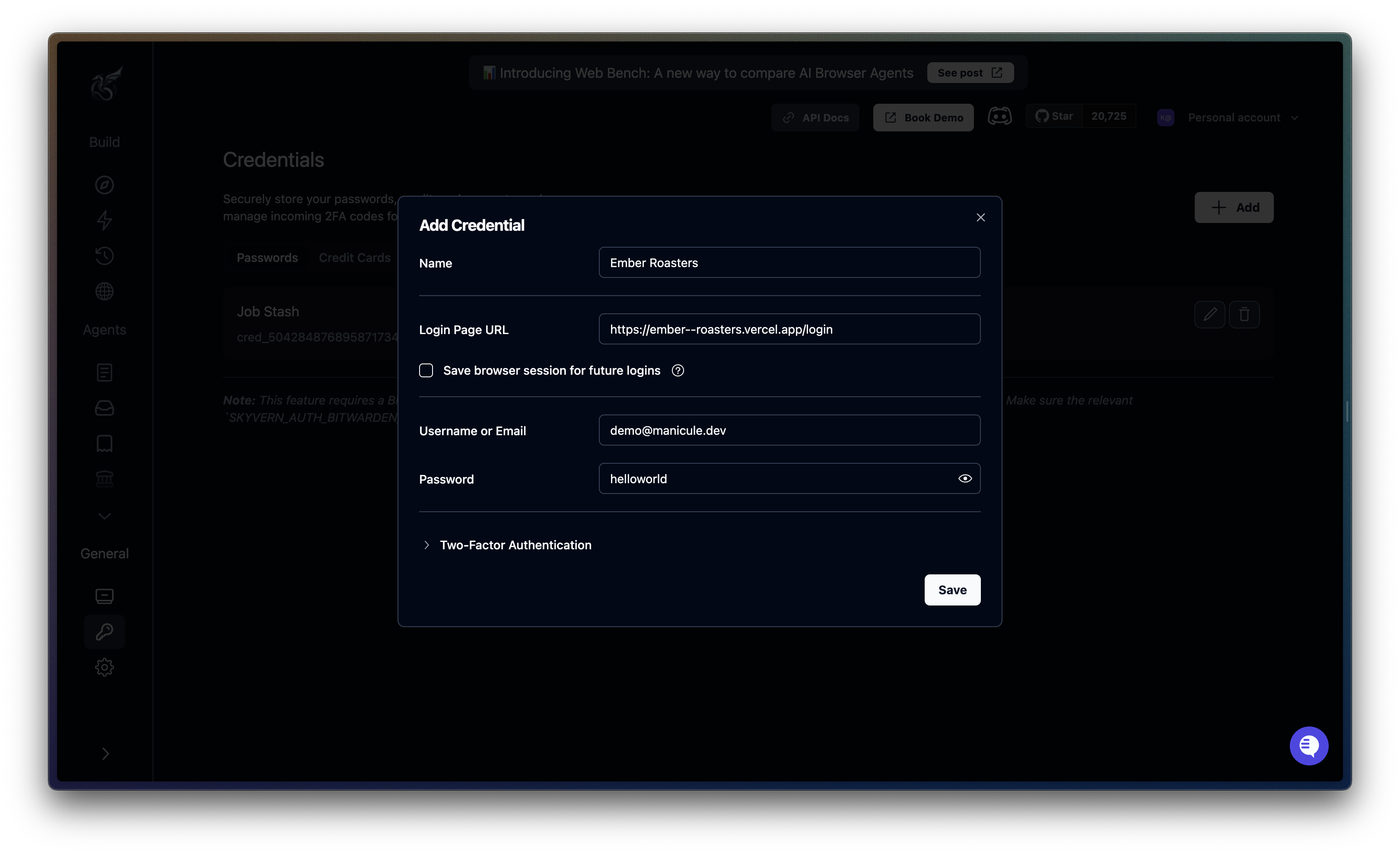
 Click **Create Credential**. Set the name to `Vendor Portal`, add login page URL, and enter the username (`demo@manicule.dev`) and password (`helloworld`). Click **Save**.
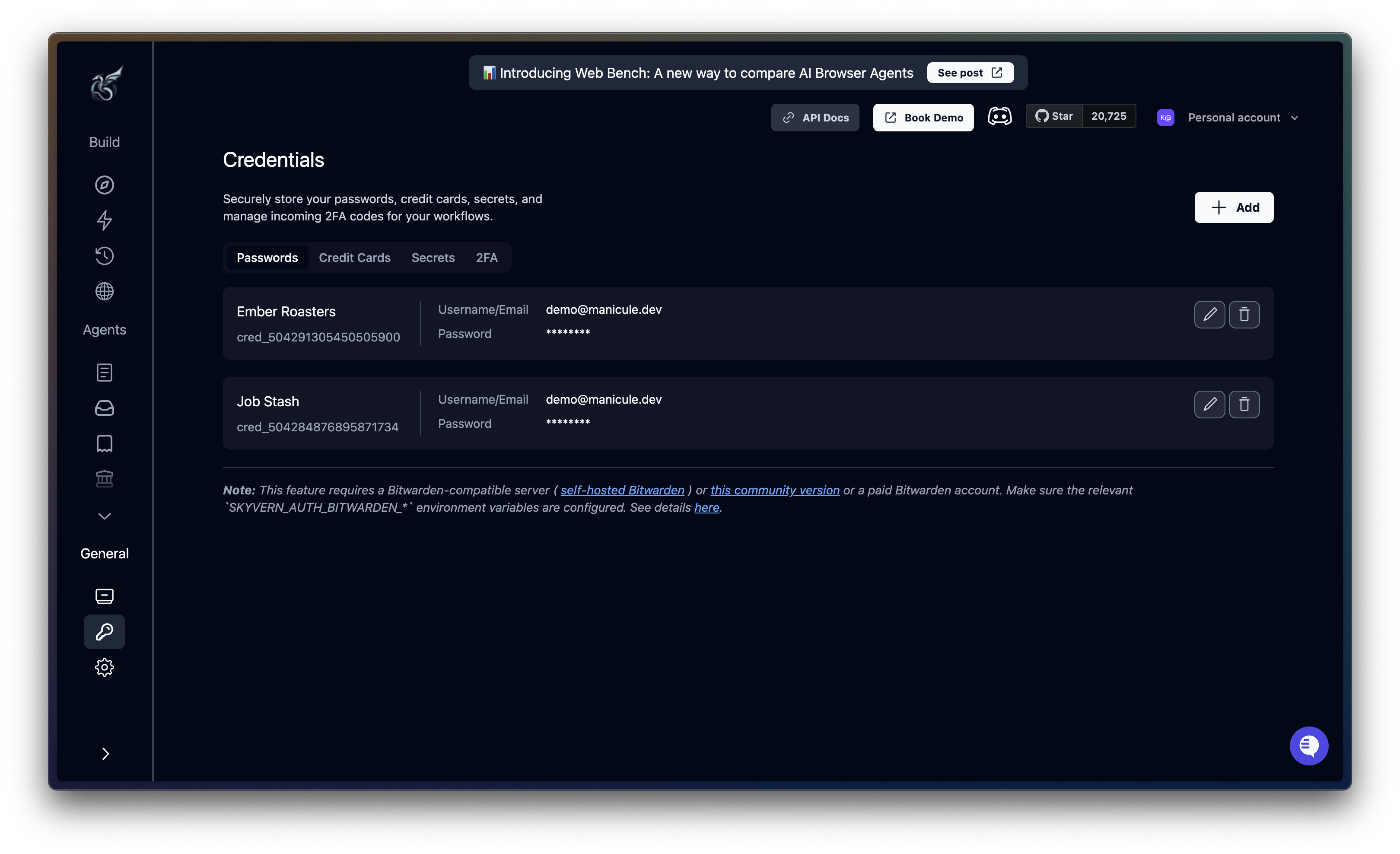
 Copy the credential ID (here: `cred_504291305450505900`). You'll use this when configuring the agent.
 ```python Python theme={null}
import os
import asyncio
from skyvern import Skyvern
async def main():
client = Skyvern(api_key=os.getenv("SKYVERN_API_KEY"))
credential = await client.create_credential(
name="Vendor Portal",
credential_type="password",
credential={
"username": "demo@manicule.dev",
"password": "helloworld"
}
)
print(f"Credential ID: {credential.credential_id}")
# Save this ID for your workflow: cred_xxx
asyncio.run(main())
```
```typescript TypeScript theme={null}
import { SkyvernClient } from "@skyvern/client";
const client = new SkyvernClient({
apiKey: process.env.SKYVERN_API_KEY,
});
const credential = await client.createCredential({
name: "Vendor Portal",
credential_type: "password",
credential: {
username: "demo@manicule.dev",
password: "helloworld",
},
});
console.log(`Credential ID: ${credential.credential_id}`);
```
```bash cURL theme={null}
curl -X POST "https://api.skyvern.com/v1/credentials" \
-H "x-api-key: $SKYVERN_API_KEY" \
-H "Content-Type: application/json" \
-d '{
"name": "Vendor Portal",
"credential_type": "password",
"credential": {
"username": "demo@manicule.dev",
"password": "helloworld"
}
}'
```
***
## Step 2: Create a new agent
Go to **Agents** → **Create Agent**. Name it "Bulk Invoice Downloader".
```python Python theme={null}
import os
import asyncio
from skyvern import Skyvern
async def main():
client = Skyvern(api_key=os.getenv("SKYVERN_API_KEY"))
credential = await client.create_credential(
name="Vendor Portal",
credential_type="password",
credential={
"username": "demo@manicule.dev",
"password": "helloworld"
}
)
print(f"Credential ID: {credential.credential_id}")
# Save this ID for your workflow: cred_xxx
asyncio.run(main())
```
```typescript TypeScript theme={null}
import { SkyvernClient } from "@skyvern/client";
const client = new SkyvernClient({
apiKey: process.env.SKYVERN_API_KEY,
});
const credential = await client.createCredential({
name: "Vendor Portal",
credential_type: "password",
credential: {
username: "demo@manicule.dev",
password: "helloworld",
},
});
console.log(`Credential ID: ${credential.credential_id}`);
```
```bash cURL theme={null}
curl -X POST "https://api.skyvern.com/v1/credentials" \
-H "x-api-key: $SKYVERN_API_KEY" \
-H "Content-Type: application/json" \
-d '{
"name": "Vendor Portal",
"credential_type": "password",
"credential": {
"username": "demo@manicule.dev",
"password": "helloworld"
}
}'
```
***
## Step 2: Create a new agent
Go to **Agents** → **Create Agent**. Name it "Bulk Invoice Downloader".
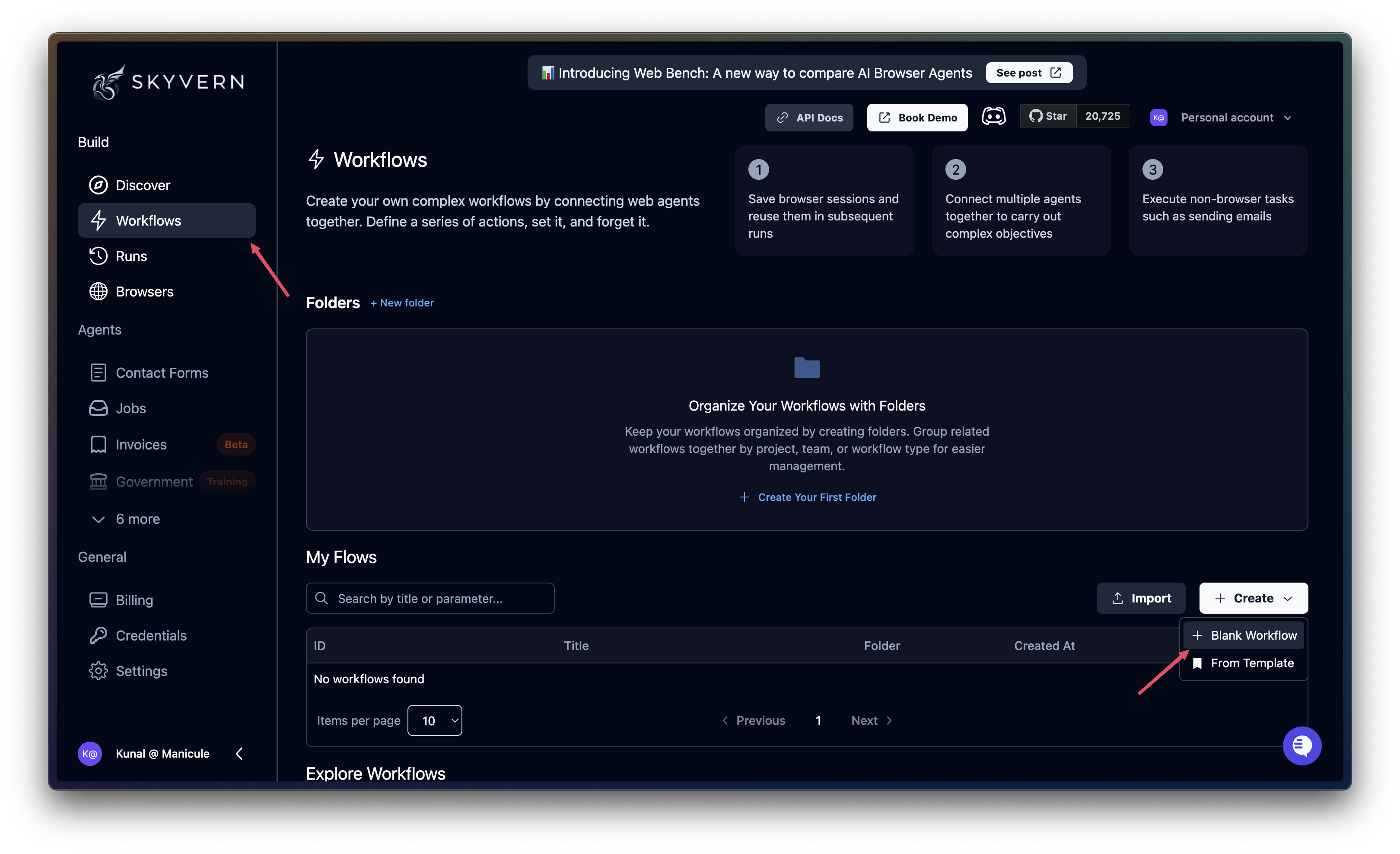 Click the **Start** node. Set **Proxy Location** to **Residential**.
An **agent definition** is a JSON or YAML file that describes your entire agent: its metadata, parameters, and blocks.
This definition file contains no sensitive information (like credentials or input values) and can be shared publicly. Once we make this, it can either be uploaded via the Cloud UI or sent as an input parameter to `create_workflow()`. We'll do this in Step 4.
```json invoice-downloader.json theme={null}
{
"title": "Bulk Invoice Downloader",
"description": "Download invoices from vendor portals, parse PDFs to extract amounts, and email a summary with attachments.",
"proxy_location": "RESIDENTIAL",
"workflow_definition": {
"version": 1,
"parameters": [], // <-- filled in below
"blocks": [] // <-- filled in Step 3
}
```
```yaml invoice-downloader.yaml theme={null}
title: Bulk Invoice Downloader
description: "Download invoices from vendor portals, parse PDFs to extract amounts, and email a summary with attachments."
proxy_location: RESIDENTIAL
workflow_definition:
version: 1
parameters: [] # <-- filled in below
blocks: [] # <-- filled in Step 3
```
### Set parameters
Parameters are the inputs your agent accepts. Defining them upfront lets you reuse the same agent against different portals, date ranges, or recipients.
On the **Start** node, add the following parameters:
| Parameter | Type | Notes |
| ----------------- | ------------- | ------------------------------------------- |
| `portal_url` | String | Vendor portal login URL |
| `start_date` | String | Filter start date |
| `end_date` | String | Filter end date |
| `recipient_email` | String | Email recipient for the summary |
| `credentials` | Credential ID | Select the credential you created in Step 1 |
Click the **Start** node. Set **Proxy Location** to **Residential**.
An **agent definition** is a JSON or YAML file that describes your entire agent: its metadata, parameters, and blocks.
This definition file contains no sensitive information (like credentials or input values) and can be shared publicly. Once we make this, it can either be uploaded via the Cloud UI or sent as an input parameter to `create_workflow()`. We'll do this in Step 4.
```json invoice-downloader.json theme={null}
{
"title": "Bulk Invoice Downloader",
"description": "Download invoices from vendor portals, parse PDFs to extract amounts, and email a summary with attachments.",
"proxy_location": "RESIDENTIAL",
"workflow_definition": {
"version": 1,
"parameters": [], // <-- filled in below
"blocks": [] // <-- filled in Step 3
}
```
```yaml invoice-downloader.yaml theme={null}
title: Bulk Invoice Downloader
description: "Download invoices from vendor portals, parse PDFs to extract amounts, and email a summary with attachments."
proxy_location: RESIDENTIAL
workflow_definition:
version: 1
parameters: [] # <-- filled in below
blocks: [] # <-- filled in Step 3
```
### Set parameters
Parameters are the inputs your agent accepts. Defining them upfront lets you reuse the same agent against different portals, date ranges, or recipients.
On the **Start** node, add the following parameters:
| Parameter | Type | Notes |
| ----------------- | ------------- | ------------------------------------------- |
| `portal_url` | String | Vendor portal login URL |
| `start_date` | String | Filter start date |
| `end_date` | String | Filter end date |
| `recipient_email` | String | Email recipient for the summary |
| `credentials` | Credential ID | Select the credential you created in Step 1 |
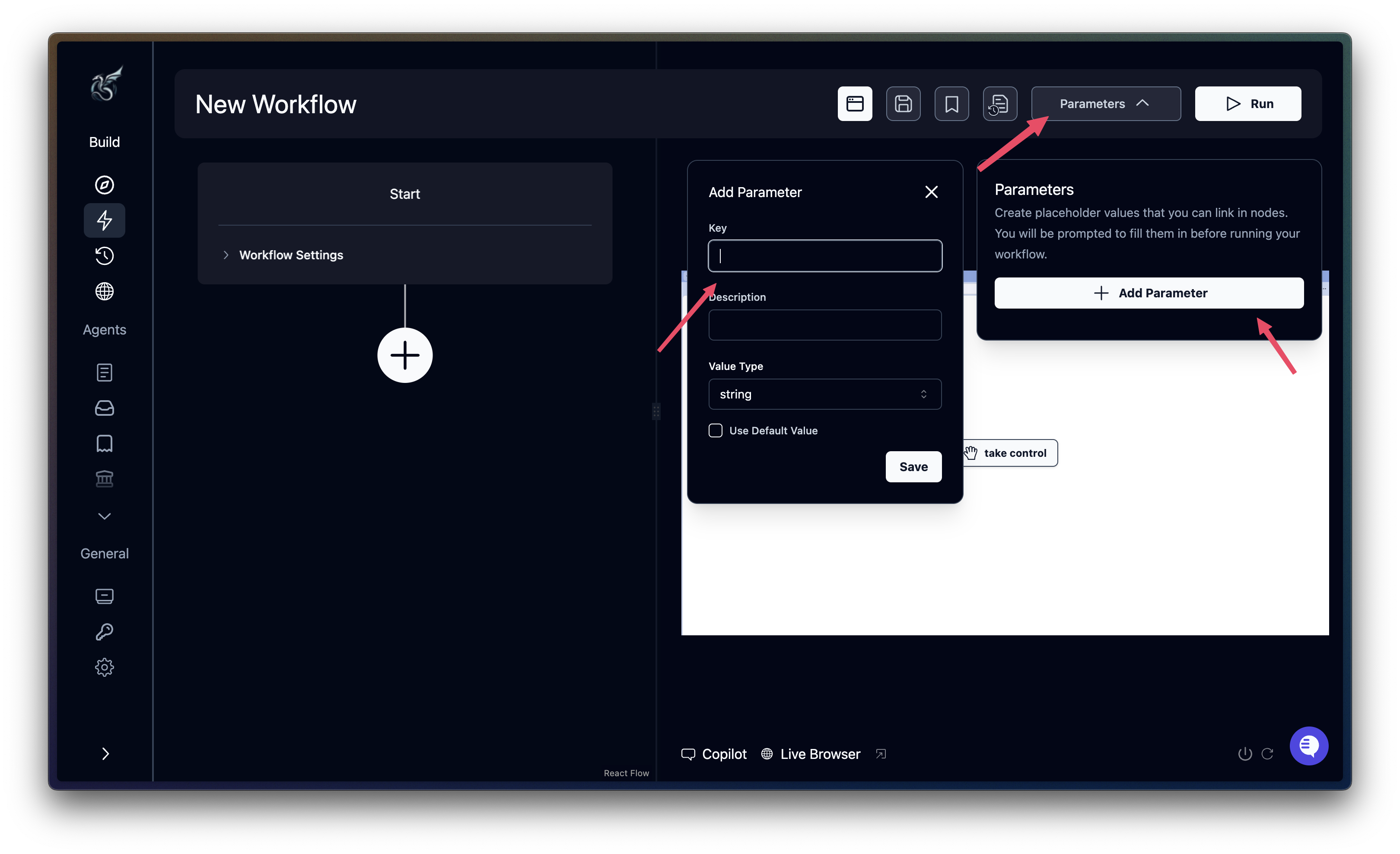 SMTP parameters are configured automatically by Skyvern Cloud. For self-hosted deployments, add them as AWS Secret parameters.
Replace the empty `parameters` array with the following:
```json JSON theme={null}
"parameters": [
{ "key": "portal_url", "parameter_type": "workflow", "workflow_parameter_type": "string" },
{ "key": "start_date", "parameter_type": "workflow", "workflow_parameter_type": "string" },
{ "key": "end_date", "parameter_type": "workflow", "workflow_parameter_type": "string" },
{ "key": "recipient_email", "parameter_type": "workflow", "workflow_parameter_type": "string" },
{
"key": "credentials",
"parameter_type": "workflow",
"workflow_parameter_type": "credential_id",
"default_value": "your-credential-id"
},
{ "key": "smtp_host", "parameter_type": "aws_secret", "aws_key": "SKYVERN_SMTP_HOST_AWS_SES" },
{ "key": "smtp_port", "parameter_type": "aws_secret", "aws_key": "SKYVERN_SMTP_PORT_AWS_SES" },
{ "key": "smtp_username", "parameter_type": "aws_secret", "aws_key": "SKYVERN_SMTP_USERNAME_SES" },
{ "key": "smtp_password", "parameter_type": "aws_secret", "aws_key": "SKYVERN_SMTP_PASSWORD_SES" }
]
```
```yaml YAML theme={null}
parameters:
- key: portal_url
parameter_type: workflow
workflow_parameter_type: string
- key: start_date
parameter_type: workflow
workflow_parameter_type: string
- key: end_date
parameter_type: workflow
workflow_parameter_type: string
- key: recipient_email
parameter_type: workflow
workflow_parameter_type: string
- key: credentials
parameter_type: workflow
workflow_parameter_type: credential_id
default_value: your-credential-id # <-- replace this
- key: smtp_host
parameter_type: aws_secret
aws_key: SKYVERN_SMTP_HOST_AWS_SES
- key: smtp_port
parameter_type: aws_secret
aws_key: SKYVERN_SMTP_PORT_AWS_SES
- key: smtp_username
parameter_type: aws_secret
aws_key: SKYVERN_SMTP_USERNAME_SES
- key: smtp_password
parameter_type: aws_secret
aws_key: SKYVERN_SMTP_PASSWORD_SES
```
***
## Step 3: Add agent blocks
The agent chains together several blocks to automate the full invoice collection process:
1. **Login block**: Authenticates to the vendor portal using stored credentials
2. **Navigation block**: Navigates to order history and applies date filters
3. **Extraction block**: Extracts order metadata from the filtered results
4. **For loop + File download**: Iterates over each order and downloads its invoice PDF
5. **For loop + File parser**: Parses each downloaded PDF to extract structured data
6. **Send email**: Sends a summary with PDFs attached to the recipient
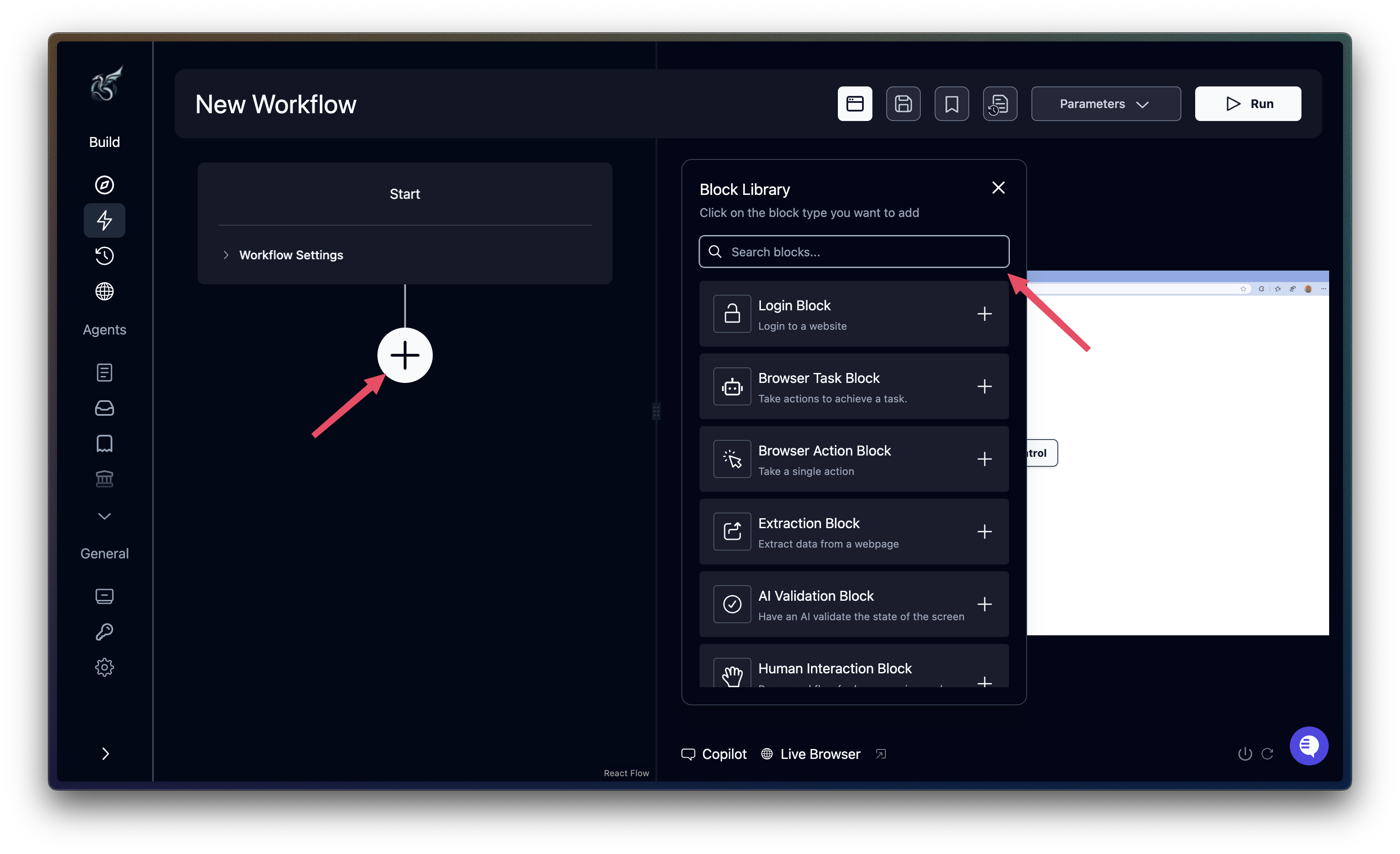
In the Cloud UI, click the **+** button after the Start node to add blocks sequentially. For SDK users, add each block to the `blocks` array in your agent definition file.
### Login block
The `login` block authenticates using stored credentials. Skyvern injects the username/password directly into form fields without exposing them to the LLM.
Add a **Login** block. Configure it as follows:
* **URL**: set to the `portal_url` parameter
* **Credential**: Select the `credentials` parameter
* **Goal**: "Log in using the provided credentials. Handle any cookie consent popups. COMPLETE when on the account dashboard or orders page."
* In **Advanced Settings**, enable **Error Messages** and add:
* `INVALID_CREDENTIALS`: "Login failed - incorrect email or password"
* `ACCOUNT_LOCKED`: "Account has been locked or suspended"
SMTP parameters are configured automatically by Skyvern Cloud. For self-hosted deployments, add them as AWS Secret parameters.
Replace the empty `parameters` array with the following:
```json JSON theme={null}
"parameters": [
{ "key": "portal_url", "parameter_type": "workflow", "workflow_parameter_type": "string" },
{ "key": "start_date", "parameter_type": "workflow", "workflow_parameter_type": "string" },
{ "key": "end_date", "parameter_type": "workflow", "workflow_parameter_type": "string" },
{ "key": "recipient_email", "parameter_type": "workflow", "workflow_parameter_type": "string" },
{
"key": "credentials",
"parameter_type": "workflow",
"workflow_parameter_type": "credential_id",
"default_value": "your-credential-id"
},
{ "key": "smtp_host", "parameter_type": "aws_secret", "aws_key": "SKYVERN_SMTP_HOST_AWS_SES" },
{ "key": "smtp_port", "parameter_type": "aws_secret", "aws_key": "SKYVERN_SMTP_PORT_AWS_SES" },
{ "key": "smtp_username", "parameter_type": "aws_secret", "aws_key": "SKYVERN_SMTP_USERNAME_SES" },
{ "key": "smtp_password", "parameter_type": "aws_secret", "aws_key": "SKYVERN_SMTP_PASSWORD_SES" }
]
```
```yaml YAML theme={null}
parameters:
- key: portal_url
parameter_type: workflow
workflow_parameter_type: string
- key: start_date
parameter_type: workflow
workflow_parameter_type: string
- key: end_date
parameter_type: workflow
workflow_parameter_type: string
- key: recipient_email
parameter_type: workflow
workflow_parameter_type: string
- key: credentials
parameter_type: workflow
workflow_parameter_type: credential_id
default_value: your-credential-id # <-- replace this
- key: smtp_host
parameter_type: aws_secret
aws_key: SKYVERN_SMTP_HOST_AWS_SES
- key: smtp_port
parameter_type: aws_secret
aws_key: SKYVERN_SMTP_PORT_AWS_SES
- key: smtp_username
parameter_type: aws_secret
aws_key: SKYVERN_SMTP_USERNAME_SES
- key: smtp_password
parameter_type: aws_secret
aws_key: SKYVERN_SMTP_PASSWORD_SES
```
***
## Step 3: Add agent blocks
The agent chains together several blocks to automate the full invoice collection process:
1. **Login block**: Authenticates to the vendor portal using stored credentials
2. **Navigation block**: Navigates to order history and applies date filters
3. **Extraction block**: Extracts order metadata from the filtered results
4. **For loop + File download**: Iterates over each order and downloads its invoice PDF
5. **For loop + File parser**: Parses each downloaded PDF to extract structured data
6. **Send email**: Sends a summary with PDFs attached to the recipient
In the Cloud UI, click the **+** button after the Start node to add blocks sequentially. For SDK users, add each block to the `blocks` array in your agent definition file.
### Login block
The `login` block authenticates using stored credentials. Skyvern injects the username/password directly into form fields without exposing them to the LLM.
Add a **Login** block. Configure it as follows:
* **URL**: set to the `portal_url` parameter
* **Credential**: Select the `credentials` parameter
* **Goal**: "Log in using the provided credentials. Handle any cookie consent popups. COMPLETE when on the account dashboard or orders page."
* In **Advanced Settings**, enable **Error Messages** and add:
* `INVALID_CREDENTIALS`: "Login failed - incorrect email or password"
* `ACCOUNT_LOCKED`: "Account has been locked or suspended"
 ```json JSON theme={null}
{
"block_type": "login",
"label": "login_block",
"url": "{{portal_url}}",
"title": "login_block",
"parameter_keys": ["credentials"],
"navigation_goal": "Log in using the provided credentials.\nHandle any cookie consent popups.\nCOMPLETE when on the account dashboard or orders page.",
"error_code_mapping": {
"INVALID_CREDENTIALS": "Login failed - incorrect email or password",
"ACCOUNT_LOCKED": "Account has been locked or suspended"
},
"max_retries": 0,
"engine": "skyvern-1.0"
}
```
```yaml YAML theme={null}
- block_type: login
label: login_block
url: "{{portal_url}}"
title: login_block
parameter_keys:
- credentials
navigation_goal: |
Log in using the provided credentials.
Handle any cookie consent popups.
COMPLETE when on the account dashboard or orders page.
error_code_mapping:
INVALID_CREDENTIALS: Login failed - incorrect email or password
ACCOUNT_LOCKED: Account has been locked or suspended
max_retries: 0
engine: skyvern-1.0
```
**Why `error_code_mapping`?** It surfaces specific failures in your agent output, so you can handle "wrong password" differently from "account locked."
### Navigation block
Navigate to the orders page and apply the date filter.
Add a **Navigation** block. Configure it as follows:
* **URL**: Leave empty (continues from the current page after login)
* **Parameter Keys**: Select `start_date` and `end_date`
* **Goal**: "Navigate to Order History or My Orders. Filter orders between `start_date` and `end_date`. Click the Filter button. COMPLETE when filtered results are visible."
```json JSON theme={null}
{
"block_type": "navigation",
"label": "nav_block",
"url": "",
"title": "nav_block",
"engine": "skyvern-1.0",
"parameter_keys": ["start_date", "end_date"],
"navigation_goal": "Navigate to Order History or My Orders.\nFilter orders between {{ start_date }} and {{ end_date }}.\nClick the Filter button.\nCOMPLETE when filtered results are visible.",
"max_retries": 0
}
```
```yaml YAML theme={null}
- block_type: navigation
label: nav_block
url: ""
title: nav_block
engine: skyvern-1.0
parameter_keys:
- start_date
- end_date
navigation_goal: |
Navigate to Order History or My Orders.
Filter orders between {{ start_date }} and {{ end_date }}.
Click the Filter button.
COMPLETE when filtered results are visible.
max_retries: 0
```
### Extraction block
Extract order metadata from the filtered results. The `data_schema` tells Skyvern exactly what structure to return.
Add an **Extraction** block. Configure it as follows:
* **Goal**: "Extract all visible orders: order ID, date, total amount, and status."
* **Data Schema**: Paste the following JSON schema:
```json theme={null}
{
"orders": {
"type": "array",
"items": {
"type": "object",
"properties": {
"order_id": { "type": "string", "description": "Unique identifier for the order" },
"date": { "type": "string", "description": "Date when the order was placed" },
"total": { "type": "number", "description": "Total amount for the order" },
"status": { "type": "string", "description": "Current status of the order" }
},
"required": ["order_id", "date", "total", "status"]
}
}
}
```
```json JSON theme={null}
{
"block_type": "extraction",
"label": "data_extraction_block",
"url": "",
"title": "data_extraction_block",
"data_extraction_goal": "Extract all visible orders: order ID, date, total amount, and status.",
"data_schema": {
"orders": {
"type": "array",
"items": {
"type": "object",
"properties": {
"order_id": {
"type": "string",
"description": "Unique identifier for the order"
},
"date": {
"type": "string",
"description": "Date when the order was placed"
},
"total": {
"type": "number",
"description": "Total amount for the order"
},
"status": {
"type": "string",
"description": "Current status of the order"
}
},
"required": ["order_id", "date", "total", "status"]
}
}
},
"max_retries": 0,
"engine": "skyvern-1.0"
}
```
```yaml YAML theme={null}
- block_type: extraction
label: data_extraction_block
url: ""
title: data_extraction_block
data_extraction_goal: "Extract all visible orders: order ID, date, total amount, and status."
data_schema:
orders:
type: array
items:
type: object
properties:
order_id:
type: string
description: Unique identifier for the order
date:
type: string
description: Date when the order was placed
total:
type: number
description: Total amount for the order
status:
type: string
description: Current status of the order
required:
- order_id
- date
- total
- status
max_retries: 0
engine: skyvern-1.0
```
The output is accessible as `data_extraction_block_output.orders` in subsequent blocks.
### Download invoices block
Iterate over each order and click its "Download Invoice" button. `continue_on_failure: true` ensures one failed download doesn't stop the entire agent.
Add a **For Loop** block. Set the **Loop Variable** to `data_extraction_block_output.orders`. Enable **Continue on Failure** and **Next Loop on Failure**.
Inside the loop, add a **File Download** block:
* **Goal**: "Find order (current order ID). Click Download Invoice. COMPLETE when the PDF download starts."
* **Download Suffix**: `invoice_(order_id).pdf`
```json JSON theme={null}
{
"block_type": "for_loop",
"label": "for_1_block",
"loop_variable_reference": "{{data_extraction_block_output.orders}}",
"continue_on_failure": true,
"next_loop_on_failure": true,
"complete_if_empty": true,
"loop_blocks": [
{
"block_type": "file_download",
"label": "inv_download_block",
"url": "",
"title": "inv_download_block",
"navigation_goal": "Find order {{ current_value.order_id }}.\nClick Download Invoice.\nCOMPLETE when the PDF download starts.",
"download_suffix": "invoice_{{ current_value.order_id }}.pdf",
"max_retries": 0,
"engine": "skyvern-1.0"
}
]
}
```
```yaml YAML theme={null}
- block_type: for_loop
label: for_1_block
loop_variable_reference: "{{data_extraction_block_output.orders}}"
continue_on_failure: true
next_loop_on_failure: true
complete_if_empty: true
loop_blocks:
- block_type: file_download
label: inv_download_block
url: ""
title: inv_download_block
navigation_goal: |
Find order {{ current_value.order_id }}.
Click Download Invoice.
COMPLETE when the PDF download starts.
download_suffix: invoice_{{ current_value.order_id }}.pdf
max_retries: 0
engine: skyvern-1.0
```
**Key pattern:** Inside a loop, `current_value` gives you the current item being iterated over.
### Parse invoices block
Use `file_url_parser` to extract structured data from each downloaded PDF.
Add another **For Loop** block. Set the **Loop Variable** to `data_extraction_block_output.orders`. Enable **Continue on Failure** and **Next Loop on Failure**.
Inside the loop, add a **File URL Parser** block:
* **File URL**: `SKYVERN_DOWNLOAD_DIRECTORY/invoice_(order_id).pdf`
* **File Type**: PDF
* **JSON Schema**: Paste the following:
```json theme={null}
{
"type": "object",
"properties": {
"invoice_id": { "type": "string", "description": "Unique identifier for the invoice" },
"amount": { "type": "number", "description": "Total amount of the invoice" },
"date": { "type": "string", "description": "Date of the invoice, typically in YYYY-MM-DD format" }
},
"required": ["invoice_id", "amount", "date"]
}
```
```json JSON theme={null}
{
"block_type": "for_loop",
"label": "for_2_block",
"loop_variable_reference": "{{data_extraction_block_output.orders}}",
"continue_on_failure": true,
"next_loop_on_failure": true,
"complete_if_empty": true,
"loop_blocks": [
{
"block_type": "file_url_parser",
"label": "parse_block",
"file_url": "SKYVERN_DOWNLOAD_DIRECTORY/invoice_{{ current_value.order_id }}.pdf",
"file_type": "pdf",
"json_schema": {
"type": "object",
"properties": {
"invoice_id": {
"type": "string",
"description": "Unique identifier for the invoice"
},
"amount": {
"type": "number",
"description": "Total amount of the invoice"
},
"date": {
"type": "string",
"description": "Date of the invoice, typically in YYYY-MM-DD format"
}
},
"required": ["invoice_id", "amount", "date"]
}
}
]
}
```
```yaml YAML theme={null}
- block_type: for_loop
label: for_2_block
loop_variable_reference: "{{data_extraction_block_output.orders}}"
continue_on_failure: true
next_loop_on_failure: true
complete_if_empty: true
loop_blocks:
- block_type: file_url_parser
label: parse_block
file_url: SKYVERN_DOWNLOAD_DIRECTORY/invoice_{{ current_value.order_id }}.pdf
file_type: pdf
json_schema:
type: object
properties:
invoice_id:
type: string
description: Unique identifier for the invoice
amount:
type: number
description: Total amount of the invoice
date:
type: string
description: Date of the invoice, typically in YYYY-MM-DD format
required:
- invoice_id
- amount
- date
```
The output is accessible as `for_2_block_output` in subsequent blocks.
### Email block
Send a summary email with PDFs attached.
Add a **Send Email** block. Configure it as follows:
* **Sender**: `hello@skyvern.com`
* **Recipients**: set to the `recipient_email` parameter
* **Subject**: "Ember Roasters Invoices from (start\_date) to (end\_date)"
* **Body**: set to the `for_2_block_output` variable
* **File Attachments**: `SKYVERN_DOWNLOAD_DIRECTORY`
```json JSON theme={null}
{
"block_type": "send_email",
"label": "email_block",
"smtp_host_secret_parameter_key": "smtp_host",
"smtp_port_secret_parameter_key": "smtp_port",
"smtp_username_secret_parameter_key": "smtp_username",
"smtp_password_secret_parameter_key": "smtp_password",
"sender": "hello@skyvern.com",
"recipients": ["{{recipient_email}}"],
"subject": "Ember Roasters Invoices from {{start_date}} to {{end_date}}",
"body": "{{for_2_block_output}}",
"file_attachments": ["SKYVERN_DOWNLOAD_DIRECTORY"]
}
```
```yaml YAML theme={null}
- block_type: send_email
label: email_block
smtp_host_secret_parameter_key: smtp_host
smtp_port_secret_parameter_key: smtp_port
smtp_username_secret_parameter_key: smtp_username
smtp_password_secret_parameter_key: smtp_password
sender: hello@skyvern.com
recipients:
- "{{recipient_email}}"
subject: "Ember Roasters Invoices from {{start_date}} to {{end_date}}"
body: "{{for_2_block_output}}"
file_attachments:
- SKYVERN_DOWNLOAD_DIRECTORY
```
***
## Complete agent
Here's a summary of the complete agent you've built in the visual editor:
Go to **Agents** and click **Create Agent**. Name it "Bulk Invoice Downloader." On the **Start** node, set **Proxy Location** to **Residential** and add the parameters: `portal_url`, `start_date`, `end_date`, `recipient_email`, and `credentials`.
Add a **Login** block. Set **URL** to the `portal_url` parameter. Select the `credentials` parameter. Set the goal: "Log in using the provided credentials. Handle any cookie consent popups. COMPLETE when on the account dashboard or orders page." In **Advanced Settings**, add error messages for `INVALID_CREDENTIALS` and `ACCOUNT_LOCKED`.
Add a **Navigation** block. Leave **URL** empty (continues from login). Add `start_date` and `end_date` as parameter keys. Set the goal: "Navigate to Order History or My Orders. Filter orders between start\_date and end\_date. Click the Filter button. COMPLETE when filtered results are visible."
Add an **Extraction** block. Set the goal: "Extract all visible orders: order ID, date, total amount, and status." Paste the orders JSON schema into **Data Schema**.
Add a **For Loop** block. Set **Loop Variable** to `data_extraction_block_output.orders`. Enable **Continue on Failure** and **Next Loop on Failure**. Inside the loop, add a **File Download** block with goal: "Find order (current order ID). Click Download Invoice. COMPLETE when the PDF download starts." Set **Download Suffix** to `invoice_(order_id).pdf`.
Add another **For Loop** block with the same loop variable. Inside the loop, add a **File URL Parser** block. Set **File URL** to `SKYVERN_DOWNLOAD_DIRECTORY/invoice_(order_id).pdf`, **File Type** to PDF, and paste the invoice JSON schema.
Add a **Send Email** block. Set **Sender** to `hello@skyvern.com`, **Recipients** to the `recipient_email` parameter, **Subject** to "Ember Roasters Invoices from (start\_date) to (end\_date)", **Body** to `for_2_block_output`, and **File Attachments** to `SKYVERN_DOWNLOAD_DIRECTORY`.
Save this complete definition to `invoice-workflow.yaml` (or `.json`) before running.
```json JSON theme={null}
{
"title": "Bulk Invoice Downloader",
"description": "Download invoices from vendor portals, parse PDFs to extract amounts, and email a summary with attachments.",
"proxy_location": "RESIDENTIAL",
"webhook_callback_url": "",
"persist_browser_session": false,
"workflow_definition": {
"version": 1,
"parameters": [
{ "key": "portal_url", "parameter_type": "workflow", "workflow_parameter_type": "string" },
{ "key": "start_date", "parameter_type": "workflow", "workflow_parameter_type": "string" },
{ "key": "end_date", "parameter_type": "workflow", "workflow_parameter_type": "string" },
{ "key": "recipient_email", "parameter_type": "workflow", "workflow_parameter_type": "string" },
{ "key": "credentials", "parameter_type": "workflow", "workflow_parameter_type": "credential_id", "default_value": "your-credential-id" },
{ "key": "smtp_host", "parameter_type": "aws_secret", "aws_key": "SKYVERN_SMTP_HOST_AWS_SES" },
{ "key": "smtp_port", "parameter_type": "aws_secret", "aws_key": "SKYVERN_SMTP_PORT_AWS_SES" },
{ "key": "smtp_username", "parameter_type": "aws_secret", "aws_key": "SKYVERN_SMTP_USERNAME_SES" },
{ "key": "smtp_password", "parameter_type": "aws_secret", "aws_key": "SKYVERN_SMTP_PASSWORD_SES" }
],
"blocks": [
{
"block_type": "login",
"label": "login_block",
"url": "{{portal_url}}",
"title": "login_block",
"parameter_keys": ["credentials"],
"navigation_goal": "Log in using the provided credentials.\nHandle any cookie consent popups.\nCOMPLETE when on the account dashboard or orders page.",
"error_code_mapping": {
"INVALID_CREDENTIALS": "Login failed - incorrect email or password",
"ACCOUNT_LOCKED": "Account has been locked or suspended"
},
"max_retries": 0,
"engine": "skyvern-1.0"
},
{
"block_type": "navigation",
"label": "nav_block",
"url": "",
"title": "nav_block",
"engine": "skyvern-1.0",
"parameter_keys": ["start_date", "end_date"],
"navigation_goal": "Navigate to Order History or My Orders.\nFilter orders between {{ start_date }} and {{ end_date }}.\nClick the Filter button.\nCOMPLETE when filtered results are visible.",
"max_retries": 0
},
{
"block_type": "extraction",
"label": "data_extraction_block",
"url": "",
"title": "data_extraction_block",
"data_extraction_goal": "Extract all visible orders: order ID, date, total amount, and status.",
"data_schema": {
"orders": {
"type": "array",
"items": {
"type": "object",
"properties": {
"order_id": { "type": "string", "description": "Unique identifier for the order" },
"date": { "type": "string", "description": "Date when the order was placed" },
"total": { "type": "number", "description": "Total amount for the order" },
"status": { "type": "string", "description": "Current status of the order" }
},
"required": ["order_id", "date", "total", "status"]
}
}
},
"max_retries": 0,
"engine": "skyvern-1.0"
},
{
"block_type": "for_loop",
"label": "for_1_block",
"loop_variable_reference": "{{data_extraction_block_output.orders}}",
"continue_on_failure": true,
"next_loop_on_failure": true,
"complete_if_empty": true,
"loop_blocks": [
{
"block_type": "file_download",
"label": "inv_download_block",
"url": "",
"title": "inv_download_block",
"navigation_goal": "Find order {{ current_value.order_id }}.\nClick Download Invoice.\nCOMPLETE when the PDF download starts.",
"download_suffix": "invoice_{{ current_value.order_id }}.pdf",
"max_retries": 0,
"engine": "skyvern-1.0"
}
]
},
{
"block_type": "for_loop",
"label": "for_2_block",
"loop_variable_reference": "{{data_extraction_block_output.orders}}",
"continue_on_failure": true,
"next_loop_on_failure": true,
"complete_if_empty": true,
"loop_blocks": [
{
"block_type": "file_url_parser",
"label": "parse_block",
"file_url": "SKYVERN_DOWNLOAD_DIRECTORY/invoice_{{ current_value.order_id }}.pdf",
"file_type": "pdf",
"json_schema": {
"type": "object",
"properties": {
"invoice_id": { "type": "string", "description": "Unique identifier for the invoice" },
"amount": { "type": "number", "description": "Total amount of the invoice" },
"date": { "type": "string", "description": "Date of the invoice, typically in YYYY-MM-DD format" }
},
"required": ["invoice_id", "amount", "date"]
}
}
]
},
{
"block_type": "send_email",
"label": "email_block",
"smtp_host_secret_parameter_key": "smtp_host",
"smtp_port_secret_parameter_key": "smtp_port",
"smtp_username_secret_parameter_key": "smtp_username",
"smtp_password_secret_parameter_key": "smtp_password",
"sender": "hello@skyvern.com",
"recipients": ["{{recipient_email}}"],
"subject": "Ember Roasters Invoices from {{start_date}} to {{end_date}}",
"body": "{{for_2_block_output}}",
"file_attachments": ["SKYVERN_DOWNLOAD_DIRECTORY"]
}
]
}
}
```
```yaml YAML theme={null}
title: Bulk Invoice Downloader
description: "Download invoices from vendor portals, parse PDFs to extract amounts, and email a summary with attachments."
proxy_location: RESIDENTIAL
webhook_callback_url: ""
persist_browser_session: false
workflow_definition:
version: 1
parameters:
- key: portal_url
parameter_type: workflow
workflow_parameter_type: string
- key: start_date
parameter_type: workflow
workflow_parameter_type: string
- key: end_date
parameter_type: workflow
workflow_parameter_type: string
- key: recipient_email
parameter_type: workflow
workflow_parameter_type: string
- key: credentials
parameter_type: workflow
workflow_parameter_type: credential_id
default_value: your-credential-id # <-- replace this
- key: smtp_host
parameter_type: aws_secret
aws_key: SKYVERN_SMTP_HOST_AWS_SES
- key: smtp_port
parameter_type: aws_secret
aws_key: SKYVERN_SMTP_PORT_AWS_SES
- key: smtp_username
parameter_type: aws_secret
aws_key: SKYVERN_SMTP_USERNAME_SES
- key: smtp_password
parameter_type: aws_secret
aws_key: SKYVERN_SMTP_PASSWORD_SES
blocks:
- block_type: login
label: login_block
url: "{{portal_url}}"
title: login_block
parameter_keys:
- credentials
navigation_goal: |
Log in using the provided credentials.
Handle any cookie consent popups.
COMPLETE when on the account dashboard or orders page.
error_code_mapping:
INVALID_CREDENTIALS: Login failed - incorrect email or password
ACCOUNT_LOCKED: Account has been locked or suspended
max_retries: 0
engine: skyvern-1.0
- block_type: navigation
label: nav_block
url: ""
title: nav_block
engine: skyvern-1.0
parameter_keys:
- start_date
- end_date
navigation_goal: |
Navigate to Order History or My Orders.
Filter orders between {{ start_date }} and {{ end_date }}.
Click the Filter button.
COMPLETE when filtered results are visible.
max_retries: 0
- block_type: extraction
label: data_extraction_block
url: ""
title: data_extraction_block
data_extraction_goal: "Extract all visible orders: order ID, date, total amount, and status."
data_schema:
orders:
type: array
items:
type: object
properties:
order_id:
type: string
description: Unique identifier for the order
date:
type: string
description: Date when the order was placed
total:
type: number
description: Total amount for the order
status:
type: string
description: Current status of the order
required:
- order_id
- date
- total
- status
max_retries: 0
engine: skyvern-1.0
- block_type: for_loop
label: for_1_block
loop_variable_reference: "{{data_extraction_block_output.orders}}"
continue_on_failure: true
next_loop_on_failure: true
complete_if_empty: true
loop_blocks:
- block_type: file_download
label: inv_download_block
url: ""
title: inv_download_block
navigation_goal: |
Find order {{ current_value.order_id }}.
Click Download Invoice.
COMPLETE when the PDF download starts.
download_suffix: invoice_{{ current_value.order_id }}.pdf
max_retries: 0
engine: skyvern-1.0
- block_type: for_loop
label: for_2_block
loop_variable_reference: "{{data_extraction_block_output.orders}}"
continue_on_failure: true
next_loop_on_failure: true
complete_if_empty: true
loop_blocks:
- block_type: file_url_parser
label: parse_block
file_url: SKYVERN_DOWNLOAD_DIRECTORY/invoice_{{ current_value.order_id }}.pdf
file_type: pdf
json_schema:
type: object
properties:
invoice_id:
type: string
description: Unique identifier for the invoice
amount:
type: number
description: Total amount of the invoice
date:
type: string
description: Date of the invoice, typically in YYYY-MM-DD format
required:
- invoice_id
- amount
- date
- block_type: send_email
label: email_block
smtp_host_secret_parameter_key: smtp_host
smtp_port_secret_parameter_key: smtp_port
smtp_username_secret_parameter_key: smtp_username
smtp_password_secret_parameter_key: smtp_password
sender: hello@skyvern.com
recipients:
- "{{recipient_email}}"
subject: "Ember Roasters Invoices from {{start_date}} to {{end_date}}"
body: "{{for_2_block_output}}"
file_attachments:
- SKYVERN_DOWNLOAD_DIRECTORY
```
***
## Step 4: Run and monitor
Create the agent from your definition file and execute it.
Click **Run** in the agent editor. Fill in the parameters:
* **portal\_url**: `https://ember--roasters.vercel.app/`
* **start\_date**: `2025-01-01`
* **end\_date**: `2025-01-31`
* **recipient\_email**: Your email address
* **credentials**: Select the `Vendor Portal` credential
Watch the run in real time. Each block shows its status as it executes. The browser recording is available after the run completes.
```python Python theme={null}
import os
import asyncio
from skyvern import Skyvern
async def main():
client = Skyvern(api_key=os.getenv("SKYVERN_API_KEY"))
# Create workflow from YAML file
workflow = await client.create_workflow(
yaml_definition=open("invoice-workflow.yaml").read()
)
print(f"Created workflow: {workflow.workflow_permanent_id}")
# Run the workflow
run = await client.run_workflow(
workflow_id=workflow.workflow_permanent_id,
parameters={
"portal_url": "https://ember--roasters.vercel.app/",
"start_date": "2025-01-01",
"end_date": "2025-01-31",
"recipient_email": "your-email@company.com" # <-- replace this
}
)
print(f"Started run: {run.run_id}")
# Poll for completion
while True:
result = await client.get_run(run.run_id)
if result.status in ["completed", "failed", "terminated"]:
break
print(f"Status: {result.status}")
await asyncio.sleep(10)
print(f"Final status: {result.status}")
if result.status == "completed":
print("Invoices downloaded and email sent successfully")
asyncio.run(main())
```
```typescript TypeScript theme={null}
import { SkyvernClient } from "@skyvern/client";
import * as fs from "fs";
async function main() {
const client = new SkyvernClient({
apiKey: process.env.SKYVERN_API_KEY,
});
// Create workflow from YAML file
const workflow = await client.createWorkflow({
body: {
yaml_definition: fs.readFileSync("invoice-workflow.yaml", "utf-8"),
},
});
console.log(`Created workflow: ${workflow.workflow_permanent_id}`);
// Run the workflow
const run = await client.runWorkflow({
body: {
workflow_id: workflow.workflow_permanent_id,
parameters: {
portal_url: "https://ember--roasters.vercel.app",
start_date: "2025-01-01",
end_date: "2025-01-31",
recipient_email: "your-email@company.com", // <-- replace this
},
},
});
console.log(`Started run: ${run.run_id}`);
// Poll for completion
while (true) {
const result = await client.getRun(run.run_id);
if (["completed", "failed", "terminated"].includes(result.status)) {
console.log(`Final status: ${result.status}`);
if (result.status === "completed") {
console.log("Invoices downloaded and email sent successfully");
}
break;
}
console.log(`Status: ${result.status}`);
await new Promise((r) => setTimeout(r, 10000));
}
}
main();
```
```bash cURL theme={null}
# Create workflow
WORKFLOW=$(curl -s -X POST "https://api.skyvern.com/v1/workflows" \
-H "x-api-key: $SKYVERN_API_KEY" \
-H "Content-Type: application/json" \
-d "{\"yaml_definition\": $(cat invoice-workflow.yaml | jq -Rs .)}")
WORKFLOW_ID=$(echo "$WORKFLOW" | jq -r '.workflow_permanent_id')
echo "Created workflow: $WORKFLOW_ID"
# Run workflow (replace parameter values below)
RUN=$(curl -s -X POST "https://api.skyvern.com/v1/run/workflows" \
-H "x-api-key: $SKYVERN_API_KEY" \
-H "Content-Type: application/json" \
-d "{
\"workflow_id\": \"$WORKFLOW_ID\",
\"parameters\": {
\"portal_url\": \"https://ember--roasters.vercel.app\",
\"start_date\": \"2025-01-01\",
\"end_date\": \"2025-01-31\",
\"recipient_email\": \"your-email@company.com\"
}
}")
RUN_ID=$(echo "$RUN" | jq -r '.run_id')
echo "Started run: $RUN_ID"
# Poll for completion
while true; do
RESULT=$(curl -s "https://api.skyvern.com/v1/runs/$RUN_ID" \
-H "x-api-key: $SKYVERN_API_KEY")
STATUS=$(echo "$RESULT" | jq -r '.status')
echo "Status: $STATUS"
if [[ "$STATUS" == "completed" || "$STATUS" == "failed" || "$STATUS" == "terminated" ]]; then
echo "Workflow finished with status: $STATUS"
break
fi
sleep 10
done
```
***
## Resources
Complete parameter reference for all block types
Securely store and use login credentials
Download, parse, and upload files in agents
Handle failures and retries in production
```json JSON theme={null}
{
"block_type": "login",
"label": "login_block",
"url": "{{portal_url}}",
"title": "login_block",
"parameter_keys": ["credentials"],
"navigation_goal": "Log in using the provided credentials.\nHandle any cookie consent popups.\nCOMPLETE when on the account dashboard or orders page.",
"error_code_mapping": {
"INVALID_CREDENTIALS": "Login failed - incorrect email or password",
"ACCOUNT_LOCKED": "Account has been locked or suspended"
},
"max_retries": 0,
"engine": "skyvern-1.0"
}
```
```yaml YAML theme={null}
- block_type: login
label: login_block
url: "{{portal_url}}"
title: login_block
parameter_keys:
- credentials
navigation_goal: |
Log in using the provided credentials.
Handle any cookie consent popups.
COMPLETE when on the account dashboard or orders page.
error_code_mapping:
INVALID_CREDENTIALS: Login failed - incorrect email or password
ACCOUNT_LOCKED: Account has been locked or suspended
max_retries: 0
engine: skyvern-1.0
```
**Why `error_code_mapping`?** It surfaces specific failures in your agent output, so you can handle "wrong password" differently from "account locked."
### Navigation block
Navigate to the orders page and apply the date filter.
Add a **Navigation** block. Configure it as follows:
* **URL**: Leave empty (continues from the current page after login)
* **Parameter Keys**: Select `start_date` and `end_date`
* **Goal**: "Navigate to Order History or My Orders. Filter orders between `start_date` and `end_date`. Click the Filter button. COMPLETE when filtered results are visible."
```json JSON theme={null}
{
"block_type": "navigation",
"label": "nav_block",
"url": "",
"title": "nav_block",
"engine": "skyvern-1.0",
"parameter_keys": ["start_date", "end_date"],
"navigation_goal": "Navigate to Order History or My Orders.\nFilter orders between {{ start_date }} and {{ end_date }}.\nClick the Filter button.\nCOMPLETE when filtered results are visible.",
"max_retries": 0
}
```
```yaml YAML theme={null}
- block_type: navigation
label: nav_block
url: ""
title: nav_block
engine: skyvern-1.0
parameter_keys:
- start_date
- end_date
navigation_goal: |
Navigate to Order History or My Orders.
Filter orders between {{ start_date }} and {{ end_date }}.
Click the Filter button.
COMPLETE when filtered results are visible.
max_retries: 0
```
### Extraction block
Extract order metadata from the filtered results. The `data_schema` tells Skyvern exactly what structure to return.
Add an **Extraction** block. Configure it as follows:
* **Goal**: "Extract all visible orders: order ID, date, total amount, and status."
* **Data Schema**: Paste the following JSON schema:
```json theme={null}
{
"orders": {
"type": "array",
"items": {
"type": "object",
"properties": {
"order_id": { "type": "string", "description": "Unique identifier for the order" },
"date": { "type": "string", "description": "Date when the order was placed" },
"total": { "type": "number", "description": "Total amount for the order" },
"status": { "type": "string", "description": "Current status of the order" }
},
"required": ["order_id", "date", "total", "status"]
}
}
}
```
```json JSON theme={null}
{
"block_type": "extraction",
"label": "data_extraction_block",
"url": "",
"title": "data_extraction_block",
"data_extraction_goal": "Extract all visible orders: order ID, date, total amount, and status.",
"data_schema": {
"orders": {
"type": "array",
"items": {
"type": "object",
"properties": {
"order_id": {
"type": "string",
"description": "Unique identifier for the order"
},
"date": {
"type": "string",
"description": "Date when the order was placed"
},
"total": {
"type": "number",
"description": "Total amount for the order"
},
"status": {
"type": "string",
"description": "Current status of the order"
}
},
"required": ["order_id", "date", "total", "status"]
}
}
},
"max_retries": 0,
"engine": "skyvern-1.0"
}
```
```yaml YAML theme={null}
- block_type: extraction
label: data_extraction_block
url: ""
title: data_extraction_block
data_extraction_goal: "Extract all visible orders: order ID, date, total amount, and status."
data_schema:
orders:
type: array
items:
type: object
properties:
order_id:
type: string
description: Unique identifier for the order
date:
type: string
description: Date when the order was placed
total:
type: number
description: Total amount for the order
status:
type: string
description: Current status of the order
required:
- order_id
- date
- total
- status
max_retries: 0
engine: skyvern-1.0
```
The output is accessible as `data_extraction_block_output.orders` in subsequent blocks.
### Download invoices block
Iterate over each order and click its "Download Invoice" button. `continue_on_failure: true` ensures one failed download doesn't stop the entire agent.
Add a **For Loop** block. Set the **Loop Variable** to `data_extraction_block_output.orders`. Enable **Continue on Failure** and **Next Loop on Failure**.
Inside the loop, add a **File Download** block:
* **Goal**: "Find order (current order ID). Click Download Invoice. COMPLETE when the PDF download starts."
* **Download Suffix**: `invoice_(order_id).pdf`
```json JSON theme={null}
{
"block_type": "for_loop",
"label": "for_1_block",
"loop_variable_reference": "{{data_extraction_block_output.orders}}",
"continue_on_failure": true,
"next_loop_on_failure": true,
"complete_if_empty": true,
"loop_blocks": [
{
"block_type": "file_download",
"label": "inv_download_block",
"url": "",
"title": "inv_download_block",
"navigation_goal": "Find order {{ current_value.order_id }}.\nClick Download Invoice.\nCOMPLETE when the PDF download starts.",
"download_suffix": "invoice_{{ current_value.order_id }}.pdf",
"max_retries": 0,
"engine": "skyvern-1.0"
}
]
}
```
```yaml YAML theme={null}
- block_type: for_loop
label: for_1_block
loop_variable_reference: "{{data_extraction_block_output.orders}}"
continue_on_failure: true
next_loop_on_failure: true
complete_if_empty: true
loop_blocks:
- block_type: file_download
label: inv_download_block
url: ""
title: inv_download_block
navigation_goal: |
Find order {{ current_value.order_id }}.
Click Download Invoice.
COMPLETE when the PDF download starts.
download_suffix: invoice_{{ current_value.order_id }}.pdf
max_retries: 0
engine: skyvern-1.0
```
**Key pattern:** Inside a loop, `current_value` gives you the current item being iterated over.
### Parse invoices block
Use `file_url_parser` to extract structured data from each downloaded PDF.
Add another **For Loop** block. Set the **Loop Variable** to `data_extraction_block_output.orders`. Enable **Continue on Failure** and **Next Loop on Failure**.
Inside the loop, add a **File URL Parser** block:
* **File URL**: `SKYVERN_DOWNLOAD_DIRECTORY/invoice_(order_id).pdf`
* **File Type**: PDF
* **JSON Schema**: Paste the following:
```json theme={null}
{
"type": "object",
"properties": {
"invoice_id": { "type": "string", "description": "Unique identifier for the invoice" },
"amount": { "type": "number", "description": "Total amount of the invoice" },
"date": { "type": "string", "description": "Date of the invoice, typically in YYYY-MM-DD format" }
},
"required": ["invoice_id", "amount", "date"]
}
```
```json JSON theme={null}
{
"block_type": "for_loop",
"label": "for_2_block",
"loop_variable_reference": "{{data_extraction_block_output.orders}}",
"continue_on_failure": true,
"next_loop_on_failure": true,
"complete_if_empty": true,
"loop_blocks": [
{
"block_type": "file_url_parser",
"label": "parse_block",
"file_url": "SKYVERN_DOWNLOAD_DIRECTORY/invoice_{{ current_value.order_id }}.pdf",
"file_type": "pdf",
"json_schema": {
"type": "object",
"properties": {
"invoice_id": {
"type": "string",
"description": "Unique identifier for the invoice"
},
"amount": {
"type": "number",
"description": "Total amount of the invoice"
},
"date": {
"type": "string",
"description": "Date of the invoice, typically in YYYY-MM-DD format"
}
},
"required": ["invoice_id", "amount", "date"]
}
}
]
}
```
```yaml YAML theme={null}
- block_type: for_loop
label: for_2_block
loop_variable_reference: "{{data_extraction_block_output.orders}}"
continue_on_failure: true
next_loop_on_failure: true
complete_if_empty: true
loop_blocks:
- block_type: file_url_parser
label: parse_block
file_url: SKYVERN_DOWNLOAD_DIRECTORY/invoice_{{ current_value.order_id }}.pdf
file_type: pdf
json_schema:
type: object
properties:
invoice_id:
type: string
description: Unique identifier for the invoice
amount:
type: number
description: Total amount of the invoice
date:
type: string
description: Date of the invoice, typically in YYYY-MM-DD format
required:
- invoice_id
- amount
- date
```
The output is accessible as `for_2_block_output` in subsequent blocks.
### Email block
Send a summary email with PDFs attached.
Add a **Send Email** block. Configure it as follows:
* **Sender**: `hello@skyvern.com`
* **Recipients**: set to the `recipient_email` parameter
* **Subject**: "Ember Roasters Invoices from (start\_date) to (end\_date)"
* **Body**: set to the `for_2_block_output` variable
* **File Attachments**: `SKYVERN_DOWNLOAD_DIRECTORY`
```json JSON theme={null}
{
"block_type": "send_email",
"label": "email_block",
"smtp_host_secret_parameter_key": "smtp_host",
"smtp_port_secret_parameter_key": "smtp_port",
"smtp_username_secret_parameter_key": "smtp_username",
"smtp_password_secret_parameter_key": "smtp_password",
"sender": "hello@skyvern.com",
"recipients": ["{{recipient_email}}"],
"subject": "Ember Roasters Invoices from {{start_date}} to {{end_date}}",
"body": "{{for_2_block_output}}",
"file_attachments": ["SKYVERN_DOWNLOAD_DIRECTORY"]
}
```
```yaml YAML theme={null}
- block_type: send_email
label: email_block
smtp_host_secret_parameter_key: smtp_host
smtp_port_secret_parameter_key: smtp_port
smtp_username_secret_parameter_key: smtp_username
smtp_password_secret_parameter_key: smtp_password
sender: hello@skyvern.com
recipients:
- "{{recipient_email}}"
subject: "Ember Roasters Invoices from {{start_date}} to {{end_date}}"
body: "{{for_2_block_output}}"
file_attachments:
- SKYVERN_DOWNLOAD_DIRECTORY
```
***
## Complete agent
Here's a summary of the complete agent you've built in the visual editor:
Go to **Agents** and click **Create Agent**. Name it "Bulk Invoice Downloader." On the **Start** node, set **Proxy Location** to **Residential** and add the parameters: `portal_url`, `start_date`, `end_date`, `recipient_email`, and `credentials`.
Add a **Login** block. Set **URL** to the `portal_url` parameter. Select the `credentials` parameter. Set the goal: "Log in using the provided credentials. Handle any cookie consent popups. COMPLETE when on the account dashboard or orders page." In **Advanced Settings**, add error messages for `INVALID_CREDENTIALS` and `ACCOUNT_LOCKED`.
Add a **Navigation** block. Leave **URL** empty (continues from login). Add `start_date` and `end_date` as parameter keys. Set the goal: "Navigate to Order History or My Orders. Filter orders between start\_date and end\_date. Click the Filter button. COMPLETE when filtered results are visible."
Add an **Extraction** block. Set the goal: "Extract all visible orders: order ID, date, total amount, and status." Paste the orders JSON schema into **Data Schema**.
Add a **For Loop** block. Set **Loop Variable** to `data_extraction_block_output.orders`. Enable **Continue on Failure** and **Next Loop on Failure**. Inside the loop, add a **File Download** block with goal: "Find order (current order ID). Click Download Invoice. COMPLETE when the PDF download starts." Set **Download Suffix** to `invoice_(order_id).pdf`.
Add another **For Loop** block with the same loop variable. Inside the loop, add a **File URL Parser** block. Set **File URL** to `SKYVERN_DOWNLOAD_DIRECTORY/invoice_(order_id).pdf`, **File Type** to PDF, and paste the invoice JSON schema.
Add a **Send Email** block. Set **Sender** to `hello@skyvern.com`, **Recipients** to the `recipient_email` parameter, **Subject** to "Ember Roasters Invoices from (start\_date) to (end\_date)", **Body** to `for_2_block_output`, and **File Attachments** to `SKYVERN_DOWNLOAD_DIRECTORY`.
Save this complete definition to `invoice-workflow.yaml` (or `.json`) before running.
```json JSON theme={null}
{
"title": "Bulk Invoice Downloader",
"description": "Download invoices from vendor portals, parse PDFs to extract amounts, and email a summary with attachments.",
"proxy_location": "RESIDENTIAL",
"webhook_callback_url": "",
"persist_browser_session": false,
"workflow_definition": {
"version": 1,
"parameters": [
{ "key": "portal_url", "parameter_type": "workflow", "workflow_parameter_type": "string" },
{ "key": "start_date", "parameter_type": "workflow", "workflow_parameter_type": "string" },
{ "key": "end_date", "parameter_type": "workflow", "workflow_parameter_type": "string" },
{ "key": "recipient_email", "parameter_type": "workflow", "workflow_parameter_type": "string" },
{ "key": "credentials", "parameter_type": "workflow", "workflow_parameter_type": "credential_id", "default_value": "your-credential-id" },
{ "key": "smtp_host", "parameter_type": "aws_secret", "aws_key": "SKYVERN_SMTP_HOST_AWS_SES" },
{ "key": "smtp_port", "parameter_type": "aws_secret", "aws_key": "SKYVERN_SMTP_PORT_AWS_SES" },
{ "key": "smtp_username", "parameter_type": "aws_secret", "aws_key": "SKYVERN_SMTP_USERNAME_SES" },
{ "key": "smtp_password", "parameter_type": "aws_secret", "aws_key": "SKYVERN_SMTP_PASSWORD_SES" }
],
"blocks": [
{
"block_type": "login",
"label": "login_block",
"url": "{{portal_url}}",
"title": "login_block",
"parameter_keys": ["credentials"],
"navigation_goal": "Log in using the provided credentials.\nHandle any cookie consent popups.\nCOMPLETE when on the account dashboard or orders page.",
"error_code_mapping": {
"INVALID_CREDENTIALS": "Login failed - incorrect email or password",
"ACCOUNT_LOCKED": "Account has been locked or suspended"
},
"max_retries": 0,
"engine": "skyvern-1.0"
},
{
"block_type": "navigation",
"label": "nav_block",
"url": "",
"title": "nav_block",
"engine": "skyvern-1.0",
"parameter_keys": ["start_date", "end_date"],
"navigation_goal": "Navigate to Order History or My Orders.\nFilter orders between {{ start_date }} and {{ end_date }}.\nClick the Filter button.\nCOMPLETE when filtered results are visible.",
"max_retries": 0
},
{
"block_type": "extraction",
"label": "data_extraction_block",
"url": "",
"title": "data_extraction_block",
"data_extraction_goal": "Extract all visible orders: order ID, date, total amount, and status.",
"data_schema": {
"orders": {
"type": "array",
"items": {
"type": "object",
"properties": {
"order_id": { "type": "string", "description": "Unique identifier for the order" },
"date": { "type": "string", "description": "Date when the order was placed" },
"total": { "type": "number", "description": "Total amount for the order" },
"status": { "type": "string", "description": "Current status of the order" }
},
"required": ["order_id", "date", "total", "status"]
}
}
},
"max_retries": 0,
"engine": "skyvern-1.0"
},
{
"block_type": "for_loop",
"label": "for_1_block",
"loop_variable_reference": "{{data_extraction_block_output.orders}}",
"continue_on_failure": true,
"next_loop_on_failure": true,
"complete_if_empty": true,
"loop_blocks": [
{
"block_type": "file_download",
"label": "inv_download_block",
"url": "",
"title": "inv_download_block",
"navigation_goal": "Find order {{ current_value.order_id }}.\nClick Download Invoice.\nCOMPLETE when the PDF download starts.",
"download_suffix": "invoice_{{ current_value.order_id }}.pdf",
"max_retries": 0,
"engine": "skyvern-1.0"
}
]
},
{
"block_type": "for_loop",
"label": "for_2_block",
"loop_variable_reference": "{{data_extraction_block_output.orders}}",
"continue_on_failure": true,
"next_loop_on_failure": true,
"complete_if_empty": true,
"loop_blocks": [
{
"block_type": "file_url_parser",
"label": "parse_block",
"file_url": "SKYVERN_DOWNLOAD_DIRECTORY/invoice_{{ current_value.order_id }}.pdf",
"file_type": "pdf",
"json_schema": {
"type": "object",
"properties": {
"invoice_id": { "type": "string", "description": "Unique identifier for the invoice" },
"amount": { "type": "number", "description": "Total amount of the invoice" },
"date": { "type": "string", "description": "Date of the invoice, typically in YYYY-MM-DD format" }
},
"required": ["invoice_id", "amount", "date"]
}
}
]
},
{
"block_type": "send_email",
"label": "email_block",
"smtp_host_secret_parameter_key": "smtp_host",
"smtp_port_secret_parameter_key": "smtp_port",
"smtp_username_secret_parameter_key": "smtp_username",
"smtp_password_secret_parameter_key": "smtp_password",
"sender": "hello@skyvern.com",
"recipients": ["{{recipient_email}}"],
"subject": "Ember Roasters Invoices from {{start_date}} to {{end_date}}",
"body": "{{for_2_block_output}}",
"file_attachments": ["SKYVERN_DOWNLOAD_DIRECTORY"]
}
]
}
}
```
```yaml YAML theme={null}
title: Bulk Invoice Downloader
description: "Download invoices from vendor portals, parse PDFs to extract amounts, and email a summary with attachments."
proxy_location: RESIDENTIAL
webhook_callback_url: ""
persist_browser_session: false
workflow_definition:
version: 1
parameters:
- key: portal_url
parameter_type: workflow
workflow_parameter_type: string
- key: start_date
parameter_type: workflow
workflow_parameter_type: string
- key: end_date
parameter_type: workflow
workflow_parameter_type: string
- key: recipient_email
parameter_type: workflow
workflow_parameter_type: string
- key: credentials
parameter_type: workflow
workflow_parameter_type: credential_id
default_value: your-credential-id # <-- replace this
- key: smtp_host
parameter_type: aws_secret
aws_key: SKYVERN_SMTP_HOST_AWS_SES
- key: smtp_port
parameter_type: aws_secret
aws_key: SKYVERN_SMTP_PORT_AWS_SES
- key: smtp_username
parameter_type: aws_secret
aws_key: SKYVERN_SMTP_USERNAME_SES
- key: smtp_password
parameter_type: aws_secret
aws_key: SKYVERN_SMTP_PASSWORD_SES
blocks:
- block_type: login
label: login_block
url: "{{portal_url}}"
title: login_block
parameter_keys:
- credentials
navigation_goal: |
Log in using the provided credentials.
Handle any cookie consent popups.
COMPLETE when on the account dashboard or orders page.
error_code_mapping:
INVALID_CREDENTIALS: Login failed - incorrect email or password
ACCOUNT_LOCKED: Account has been locked or suspended
max_retries: 0
engine: skyvern-1.0
- block_type: navigation
label: nav_block
url: ""
title: nav_block
engine: skyvern-1.0
parameter_keys:
- start_date
- end_date
navigation_goal: |
Navigate to Order History or My Orders.
Filter orders between {{ start_date }} and {{ end_date }}.
Click the Filter button.
COMPLETE when filtered results are visible.
max_retries: 0
- block_type: extraction
label: data_extraction_block
url: ""
title: data_extraction_block
data_extraction_goal: "Extract all visible orders: order ID, date, total amount, and status."
data_schema:
orders:
type: array
items:
type: object
properties:
order_id:
type: string
description: Unique identifier for the order
date:
type: string
description: Date when the order was placed
total:
type: number
description: Total amount for the order
status:
type: string
description: Current status of the order
required:
- order_id
- date
- total
- status
max_retries: 0
engine: skyvern-1.0
- block_type: for_loop
label: for_1_block
loop_variable_reference: "{{data_extraction_block_output.orders}}"
continue_on_failure: true
next_loop_on_failure: true
complete_if_empty: true
loop_blocks:
- block_type: file_download
label: inv_download_block
url: ""
title: inv_download_block
navigation_goal: |
Find order {{ current_value.order_id }}.
Click Download Invoice.
COMPLETE when the PDF download starts.
download_suffix: invoice_{{ current_value.order_id }}.pdf
max_retries: 0
engine: skyvern-1.0
- block_type: for_loop
label: for_2_block
loop_variable_reference: "{{data_extraction_block_output.orders}}"
continue_on_failure: true
next_loop_on_failure: true
complete_if_empty: true
loop_blocks:
- block_type: file_url_parser
label: parse_block
file_url: SKYVERN_DOWNLOAD_DIRECTORY/invoice_{{ current_value.order_id }}.pdf
file_type: pdf
json_schema:
type: object
properties:
invoice_id:
type: string
description: Unique identifier for the invoice
amount:
type: number
description: Total amount of the invoice
date:
type: string
description: Date of the invoice, typically in YYYY-MM-DD format
required:
- invoice_id
- amount
- date
- block_type: send_email
label: email_block
smtp_host_secret_parameter_key: smtp_host
smtp_port_secret_parameter_key: smtp_port
smtp_username_secret_parameter_key: smtp_username
smtp_password_secret_parameter_key: smtp_password
sender: hello@skyvern.com
recipients:
- "{{recipient_email}}"
subject: "Ember Roasters Invoices from {{start_date}} to {{end_date}}"
body: "{{for_2_block_output}}"
file_attachments:
- SKYVERN_DOWNLOAD_DIRECTORY
```
***
## Step 4: Run and monitor
Create the agent from your definition file and execute it.
Click **Run** in the agent editor. Fill in the parameters:
* **portal\_url**: `https://ember--roasters.vercel.app/`
* **start\_date**: `2025-01-01`
* **end\_date**: `2025-01-31`
* **recipient\_email**: Your email address
* **credentials**: Select the `Vendor Portal` credential
Watch the run in real time. Each block shows its status as it executes. The browser recording is available after the run completes.
```python Python theme={null}
import os
import asyncio
from skyvern import Skyvern
async def main():
client = Skyvern(api_key=os.getenv("SKYVERN_API_KEY"))
# Create workflow from YAML file
workflow = await client.create_workflow(
yaml_definition=open("invoice-workflow.yaml").read()
)
print(f"Created workflow: {workflow.workflow_permanent_id}")
# Run the workflow
run = await client.run_workflow(
workflow_id=workflow.workflow_permanent_id,
parameters={
"portal_url": "https://ember--roasters.vercel.app/",
"start_date": "2025-01-01",
"end_date": "2025-01-31",
"recipient_email": "your-email@company.com" # <-- replace this
}
)
print(f"Started run: {run.run_id}")
# Poll for completion
while True:
result = await client.get_run(run.run_id)
if result.status in ["completed", "failed", "terminated"]:
break
print(f"Status: {result.status}")
await asyncio.sleep(10)
print(f"Final status: {result.status}")
if result.status == "completed":
print("Invoices downloaded and email sent successfully")
asyncio.run(main())
```
```typescript TypeScript theme={null}
import { SkyvernClient } from "@skyvern/client";
import * as fs from "fs";
async function main() {
const client = new SkyvernClient({
apiKey: process.env.SKYVERN_API_KEY,
});
// Create workflow from YAML file
const workflow = await client.createWorkflow({
body: {
yaml_definition: fs.readFileSync("invoice-workflow.yaml", "utf-8"),
},
});
console.log(`Created workflow: ${workflow.workflow_permanent_id}`);
// Run the workflow
const run = await client.runWorkflow({
body: {
workflow_id: workflow.workflow_permanent_id,
parameters: {
portal_url: "https://ember--roasters.vercel.app",
start_date: "2025-01-01",
end_date: "2025-01-31",
recipient_email: "your-email@company.com", // <-- replace this
},
},
});
console.log(`Started run: ${run.run_id}`);
// Poll for completion
while (true) {
const result = await client.getRun(run.run_id);
if (["completed", "failed", "terminated"].includes(result.status)) {
console.log(`Final status: ${result.status}`);
if (result.status === "completed") {
console.log("Invoices downloaded and email sent successfully");
}
break;
}
console.log(`Status: ${result.status}`);
await new Promise((r) => setTimeout(r, 10000));
}
}
main();
```
```bash cURL theme={null}
# Create workflow
WORKFLOW=$(curl -s -X POST "https://api.skyvern.com/v1/workflows" \
-H "x-api-key: $SKYVERN_API_KEY" \
-H "Content-Type: application/json" \
-d "{\"yaml_definition\": $(cat invoice-workflow.yaml | jq -Rs .)}")
WORKFLOW_ID=$(echo "$WORKFLOW" | jq -r '.workflow_permanent_id')
echo "Created workflow: $WORKFLOW_ID"
# Run workflow (replace parameter values below)
RUN=$(curl -s -X POST "https://api.skyvern.com/v1/run/workflows" \
-H "x-api-key: $SKYVERN_API_KEY" \
-H "Content-Type: application/json" \
-d "{
\"workflow_id\": \"$WORKFLOW_ID\",
\"parameters\": {
\"portal_url\": \"https://ember--roasters.vercel.app\",
\"start_date\": \"2025-01-01\",
\"end_date\": \"2025-01-31\",
\"recipient_email\": \"your-email@company.com\"
}
}")
RUN_ID=$(echo "$RUN" | jq -r '.run_id')
echo "Started run: $RUN_ID"
# Poll for completion
while true; do
RESULT=$(curl -s "https://api.skyvern.com/v1/runs/$RUN_ID" \
-H "x-api-key: $SKYVERN_API_KEY")
STATUS=$(echo "$RESULT" | jq -r '.status')
echo "Status: $STATUS"
if [[ "$STATUS" == "completed" || "$STATUS" == "failed" || "$STATUS" == "terminated" ]]; then
echo "Workflow finished with status: $STATUS"
break
fi
sleep 10
done
```
***
## Resources
Complete parameter reference for all block types
Securely store and use login credentials
Download, parse, and upload files in agents
Handle failures and retries in production