> ## Documentation Index
> Fetch the complete documentation index at: https://skyvern.com/docs/llms.txt
> Use this file to discover all available pages before exploring further.
# Account, team, API keys and billing
> Find, copy and rotate your Skyvern API key, authenticate API requests, invite teammates, choose a plan, track credits, and set organization limits and models.
Everything in Skyvern (agents, runs, credentials, API keys, credits) belongs to an **organization**. Open **Settings** from the menu under your organization name at the top of the sidebar: **Organization settings** opens the organization pages, **Account settings** opens your personal ones.
| Group | Page | What it holds |
| - | - | - |
| Organization | **General** | Organization ID and name, organization profile |
| | **Members** | Invite teammates and manage their roles |
| | **Billing** | Plan, credit usage, extra credits, payment method |
| | **API keys** | Your organization's API key and **Rotate API Key** |
| | **Limits** | Step limits and artifact link expiry |
| | **Models** | Custom LLMs and default models |
| Account | **Profile** | Your name, email addresses and connected accounts |
| | **Security** | Password, two-factor authentication, passkeys, active sessions |
| | **Notifications** | Which emails Skyvern sends you |
| | **Appearance** | Light, dark or system theme |
| | **Feature previews** | Replay onboarding and try features still in development |
## API keys
Your API key authenticates every API, SDK, CLI and MCP request for your organization.
Go to **Settings → API keys**. The sidebar shortcut **Integrations → API keys** opens the same page.
The key is masked. Click the eye icon to reveal it, or the copy icon to copy it.
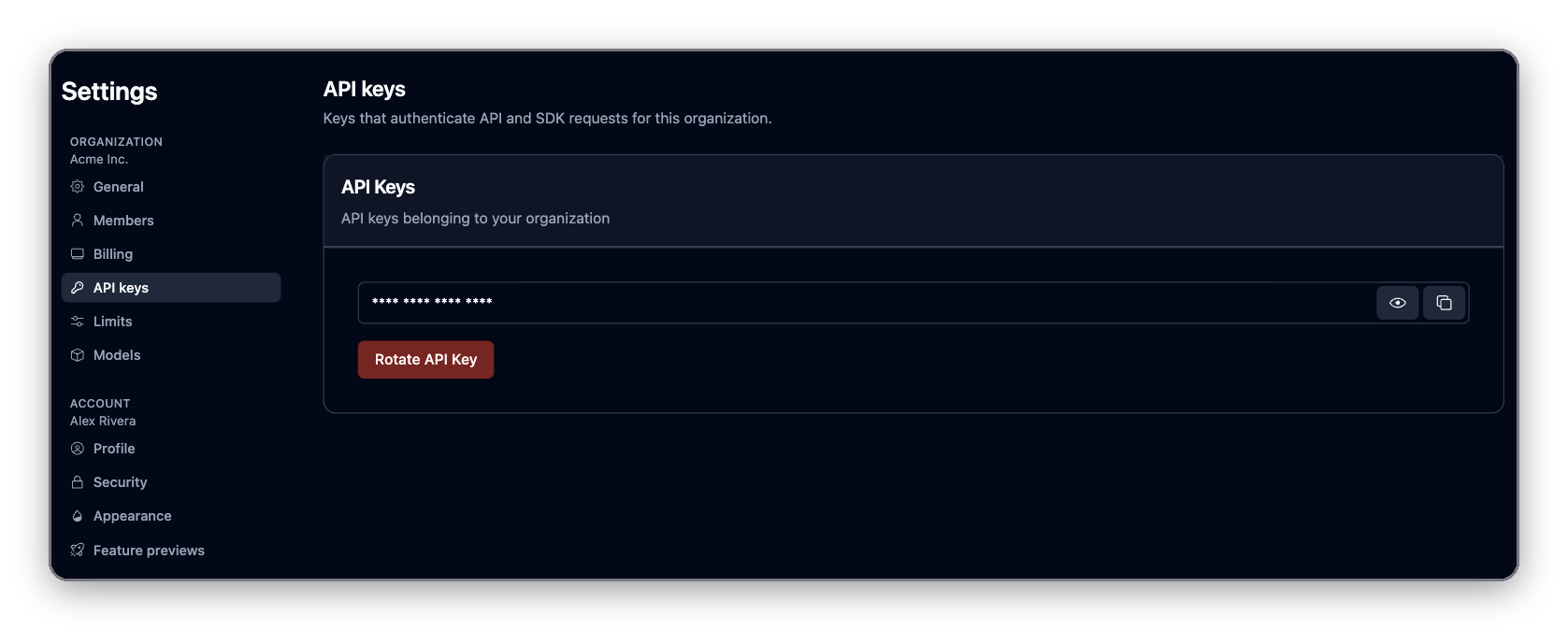 Anyone with the key has full access to your organization: they can start runs, read results and stored credentials, and edit agents. Keep it in a secrets manager or an environment variable. Never commit it or ship it to a browser or mobile app.
### Rotate your key
Rotate the key if it may have leaked or someone who had it leaves.
1. Click **Rotate API Key**.
2. Type `I want to rotate my key` and click **Rotate key**.
3. Copy the new key and update every script, worker and integration that used the old one.
The old key stops working immediately. Skyvern emails you a confirmation. You can rotate once every 60 seconds.
## API access
### Authenticate requests
Send the key in the `x-api-key` header:
```bash theme={null}
curl -X POST "https://api.skyvern.com/v1/run/tasks" \
-H "x-api-key: $SKYVERN_API_KEY" \
-H "Content-Type: application/json" \
-d '{ "url": "https://news.ycombinator.com", "prompt": "Get the title of the top post" }'
```
The SDKs send the header for you:
```python Python theme={null}
import os
from skyvern import Skyvern
client = Skyvern(api_key=os.environ["SKYVERN_API_KEY"])
```
```typescript TypeScript theme={null}
import { Skyvern } from "@skyvern/client";
const client = new Skyvern({ apiKey: process.env.SKYVERN_API_KEY! });
```
MCP clients can sign in with OAuth instead of a key. They then send `Authorization: Bearer `. See [MCP and coding agents](/docs/developers/getting-started/mcp).
### OAuth
Skyvern Cloud is an OAuth 2.0 authorization server, backed by Clerk. Clients that support MCP OAuth discovery, such as Claude Code, Claude Desktop, Cursor, Codex CLI and ChatGPT, need no client ID or secret: they register themselves and open a browser to sign in. Other OAuth clients can read the discovery metadata:
```bash theme={null}
curl https://api.skyvern.com/.well-known/oauth-authorization-server
curl https://api.skyvern.com/.well-known/oauth-protected-resource
```
| Property | Value |
| - | - |
| Issuer | `https://clerk.skyvern.com` |
| Authorization endpoint | `https://api.skyvern.com/oauth/authorize` |
| Token endpoint | `https://api.skyvern.com/oauth/token` |
| Revocation endpoint | `https://clerk.skyvern.com/oauth/token/revoke` |
| Dynamic client registration | `https://clerk.skyvern.com/oauth/register` |
| Grant types | `authorization_code`, `refresh_token` |
| PKCE | `S256` required |
| Protected resource | `https://api.skyvern.com/mcp` |
The server advertises the scopes `openid`, `profile`, `email`, `public_metadata`, `private_metadata`, `offline_access` and `user:org:read`; the MCP server's metadata narrows them to `profile` and `email`. These are identity scopes, not API permissions (see [Permissions](#permissions)).
Access tokens expire and can be refreshed when you request `offline_access`. A refresh token works once and is replaced on every exchange; replaying an old one revokes the whole token family. Revoking the organization's API key also invalidates tokens issued against it.
### Permissions
The organization is the only permission boundary.
* An API key can call every endpoint your organization can reach. There are no read-only, per-endpoint or per-agent keys.
* An OAuth token acts as the organization of the person who signed in, with the same reach as an API key. Its OAuth scopes (`profile`, `email` and the like) describe who signed in. They don't limit what the token can do.
* MCP tool scopes (`operate`, `build`, `browser`, `lean`, `all`) only change which tools a client sees. They are not a security boundary.
* Usage from any credential is billed to the organization.
To keep production and staging apart, or one team or customer from another, use separate organizations, each with its own key.
### API versions and deprecations
Skyvern's REST API is versioned in the URL path. The current and only supported version is **v1**, served from `https://api.skyvern.com/v1/`.
```bash theme={null}
curl -X POST "https://api.skyvern.com/v1/run/tasks" \
-H "x-api-key: YOUR_API_KEY" \
-H "Content-Type: application/json" \
-d '{ "url": "https://example.com", "prompt": "Extract the pricing table" }'
```
#### How versioning works
The major version appears once, as the first path segment. It never appears in a header, query parameter, or `Accept` media type.
| Change type | How it ships |
| - | - |
| Backward-compatible change | Released into `v1` with no new version and no client action required |
| Breaking change | Released under a new path prefix (`/v2/`), with `v1` kept alive through the deprecation window below |
Skyvern does not use date-based or header-negotiated versions. If your client pins `https://api.skyvern.com/v1`, no deployment we make will change the shape of a response you already depend on.
#### What counts as backward compatible
Treat the following as expected within `v1`, and make sure your client tolerates them:
* New endpoints and new HTTP methods on existing paths
* New optional request parameters and request body fields
* New fields in response bodies
* New values in existing enums (for example, a new run status or failure reason)
* New or reworded human-readable `detail` strings on error responses
* Changes to the ordering of JSON object keys or of items in an unordered collection
The practical rule: **ignore unknown fields rather than failing on them**, and treat an unrecognized enum value as "something newer than my client" instead of an error.
#### What we will not do inside v1
These are breaking changes. They only ship in a new major version, never into `v1`:
* Removing or renaming an endpoint, a request field, or a response field
* Changing the type or format of an existing field
* Making an optional parameter required, or adding a new required parameter
* Removing a value from an enum
* Changing the HTTP status code or error code for an existing failure mode
* Changing the authentication a route requires
#### Stability guarantees by surface
| Surface | Stability |
| - | - |
| `https://api.skyvern.com/v1/*` | Stable and covered by this policy. Described by the [OpenAPI specification](/docs/api-reference/openapi.json) |
| `/api/v1/*`, `/api/v2/*` | Legacy compatibility paths. Excluded from the OpenAPI specification and from this policy. Do not build new integrations on them; use `/v1/` |
| Official SDKs (Python, TypeScript) | Semantic versioning, generated from the same OpenAPI specification. A major SDK bump can accompany an API major version |
| MCP server (`https://api.skyvern.com/mcp`) | Tool names and arguments follow the same compatibility rules as `v1` endpoints |
| Undocumented endpoints and fields | Anything absent from the OpenAPI specification and these docs is internal and may change without notice |
#### Deprecation and sunset policy
When we do deprecate part of the API, this is what you can count on:
* **At least 6 months notice.** That is the minimum time between the deprecation announcement and the sunset date on which the endpoint stops serving traffic. Removing an entire major version gets at least 12 months.
* **A changelog announcement** on the [Skyvern changelog](/docs/changelog), naming the affected endpoints, the replacement, and the sunset date.
* **Machine-readable response headers** on every response from a deprecated endpoint, following [RFC 9745](https://www.rfc-editor.org/rfc/rfc9745.html) (`Deprecation`) and [RFC 8594](https://www.rfc-editor.org/rfc/rfc8594.html) (`Sunset`).
* **`deprecated: true` in the OpenAPI specification** for the affected operation, parameter, or schema field, so generated clients and API tooling surface the warning automatically.
* **No silent removals.** An endpoint that has not been announced, header-flagged, and given its full notice window will not be turned off.
A response from a deprecated endpoint looks like this:
```http theme={null}
HTTP/1.1 200 OK
Deprecation: @1767225600
Sunset: Wed, 01 Jul 2026 00:00:00 GMT
Link: ; rel="deprecation"; type="text/html"
```
`Deprecation` carries the moment the endpoint became deprecated, `Sunset` the moment it stops responding, and the `Link` header points at the announcement explaining the migration.
No `/v1` endpoint is deprecated today, so these headers are not present on any current response. The two deprecations in flight are field-level and documented in place: the `title` query parameter on `GET /v1/agents` (use `search_key`) and `publish_workflow` on task creation.
#### Building a client that survives changes
* Pin the version prefix (`/v1/`), not a specific SDK patch release.
* Parse responses leniently: ignore unknown fields, default unknown enum values to a safe branch.
* Log any response carrying a `Deprecation` or `Sunset` header, and alert on it — that header is the earliest programmatic signal you will get.
* Watch the [changelog](/docs/changelog) for announcements, and diff the [OpenAPI specification](/docs/api-reference/openapi.json) in CI if you generate your own client.
#### Where changes are announced
| Channel | What it carries |
| - | - |
| [Changelog](/docs/changelog) | Weekly entries: new features, improvements, fixes, and every deprecation announcement |
| [OpenAPI specification](/docs/api-reference/openapi.json) | The authoritative machine-readable contract, including `deprecated` flags |
| `Deprecation` / `Sunset` headers | Per-request signal on any deprecated endpoint |
Questions about a migration: [support@skyvern.com](mailto:support@skyvern.com).
## Billing and credits
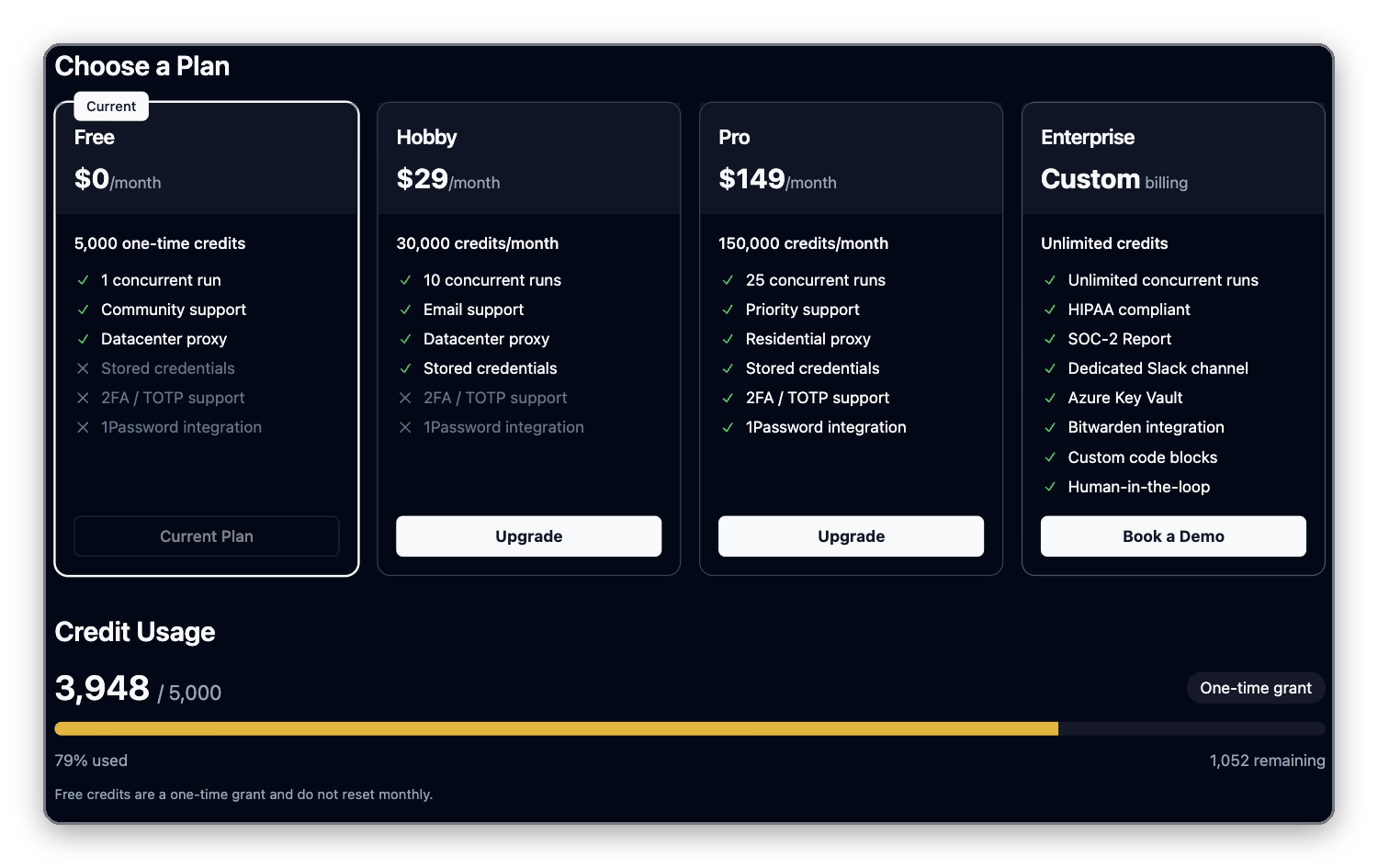
Open **Settings → Billing**. On the Free and Hobby plans, the **Upgrade plan** link at the bottom of the sidebar opens the same page; on other plans it reads **Plan & usage**.
Anyone with the key has full access to your organization: they can start runs, read results and stored credentials, and edit agents. Keep it in a secrets manager or an environment variable. Never commit it or ship it to a browser or mobile app.
### Rotate your key
Rotate the key if it may have leaked or someone who had it leaves.
1. Click **Rotate API Key**.
2. Type `I want to rotate my key` and click **Rotate key**.
3. Copy the new key and update every script, worker and integration that used the old one.
The old key stops working immediately. Skyvern emails you a confirmation. You can rotate once every 60 seconds.
## API access
### Authenticate requests
Send the key in the `x-api-key` header:
```bash theme={null}
curl -X POST "https://api.skyvern.com/v1/run/tasks" \
-H "x-api-key: $SKYVERN_API_KEY" \
-H "Content-Type: application/json" \
-d '{ "url": "https://news.ycombinator.com", "prompt": "Get the title of the top post" }'
```
The SDKs send the header for you:
```python Python theme={null}
import os
from skyvern import Skyvern
client = Skyvern(api_key=os.environ["SKYVERN_API_KEY"])
```
```typescript TypeScript theme={null}
import { Skyvern } from "@skyvern/client";
const client = new Skyvern({ apiKey: process.env.SKYVERN_API_KEY! });
```
MCP clients can sign in with OAuth instead of a key. They then send `Authorization: Bearer `. See [MCP and coding agents](/docs/developers/getting-started/mcp).
### OAuth
Skyvern Cloud is an OAuth 2.0 authorization server, backed by Clerk. Clients that support MCP OAuth discovery, such as Claude Code, Claude Desktop, Cursor, Codex CLI and ChatGPT, need no client ID or secret: they register themselves and open a browser to sign in. Other OAuth clients can read the discovery metadata:
```bash theme={null}
curl https://api.skyvern.com/.well-known/oauth-authorization-server
curl https://api.skyvern.com/.well-known/oauth-protected-resource
```
| Property | Value |
| - | - |
| Issuer | `https://clerk.skyvern.com` |
| Authorization endpoint | `https://api.skyvern.com/oauth/authorize` |
| Token endpoint | `https://api.skyvern.com/oauth/token` |
| Revocation endpoint | `https://clerk.skyvern.com/oauth/token/revoke` |
| Dynamic client registration | `https://clerk.skyvern.com/oauth/register` |
| Grant types | `authorization_code`, `refresh_token` |
| PKCE | `S256` required |
| Protected resource | `https://api.skyvern.com/mcp` |
The server advertises the scopes `openid`, `profile`, `email`, `public_metadata`, `private_metadata`, `offline_access` and `user:org:read`; the MCP server's metadata narrows them to `profile` and `email`. These are identity scopes, not API permissions (see [Permissions](#permissions)).
Access tokens expire and can be refreshed when you request `offline_access`. A refresh token works once and is replaced on every exchange; replaying an old one revokes the whole token family. Revoking the organization's API key also invalidates tokens issued against it.
### Permissions
The organization is the only permission boundary.
* An API key can call every endpoint your organization can reach. There are no read-only, per-endpoint or per-agent keys.
* An OAuth token acts as the organization of the person who signed in, with the same reach as an API key. Its OAuth scopes (`profile`, `email` and the like) describe who signed in. They don't limit what the token can do.
* MCP tool scopes (`operate`, `build`, `browser`, `lean`, `all`) only change which tools a client sees. They are not a security boundary.
* Usage from any credential is billed to the organization.
To keep production and staging apart, or one team or customer from another, use separate organizations, each with its own key.
### API versions and deprecations
Skyvern's REST API is versioned in the URL path. The current and only supported version is **v1**, served from `https://api.skyvern.com/v1/`.
```bash theme={null}
curl -X POST "https://api.skyvern.com/v1/run/tasks" \
-H "x-api-key: YOUR_API_KEY" \
-H "Content-Type: application/json" \
-d '{ "url": "https://example.com", "prompt": "Extract the pricing table" }'
```
#### How versioning works
The major version appears once, as the first path segment. It never appears in a header, query parameter, or `Accept` media type.
| Change type | How it ships |
| - | - |
| Backward-compatible change | Released into `v1` with no new version and no client action required |
| Breaking change | Released under a new path prefix (`/v2/`), with `v1` kept alive through the deprecation window below |
Skyvern does not use date-based or header-negotiated versions. If your client pins `https://api.skyvern.com/v1`, no deployment we make will change the shape of a response you already depend on.
#### What counts as backward compatible
Treat the following as expected within `v1`, and make sure your client tolerates them:
* New endpoints and new HTTP methods on existing paths
* New optional request parameters and request body fields
* New fields in response bodies
* New values in existing enums (for example, a new run status or failure reason)
* New or reworded human-readable `detail` strings on error responses
* Changes to the ordering of JSON object keys or of items in an unordered collection
The practical rule: **ignore unknown fields rather than failing on them**, and treat an unrecognized enum value as "something newer than my client" instead of an error.
#### What we will not do inside v1
These are breaking changes. They only ship in a new major version, never into `v1`:
* Removing or renaming an endpoint, a request field, or a response field
* Changing the type or format of an existing field
* Making an optional parameter required, or adding a new required parameter
* Removing a value from an enum
* Changing the HTTP status code or error code for an existing failure mode
* Changing the authentication a route requires
#### Stability guarantees by surface
| Surface | Stability |
| - | - |
| `https://api.skyvern.com/v1/*` | Stable and covered by this policy. Described by the [OpenAPI specification](/docs/api-reference/openapi.json) |
| `/api/v1/*`, `/api/v2/*` | Legacy compatibility paths. Excluded from the OpenAPI specification and from this policy. Do not build new integrations on them; use `/v1/` |
| Official SDKs (Python, TypeScript) | Semantic versioning, generated from the same OpenAPI specification. A major SDK bump can accompany an API major version |
| MCP server (`https://api.skyvern.com/mcp`) | Tool names and arguments follow the same compatibility rules as `v1` endpoints |
| Undocumented endpoints and fields | Anything absent from the OpenAPI specification and these docs is internal and may change without notice |
#### Deprecation and sunset policy
When we do deprecate part of the API, this is what you can count on:
* **At least 6 months notice.** That is the minimum time between the deprecation announcement and the sunset date on which the endpoint stops serving traffic. Removing an entire major version gets at least 12 months.
* **A changelog announcement** on the [Skyvern changelog](/docs/changelog), naming the affected endpoints, the replacement, and the sunset date.
* **Machine-readable response headers** on every response from a deprecated endpoint, following [RFC 9745](https://www.rfc-editor.org/rfc/rfc9745.html) (`Deprecation`) and [RFC 8594](https://www.rfc-editor.org/rfc/rfc8594.html) (`Sunset`).
* **`deprecated: true` in the OpenAPI specification** for the affected operation, parameter, or schema field, so generated clients and API tooling surface the warning automatically.
* **No silent removals.** An endpoint that has not been announced, header-flagged, and given its full notice window will not be turned off.
A response from a deprecated endpoint looks like this:
```http theme={null}
HTTP/1.1 200 OK
Deprecation: @1767225600
Sunset: Wed, 01 Jul 2026 00:00:00 GMT
Link: ; rel="deprecation"; type="text/html"
```
`Deprecation` carries the moment the endpoint became deprecated, `Sunset` the moment it stops responding, and the `Link` header points at the announcement explaining the migration.
No `/v1` endpoint is deprecated today, so these headers are not present on any current response. The two deprecations in flight are field-level and documented in place: the `title` query parameter on `GET /v1/agents` (use `search_key`) and `publish_workflow` on task creation.
#### Building a client that survives changes
* Pin the version prefix (`/v1/`), not a specific SDK patch release.
* Parse responses leniently: ignore unknown fields, default unknown enum values to a safe branch.
* Log any response carrying a `Deprecation` or `Sunset` header, and alert on it — that header is the earliest programmatic signal you will get.
* Watch the [changelog](/docs/changelog) for announcements, and diff the [OpenAPI specification](/docs/api-reference/openapi.json) in CI if you generate your own client.
#### Where changes are announced
| Channel | What it carries |
| - | - |
| [Changelog](/docs/changelog) | Weekly entries: new features, improvements, fixes, and every deprecation announcement |
| [OpenAPI specification](/docs/api-reference/openapi.json) | The authoritative machine-readable contract, including `deprecated` flags |
| `Deprecation` / `Sunset` headers | Per-request signal on any deprecated endpoint |
Questions about a migration: [support@skyvern.com](mailto:support@skyvern.com).
## Billing and credits
Open **Settings → Billing**. On the Free and Hobby plans, the **Upgrade plan** link at the bottom of the sidebar opens the same page; on other plans it reads **Plan & usage**.
 ### How credits are used
One credit is \$0.001. Credits are charged for what the browser does:
| Usage | Credits |
| - | - |
| Action (a click, a keystroke, an extraction) | 30 (\$0.03) |
| Cached action, replayed from code without the AI | 15 (\$0.015) |
| Browser uptime | 200 per hour (\$0.20) |
| One-time code read from an email or text message | 10 (\$0.01) |
A short login takes a few actions; a long multi-page run takes many more. Two job recipes have their own prices: applying to a job costs 100 credits per application (200 when it signs in with a saved login), and extracting a job posting costs 50 credits per attempt. Other recipes are billed like any other run.
Under **Credit Usage** you see credits used and remaining for the current period, your daily burn rate, and when your balance will run out at that rate. Expand **Usage Breakdown** to split usage into **Regular Actions**, **Cached Actions**, **Browser Uptime** and **OTP Parses**.
Specific prompts use fewer actions. "Extract the monthly price from the pricing table on /pricing" goes straight there; "Find information about pricing" makes the AI explore.
### Plans
| Plan | Price | Credits | About | Concurrent runs |
| - | - | - | - | - |
| **Free** | \$0 | 5,000, one time | 165 actions | 1 |
| **Hobby** | \$29/month | 30,000/month | 1,000 actions | 10 |
| **Pro** | \$149/month | 150,000/month | 5,000 actions | 25 |
| **Enterprise** | Custom | Unlimited | Unlimited | Unlimited |
Free credits are a one-time grant and don't reset. Click **Subscribe** on the Hobby or Pro card to start a plan. Once you're subscribed, the cards read **Upgrade** or **Downgrade** and the page shows your current plan, with **Manage Subscription** to change or cancel it. For Enterprise, click **Book a Demo**. For a full feature comparison, see [skyvern.com/pricing](https://www.skyvern.com/pricing).
### Extra credits and payment
On a paid plan, **Buy Extra Credits** lets you top up with a one-time purchase ($10, $25, $50, $100 or a custom amount). Some plans also offer monthly add-on credit packs under **Add more credits**. Click **Manage Payment Methods** to update your card, see invoices and change billing details.
### Runs refused for credits
Skyvern checks credits before it starts a run and returns `402` if they don't cover it.
| Message | Why | Fix |
| - | - | - |
| `Credits exhausted. Upgrade your plan in Billing.` | No credits left this period | Buy extra credits or upgrade |
| `Insufficient credit balance` | Older accounts without a plan. A run needs $0.10 per step of **Max Steps Per Run** ($1.00 when it's blank), and charges on your upcoming invoice count against your balance, so you can be refused while still showing credit. | Add credit, or lower **Max Steps Per Run** |
## Members
Go to **Settings → Members** to invite teammates by email and manage their roles. **Invite teammates** in the organization menu at the top of the sidebar opens the same page. Members share the organization's agents, runs, credentials, API key and credits.
### How credits are used
One credit is \$0.001. Credits are charged for what the browser does:
| Usage | Credits |
| - | - |
| Action (a click, a keystroke, an extraction) | 30 (\$0.03) |
| Cached action, replayed from code without the AI | 15 (\$0.015) |
| Browser uptime | 200 per hour (\$0.20) |
| One-time code read from an email or text message | 10 (\$0.01) |
A short login takes a few actions; a long multi-page run takes many more. Two job recipes have their own prices: applying to a job costs 100 credits per application (200 when it signs in with a saved login), and extracting a job posting costs 50 credits per attempt. Other recipes are billed like any other run.
Under **Credit Usage** you see credits used and remaining for the current period, your daily burn rate, and when your balance will run out at that rate. Expand **Usage Breakdown** to split usage into **Regular Actions**, **Cached Actions**, **Browser Uptime** and **OTP Parses**.
Specific prompts use fewer actions. "Extract the monthly price from the pricing table on /pricing" goes straight there; "Find information about pricing" makes the AI explore.
### Plans
| Plan | Price | Credits | About | Concurrent runs |
| - | - | - | - | - |
| **Free** | \$0 | 5,000, one time | 165 actions | 1 |
| **Hobby** | \$29/month | 30,000/month | 1,000 actions | 10 |
| **Pro** | \$149/month | 150,000/month | 5,000 actions | 25 |
| **Enterprise** | Custom | Unlimited | Unlimited | Unlimited |
Free credits are a one-time grant and don't reset. Click **Subscribe** on the Hobby or Pro card to start a plan. Once you're subscribed, the cards read **Upgrade** or **Downgrade** and the page shows your current plan, with **Manage Subscription** to change or cancel it. For Enterprise, click **Book a Demo**. For a full feature comparison, see [skyvern.com/pricing](https://www.skyvern.com/pricing).
### Extra credits and payment
On a paid plan, **Buy Extra Credits** lets you top up with a one-time purchase ($10, $25, $50, $100 or a custom amount). Some plans also offer monthly add-on credit packs under **Add more credits**. Click **Manage Payment Methods** to update your card, see invoices and change billing details.
### Runs refused for credits
Skyvern checks credits before it starts a run and returns `402` if they don't cover it.
| Message | Why | Fix |
| - | - | - |
| `Credits exhausted. Upgrade your plan in Billing.` | No credits left this period | Buy extra credits or upgrade |
| `Insufficient credit balance` | Older accounts without a plan. A run needs $0.10 per step of **Max Steps Per Run** ($1.00 when it's blank), and charges on your upcoming invoice count against your balance, so you can be refused while still showing credit. | Add credit, or lower **Max Steps Per Run** |
## Members
Go to **Settings → Members** to invite teammates by email and manage their roles. **Invite teammates** in the organization menu at the top of the sidebar opens the same page. Members share the organization's agents, runs, credentials, API key and credits.
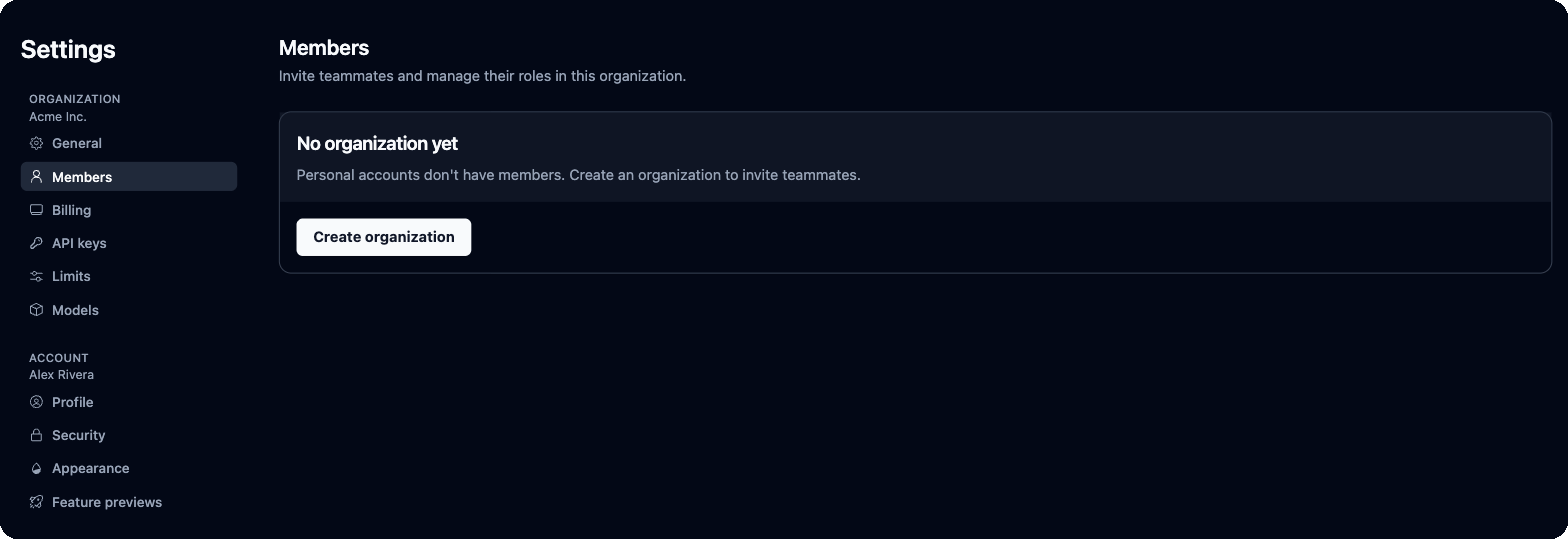 If you signed up without an organization, Members shows **No organization yet**. Click **Create organization**, then invite people.
When someone leaves, remove them here and [rotate the API key](#rotate-your-key) if they had it. Removing a member doesn't revoke a key they copied.
## Organization settings
* **General** shows your **Organization ID** and **Organization Name**. Edit the name and logo in the **Organization profile** card.
* **Limits** caps how much a run can do:
| Setting | What it does | Range |
| - | - | - |
| **Max Steps Per Block** | Steps Skyvern takes inside one task or navigation block before stopping it | 1–150 |
| **Max Steps Per Run** | Total steps across all blocks in an agent run. Blank means no run-level cap. | 1–1,000 |
| **Artifact URL Expiry (minutes)** | How long download links for PDFs and exported files stay valid. Blank means 720 minutes (12 hours). Screenshot and recording links always expire after 1 hour. | 60–10,080 (7 days) |
* **Models** has two cards. **Custom LLMs** adds your own OpenAI-compatible, Ollama or OpenRouter models. **Default Models** picks the **Smart LLM** and **Fast LLM** your runs use, or **Skyvern Default**.
* **Labels** appears when labels are turned on for your organization.
Vault connections (1Password, Bitwarden, Azure Key Vault, Custom Credential Service) are on [Integrations](/docs/cloud/integrations#password-vaults), not in Settings.
## Your account
* **Profile**: your name, email addresses and connected sign-in accounts.
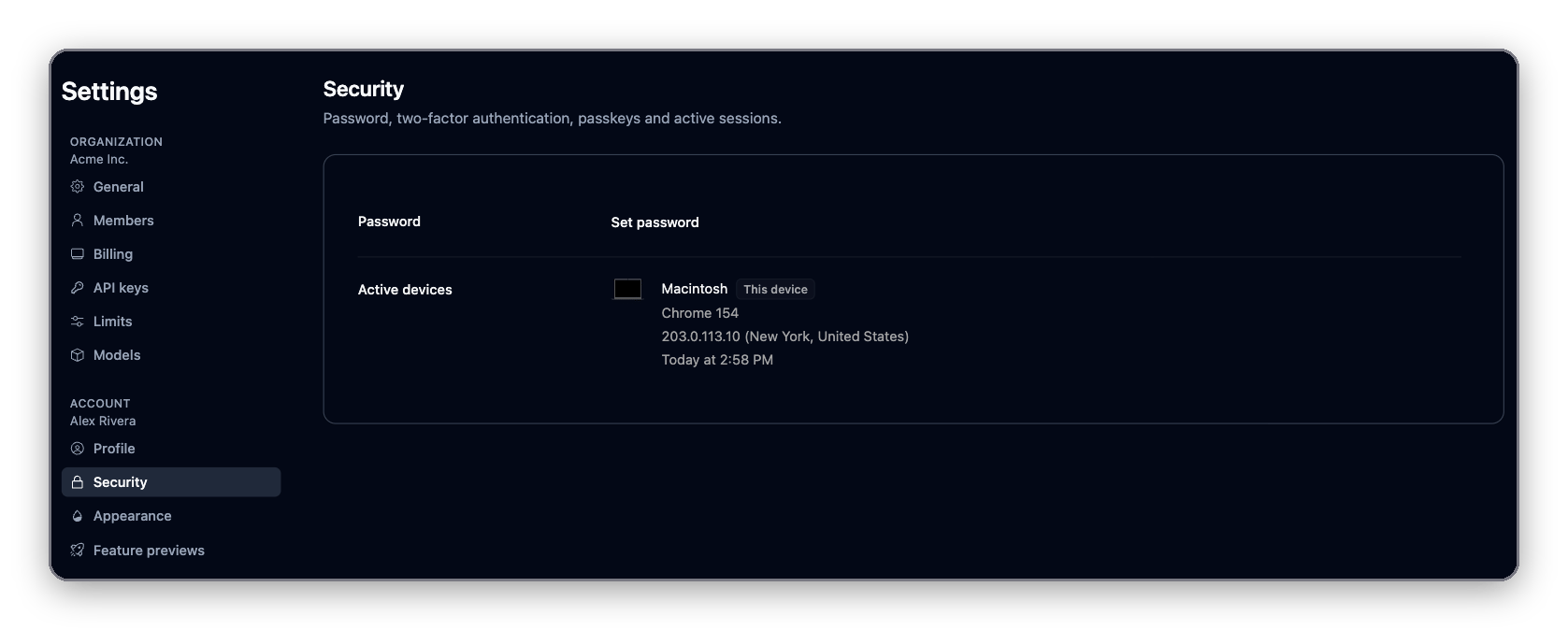
* **Security**: change your password, set up two-factor authentication and passkeys, and review the devices signed in to your account.
* **Notifications**: choose which emails you get: **Product tips and account updates**, **Weekly digest** and **Product updates**. **Security and account notices** (API key changes, new members, failing agents) are always sent.
* **Appearance**: **Light**, **Dark** or **System** theme for this device.
* **Feature previews**: replay onboarding, or turn on features still in development.
If you signed up without an organization, Members shows **No organization yet**. Click **Create organization**, then invite people.
When someone leaves, remove them here and [rotate the API key](#rotate-your-key) if they had it. Removing a member doesn't revoke a key they copied.
## Organization settings
* **General** shows your **Organization ID** and **Organization Name**. Edit the name and logo in the **Organization profile** card.
* **Limits** caps how much a run can do:
| Setting | What it does | Range |
| - | - | - |
| **Max Steps Per Block** | Steps Skyvern takes inside one task or navigation block before stopping it | 1–150 |
| **Max Steps Per Run** | Total steps across all blocks in an agent run. Blank means no run-level cap. | 1–1,000 |
| **Artifact URL Expiry (minutes)** | How long download links for PDFs and exported files stay valid. Blank means 720 minutes (12 hours). Screenshot and recording links always expire after 1 hour. | 60–10,080 (7 days) |
* **Models** has two cards. **Custom LLMs** adds your own OpenAI-compatible, Ollama or OpenRouter models. **Default Models** picks the **Smart LLM** and **Fast LLM** your runs use, or **Skyvern Default**.
* **Labels** appears when labels are turned on for your organization.
Vault connections (1Password, Bitwarden, Azure Key Vault, Custom Credential Service) are on [Integrations](/docs/cloud/integrations#password-vaults), not in Settings.
## Your account
* **Profile**: your name, email addresses and connected sign-in accounts.
* **Security**: change your password, set up two-factor authentication and passkeys, and review the devices signed in to your account.
* **Notifications**: choose which emails you get: **Product tips and account updates**, **Weekly digest** and **Product updates**. **Security and account notices** (API key changes, new members, failing agents) are always sent.
* **Appearance**: **Light**, **Dark** or **System** theme for this device.
* **Feature previews**: replay onboarding, or turn on features still in development.
 ## Next
Use your API key to run your first task
Connect Google, vaults, MCP and automation platforms
Every endpoint, with a playground
This documentation is built and hosted on [Mintlify](https://mintlify.com), a developer documentation platform.
## Next
Use your API key to run your first task
Connect Google, vaults, MCP and automation platforms
Every endpoint, with a playground
This documentation is built and hosted on [Mintlify](https://mintlify.com), a developer documentation platform.